
Python library to select points on a image [pyqt5 GUI]

Project description
pyclickimage
Description
UI to collect 2D-coordinates of points on an image. The points can be separated into various groups.
Run the command:
pyclickimage-gui
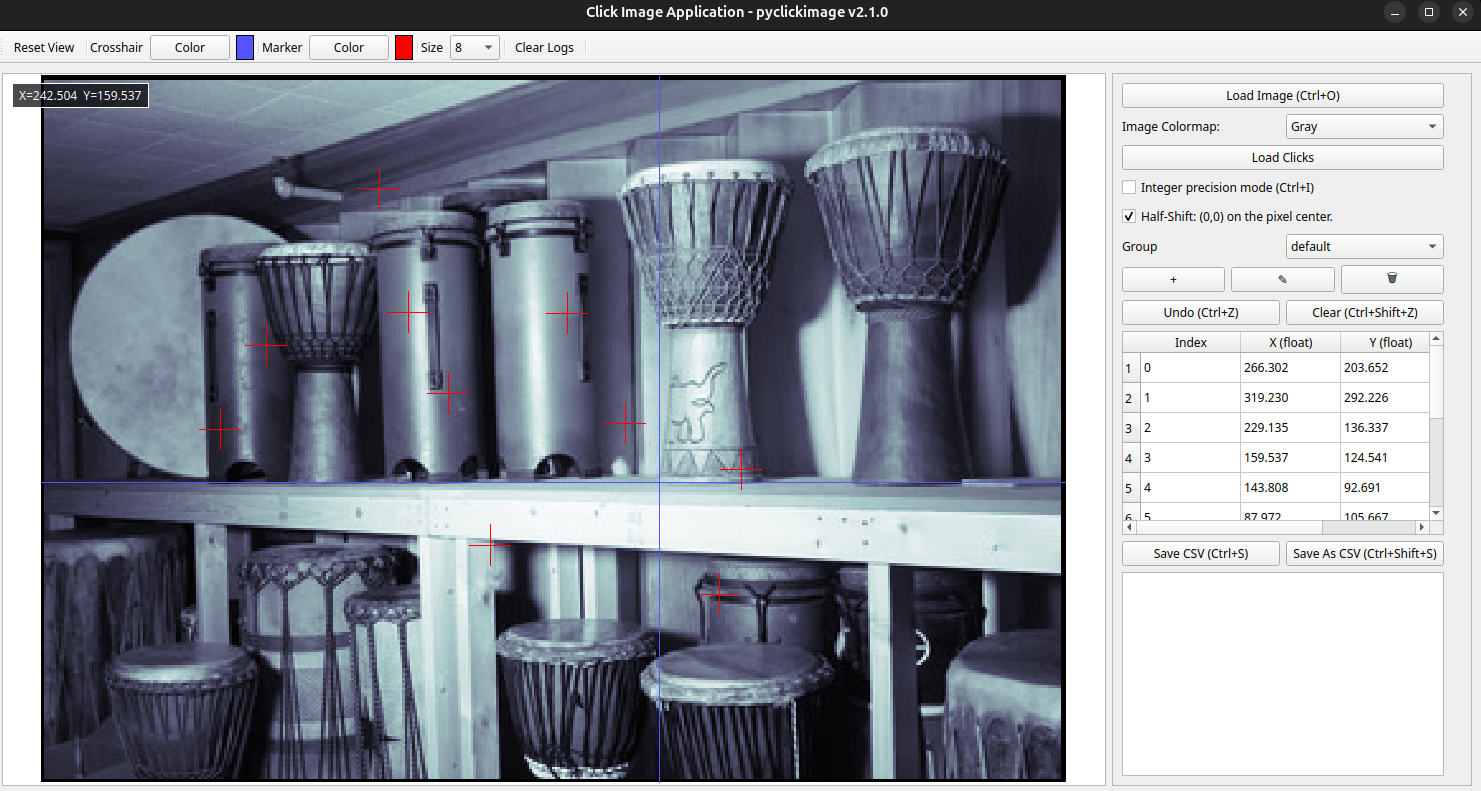
The output csv will have the following format (with integer or floating precision):
Group,Index,X,Y
default,0,128,102
default,1,115,153
default,2,207,181
default,3,261,134
default,4,220,83
default,5,151,37
Coco,0,201,126
Coco,1,105,119
Coco,2,90,80
Coco,3,126,51
Coco,4,206,59
Coco,5,261,93
Coco,6,212,157
Coco,7,166,175
X is the column-index of the click in the image and Y is the row-index of the click in the image such as for a NumPy Array the click is at image[Y, X].
Authors
-
Artezaru artezaru.github@proton.me
-
Git Plateform: https://github.com/Artezaru/pyclickimage.git
-
Online Documentation: https://Artezaru.github.io/pyclickimage
Installation
Install with pip
pip install git+https://github.com/Artezaru/pyclickimage.git
Clone with git
git clone https://github.com/Artezaru/pyclickimage.git
WARNING
This package use PyQt5 to display the GUI.
If you have opencv-python installed on your environment, it will should be replaced by opencv-python-headless to avoid conflicts.
This package is not compatible with the full opencv-python.
License
Copyright 2025-2026 Artezaru
Licensed under the Apache License, Version 2.0 (the "License"); you may not use this file except in compliance with the License. You may obtain a copy of the License at
http://www.apache.org/licenses/LICENSE-2.0
Unless required by applicable law or agreed to in writing, software distributed under the License is distributed on an "AS IS" BASIS, WITHOUT WARRANTIES OR CONDITIONS OF ANY KIND, either express or implied. See the License for the specific language governing permissions and limitations under the License.


Download files
Download the file for your platform. If you're not sure which to choose, learn more about installing packages.
Source Distribution
Built Distribution
Filter files by name, interpreter, ABI, and platform.
If you're not sure about the file name format, learn more about wheel file names.
Copy a direct link to the current filters
File details
Details for the file pyclickimage-2.1.0.tar.gz.
File metadata
- Download URL: pyclickimage-2.1.0.tar.gz
- Upload date:
- Size: 594.0 kB
- Tags: Source
- Uploaded using Trusted Publishing? No
- Uploaded via: twine/6.2.0 CPython/3.11.15
File hashes
| Algorithm | Hash digest | |
|---|---|---|
| SHA256 |
e6afb38847e76f663e2bc7e6a493b2817a0a3d7347bbdecea6ce60321abe9601
|
|
| MD5 |
1f76b3d5a4e063c63bf4e75189b6f0fc
|
|
| BLAKE2b-256 |
30641cc8c101c3bce2f8d8a9dee60e9aa42e43e9b5d17c6240874c0abd68a163
|
File details
Details for the file pyclickimage-2.1.0-py3-none-any.whl.
File metadata
- Download URL: pyclickimage-2.1.0-py3-none-any.whl
- Upload date:
- Size: 364.2 kB
- Tags: Python 3
- Uploaded using Trusted Publishing? No
- Uploaded via: twine/6.2.0 CPython/3.11.15
File hashes
| Algorithm | Hash digest | |
|---|---|---|
| SHA256 |
30c9f90807aa97562ffdeef8a68cd310ddbce4d9a8725a4d79be9473995d8799
|
|
| MD5 |
462e65e5b00096095379be3cd0810b99
|
|
| BLAKE2b-256 |
6e5996ff9bba8cef72b1192f8f40e5c098f7dfafc73c4ea44a2e24b2a094c3f2
|






