
Execute commands to perform real-time terminal output coloring using ANSI color codes.

Project description
Pycolor


A Python program that executes commands to perform real-time terminal output coloring using ANSI color codes. Color formatting can be added to program output using JSON configuration files and regular expressions to improve readability of the output.
Designed for Unix, but works in Windows.
Installation
pip install pycolor-term
Example Usage
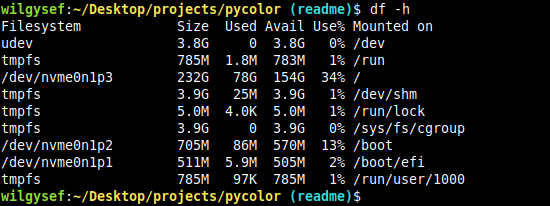
Pycolor can be used explicitly on the command line:
Before:
After:
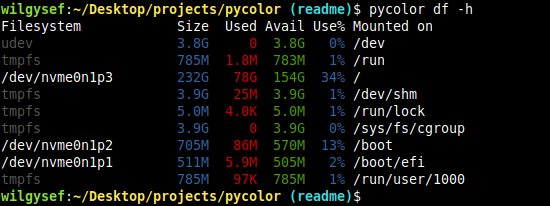
Pycolor can also be aliased in ~/.bashrc like so:
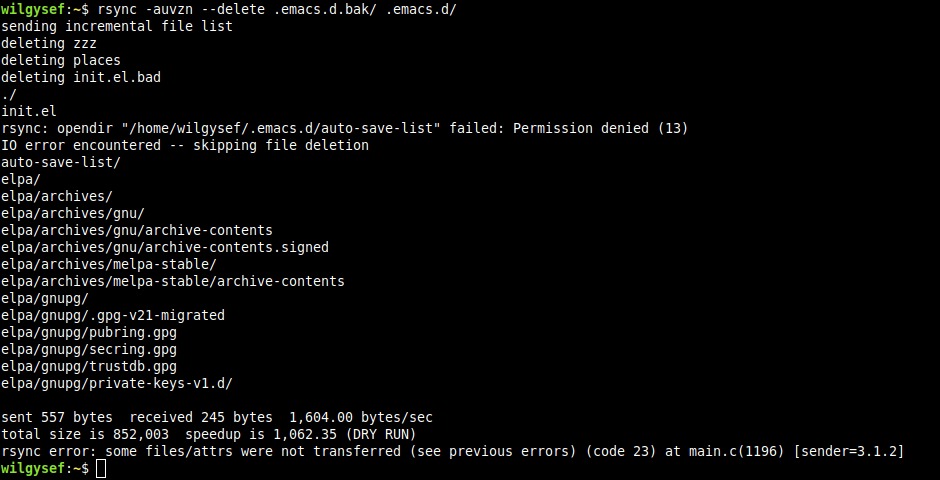
alias rsync='pycolor rsync'
Before:
After: Note pycolor omitted lines with trailing slashes in addition to coloring output for better readability.
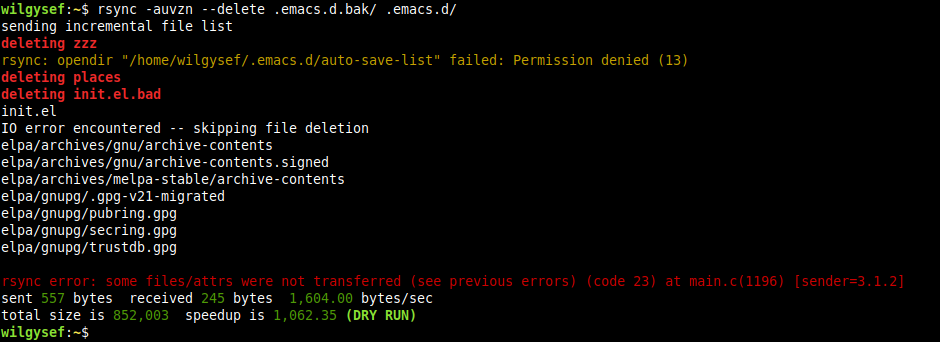
Sample rsync configuration file.
Configuration
Pycolor will first try to load configuration from ~/.pycolor.json before loading files found in ~/.pycolor.d/ in filename order.
When looking for a profile to use, pycolor will select the last matching profile based on the name, name_expression, or which property.
Patterns are applied first-to-last for each profile.
JSON schema files that describe the config format can be found in /config/schema/.
Sample config files can also be found in /docs/sample-config/.
Formatting Strings
Use formatting strings to color/manipulate the program output in real-time: %<format type>(<format value>).
| Format Type Code | Description |
|---|---|
| C | Color formatter |
| F | Field (separator) formatter |
| G | Regex group formatter |
| H | Context-aware field/group color alias |
| P | Padding formatter |
| T | Truncation formatter |
Formatting strings can written like %C(red) or %Cred, where the first letter is used as the format type and the rest is the argument.
%C(red)hello formats the string hello in red, but %Credhello is incorrect.
A literal % can be used in a format string by using %%.
E.g. the format string The total is %C(red)15%% will become The total is 15%, with the 15% part in red.
Valid formatting argument characters are upper/lowercase letters and numbers, unless the argument is encapsulated in parentheses, then everything in the parenthesis pair is used.
Check /docs/sample-config/ for examples of formatting strings being used for actual programs.
Colors
To colorize output through a replace pattern use %C<color argument>.
Recognized Attributes and Colors:
| Color Argument | Aliases | ANSI Code | Description |
|---|---|---|---|
| reset | normal, res, nor, z | \e[0m |
Resets all ANSI color formatting |
| bold | bright, bol, bri | \e[1m |
Bold characters |
| dim | \e[2m |
Dim characters | |
| italic | ita | \e[3m |
Italicize characters |
| underline | underlined, ul, und | \e[4m |
Underline characters |
| blink | bli | \e[5m |
Blink characters |
| invert | reverse, inv, rev | \e[7m |
Invert characters |
| hidden | conceal, hid, con | \e[8m |
Hide characters |
| strikethrough | strike, str, crossedout, crossed, cro | \e[9m |
Strikethrough characters |
| black | k | \e[30m |
Black color |
| red | r | \e[31m |
Red color |
| green | g | \e[32m |
Green color |
| yellow | y | \e[33m |
Yellow color |
| blue | b | \e[34m |
Blue color |
| magenta | m | \e[35m |
Magenta color |
| cyan | c | \e[36m |
Cyan color |
| grey | gray, e | \e[37m |
Grey color |
| default | \e[39m |
Default color | |
| overline | overlined, ol, ove | \e[53m |
Overline characters |
| darkgrey | darkgray, de, lk | \e[90m |
Dark grey color |
| lightred | lr | \e[91m |
Light red color |
| lightgreen | lg | \e[92m |
Light green color |
| lightyellow | ly | \e[93m |
Light yellow color |
| lightblue | lb | \e[94m |
Light blue color |
| lightmagenta | lm | \e[95m |
Light magenta color |
| lightcyan | lc | \e[96m |
Light cyan color |
| white | lightgrey, le, w | \e[97m |
White color |
Click here for a list of all attributes and color codes.
Modifier Characters
You can select multiple colors by separating them with ; (must be wrapped in parentheses). e.g. %C(bold;red).
If a ^ is prepended before a color (e.g. %C(^red)), then it is used to set the background color instead.
The color formatting for bold, red-on-yellow text can be written as %C(bold;red;^yellow)hello, or %C(bol;r;^y)hello, which will produce \e[1;31;43mhello.
If a ^ is prepended before a style (e.g. %C(^italic) produces \e[23m), then the style is turned off.
Note that for turning off bold (%C(^bold) i.e. \e[21m) instead turns on double underline for some terminals.
Special Colors
256-Color
If a color format is just a number (e.g. %C130), then it will use the 256-color set (in this case, a brown color: \e[38;5;130m).
This also works for background colors as well (e.g. %C(^130) produces \e[48;5;130m).
Click here to see the 256-color table.
24-bit Color
24-bit color is also supported by using hex codes (%C0xffaa00 or %C0xfa0 will produce orange: \e[38;2;255;170;0m).
Raw ANSI Codes
If for some reason you would like to use raw codes in the color formats: %C(raw1;3;36) will produce bold, italic, cyan (\e[1;3;36m).
Groups
Regex groups can be referenced with the format: %G<group number or name>.
%G0 is the entire matching text from expression. %G1 is the first matching group, %G2 is the second, etc. If the regex group is named, it can also be referenced (e.g. %G(myregexgroup)).
Group Incrementer
Instead of using groups explicitly in order (e.g. %G1, %G2: %G3), using the special incrementer instead of numbers, %Gn, %Gn: %Gn, will result in the same format output.
Note that if a named group n is defined in the expression, then the special incrementer will be overridden.
Fields
If the pattern's separator property is set, then fields and their separators can be referenced in the format string.
To get a field's text, use %F<field number>.
If a output line is this is a test, and the pattern separator property is , the format string %F2 %F1 %F3 %F4 will format to is this a test for that line.
To get the field separator string, use %Fs<field number>. This will return the field separator string that precedes the field number. (e.g. %Fs3 will get the field separator string that comes before the third field %F3).
If separator is set to #+, and the output line is a#b##c###d##e#f, the field format values will be:
| Field Format | Value |
|---|---|
%F1 |
a |
%Fs2 |
# |
%F2 |
b |
%Fs3 |
## |
%F3 |
c |
%Fs4 |
### |
%F4 |
d |
%Fs5 |
## |
%F5 |
e |
%Fs6 |
# |
%F6 |
f |
Negative Indexing
Field formats support negative indexing, so %F(-1)_%F(-2) will format to f_e in the previous example.
Field Ranges
Giving a range of fields is possible using the * character, where %F(<start range>*<end range>).
A sample table is given below, using the same example as above:
| Field Format | Value |
|---|---|
%F(*3) |
a#b##c |
%F(1*3) |
a#b##c |
%F(2*3) |
b##c |
%F(2*4) |
b##c###d |
%F(4*) |
d##e#f |
Separator replacement
If you want to format using field ranges, but want to override the separator used to be a constant-length string, use %F(<start range>*<end range>,<separator>).
Using the previous input as an example, %F(*4,_) formats to a_b_c_d.
Padding
Formatting a string with padding can be done with %P(<pad count>;<value>) or %P(<pad count>,<pad char>;<value>).
For example, left-padding group 1 to 12 characters can be done with the format string %P(12;%G1)%G1.
The pad formatter will take the length of value, which can contain string formats or a normal string, and will format to the necessary number of pad characters if value is not long enough.
Right-padding is simply done by moving the pad formatter to the right of the group: %G1%P(12;%G1).
Truncate
Truncate strings to a certain length using %T(<string>;<replace>;<location>,<length>), where:
| Value | Description |
|---|---|
string |
the string to be truncated |
replace |
insert this string at the truncation (e.g ...) |
location |
where to truncate string, see below for more |
length |
truncate string to this length |
replace may be empty (%T(<string>;;<location>,<length>)).
Possible location values:
| Location | Description |
|---|---|
| start | truncate the start of the string, replacement string length is counted as part of length |
| start-add | truncate the start of the string, replacement string length is not counted as part of length |
| mid | truncate the middle of the string, replacement string length is counted as part of length |
| mid-add | truncate the middle of the string, replacement string length is not counted as part of length |
| end | truncate the end of the string, replacement string length is counted as part of length |
| end-add | truncate the end of the string, replacement string length is not counted as part of length |
Truncate Samples
Truncate the value of group 1 to 8 chars, adding ... if necessary: %T(%G1;...;end-add,8).
| String | Result |
|---|---|
Testing |
Testing |
LongString |
LongStri... |
Truncate the value of a path in field 1 to 16 chars, inserting ... if necessary: %T(%F1;...;mid,16).
| String | Result |
|---|---|
/root/ |
/root/ |
/path/to/a/certain/file |
/path/...in/file |
Truncate above with right padding (all results will always have a length of 16): %T(%F1;...;mid,16)%P(16,%F1).
Limitations
- Programs that expect interactive standard input may not work properly.
- Interactive programs that rewrite parts of the screen may cause unexpected behavior.


Download files
Download the file for your platform. If you're not sure which to choose, learn more about installing packages.
Source Distribution
Built Distribution
Filter files by name, interpreter, ABI, and platform.
If you're not sure about the file name format, learn more about wheel file names.
Copy a direct link to the current filters
File details
Details for the file pycolor-term-0.0.6.tar.gz.
File metadata
- Download URL: pycolor-term-0.0.6.tar.gz
- Upload date:
- Size: 35.3 kB
- Tags: Source
- Uploaded using Trusted Publishing? No
- Uploaded via: twine/3.4.2 importlib_metadata/4.6.3 pkginfo/1.7.1 requests/2.22.0 requests-toolbelt/0.9.1 tqdm/4.62.0 CPython/3.8.10
File hashes
| Algorithm | Hash digest | |
|---|---|---|
| SHA256 |
15b598e744f14104f6b01df04d3752be126a0b8a49d710639069a44f3f69dc08
|
|
| MD5 |
69ca93d8c39fa9ee4f3ff531cbf5e12a
|
|
| BLAKE2b-256 |
f4152d953c58f9599bdaa28798ae1fd680f878cb540f4cc80bf65918d0d6487c
|
File details
Details for the file pycolor_term-0.0.6-py3-none-any.whl.
File metadata
- Download URL: pycolor_term-0.0.6-py3-none-any.whl
- Upload date:
- Size: 38.4 kB
- Tags: Python 3
- Uploaded using Trusted Publishing? No
- Uploaded via: twine/3.4.2 importlib_metadata/4.6.3 pkginfo/1.7.1 requests/2.22.0 requests-toolbelt/0.9.1 tqdm/4.62.0 CPython/3.8.10
File hashes
| Algorithm | Hash digest | |
|---|---|---|
| SHA256 |
84490f4665257d736ad9f5693481149c9e17e81299b56534fd841db95201af12
|
|
| MD5 |
c741182aba9b06966336e0449dc56e47
|
|
| BLAKE2b-256 |
8008b193c0b08b8e9c7072463f71df9d743ce9dfa7a7c22967469a3131a182b4
|






