
pycvcam
[DEPRECATED] Consider using "pysdic" instead : https://github.com/Artezaru/pysdic.git
Description
Python Computer Vision Cameras transformations and models.
A computer vision camera is modeled by three main components:
- Extrinsic: The transformation from the world coordinate system to the normalized camera coordinate system (
world_pointstonormalized_points) - Distortion: The transformation from the normalized camera coordinate system to the distorted camera coordinate system (
normalized_pointstodistorted_points) - Intrinsic: The transformation from the distorted camera coordinate system to the image coordinate system (
distorted_pointstoimage_points)
As described in the figure below, the package pycvcam uses the following notation:
world_points: The 3-D points X_w ((..., 3)) expressed in the world coordinate system (Ex, Ey, Ez).normalized_points: The 2-D points x_n ((..., 2)) expressed in the normalized camera coordinate system (I, J) with a unit distance along the optical axis (K).distorted_points: The distorted 2-D points x_d ((..., 2)) expressed in the normalized camera coordinate system (I, J) with a unit distance along the optical axis (K).image_points: The 2-D points x_i ((..., 2)) expressed in the image coordinate system (ex, ey) in the sensor plane.pixel_points: The 2-D points x_p ((..., 2)) expressed in the pixel coordinate system (u, v) in the matrix of pixels.
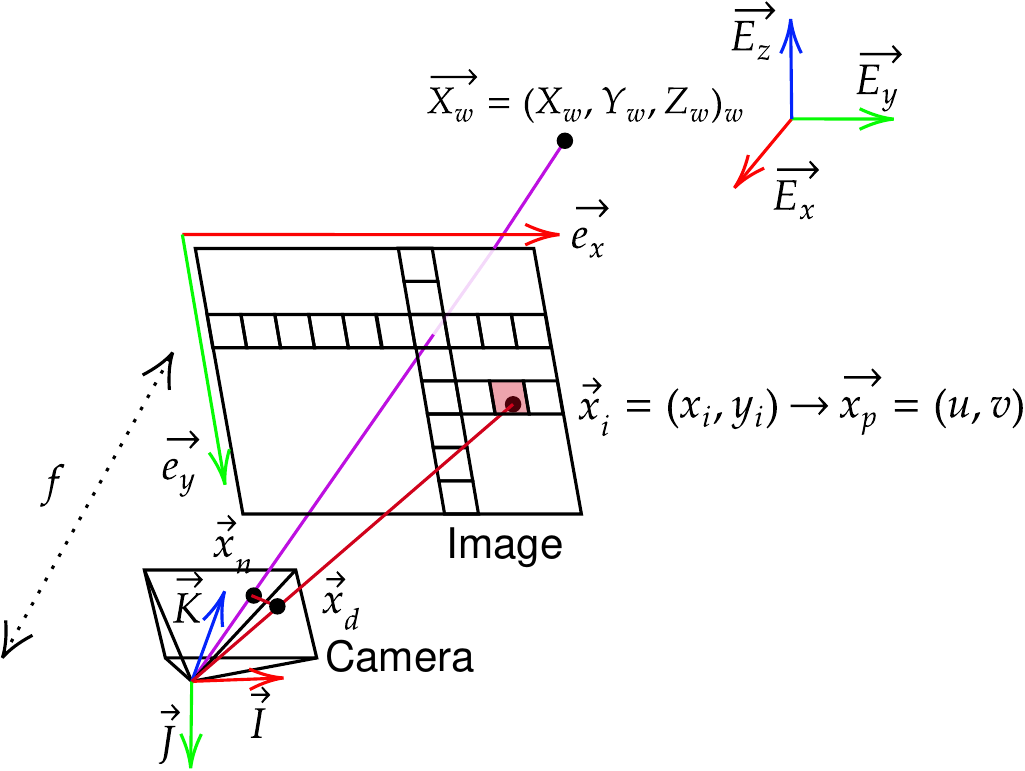
To convert the image_points to the pixel_points, a simple switch of coordinate system can be performed.
The package provides several models and extrinsic, distortion, and intrinsic transformations.
The functions project_points, compute_rays, ... can be used to easily process transformations from the 3D world frame of reference to the image plane.
Examples
Create a simple example to project 3D points to 2D image points using the intrinsic and extrinsic parameters of the camera.
import numpy
from pycvcam import project_points, Cv2Distortion, Cv2Extrinsic, Cv2Intrinsic

# Define the 3D points in the world coordinate system
world_points = numpy.array([[0.0, 0.0, 5.0],
                            [0.1, -0.1, 5.0],
                            [-0.1, 0.2, 5.0],
                            [0.2, 0.1, 5.0],
                            [-0.2, -0.2, 5.0]])  # shape (5, 3)

# Define the rotation vector and translation vector
rvec = numpy.array([0.01, 0.02, 0.03])  # small rotation
tvec = numpy.array([0.1, -0.1, 0.2])    # small translation
extrinsic = Cv2Extrinsic.from_rt(rvec, tvec)

# Define the intrinsic camera matrix
K = numpy.array([[1000.0, 0.0, 320.0],
                 [0.0, 1000.0, 240.0],
                 [0.0, 0.0, 1.0]])

intrinsic = Cv2Intrinsic.from_matrix(K)

# Define the distortion model (optional)
distortion = Cv2Distortion(parameters=[0.1, 0.2, 0.3, 0.4, 0.5])

# Project the 3D points to 2D image points
result = project_points(world_points, intrinsic=intrinsic, distortion=distortion, extrinsic=extrinsic)
print("Projected image points:")
print(result.image_points)  # shape (5, 2)
You can also compute the Jacobians of the image points with respect to the input 3D world points and the projection parameters by setting the dx and dp parameters to True.
# Project the 3D points to 2D image points with Jacobians
result = project_points(world_points, intrinsic=intrinsic, distortion=distortion, extrinsic=extrinsic, dx=True, dp=True)

print("Jacobian with respect to 3D points:")
print(result.jacobian_dx)  # shape (5, 2, 3)

print("Jacobian with respect to projection parameters:")
print(result.jacobian_dp)  # shape (5, 2, Nparams)

print("Jacobian with respect to extrinsic parameters:")
print(result.jacobian_dextrinsic)  # shape (5, 2, Nextrinsic)

print("Jacobian with respect to distortion parameters:")
print(result.jacobian_ddistortion)  # shape (5, 2, Ndistortion)

print("Jacobian with respect to intrinsic parameters:")
print(result.jacobian_dintrinsic)  # shape (5, 2, Nintrinsic)
Authors
-
Artezaru artezaru.github@proton.me
-
Git Plateform: https://github.com/Artezaru/pycvcam.git
-
Online Documentation: https://Artezaru.github.io/pycvcam
Installation
Install with pip
pip install pycvcam
pip install git+https://github.com/Artezaru/pycvcam.git
Clone with git
git clone https://github.com/Artezaru/pycvcam.git
License
Copyright 2025 Artezaru
Licensed under the Apache License, Version 2.0 (the "License"); you may not use this file except in compliance with the License. You may obtain a copy of the License at
http://www.apache.org/licenses/LICENSE-2.0
Unless required by applicable law or agreed to in writing, software distributed under the License is distributed on an "AS IS" BASIS, WITHOUT WARRANTIES OR CONDITIONS OF ANY KIND, either express or implied. See the License for the specific language governing permissions and limitations under the License.
1 maintainer

Metadata
1 maintainer
Release files for pycvcam 3.1.0
For a detailed explanation of source distributions (sdists) and built distributions (wheels), please see the package formats documentation.
Source distribution (sdist)
| File | Size | Uploaded | Provenance | Actions |
|---|---|---|---|---|
| pycvcam-3.1.0.tar.gz | 6.6 MB | Without provenance | Details for pycvcam-3.1.0.tar.gz |
Built distribution (wheel)
| File | Interpreter | ABI | Platform | Actions Reset |
|---|---|---|---|---|
| pycvcam-3.1.0-py3-none-any.whl | Python 3 | none | any | Details for pycvcam-3.1.0-py3-none-any.whl |
Total release size: 7.0 MB
Release files / pycvcam-3.1.0.tar.gz
| Download URL | pycvcam-3.1.0.tar.gz |
|---|---|
| Size | 6.6 MB |
| Tags | Source |
|
SHA-256 checksum How to use checksums |
d02f4d995784d174ecdcbced640e8a1999068bc00699715aa8d07d6f007cb100
|
|
BLAKE2b-256 checksum How to use checksums |
327f6cc26c267aef99340d960b242ecdd5643d8d994ed528977e0f960baec3f6
|
| Upload date | |
|
Uploaded using Trusted Publishing? What is trusted publishing? |
No |
| Uploaded via |
twine/7.0.0 CPython/3.10.22
|
Release files / pycvcam-3.1.0-py3-none-any.whl
| Download URL | pycvcam-3.1.0-py3-none-any.whl |
|---|---|
| Size | 412.7 kB |
| Tags | Python 3 |
|
SHA-256 checksum How to use checksums |
f6e78a2f6035764a461015742ef526d5c3cd2cf7f1a1cd54553378664f4b5fa2
|
|
BLAKE2b-256 checksum How to use checksums |
9e985b15cba148fb3c74ef5d46a382d2cc60a829dc584d256f5b6e1805b42d9c
|
| Upload date | |
|
Uploaded using Trusted Publishing? What is trusted publishing? |
No |
| Uploaded via |
twine/7.0.0 CPython/3.10.22
|
Security for pycvcam 3.1.0
Provenance
Provenance describes where a file came from. On PyPI, provenance is shared via attestations, which provide a verifiable record of the build or publishing details. View details, limitations and caveats.
No provenance found
None of the files in this release were uploaded with provenance metadata.
A note on package security
PyPI is a repository for distributing packages, not a service for auditing them. While third-party security researchers and our staff do their best to detect and remove malicious packages, PyPI cannot guarantee the quality, security or suitability of any given package.
To learn more about protecting yourself from malicious actors, visit our package security documentation.














