
pydantic-ai-trace
Use pydantic-ai-trace when you need to inspect an agent run from a JSON dump. Give it a pydantic-ai list[ModelMessage] dump and it opens the run in a browser view.
It is a lightweight local tool. Point it at a trace or a directory of traces and it reads the files from disk, reloads them when they change, and exports individual traces as self-contained HTML files. Your traces stay on disk, with no hosted service or account.
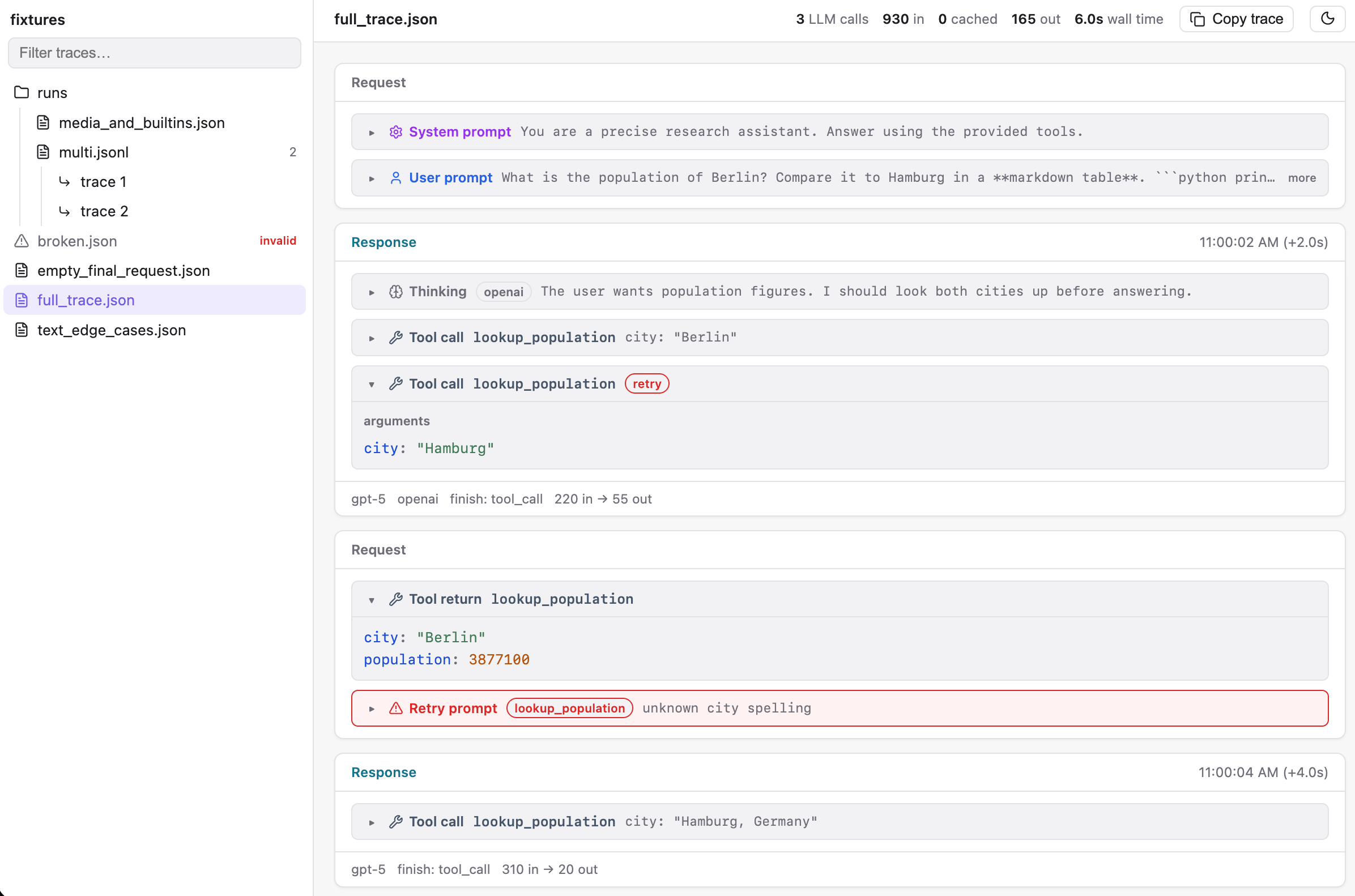
What you can inspect
- The full request and response sequence, including prompts, text, thinking, tool calls, tool results, and unknown parts
- Tool search and capability loading rendered by what they carry: the queries asked, the tools discovered, and the tools each step made available
- Tool calls paired with their results, including results in later messages
- Model, provider, timing, and token usage
- A searchable directory tree for
.jsonand.jsonltraces - Collapsible large values, rendered Markdown, and keyboard navigation
- One-click copying as a compact text transcript that preserves request and response order
- CLI rendering of the same compact transcript for use by people, scripts, and AI agents
Run from a checkout
This project uses pixi. Build the bundled frontend once, then run paitrace with a trace file or directory.
pixi run build-frontend
pixi run paitrace trace.json
Usage
# View one trace
pixi run paitrace trace.json

# Browse a directory tree of traces
pixi run paitrace ./my-traces/

# Browse an explicit collection of trace files with live reload
pixi run paitrace first.json second.json runs/multi.jsonl

# Write one trace to a standalone HTML file
pixi run paitrace export trace.json -o trace.html

# Choose a trace line when exporting a multi-trace JSONL file
pixi run paitrace export runs.jsonl --line 2

# Print the browser's compact text representation to stdout
pixi run paitrace text trace.json

# Print a compact, structured trajectory for jq and other tools
pixi run paitrace json trace.json

# Read a trace from stdin; `-` can also be used explicitly
curl https://example.test/my-traj.json | pixi run paitrace json | jq '.messages[]'
curl https://example.test/my-traj.json | pixi run paitrace text

# Select a trace from JSONL, or write the text to a file
pixi run paitrace text runs.jsonl --line 2
pixi run paitrace text trace.json -o trace.txt

# JSON output supports the same selection and output options
pixi run paitrace json runs.jsonl --line 2
pixi run paitrace json trace.json -o compact.json

# Convert every trace in JSONL to one compact JSON object per line
pixi run paitrace json runs.jsonl --all -o compact.jsonl

# Convert multiple JSON files to compact JSONL in argument order
pixi run paitrace json first.json second.json -o compact.jsonl

# Mix JSON and JSONL inputs; --all expands every JSONL source
pixi run paitrace json first.json runs.jsonl --all -o compact.jsonl

# Indent one compact trajectory for direct inspection
pixi run paitrace json trace.json --pretty

# Export or view a trace received on stdin
curl https://example.test/my-traj.json | pixi run paitrace export -o trace.html
curl https://example.test/my-traj.json | pixi run paitrace --no-open
paitrace text writes only the transcript to stdout by default, so it can be piped directly into
another command. Repeated request instructions are omitted until they change. Multi-trace JSONL
files require --line, just as HTML export does.
paitrace json emits a token-efficient trajectory document. It preserves request and response
order, native tool arguments and results, tool-call IDs, model and token metadata, and unknown
variants. It omits display headings, repeated instructions, provider response identifiers, and
binary payloads. It retains the provider name. Tool calls and results remain separate events
linked by id.
Pass --all to convert every trace in a JSONL file or stream. The output remains JSONL, with one
compact trajectory per line. --all cannot be combined with --line or --pretty. Pass
--pretty to indent single-trace output by two spaces.
Multiple .json inputs also produce compact JSONL, in argument order. When multiple inputs include
JSONL, pass --all to expand each JSONL source. Multiple inputs cannot use stdin, --line, or
--pretty. The browser also accepts multiple explicit .json and .jsonl files and watches each
source for changes. text and export remain single-input commands.
Query compact JSON with jq
# Extract the final assistant text
pixi run paitrace json trace.json \
  | jq -r '[.messages[].parts[] | select(.type == "text") | .content] | last'

# Extract tool calls, results, and retries in chronological order
pixi run paitrace json trace.json \
  | jq '[.messages[].parts[] | select(.type == "tool_call" or .type == "tool_result" or .type == "retry")]'

# Pair tool calls with their result or retry by call ID
pixi run paitrace json trace.json | jq '
  [.messages[].parts[]] as $parts
  | [$parts[] | select(.type == "tool_result" or .type == "retry")] as $results
  | [$parts[] | select(.type == "tool_call")
      | . as $call
      | {
          id,
          name,
          args,
          result: ($results | map(select(.id == $call.id)) | first)
        }
    ]
'

# Read aggregate model-call and token statistics
pixi run paitrace json trace.json | jq '.stats'

# Collect several compact trajectories into one JSON array
pixi run paitrace json first.json second.json | jq -s '.'
The viewer, text, json, and export commands accept a trace from piped stdin when their input
is omitted. Pass - to request stdin explicitly. Stdin can contain one JSON trace or JSONL traces;
use --line to select from multi-trace JSONL. HTML export from stdin requires -o.
The viewer binds to 127.0.0.1:1205 and opens your browser. Pass --port, --host, or --no-open to change that behavior.
Embed from Python
TraceView turns Pydantic AI messages into the same self-contained HTML document produced by
paitrace export. It does not start a server or write a temporary trace file.
from pydantic_ai_trace import TraceView

view = TraceView.from_messages(messages, title="Candidate response")
html = view.html()
Use from_json when the trace is already serialized:
view = TraceView.from_json(trace_json, title="Candidate response")
Compose several validated traces into one document with an in-memory sidebar:
from pydantic_ai_trace import TraceCollectionView, TraceView

view = TraceCollectionView(
    [
        TraceView.from_json(original_json, title="Original"),
        TraceView.from_json(candidate_json, title="Candidate"),
        TraceView.from_messages(retry_messages, title="Retry"),
    ],
    title="Case 42",
)
html = view.html()
The sequence order becomes the sidebar order. Trace titles must be non-empty and unique.
Pydantic AI remains an optional dependency. from_messages uses the installed
ModelMessagesTypeAdapter; from_json works without Pydantic AI installed.
Streamlit
Streamlit renders custom HTML inside an iframe:
import streamlit.components.v1 as components

from pydantic_ai_trace import TraceView

view = TraceView.from_messages(messages, title="Candidate response")
components.html(view.html(), height=900, scrolling=True)
Python HTTP servers
Return the document from a dedicated endpoint, then show that URL in an iframe in the host page. For example, with Starlette:
from starlette.responses import HTMLResponse

from pydantic_ai_trace import TraceView


async def trace_view(request):
    messages = load_messages(request.path_params["run_id"])
    view = TraceView.from_messages(messages, title=f"Run {request.path_params['run_id']}")
    return HTMLResponse(view.html())
<iframe
  src="/runs/abc123/trace"
  title="Agent trace"
  style="width: 100%; height: 100%; border: 0"
></iframe>
The iframe isolates the viewer's CSS and keyboard shortcuts from the host application. The generated document contains inline JavaScript and CSS, so applications with a strict Content Security Policy must allow the document or serve it under a suitable policy.
Trace files
The viewer reads the JSON emitted by ModelMessagesTypeAdapter.dump_json(messages):
.json: one bare JSON array ofModelMessageobjects.jsonl: one such array per line
When you open a directory, each line in a multi-trace .jsonl file is available as a separate trace.
Development
Run the API and frontend in separate terminals while working on the viewer.
pixi run dev-api ./trace.json  # API with reload on port 1205
pixi run dev-web               # Vite with HMR, proxying /api
pixi run test        # pytest and vitest
pixi run lint        # ruff, prettier, and eslint
pixi run typecheck   # pyright and TypeScript
pixi run build       # bundled frontend plus sdist and wheel
Releasing
Create and publish a GitHub release with a vX.Y.Z tag. The package version is derived from that
tag, so no source file needs a version bump. Publishing the release triggers GitHub Actions to run
the full check suite, build the frontend into the wheel and source distribution, publish both to
PyPI using trusted publishing, and attach them to the GitHub release. Configure a pypi
environment in GitHub and add this repository as a trusted publisher for the pydantic-ai-trace
project on PyPI before the first release.
1 maintainer

Metadata
1 maintainer
Release files for pydantic-ai-trace 0.2.0
For a detailed explanation of source distributions (sdists) and built distributions (wheels), please see the package formats documentation.
Source distribution (sdist)
| File | Size | Uploaded | |
|---|---|---|---|
| pydantic_ai_trace-0.2.0.tar.gz | 204.4 kB | Details |
Built distribution (wheel)
| File | Interpreter | ABI | Platform | Reset |
|---|---|---|---|---|
| pydantic_ai_trace-0.2.0-py3-none-any.whl | Python 3 | none | any | Details |
Total release size: 293.8 kB
Release files / pydantic_ai_trace-0.2.0.tar.gz
| Download URL | pydantic_ai_trace-0.2.0.tar.gz |
|---|---|
| Size | 204.4 kB |
| Tags | Source |
|
SHA-256 checksum How to use checksums |
dac3a3dc8b98ff3351481db2c87048466623dba7718ce555fb09f404f0c29334
|
|
BLAKE2b-256 checksum How to use checksums |
9d9a4f6fd0fb49a12bd43674183552125d667eac64e55f97597020a35364df10
|
| Upload date | |
|
Uploaded using Trusted Publishing? What is trusted publishing? |
Yes |
| Uploaded via |
twine/7.0.0 CPython/3.13.14
|
Provenance
Provenance describes where a file came from. On PyPI, provenance is shared via attestations, which provide a verifiable record of the build or publishing details. View details, limitations and caveats.


PyPI Publish Attestation
PyPI verified that this artifact, at this checksum, originated from the publisher listed below.
Signed by GitHub Actions, verified by PyPI on Aug 19, 2026.
Transparency logRelease files / pydantic_ai_trace-0.2.0-py3-none-any.whl
| Download URL | pydantic_ai_trace-0.2.0-py3-none-any.whl |
|---|---|
| Size | 89.4 kB |
| Tags | Python 3 |
|
SHA-256 checksum How to use checksums |
bb7eeabdc6fffe1b83a3050c501b678ddc66c9e9091b2f45d2b9054826556bdb
|
|
BLAKE2b-256 checksum How to use checksums |
d2216399358c44d7e82cf959a5bec022be2e5fb3f94fca70061459e807374a78
|
| Upload date | |
|
Uploaded using Trusted Publishing? What is trusted publishing? |
Yes |
| Uploaded via |
twine/7.0.0 CPython/3.13.14
|
Provenance
Provenance describes where a file came from. On PyPI, provenance is shared via attestations, which provide a verifiable record of the build or publishing details. View details, limitations and caveats.
PyPI Publish Attestation
PyPI verified that this artifact, at this checksum, originated from the publisher listed below.
Signed by GitHub Actions, verified by PyPI on Aug 19, 2026.
Transparency log













