
This release is a pre-release and may not be stable for production use.
A powerful and easy-to-use Python library for seamless integration with the Diagral alarm system.









pydiagral
Welcome to the documentation for pydiagral, a Python library for interacting with the Diagral API.
📍 About pydiagral
pydiagral is an asynchronous Python interface for the Diagral alarm system. This library allows users to control and monitor their Diagral alarm system through the official API.
✅ Requirement
To use this library, which leverages the Diagral APIs, you must have a Diagral box (DIAG56AAX or DIAG59AAX). This box connects your Diagral alarm system to the internet, enabling interaction with the alarm system via the API. DIAG56AAX is End of Sales but you can find more information about the DIAG59AAX available inside the DIAG99AGX.
📦 Key Features
The DiagralAPI class offers the following functionalities:
-
Authentication:
- Connect to the Diagral API with username and password
- Log in to obtain an access token
- Create, validate, and delete API keys
- List the systems of the account and their API keys, to discover the serial IDs
-
System Configuration:
- Retrieve alarm configuration
-
System Information:
- Obtain system details
- Retrieve the current system status
- Check that the Diagral cloud answers (health check, no credential needed)
- Manage webhooks
- Manage anomalies
-
System Interraction:
- Activate or Desactivate system (partially or globally)
- List automatism rules and run their actions
-
Diagnostics:
- List what Diagral sent that the models did not expect, without any value the user entered (
pydiagral.models.unexpected_data()) - Describe the structure of the last response of each read, without any value the user entered (
DiagralAPI.response_shapes())
- List what Diagral sent that the models did not expect, without any value the user entered (
🧪 Untested features
Some parts of pydiagral are built from the Diagral API documentation only, because they could not be checked on a real installation. pydiagral logs a warning the first time each of them is used:
- Cameras:
AlarmConfiguration.camerasfollows theCameraModelof the Diagral OpenAPI specification. The warning appears when a configuration includes cameras. - Automatisms:
get_automatism_rudes()lists the automatisms andset_automatism_action()runs one. Only an empty list has been seen; whatTIMERdoes, and whether an action must match the automatism's mode, are unknown. - Anomaly deletion:
delete_anomalies()deletes an anomaly. Which identifier it expects is unknown: the anomaliesget_anomalies()returns have none of their own. - Product enabling and disabling:
enable_product()anddisable_product()follow the specification. What disabling does, and which identifier designates a device, are unknown.
If you own the matching equipment or use these calls, please open an issue describing what you observe, with what pydiagral recorded about it, which holds no value you typed and no identifier:
- With hass-diagral, attach the integration's diagnostics: they include both lists below.
- From Python, attach the output of
pydiagral.models.unexpected_data(), and ofresponse_shapes()called on the client after the calls in question.
The debug log shows the full answers instead: enable the pydiagral logger at debug level, with logging.getLogger("pydiagral").setLevel(logging.DEBUG), or in Home Assistant with pydiagral: debug under logger: logs:. Keys, tokens, PIN codes and serial numbers are redacted, but the log still shows the names of your devices: read it before posting.
🚀 Quick Start
To get started with pydiagral, follow these steps:
-
Installation:
pip install pydiagral
-
Example
A modular and easy-to-use test script is available example_code.py to help you get started with the library.
Simply create a .env file with the following content:
USERNAME=your_email@example.com
PASSWORD=your_password
SERIAL_ID=your_serial_id
PIN_CODE=your_pin_code
LOG_LEVEL=DEBUG
And run the example_code.py.
- Request timeout
Each request to the Diagral cloud may take up to 30 seconds. To allow more, set request_timeout (in seconds) when creating the client:
async with DiagralAPI(
    username=username,
    password=password,
    serial_id=serial_id,
    request_timeout=60,
) as diagral:
    ...
To give a single call a shorter deadline, wrap it in asyncio.timeout(). That deadline cannot exceed request_timeout.
- Shared session
To send requests through an aiohttp.ClientSession you already manage, pass it as session. The client uses it as is and never closes it:
async with aiohttp.ClientSession() as session:
    async with DiagralAPI(
        username=username,
        password=password,
        serial_id=serial_id,
        session=session,
    ) as diagral:
        ...
Without session, the client opens its own on async with and closes it on exit.
- Brand
Diagral shares its cloud with sister brands. For an account of another brand, set vendor when creating the client, to one of DIAGRAL (the default), DAITEM, EDAITEM, LOGISTYALMA or DISTRIBUTION, in any case:
async with DiagralAPI(
    username=username,
    password=password,
    serial_id=serial_id,
    vendor="DAITEM",
) as diagral:
    ...
- Discover the serial IDs
Without a serial ID, the client can still log in and list the systems of the account. Create it with the serial ID you pick to use every other call:
async with DiagralAPI(username=username, password=password) as diagral:
    systems = await diagral.get_systems()
serial_id = systems[0].serial_id
📖 Documentations
Package Documentation
Library documentation is available here.
Package Structure
For detailed library documentation, please refer to the following sections:
- API Reference: Comprehensive documentation of the DiagralAPI class and its methods
- Data Models: Description of the data structures used
- Exceptions: List of package exceptions
Diagral API Official documentation
Official Diagral API is available here.
🙋 FAQ
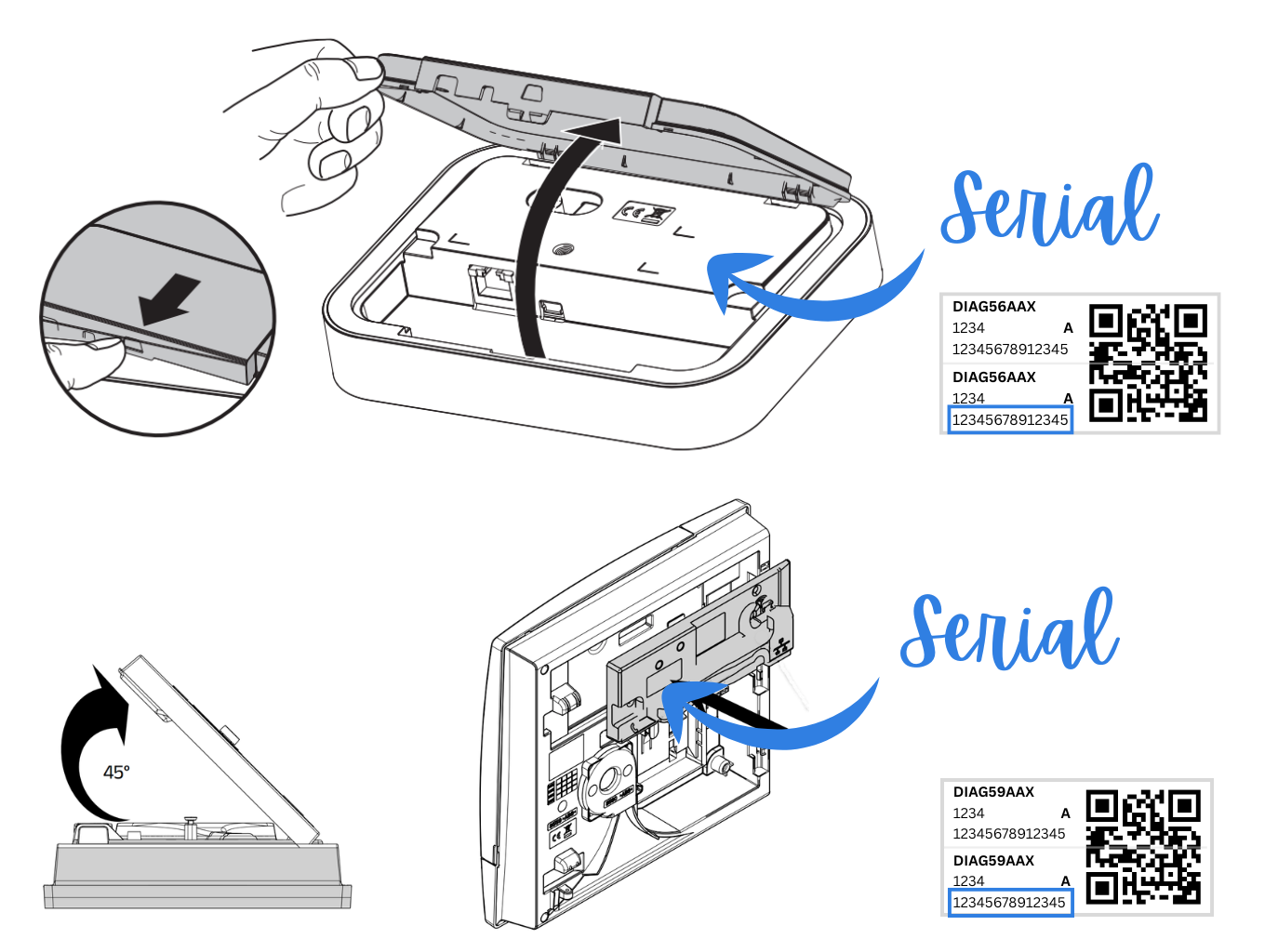
How to find Serial on DIAG56AAX
The serial number can only be found with physical access to the box. You need to open it, and you will find a label with a QR Code.
On this label, there is a 14-character code that represents the serial number of the box.
🤝 Contribution
Contributions are welcome! Here are several ways you can contribute:
- Submit Pull Requests: Review open PRs, and submit your own PRs.
- Report Issues: Submit bugs found or log feature requests.
Contributing Guidelines
- Fork the Repository: Start by forking the project repository to your GitHub account.
- Clone Locally: Clone the forked repository to your local machine using a Git client.
git clone https://github.com/mguyard/pydiagral
- Create a New Branch: Always work on a new branch, giving it a descriptive name.
git checkout -b new-feature-x
- Make Your Changes: Develop and test your changes locally.
- Commit Your Changes: Commit your changes with a clear and concise message that follows the Conventional Commits guidelines.
git commit -m 'feat: Implemented new feature x.'
- Push to GitHub: Push the changes to your forked repository.
git push origin new-feature-x
- Submit a Pull Request: Create a PR against the original project repository. Clearly describe the changes and their motivations.
Open your PR against the dev branch. Once it is reviewed and approved, it is merged there, then promoted to beta for a prerelease and to main for a stable release.
📄 License
pydiagral is distributed under the GPL-v3 License. See the LICENSE file for more details.
1 maintainer

Metadata
1 maintainer
Release files for pydiagral 2.0.0b3
For a detailed explanation of source distributions (sdists) and built distributions (wheels), please see the package formats documentation.
Source distribution (sdist)
| File | Size | Uploaded | Provenance | Actions |
|---|---|---|---|---|
| pydiagral-2.0.0b3.tar.gz | 82.4 kB | With provenance | Details for pydiagral-2.0.0b3.tar.gz |
Built distribution (wheel)
| File | Interpreter | ABI | Platform | Actions Reset |
|---|---|---|---|---|
| pydiagral-2.0.0b3-py3-none-any.whl | Python 3 | none | any | Details for pydiagral-2.0.0b3-py3-none-any.whl |
Total release size: 132.2 kB
Release files / pydiagral-2.0.0b3.tar.gz
| Download URL | pydiagral-2.0.0b3.tar.gz |
|---|---|
| Size | 82.4 kB |
| Tags | Source |
|
SHA-256 checksum How to use checksums |
2670bda21981ae6aa1f8a814f9ae3016491de7a2e460d6be2ac5cd54b44eeac6
|
|
BLAKE2b-256 checksum How to use checksums |
f108f4efbece0e743105a67146a126e2ab773a3c1da46ff6f74a8c78267d6212
|
| Upload date | |
|
Uploaded using Trusted Publishing? What is trusted publishing? |
Yes |
| Uploaded via |
twine/7.0.0 CPython/3.13.16
|
Provenance
Provenance describes where a file came from. On PyPI, provenance is shared via attestations, which provide a verifiable record of the build or publishing details. View details, limitations and caveats.


PyPI Publish Attestation
PyPI verified that this artifact, at this checksum, originated from the publisher listed below.
Signed by GitHub Actions, verified by PyPI on Oct 25, 2026.
Transparency logRelease files / pydiagral-2.0.0b3-py3-none-any.whl
| Download URL | pydiagral-2.0.0b3-py3-none-any.whl |
|---|---|
| Size | 49.8 kB |
| Tags | Python 3 |
|
SHA-256 checksum How to use checksums |
197b1d5b683bf2b03523cc2f8e2b3b14679072fa92e4d39fce1f7daee939a0f0
|
|
BLAKE2b-256 checksum How to use checksums |
7b88fbd763606e0c4193d73f495e299d59e4ad8693bcae428bb538cc994cbb52
|
| Upload date | |
|
Uploaded using Trusted Publishing? What is trusted publishing? |
Yes |
| Uploaded via |
twine/7.0.0 CPython/3.13.16
|
Provenance
Provenance describes where a file came from. On PyPI, provenance is shared via attestations, which provide a verifiable record of the build or publishing details. View details, limitations and caveats.
PyPI Publish Attestation
PyPI verified that this artifact, at this checksum, originated from the publisher listed below.
Signed by GitHub Actions, verified by PyPI on Oct 25, 2026.
Transparency logSecurity for pydiagral 2.0.0b3
Provenance
Provenance describes where a file came from. On PyPI, provenance is shared via attestations, which provide a verifiable record of the build or publishing details. View details, limitations and caveats.
Full provenance
Both files in this release have been uploaded with provenance metadata.
Attestation for pydiagral-2.0.0b3.tar.gz
PyPI Publish Attestation
PyPI verified that this artifact, at this checksum, originated from the publisher listed below.
Signed by GitHub Actions, verified by PyPI on Oct 25, 2026.
Transparency logA note on package security
PyPI is a repository for distributing packages, not a service for auditing them. While third-party security researchers and our staff do their best to detect and remove malicious packages, PyPI cannot guarantee the quality, security or suitability of any given package.
To learn more about protecting yourself from malicious actors, visit our package security documentation.














