
End-to-end dREG peak calling from PRO-seq/GRO-seq bigWig data
Verified details
These details have been verified by PyPIProject links
GitHub Statistics
Maintainers

Project description
pydreg


An inference-only Python port of dREG (Danko Lab) — detects active transcriptional regulatory elements (promoters and enhancers) from PRO-seq/GRO-seq nascent-transcription data.
Given a pair of strand-specific bigWig files, pydreg scores every informative genomic position with a pretrained SVR model, then calls significant peaks with FDR control, mirroring the original R package's recommended run_dREG.R pipeline end to end.
Performance
pydreg is substantially faster and less memory demanding than dREG. On an NVIDIA P100 with 16 cores, we obtain about a 3.4x speed-up and a 4-7x reduction in peak RSS:
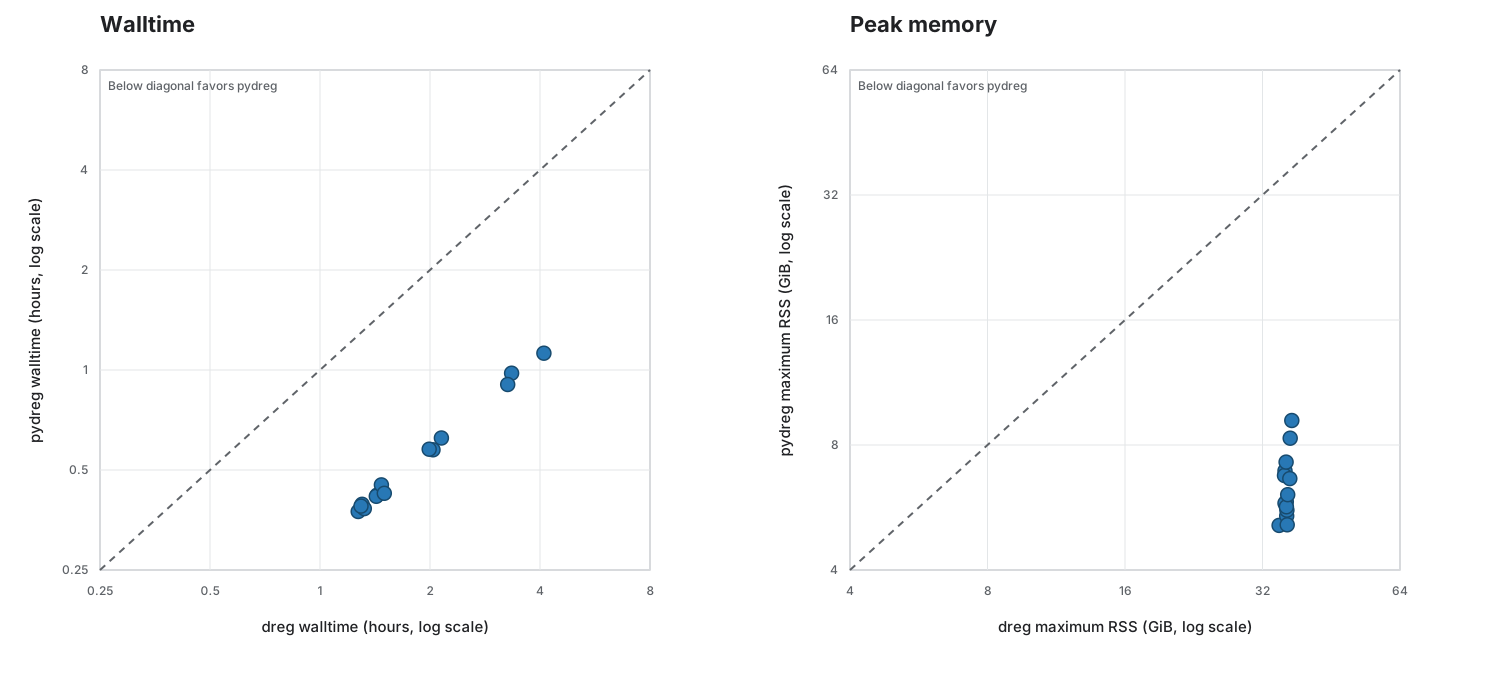
Peak calls from pydreg have ~0.999 Jaccard similarity with official dREG peak calls.
Installation
pip install pydreg[gpu]
pydreg --help
Or with uv — uv tool install if you only need the pydreg CLI (isolated environment, nothing else to manage):
uv tool install pydreg[gpu]
pydreg --help
If you want the Python API (from pydreg import pipeline, see below) available in your own project instead, use uv add pydreg[gpu] there, or uv pip install pydreg[gpu] into an already-active environment.
[gpu] installs CuPy and enables GPU-accelerated scoring on Linux with an NVIDIA GPU (auto-selected whenever one's detected). It is not required, but CPU-only scoring is much slower and so is not generally recommended.
GPU requirement: compute capability ≥3.0 (essentially any CUDA-capable NVIDIA GPU from the last decade-plus, including older Pascal-class cards). Scoring runs pydreg's own RBF kernel implementation directly on a CuPy device array (pydreg.backend._build_cupy_predict_fn) and enables broad CUDA compatibility and fp32 support. v0.1.x used cuML, which came with significant GPU restrictions (no Pascal support) and no fp32 support — see docs/OPTIMIZATION.md for the full writeup, including why that library was dropped (real hardware confirmed it silently returned wrong scores below compute capability 7.0).
Pretrained model weights (an RBF-kernel SVR scorer and a small random-forest peak-splitter) are downloaded automatically from adamyhe/pydreg on Hugging Face the first time they're needed, and cached locally by huggingface_hub.
Usage
CLI
pydreg plus.bw minus.bw out_prefix --verbose
plus.bw/minus.bw: strand-specific bigWig files (3′-mapped, point-mode, unnormalized read counts — the same input format the original dREG expects). See proseq2.0 for the Danko lab's pipeline.minus.bwmay be positive- or negative-signed —pydregtakes the absolute value of both strands during feature extraction (matching the original C implementation), so sign convention doesn't affect scoring.out_prefix: prefix for all output files (see below).
Options:
Arguments meant to be set per-run/per-system. These change performance and logging only, not the results — safe to tune.
| flag | default | meaning |
|---|---|---|
--backend {auto,cupy,sklearn,numpy} |
auto |
Scoring backend. auto uses cupy when a usable CUDA device is detected, otherwise pure NumPy. scikit-learn is selectable explicitly but is not auto-selected (see docs/OPTIMIZATION.md for why). An explicit choice raises if that backend isn't actually usable, rather than silently falling back. |
-p, --peak-calling-cores N |
1 |
Worker processes for the final peak-calling stage (embarrassingly parallel across broad candidate peaks). Set this to the max number of cores you can spare on your machine — the default of 1 is just a safe, non-surprising starting point, not a recommendation. |
--peak-calling-block-width N |
100 |
Candidate broad peaks handed to each peak-calling worker per task; smaller blocks improve load balancing on uneven peak sizes. Tune alongside --peak-calling-cores. |
--query-chunk N |
backend-specific | Positions scored per batch; defaults to a size tuned per backend (pydreg.backend.DEFAULT_QUERY_CHUNK). Pure batching — does not change scores. |
--cupy-sv-chunk N |
32768 |
Support vectors (of 605,187) evaluated per GPU kernel/GEMM call for the cupy backend specifically. The main lever for trading GPU memory for fewer, larger, better-amortized kernel launches — real headroom varies by card, so sweep a few values on your target GPU (see docs/OPTIMIZATION.md). Pure batching — does not change scores. |
--no-progress |
off | Disable tqdm progress bars (auto-hidden anyway when stdout isn't a terminal). |
-v, --verbose |
off | Log progress at INFO level. |
Arguments that will change results. --pv-adjust/--pv-threshold are genuine statistical choices. The rest reproduce specific constants/tolerances from legacy dREG's own hardcoded behavior; pydreg's >0.999 Jaccard agreement with real dREG was measured at their defaults, so moving off those defaults is unexplored territory — nothing downstream validates the result against R at other values.
| flag | default | meaning |
|---|---|---|
--pv-adjust METHOD |
fdr |
Multiple-testing correction method (any statsmodels.stats.multitest.multipletests method name). |
--pv-threshold P |
0.05 |
Significance threshold applied after correction. |
--smoothwidth N |
4 |
Smoothing window used during peak-splitting; matches legacy dREG's own hardcoded smoothwidth=4 in find_rf_peaks. |
--pmv-laplace-cdf-maxpts N |
25000 |
Max integration points for the per-summit p-value's quasi-Monte-Carlo integral; matches R's mvtnorm::pmvnorm()/GenzBretz() default. Only lower this if you want to trade fidelity with R for further speed. |
--pmv-laplace-cdf-eps EPS |
0.001 |
Absolute/relative tolerance for the same integral; also matches R's default. Only lower this (i.e. tighten precision) if you specifically want to exceed R's own reference precision, at real speed cost. |
Python API
from pydreg import pipeline

result = pipeline.run("plus.bw", "minus.bw", "out_prefix", backend_name=None)
# result: {"dense_infp": ..., "raw_peak": ..., "peak_bed": ..., "min_score": ...}
Pass write_outputs=False to get the result dict back without writing files, if you just want to work with the DataFrames directly.
Output files
Given out_prefix, pydreg writes:
| file | contents |
|---|---|
{out_prefix}.dREG.infp.bed.gz (+.tbi), .bw |
Every informative position and its raw dREG score. |
{out_prefix}.dREG.raw.peak.bed.gz (+.tbi) |
All candidate peaks before FDR filtering. |
{out_prefix}.dREG.peak.full.bed.gz (+.tbi) |
Significant peaks: chrom, start, end, score, p-value, center. |
{out_prefix}.dREG.peak.score.bed.gz/.bw (+.tbi) |
Significant peaks' scores only. |
{out_prefix}.dREG.peak.prob.bed.gz/.bw (+.tbi) |
Significant peaks' 1 - p-value. |
.bed.gz files are bgzipped and tabix-indexed; .bw files are standard bigWig tracks.
How it works
- Informative-position scan — tiles the genome looking for positions with any transcriptional signal on either strand, to avoid scoring silent regions.
- Feature extraction — for each informative position, bins nearby read counts into multiple nested window sizes ("zoom levels") per strand, producing a fixed-length feature vector.
- Scoring — an RBF-kernel SVR (605,187 support vectors, trained on the original dREG data) maps each feature vector to a dREG score in ~[0, 1].
- Peak calling — merges scored positions into broad candidate regions, refines local maxima with a small random-forest model to decide where to split adjacent peaks, computes a per-peak p-value, and applies FDR control to select significant peaks.
See docs/METHODS.md for a plain-language walkthrough of each stage, and docs/OPTIMIZATION.md for the performance design choices layered on top without changing any of the above. docs/PLANNING.md/docs/PERF_LOG.md are the underlying comprehensive design/research records (full algorithmic spec, every upstream R quirk and why it's kept, every benchmark) for anyone going deeper.
This is validated directly against the original: on real test data, pydreg's called peaks agree with real dREG's at a >0.999 Jaccard index.
Caveats
minus.bw's sign doesn't matter: both informative-position detection and feature extraction take the absolute value of the minus-strand signal (the latter matching the original C'sbigwig_readi(..., abs=1, ...)read call, which strips sign from both strands before any binning) — seedocs/PLANNING.mdfor the sourced trace.- Chromosome/contig selection follows the original plus-strand-driven scan: contigs present only in
plus.bwcan still be scored, with the missingminus.bwcontig treated as all-zero signal during feature extraction; contigs present only inminus.bware not discovered by the initial informative-position scan. - A handful of upstream R bugs/quirks are faithfully replicated rather than fixed, because the pretrained model's expected behavior was produced by that exact code (e.g. a
mean()-argument-binding bug in the p-value calculation, an off-by-one in broad-peak merging that drops the last group per chromosome, and others) — seedocs/PLANNING.mdfor the full list and reasoning. - Peak-calling p-values have small inherent run-to-run noise (the per-summit p-value's underlying quasi-Monte-Carlo integral is unseeded, matching the original R implementation's
mvtnorm::pmvnorm, which is also unseeded) — this doesn't affect which peaks are called significant in practice, and is reflected in the >0.999 (not exactly 1.0) Jaccard index above.
Contributing
See CONTRIBUTING.md for development setup, running tests, and what to read before making algorithmic or performance changes.
License
GPL-3.0 (matching the original dREG R package, which is GPL-3-licensed).
Citation
If you use this package, please cite the original dREG papers:
Danko, C. G., Hyland, S. L., Core, L. J., Martins, A. L., Waters, C. T., Lee, H. W., Baranello, L., Yang, Z., Wong, S. E., Setola, V., Lee, S. K., ... & Siepel, A. (2015). Identification of active transcriptional regulatory elements from GRO-seq data. Nature Methods, 12(5), 433-438. https://doi.org/10.1038/nmeth.3329
Wang, Z., Chu, T., Choate, L. A., & Danko, C. G. (2018). Identification of regulatory elements from nascent transcription using dREG. Genome Research, 29, 293–303. https://doi.org/10.1101/gr.238279.118
Please also cite the version number of this port to improve reproducibility.
Project details
Verified details
These details have been verified by PyPIProject links
GitHub Statistics
Maintainers
Release history Release notifications | RSS feed


Download files
Download the file for your platform. If you're not sure which to choose, learn more about installing packages.
Source Distribution
Built Distribution
Filter files by name, interpreter, ABI, and platform.
If you're not sure about the file name format, learn more about wheel file names.
Copy a direct link to the current filters
File details
Details for the file pydreg-0.2.5.tar.gz.
File metadata
- Download URL: pydreg-0.2.5.tar.gz
- Upload date:
- Size: 212.3 kB
- Tags: Source
- Uploaded using Trusted Publishing? Yes
- Uploaded via: twine/6.1.0 CPython/3.13.14
File hashes
| Algorithm | Hash digest | |
|---|---|---|
| SHA256 |
f1d4454ba05eac430e96e6e504b0e4bb6092133522de06ec605ce2e59fab1dca
|
|
| MD5 |
72392af3eb4748df22da2ade7c812ab9
|
|
| BLAKE2b-256 |
cf0cba6bf884393427a434509f8caa02e9310d5cdd230ab5542a7989ae8ad7e4
|
Provenance
The following attestation bundles were made for pydreg-0.2.5.tar.gz:
Publisher:
publish.yml on adamyhe/pydreg
-
Statement:
-
Statement type:
https://in-toto.io/Statement/v1 -
Predicate type:
https://docs.pypi.org/attestations/publish/v1 -
Subject name:
pydreg-0.2.5.tar.gz -
Subject digest:
f1d4454ba05eac430e96e6e504b0e4bb6092133522de06ec605ce2e59fab1dca - Sigstore transparency entry: 2215069256
- Sigstore integration time:
-
Permalink:
adamyhe/pydreg@aab1fd23bc4907f7010214281ec0d297a60f5773 -
Branch / Tag:
refs/tags/v0.2.5 - Owner: https://github.com/adamyhe
-
Access:
public
-
Token Issuer:
https://token.actions.githubusercontent.com -
Runner Environment:
github-hosted -
Publication workflow:
publish.yml@aab1fd23bc4907f7010214281ec0d297a60f5773 -
Trigger Event:
release
-
Statement type:
File details
Details for the file pydreg-0.2.5-py3-none-any.whl.
File metadata
- Download URL: pydreg-0.2.5-py3-none-any.whl
- Upload date:
- Size: 67.3 kB
- Tags: Python 3
- Uploaded using Trusted Publishing? Yes
- Uploaded via: twine/6.1.0 CPython/3.13.14
File hashes
| Algorithm | Hash digest | |
|---|---|---|
| SHA256 |
3a09902ebbdc5fddbd8bc9590e503f8b7b7b7e2867f08c4c037acba2e9cfdeee
|
|
| MD5 |
cb50288c1a143b142a418998968e8529
|
|
| BLAKE2b-256 |
6a824ab45367f80bd4740253934fdfe2630267760604e537ba4b6037dcea519b
|
Provenance
The following attestation bundles were made for pydreg-0.2.5-py3-none-any.whl:
Publisher:
publish.yml on adamyhe/pydreg
-
Statement:
-
Statement type:
https://in-toto.io/Statement/v1 -
Predicate type:
https://docs.pypi.org/attestations/publish/v1 -
Subject name:
pydreg-0.2.5-py3-none-any.whl -
Subject digest:
3a09902ebbdc5fddbd8bc9590e503f8b7b7b7e2867f08c4c037acba2e9cfdeee - Sigstore transparency entry: 2215069282
- Sigstore integration time:
-
Permalink:
adamyhe/pydreg@aab1fd23bc4907f7010214281ec0d297a60f5773 -
Branch / Tag:
refs/tags/v0.2.5 - Owner: https://github.com/adamyhe
-
Access:
public
-
Token Issuer:
https://token.actions.githubusercontent.com -
Runner Environment:
github-hosted -
Publication workflow:
publish.yml@aab1fd23bc4907f7010214281ec0d297a60f5773 -
Trigger Event:
release
-
Statement type:






