
PyEarthTools: Machine learning for Earth system science

- An approachable way for researchers to get started with ML research for Earth system science
- Provides a software framework for research and experimentation
- Also suitable for students and newcomers
- Still under early-stage development - things are likely to change a lot. If you notice an issue, please feel free to raise it on GitHub
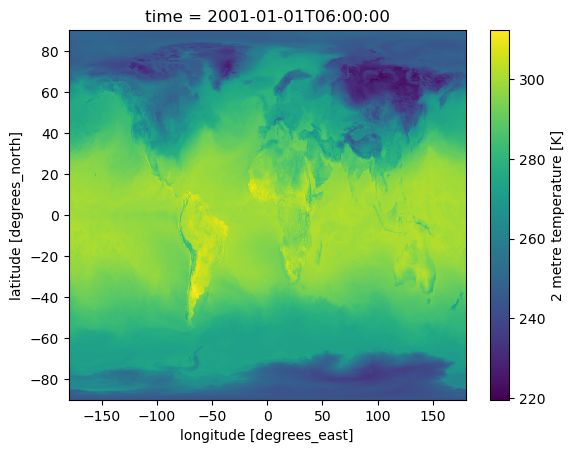 A weather prediction from a model trained with PyEarthTools. |
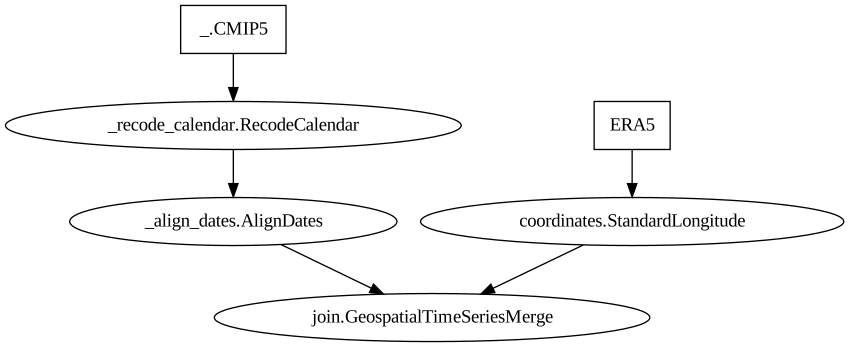 A data processing flow composed for working with climate data. |
|---|
Source Code: github.com/ACCESS-Community-Hub/PyEarthTools
Documentation: pyearthtools.readthedocs.io
Tutorial Gallery: available here
New Users Guide: available here
If you use PyEarthTools for your work or a publication, please cite our work.
Installation
Here is the quickest way to install the complete framework and get started:
We strongly recommend using either a Conda or Python virtual environment.
Run the following commands to install PyEarthTools in a Conda environment:
git clone git@github.com:ACCESS-Community-Hub/PyEarthTools.git
conda create -y -p ./venv python graphviz
conda activate ./venv
pip install -r requirements.txt
cd notebooks
jupyter lab
Alternatively, run the following commands to install PyEarthTools in a Python virtual environment:
git clone git@github.com:ACCESS-Community-Hub/PyEarthTools.git
python3 -m venv ./venv
source venv/bin/activate
pip install -r requirements.txt
cd notebooks
jupyter lab
PyEarthTools comprises multiple sub-packages which may be installed and used separately. See the installation guide for more details.
Overview of PyEarthTools
PyEarthTools is a Python framework containing modules for:
- loading and fetching data;
- pre-processing, normalising and standardising data into a normal form suitable for machine learning;
- defining machine learning (ML) models;
- training ML models and managing experiments;
- performing inference with ML models;
- and evaluating ML models (coming soon).
Overview of the Packages within PyEarthTools
PyEarthTools comprises multiple sub-packages which can be used individually or together.
| Sub-Package | Purpose |
|---|---|
| Data | Loading and indexing Earth system data into xarray |
| Utils | Code for common functionality across the sub-packages |
| Pipeline | Process and normalise Earth system data ready for machine learning |
| Training | Training processes for machine learning models |
| Tutorial | Contains helper code for data sets used in tutorials |
| Bundled Models | Maintained versions of specific, bundled models which can be easily trained and run |
| Zoo | Contains code for managing registered models (such as the bundled models) |
| Evaluation | (Coming soon) Contains code for producing standard evaluations (such as benchmarks and scorecards) |
Acknowleging or Citing PyEarthTools
If you use PyEarthTools for your work, we would appreciate you citing our software as below:
Cook, H., Leeuwenburg, T., Rio, M., Miller, J., Mason, G., Ramanathan, N., Pill, J., Haddad, S., de Burgh-Day, C., Sullivan, B., Hobeichi, S., Holmes, R., Potokina, M., Bogacheva, J., James, M., & Stassen, C. (2025). PyEarthTools: Machine learning for Earth system science (0.4.0). Zenodo. https://doi.org/10.5281/zenodo.17429589
BibTeX:
@software{cook_2025_17429589,
  author       = {Cook, Harrison and
                  Leeuwenburg, Tennessee and
                  Rio, Maxime and
                  Miller, Joel and
                  Mason, Gemma and
                  Ramanathan, Nikeeth and
                  Pill, John and
                  Haddad, Stephen and
                  de Burgh-Day, Catherine and
                  Sullivan, Ben and
                  Hobeichi, Sanaa and
                  Holmes, Ryan and
                  Potokina, Margarita and
                  Bogacheva, Jenya and
                  James, Matthew and
                  Stassen, Christian},
  title        = {PyEarthTools: Machine learning for Earth system
                   science
                  },
  month        = oct,
  year         = 2025,
  publisher    = {Zenodo},
  version      = {0.4.0},
  doi          = {10.5281/zenodo.17429589},
  url          = {https://doi.org/10.5281/zenodo.17429589},
}
1 maintainer

Metadata
1 maintainer
Release files for pyearthtools 0.5.1
For a detailed explanation of source distributions (sdists) and built distributions (wheels), please see the package formats documentation.
Source distribution (sdist)
| File | Size | Uploaded | |
|---|---|---|---|
| pyearthtools-0.5.1.tar.gz | 10.2 kB | Details |
Built distribution (wheel)
| File | Interpreter | ABI | Platform | Reset |
|---|---|---|---|---|
| pyearthtools-0.5.1-py3-none-any.whl | Python 3 | none | any | Details |
Total release size: 21.3 kB
Release files / pyearthtools-0.5.1.tar.gz
| Download URL | pyearthtools-0.5.1.tar.gz |
|---|---|
| Size | 10.2 kB |
| Tags | Source |
|
SHA-256 checksum How to use checksums |
7577ca685193fac776561858861a4c1537ee0064d84804c3417c498a73ba560c
|
|
BLAKE2b-256 checksum How to use checksums |
5200e520371e2fb01d85d11665d503e7d96eb0d11da52d586a1e5b5e400f24df
|
| Upload date | |
|
Uploaded using Trusted Publishing? What is trusted publishing? |
No |
| Uploaded via |
twine/6.2.0 CPython/3.12.12
|
Release files / pyearthtools-0.5.1-py3-none-any.whl
| Download URL | pyearthtools-0.5.1-py3-none-any.whl |
|---|---|
| Size | 11.1 kB |
| Tags | Python 3 |
|
SHA-256 checksum How to use checksums |
b7b84cd9033e784c049bf64b9a9c09981c2c30e652d7fd1681ca8faa44f12e2e
|
|
BLAKE2b-256 checksum How to use checksums |
1c44cf14f400c6795d764c0d8c0c3b68fe019492a8fec9c3b52022d80e97f9ec
|
| Upload date | |
|
Uploaded using Trusted Publishing? What is trusted publishing? |
No |
| Uploaded via |
twine/6.2.0 CPython/3.12.12
|














