
pyEugene 📈



Eugene Investment & Securities Champion Open Api Python Wrapper
Free software: MIT
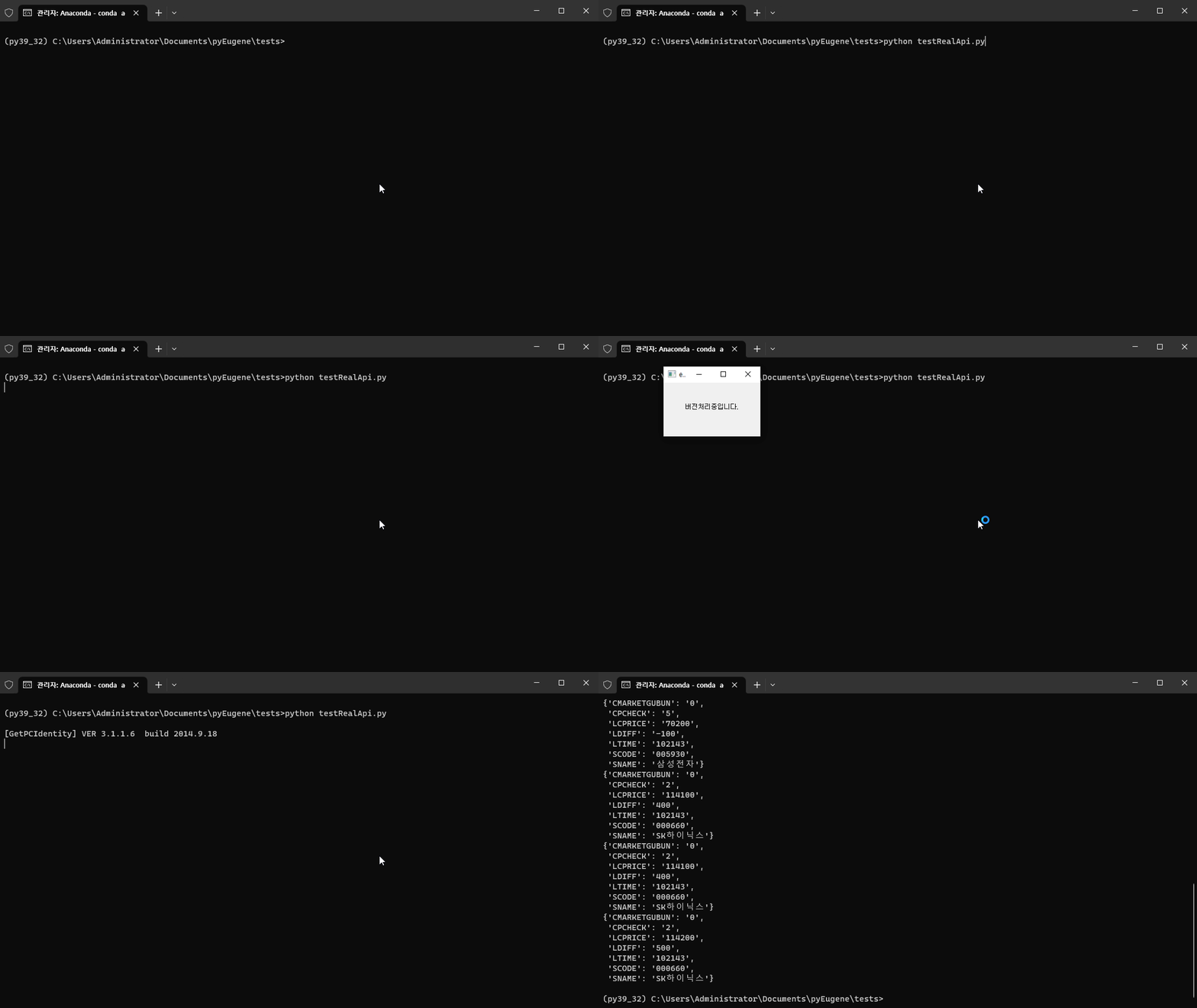
Demo
Prerequisites 👓
- Python 3.9.*
- 32 Bit Development environment
- Eugene Web Account (need Eugene securities account)
Introduction 💻
pyEugene is an unofficial python wrapper for easy use of the Champion Open API provided by Eugene Investment & Securities.
Even if you are not familiar with the functions below, you can use all of them.
- The API structure of OCX provided by Eugene Investment & Securities
- Operating Structure of the Version Processing Program Provided by Eugene Investment & Securities
- Use
dynamicCallfunction for function invocation in con>
한국어 소개 💻
pyEugene은 유진투자증권에서 제공하는 Champion Open API를 쉽게 사용하기 위한 비공식 python wrapper입니다.
아래의 기능들을 잘 모르더라도 충분히 모든 기능을 사용할 수 있습니다.
- 유진투자증권에서 제공하는 OCX의 API 구조
- 유진투자증권에서 제공하는 버전처리 프로그램의 작동 구조
- 컨트롤에서 함수 호출을 위한
dynamicCall함수 사용
Getting Started 🚀
To begin using pyEugene, start by installing anaconda(or you can use miniconda):
Download anaconda
Download miniconda
When you're done installing the anaconda, run the anaconda prompt and set it to a 32-bit development environment
set CONDA_FORCE_32BIT=1
If you replace the anaconda with 32-bit, create a 32-bit virtual environment (You should use Python 3.9 version)
conda create --name py39_32 python=3.9
When you're done installing, activate virtual environment and use the pip to install pyEugene
conda activate py39_32
pip install pyeugene
Once you've installed pyEugene, you can start using it right away.
For example, to get real-time stock price using pyEugene, enter the following code:
import sys
import os
from pprint import pprint
from dotenv import load_dotenv
from pyeugene.eugene_manager import EugeneManager

if __name__ == "__main__":
    load_dotenv()
    em = EugeneManager(os.getenv("USER_ID"), os.getenv("USER_PW"), os.getenv("CERT_PW"))

    real_cmd = {
        'realId': '21',
        'realKey': '005930',
        'output': ["SCODE", "SNAME", "CMARKETGUBUN", "LTIME", "CPCHECK", "LDIFF", "LCPRICE"]
    }

    em.put_real(real_cmd)
    for i in range(10):
        data = em.get_real()
        pprint(data)
    sys.exit()
한국어 사용 가이드 🚀
pyEugene을 사용하기 위해서는 아나콘다를 설치해야 합니다(미니콘다를 설치해 사용할 수도 있습니다)
아나콘다 다운로드가 완료 되었으면 아나콘다 프롬프트를 실행해 32bit 개발환경으로 설정해줘야 합니다
set CONDA_FORCE_32BIT=1
32bit로 설정이 완료 되었으면 32bit 가상 개발 환경을 만들어줍니다 (파이썬 3.9 버전을 사용해야 합니다)
conda create --name py39_32 python=3.9
설치가 모두 끝나면 가상환경을 실행하고 pip를 통해 pyEugene을 설치해줍니다
conda activate py39_32
pip install pyeugene
다음부터는 pyEugene을 설치하지 않고도 기능을 사용할 수 있습니다.
간단한 예시로 pyEugene을 이용해 실시간 시세를 받아오려면 아래 코드를 사용하면 됩니다
import sys
import os
from pprint import pprint
from dotenv import load_dotenv
from pyeugene.eugene_manager import EugeneManager

if __name__ == "__main__":
    load_dotenv()
    em = EugeneManager(os.getenv("USER_ID"), os.getenv("USER_PW"), os.getenv("CERT_PW"))

    real_cmd = {
        'realId': '21',
        'realKey': '005930',
        'output': ["SCODE", "SNAME", "CMARKETGUBUN", "LTIME", "CPCHECK", "LDIFF", "LCPRICE"]
    }

    em.put_real(real_cmd)
    for i in range(10):
        data = em.get_real()
        pprint(data)
    sys.exit()
REST API Gateway 🌐
Want a REST API + Swagger UI on top of pyEugene instead of calling it directly from Python? See README_API.md - it generates a FastAPI route per TR code / Real ID straight from Eugene's TRAN서비스IO.pdf / Real서비스IO.pdf, and ships a mock mode that runs on any OS (no Windows/account needed) to explore the generated API.
Contributions 💬
Feel free to contribute to pyEugene fixing bugs.
If you have any problems, please contact me by e-mail(danielch0401@naver.com)
1 maintainer

Metadata
1 maintainer
Release files for pyeugene 2.0.0
For a detailed explanation of source distributions (sdists) and built distributions (wheels), please see the package formats documentation.
Source distribution (sdist)
| File | Size | Uploaded | Provenance | Actions |
|---|---|---|---|---|
| pyeugene-2.0.0.tar.gz | 9.6 kB | Without provenance | Details for pyeugene-2.0.0.tar.gz |
Built distribution (wheel)
| File | Interpreter | ABI | Platform | Actions Reset |
|---|---|---|---|---|
| pyeugene-2.0.0-py3-none-any.whl | Python 3 | none | any | Details for pyeugene-2.0.0-py3-none-any.whl |
Total release size: 20.7 kB
Release files / pyeugene-2.0.0.tar.gz
| Download URL | pyeugene-2.0.0.tar.gz |
|---|---|
| Size | 9.6 kB |
| Tags | Source |
|
SHA-256 checksum How to use checksums |
1f8327b0fa6a7d709049d1dc9212de3f8e55d818c2c86ed29ed9be18a645f9f5
|
|
BLAKE2b-256 checksum How to use checksums |
dfb07b8f54ad5d31231ffb04bd59abc7cb9e9c6bad92f68a5e18ecba7ef7e89f
|
| Upload date | |
|
Uploaded using Trusted Publishing? What is trusted publishing? |
No |
| Uploaded via |
poetry/2.2.1 CPython/3.9.13 Windows/10
|
Release files / pyeugene-2.0.0-py3-none-any.whl
| Download URL | pyeugene-2.0.0-py3-none-any.whl |
|---|---|
| Size | 11.1 kB |
| Tags | Python 3 |
|
SHA-256 checksum How to use checksums |
d07b692ffad18b571867076af2a88340a1da355897f71d2990719790d48f0b90
|
|
BLAKE2b-256 checksum How to use checksums |
fe8dfe1aa4078957ec6b8e01536a76aeb1ed84420576fe618505a95a22eb9a9a
|
| Upload date | |
|
Uploaded using Trusted Publishing? What is trusted publishing? |
No |
| Uploaded via |
poetry/2.2.1 CPython/3.9.13 Windows/10
|
Security for pyeugene 2.0.0
Provenance
Provenance describes where a file came from. On PyPI, provenance is shared via attestations, which provide a verifiable record of the build or publishing details. View details, limitations and caveats.
No provenance found
None of the files in this release were uploaded with provenance metadata.
A note on package security
PyPI is a repository for distributing packages, not a service for auditing them. While third-party security researchers and our staff do their best to detect and remove malicious packages, PyPI cannot guarantee the quality, security or suitability of any given package.
To learn more about protecting yourself from malicious actors, visit our package security documentation.














