
PyFrame
NSFW moderation for GIFs, videos, and images using local HuggingFace models and/or AWS Rekognition.
PyFrame uses temporal segmentation to avoid moderating every frame: it splits an animation into equal time buckets and extracts the most significant frame from each, capturing diverse scene coverage at a fraction of the cost. It also offers an optional two-stage cascade (--prescreen): a free local model soft-screens densely, and only the flagged time windows get escalated to the precise (e.g. AWS) backend. See the pipeline diagram for a visual of the approach.






Install
pip install "pyframe-gif-video-image-moderation[local]"   # free local HuggingFace backend
pip install "pyframe-gif-video-image-moderation[aws]"      # AWS Rekognition backend
pip install "pyframe-gif-video-image-moderation[all]"      # everything (local + aws + video)
Or with uv:
uv add "pyframe-gif-video-image-moderation[local]"
# or, ad-hoc:  uv pip install "pyframe-gif-video-image-moderation[local]"
The base install is intentionally light (just opencv-python-headless, numpy, Pillow); the heavy backends (boto3, transformers/torch, moviepy) are optional extras you only pull in if you use them.
Python API
Pipe is the high-level facade: build it, call run().
from pyframe import Pipe

result = Pipe("clip.gif", backend="local").run()

print(result.verdict)   # clean
print(result.is_nsfw)   # False
Swap the backend, or turn on the two-pass cascade:
Pipe("clip.gif", backend="aws").run()                  # AWS Rekognition
Pipe("clip.gif", backend="aws", prescreen=True).run()  # local screens, AWS confirms
Scan raw bytes (e.g. a download) with no disk touched at all:
from pyframe import scan_bytes

result = scan_bytes(gif_bytes, backend="local")  # GIF/image decoded in memory
Tuning the two-pass
Every knob is a Pipe param with a sensible default:
Pipe(
    "clip.gif",
    backend="aws",            # precise backend used on escalation
    prescreen=True,           # two-pass cascade on
    escalate_threshold=0.15,  # escalate on the faintest local signal (lower = more recall, more cost)
    max_escalations=2,        # hard cap on AWS calls per file
    frames_per_batch=2,       # frames merged into each grid sent to AWS
    screen_fps=2.0,           # soft-screen sample rate
    min_confidence=0.5,       # NSFW threshold (defaults to the backend's recall-safe value)
).run()
CLI
The same pipeline as a command, no script to edit:
pyframe clip.gif                                   # auto backend, prints a verdict
pyframe clip.gif --backend local                   # free local model
pyframe clip.gif --backend aws --region us-east-1  # AWS Rekognition
pyframe clip.gif --prescreen --backend aws         # cascade: local gate then AWS
pyframe a.gif b.gif c.png --json                   # batch, machine-readable
Exit code: 0 clean, 1 NSFW (per --fail-on), 2 bad input, 3 backend not installed, 4 could not classify, so it drops straight into a shell gate: pyframe upload.gif || reject. A broken backend exits 4 rather than 0 — if nothing scored, nothing was cleared. Equivalent module form: python -m pyframe clip.gif.
Options
| Flag | Default | Meaning |
|---|---|---|
--backend |
auto |
local, aws, or local:<model-id> |
--model |
model default | HuggingFace model id (local backend) |
--region |
us-east-1 |
AWS region (aws backend) |
--max-frames |
10 |
frames to extract from a GIF/video (must be ≥ 1) |
--min-confidence |
backend default | NSFW threshold (0-1); 0.5 local, 0.8 aws |
--sampler |
motion |
motion (bucketing) or dense (uniform) |
--prescreen |
off | enable the two-stage cascade |
--escalate-threshold |
0.15 |
cascade gate (low = recall-safe) |
--max-escalations |
2 |
hard cap on precise (AWS) calls per file (must be ≥ 1) |
--screen-fps |
2.0 |
soft-screen sample rate |
--use-merged / --frames-per-batch |
off / 2 |
merge frames into a grid before classifying |
--json / --fail-on |
off / nsfw |
output format / exit-code policy |
How it works
Pipe- facade you construct (mirrors the old main.py flow)Scanner- engine: single-pass, or the two-stage cascadeBackend- local (HuggingFace) or aws (Rekognition), normalized resultsSampler- motion bucketing, dense uniform, or suspicion
Single-pass (default): extract max_frames via motion bucketing, then classify each with one backend.
Decoding is split in two so memory tracks the sample rather than the clip: one pass reads the whole timeline as per-frame metadata (index, timestamp, motion), sampling picks from that, and a second pass fetches pixels for the selected frames only. A 900-frame 640x480 video scans in ~12 MB of frame memory instead of ~444 MB, so long videos are bounded rather than fatal. See performance for the measurements and what the second pass costs.
Cascade (--prescreen): a free local model densely soft-screens the whole clip; if any frame scores above --escalate-threshold (a deliberately low recall gate), the most-suspicious frames are merged into grids and sent to the precise backend, capped at --max-escalations calls per file (default 2) so a heavily-flagged clip can never cost more than a single-pass scan. Clean media short-circuits to ~$0 and never hits the expensive backend. Because the soft-screen looks at content (not motion), it won't discard a unique suspicious frame the way motion bucketing can, and it fails open: a decode/inference error escalates rather than silently clearing.
Cost
AWS Rekognition bills ~$1.00 / 1,000 images. A 150-frame GIF costs $0.15 to moderate every frame; PyFrame's 10-bucket extraction drops that to ~$0.01 (a ~93% reduction). With --prescreen, clean clips cost $0 (local only) and flagged clips incur at most --max-escalations AWS calls (default 2), so the cascade never costs more than a single-pass scan.
Tune the cascade on labeled data before relying on it: the local gate's recall bounds the system's recall. Keep
--escalate-thresholdlow (catch anything potentially NSFW) and sample densely enough (--screen-fps) that brief events don't fall between samples.
Pipeline
A 150-frame GIF flows through temporal segmentation down to a handful of extracted frames, optionally merged into grids, then sent to the backend:
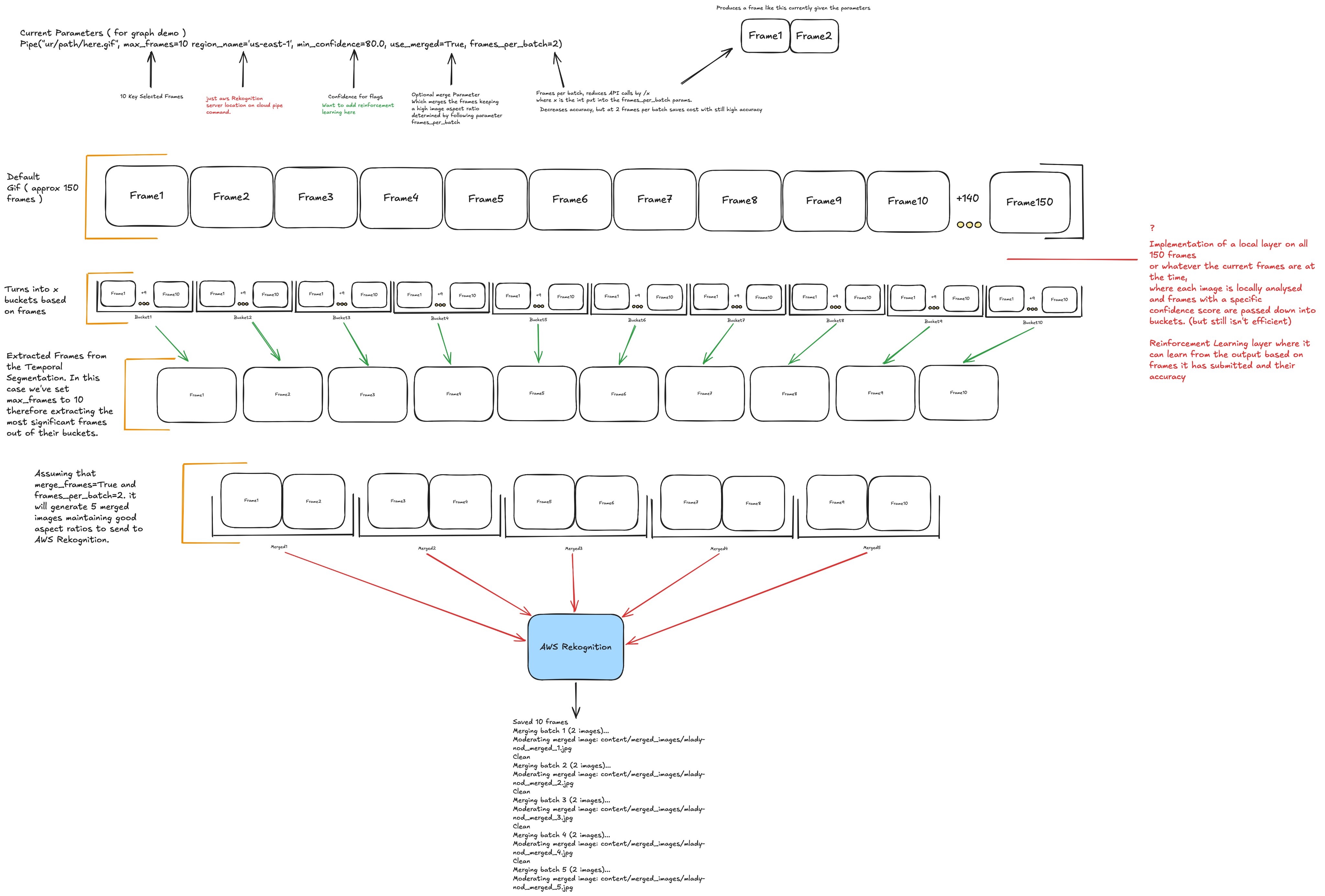
A short, annotated live version of this diagram is at eden.report/docs.
Documentation
The documentation home is eden.report/docs: the fullest guides plus a short annotated live diagram of the pipeline.
Reference docs also live in docs/; start with the output reference for the complete JSON / ScanResult schema.
Citation
PyFrame's temporal sampling design is informed by the temporal action segmentation survey of Ding, Sener, and Yao (arXiv:2210.10352). Full citation and BibTeX: docs/README.md.
Notes
- The
awsbackend needs credentials: install withpip install "pyframe-gif-video-image-moderation[aws]", then runaws configure(or setAWS_ACCESS_KEY_ID,AWS_SECRET_ACCESS_KEY, andAWS_DEFAULT_REGION). [video](video to GIF) needsmoviepy, which requires a system ffmpeg (brew install ffmpeg).- HuggingFace model weights have their own licenses, separate from this package's MIT license.
Development
uv pip install -e ".[dev]"   # or: pip install -e ".[dev]"
pytest
python -m build              # or: uv build
twine check dist/*           # or: uv publish  (to PyPI)
1 maintainer

Metadata
1 maintainer
Release files for pyframe-gif-video-image-moderation 0.5.0
For a detailed explanation of source distributions (sdists) and built distributions (wheels), please see the package formats documentation.
Source distribution (sdist)
| File | Size | Uploaded | |
|---|---|---|---|
| pyframe_gif_video_image_moderation-0.5.0.tar.gz | 28.9 kB | Details |
Built distribution (wheel)
| File | Interpreter | ABI | Platform | Reset |
|---|---|---|---|---|
| pyframe_gif_video_image_moderation-0.5.0-py3-none-any.whl | Python 3 | none | any | Details |
Total release size: 55.9 kB
Release files / pyframe_gif_video_image_moderation-0.5.0.tar.gz
| Download URL | pyframe_gif_video_image_moderation-0.5.0.tar.gz |
|---|---|
| Size | 28.9 kB |
| Tags | Source |
|
SHA-256 checksum How to use checksums |
ce219f014a7b2c4fd35de5a0870124800889580853219505573da898f61b0ccf
|
|
BLAKE2b-256 checksum How to use checksums |
ad5e8891b5c36fcdad177f862d46e775b64eca5f3c51499fce67b03e259d6f96
|
| Upload date | |
|
Uploaded using Trusted Publishing? What is trusted publishing? |
Yes |
| Uploaded via |
twine/7.0.0 CPython/3.13.14
|
Provenance
Provenance describes where a file came from. On PyPI, provenance is shared via attestations, which provide a verifiable record of the build or publishing details. View details, limitations and caveats.


PyPI Publish Attestation
PyPI verified that this artifact, at this checksum, originated from the publisher listed below.
Signed by GitHub Actions, verified by PyPI on Sep 16, 2026.
Transparency logRelease files / pyframe_gif_video_image_moderation-0.5.0-py3-none-any.whl
| Download URL | pyframe_gif_video_image_moderation-0.5.0-py3-none-any.whl |
|---|---|
| Size | 27.0 kB |
| Tags | Python 3 |
|
SHA-256 checksum How to use checksums |
4be6dc455db87ffe821e28f5cd359b6fbe6d68b7b9de93dfad74f3604e16b36c
|
|
BLAKE2b-256 checksum How to use checksums |
074fd4282119174da70be8990ff7ece1bfc254be105cfd90b8965f44022a095b
|
| Upload date | |
|
Uploaded using Trusted Publishing? What is trusted publishing? |
Yes |
| Uploaded via |
twine/7.0.0 CPython/3.13.14
|
Provenance
Provenance describes where a file came from. On PyPI, provenance is shared via attestations, which provide a verifiable record of the build or publishing details. View details, limitations and caveats.
PyPI Publish Attestation
PyPI verified that this artifact, at this checksum, originated from the publisher listed below.
Signed by GitHub Actions, verified by PyPI on Sep 16, 2026.
Transparency log













