
Two-stage NSFW moderation for GIFs, videos, and images via local HuggingFace models and/or AWS Rekognition.
Verified details
These details have been verified by PyPIProject links
GitHub Statistics
Maintainers

Project description
PyFrame
NSFW moderation for GIFs, videos, and images using local HuggingFace models and/or AWS Rekognition.
PyFrame uses temporal segmentation to avoid moderating every frame: it splits an animation into equal time buckets and extracts the most significant frame from each, capturing diverse scene coverage at a fraction of the cost. It also offers an optional two-stage cascade (--prescreen): a free local model soft-screens densely, and only the flagged time windows get escalated to the precise (e.g. AWS) backend. See the pipeline diagram for a visual of the approach.






Install
pip install "pyframe-gif-video-image-moderation[local]"   # free local HuggingFace backend
pip install "pyframe-gif-video-image-moderation[aws]"      # AWS Rekognition backend
pip install "pyframe-gif-video-image-moderation[all]"      # everything (local + aws + video)
Or with uv:
uv add "pyframe-gif-video-image-moderation[local]"
# or, ad-hoc:  uv pip install "pyframe-gif-video-image-moderation[local]"
The base install is intentionally light (just opencv-python-headless, numpy, Pillow); the heavy backends (boto3, transformers/torch, moviepy) are optional extras you only pull in if you use them.
Python API
Pipe is the high-level facade: build it, call run().
from pyframe import Pipe

result = Pipe("clip.gif", backend="local").run()

print(result.verdict)   # clean
print(result.is_nsfw)   # False
Swap the backend, or turn on the two-pass cascade:
Pipe("clip.gif", backend="aws").run()                  # AWS Rekognition
Pipe("clip.gif", backend="aws", prescreen=True).run()  # local screens, AWS confirms
Scan raw bytes (e.g. a download) with no disk touched at all:
from pyframe import scan_bytes

result = scan_bytes(gif_bytes, backend="local")  # GIF/image decoded in memory
Tuning the two-pass
Every knob is a Pipe param with a sensible default:
Pipe(
    "clip.gif",
    backend="aws",            # precise backend used on escalation
    prescreen=True,           # two-pass cascade on
    escalate_threshold=0.15,  # escalate on the faintest local signal (lower = more recall, more cost)
    max_escalations=2,        # hard cap on AWS calls per file
    frames_per_batch=2,       # frames merged into each grid sent to AWS
    screen_fps=2.0,           # soft-screen sample rate
    min_confidence=0.5,       # NSFW threshold (defaults to the backend's recall-safe value)
).run()
CLI
The same pipeline as a command, no script to edit:
pyframe clip.gif                                   # auto backend, prints a verdict
pyframe clip.gif --backend local                   # free local model
pyframe clip.gif --backend aws --region us-east-1  # AWS Rekognition
pyframe clip.gif --prescreen --backend aws         # cascade: local gate then AWS
pyframe a.gif b.gif c.png --json                   # batch, machine-readable
Exit code: 0 clean, 1 NSFW (per --fail-on), 2 bad input, 3 backend not installed, so it drops straight into a shell gate: pyframe upload.gif || reject. Equivalent module form: python -m pyframe clip.gif.
Options
| Flag | Default | Meaning |
|---|---|---|
--backend |
auto |
local, aws, or local:<model-id> |
--model |
model default | HuggingFace model id (local backend) |
--region |
us-east-1 |
AWS region (aws backend) |
--max-frames |
10 |
frames to extract from a GIF/video |
--min-confidence |
backend default | NSFW threshold (0-1); 0.5 local, 0.8 aws |
--sampler |
motion |
motion (bucketing) or dense (uniform) |
--prescreen |
off | enable the two-stage cascade |
--escalate-threshold |
0.15 |
cascade gate (low = recall-safe) |
--max-escalations |
2 |
hard cap on precise (AWS) calls per file |
--screen-fps |
2.0 |
soft-screen sample rate |
--use-merged / --frames-per-batch |
off / 2 |
merge frames into a grid before classifying |
--json / --fail-on |
off / nsfw |
output format / exit-code policy |
How it works
Pipe- facade you construct (mirrors the old main.py flow)Scanner- engine: single-pass, or the two-stage cascadeBackend- local (HuggingFace) or aws (Rekognition), normalized resultsSampler- motion bucketing, dense uniform, or suspicion
Single-pass (default): extract max_frames via motion bucketing, then classify each with one backend.
Cascade (--prescreen): a free local model densely soft-screens the whole clip; if any frame scores above --escalate-threshold (a deliberately low recall gate), the most-suspicious frames are merged into grids and sent to the precise backend, capped at --max-escalations calls per file (default 2) so a heavily-flagged clip can never cost more than a single-pass scan. Clean media short-circuits to ~$0 and never hits the expensive backend. Because the soft-screen looks at content (not motion), it won't discard a unique suspicious frame the way motion bucketing can, and it fails open: a decode/inference error escalates rather than silently clearing.
Cost
AWS Rekognition bills ~$1.00 / 1,000 images. A 150-frame GIF costs $0.15 to moderate every frame; PyFrame's 10-bucket extraction drops that to ~$0.01 (a ~93% reduction). With --prescreen, clean clips cost $0 (local only) and flagged clips incur at most --max-escalations AWS calls (default 2), so the cascade never costs more than a single-pass scan.
Tune the cascade on labeled data before relying on it: the local gate's recall bounds the system's recall. Keep
--escalate-thresholdlow (catch anything potentially NSFW) and sample densely enough (--screen-fps) that brief events don't fall between samples.
Pipeline
A 150-frame GIF flows through temporal segmentation down to a handful of extracted frames, optionally merged into grids, then sent to the backend:
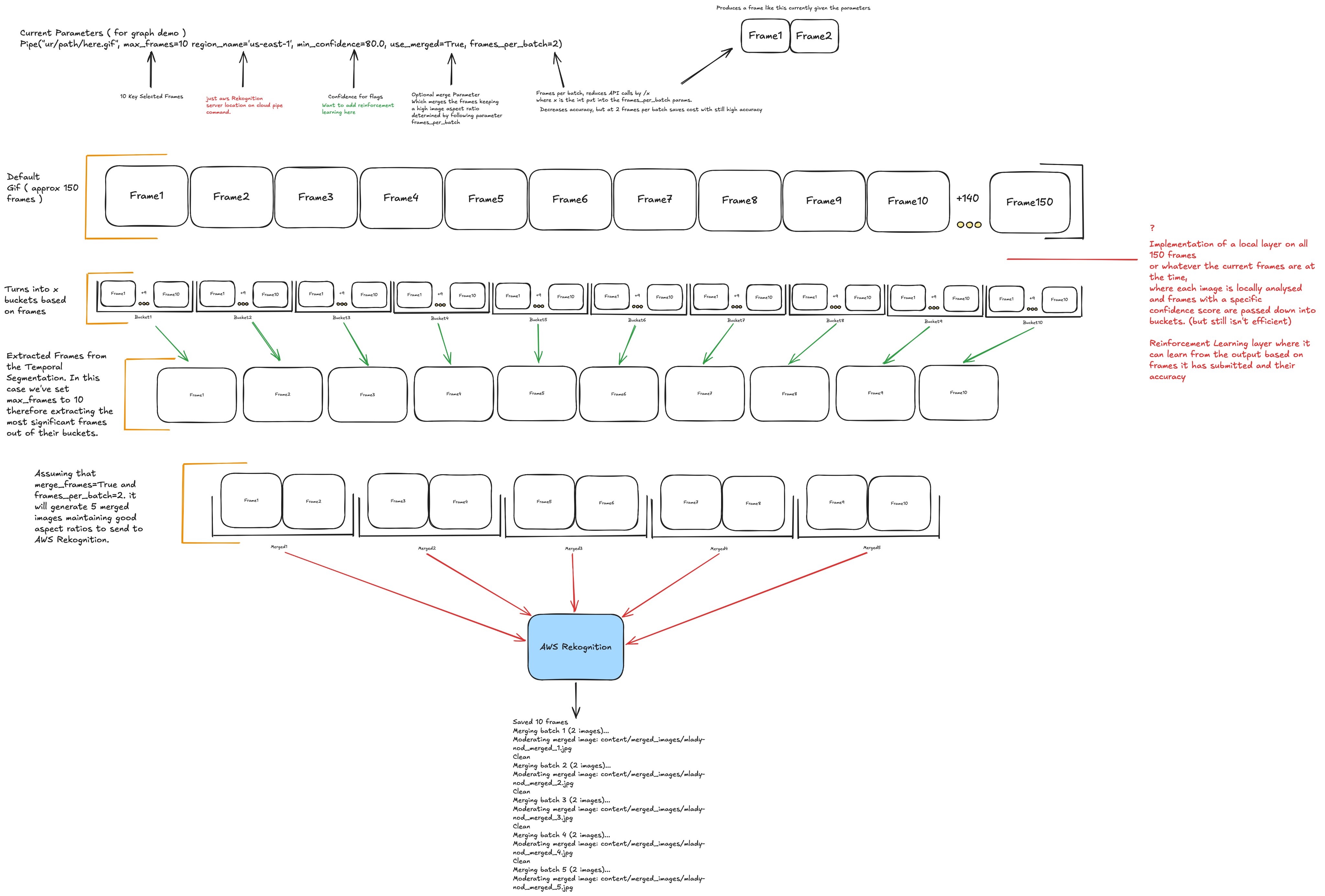
A short, annotated live version of this diagram is at eden.report/docs.
Documentation
The documentation home is eden.report/docs: the fullest guides plus a short annotated live diagram of the pipeline.
Reference docs also live in docs/; start with the output reference for the complete JSON / ScanResult schema.
Notes
- The
awsbackend needs credentials: install withpip install "pyframe-gif-video-image-moderation[aws]", then runaws configure(or setAWS_ACCESS_KEY_ID,AWS_SECRET_ACCESS_KEY, andAWS_DEFAULT_REGION). [video](video to GIF) needsmoviepy, which requires a system ffmpeg (brew install ffmpeg).- HuggingFace model weights have their own licenses, separate from this package's MIT license.
Development
uv pip install -e ".[dev]"   # or: pip install -e ".[dev]"
pytest
python -m build              # or: uv build
twine check dist/*           # or: uv publish  (to PyPI)
Project details
Verified details
These details have been verified by PyPIProject links
GitHub Statistics
Maintainers


Download files
Download the file for your platform. If you're not sure which to choose, learn more about installing packages.
Source Distribution
Built Distribution
Filter files by name, interpreter, ABI, and platform.
If you're not sure about the file name format, learn more about wheel file names.
Copy a direct link to the current filters
File details
Details for the file pyframe_gif_video_image_moderation-0.3.0.tar.gz.
File metadata
- Download URL: pyframe_gif_video_image_moderation-0.3.0.tar.gz
- Upload date:
- Size: 18.3 kB
- Tags: Source
- Uploaded using Trusted Publishing? Yes
- Uploaded via: twine/6.1.0 CPython/3.13.12
File hashes
| Algorithm | Hash digest | |
|---|---|---|
| SHA256 |
18c53c6e6bf28bb333f0144295301ace450c8be0a4e552d19b59c1ecba7672d5
|
|
| MD5 |
dc1e1f597807bd1ad66632cc26c8d301
|
|
| BLAKE2b-256 |
db884536a25599a61b54206736ff6ee3d7c787f3f8c9c48bfd2cad46fe08d3fc
|
Provenance
The following attestation bundles were made for pyframe_gif_video_image_moderation-0.3.0.tar.gz:
Publisher:
publish.yml on ehewes/pyframe
-
Statement:
-
Statement type:
https://in-toto.io/Statement/v1 -
Predicate type:
https://docs.pypi.org/attestations/publish/v1 -
Subject name:
pyframe_gif_video_image_moderation-0.3.0.tar.gz -
Subject digest:
18c53c6e6bf28bb333f0144295301ace450c8be0a4e552d19b59c1ecba7672d5 - Sigstore transparency entry: 1751383497
- Sigstore integration time:
-
Permalink:
ehewes/pyframe@728ca4d22524ede8ca251518efcc0b398d964ed7 -
Branch / Tag:
refs/tags/v0.3.0 - Owner: https://github.com/ehewes
-
Access:
public
-
Token Issuer:
https://token.actions.githubusercontent.com -
Runner Environment:
github-hosted -
Publication workflow:
publish.yml@728ca4d22524ede8ca251518efcc0b398d964ed7 -
Trigger Event:
release
-
Statement type:
File details
Details for the file pyframe_gif_video_image_moderation-0.3.0-py3-none-any.whl.
File metadata
- Download URL: pyframe_gif_video_image_moderation-0.3.0-py3-none-any.whl
- Upload date:
- Size: 22.1 kB
- Tags: Python 3
- Uploaded using Trusted Publishing? Yes
- Uploaded via: twine/6.1.0 CPython/3.13.12
File hashes
| Algorithm | Hash digest | |
|---|---|---|
| SHA256 |
bf0129477e351c4738fbb894a2093bc20750147134a531d112c11db3855f0034
|
|
| MD5 |
1e3a2438f8a3038fcaa2f8aefc56d9f0
|
|
| BLAKE2b-256 |
088f3ffd82b4a977c894cd0c0033fd9646a249880aacd44bc93f8371b8097d0a
|
Provenance
The following attestation bundles were made for pyframe_gif_video_image_moderation-0.3.0-py3-none-any.whl:
Publisher:
publish.yml on ehewes/pyframe
-
Statement:
-
Statement type:
https://in-toto.io/Statement/v1 -
Predicate type:
https://docs.pypi.org/attestations/publish/v1 -
Subject name:
pyframe_gif_video_image_moderation-0.3.0-py3-none-any.whl -
Subject digest:
bf0129477e351c4738fbb894a2093bc20750147134a531d112c11db3855f0034 - Sigstore transparency entry: 1751383628
- Sigstore integration time:
-
Permalink:
ehewes/pyframe@728ca4d22524ede8ca251518efcc0b398d964ed7 -
Branch / Tag:
refs/tags/v0.3.0 - Owner: https://github.com/ehewes
-
Access:
public
-
Token Issuer:
https://token.actions.githubusercontent.com -
Runner Environment:
github-hosted -
Publication workflow:
publish.yml@728ca4d22524ede8ca251518efcc0b398d964ed7 -
Trigger Event:
release
-
Statement type:






