
PyFT8
An FT8 Receiver, FT8 Transmitter, and GUI, written in three single & short Python files plus a tiny udp_comms file. The Receiver and Transmitter can be run standalone.
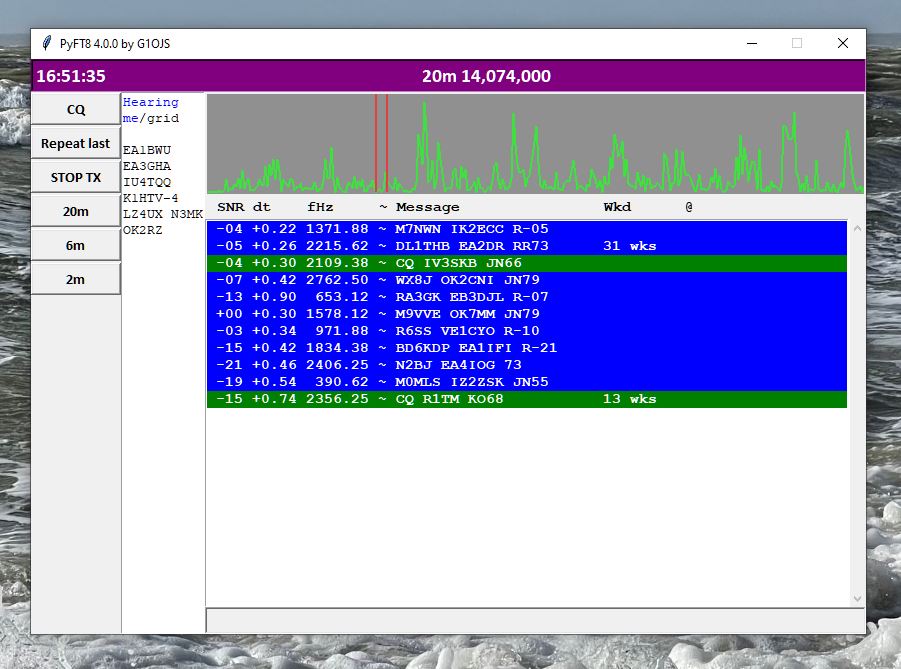
Version 4.0.0 uses a tkinter-based GUI, a simplified receiver, and a simplified project structure. PyFT8 v3.9.1 has the Matplotlib-based GUI with decodes overlaid on the waterfall.
Features
As of version 4.0.0, the key features are:
- Written entirely in Python
- Implements LDPC and OSD decoding
- Tkinter GUI
- Receiver and Transmitter can be used standalone
- Internal connections are via UDP (so e.g. alternative Receivers / Transmitters could be easily swapped in)
- Rx and Tx of standard messages with optional /P and /R
- Tx uses GFSK waveform as defined in FT8 standard
- RX of nonstandard calls plus hashed calls
- Launches quickly (~2 seconds on my old Dell Optiplex 790)
- Finds sound cards by keywords so follows them if e.g. Windows moves them ...
- Logs QSOs to user-specified ADIF file
- Uploads spots to pskreporter
- Controls rigs via Hamlib's rigctl.exe, which doesn't hog the rig's COM port(*)
- Click on the spectrum display to set Tx frequency
(*) Interactions with the rig are brief and infrequent (get/set frequency, set/unset PTT), and for my own purposes I prefer not having the Hamlib rigctld running, and having to check its run status and launch it if it's not running. In fact I'd prefer not to use Hamlib at all, and simply use a direct CAT command for the radio I'm using. I included Hamlib-style control so that people who don't have the same Icom rig as me can use this software.
Design philosophy
This isn't meant to do anything 'better' than applications like WSJT-x and MSHV, but it illustrates what can be done in a very few lines of Python, and it is written to be free of bloat. Currently, the code comprises:
- Receiver ~ 300 lines, including LDPC and OSD decoding
- Transmitter ~ 300 lines
- Tkinter GUI ~ 500 lines
That's an FT8 transmitter / receiver application in about 1100 lines of Python. The Receiver and Transmitter are implemented in single Python files (apart from common use of a small UDP class) and communicate with the GUI only via UDP. The point of doing this is to keep the interfaces here minimal, so that in theory it's easy to swap out either transmitter, receiver, or GUI and replace it with something written in any other language, subject to meeting / adapting the UDP commands reference below.
Installation and use
To use it as a 'turnkey' transceiver, just install the project via pip:
pip install PyFT8
... and then run the tk_gui either in a Python environment or by using the command:
pyft8gui
You might have to open a new command window after pip install so that the command 'pyft8gui' is recognised. I haven't written too much of a step by step quide here, as the project is really intended for people who want to poke around and maybe modify the code. But hopefully even if you're new to Python or coding, you can have a look and work out how it's done.
To control a rig's PTT and frequency, you'll need a copy of Hamlib's rigctl.exe.
Hacking it
The transmitter and receiver may be run independently from the GUI, as they communicate only via UDP (see below). For example, to run the receiver from Python,
from PyFT8 import Receiver
rx = Receiver(output_type = 'print', input_keywords = 'Mic, CODEC')
Or of course copy the receiver.py file, add this line at the bottom (minus the import), and hack away.
UDP messages
The following shows the main points of the way that the UDP messages are constructed - please see the code for the absolute reference.
- All UDP messages apart from those sent to pskreporter.info or the waterfall data sent from the receiver to the GUI, are Python dictionaries serialised with JSON and encoded to bytes.
- All dictionaries start with a key called 'mtype' meaning 'messsage type'. The main ones are 'decode' (indicating that the dictionary contains various entries from a decoded message), 'shutdown', 'waterfall', 'rollover', 'test_info', 'set_tx_Hz', 'generate_tx_audio', 'send_tx_audio', 'stop_tx_audio'.
As the project grows, I might write a more formal spec for these messages.
Acknowledgements
This project implements a decoder for the FT8 digital mode. FT8 was developed by Joe Taylor, K1JT, Steve Franke, K9AN, and others as part of the WSJT-X project. Protocol details are based on information publicly described by the WSJT-X authors and in related open documentation.
Some constants and tables (e.g. Costas synchronization sequence, LDPC structure, message packing scheme) are derived from the publicly available WSJT-X source code and FT8 protocol descriptions. Original WSJT-X source is © the WSJT Development Group and distributed under the GNU General Public License v3 (GPL-3.0), hence the use of GPL-3.0 in this repository.
1 maintainer

Metadata
1 maintainer
Release files for PyFT8 4.0.2
For a detailed explanation of source distributions (sdists) and built distributions (wheels), please see the package formats documentation.
Source distribution (sdist)
| File | Size | Uploaded | |
|---|---|---|---|
| pyft8-4.0.2.tar.gz | 43.2 kB | Details |
Built distribution (wheel)
| File | Interpreter | ABI | Platform | Reset |
|---|---|---|---|---|
| pyft8-4.0.2-py3-none-any.whl | Python 3 | none | any | Details |
Total release size: 85.0 kB
Release files / pyft8-4.0.2.tar.gz
| Download URL | pyft8-4.0.2.tar.gz |
|---|---|
| Size | 43.2 kB |
| Tags | Source |
|
SHA-256 checksum How to use checksums |
5f089174e1999ae6fc910764685b23c5bfd7ad193a63787bcce81239fcce5b71
|
|
BLAKE2b-256 checksum How to use checksums |
c7132c5778f6c77008c87bea2b354c7b445d39fc46ae676001f2190ecbfbf5a9
|
| Upload date | |
|
Uploaded using Trusted Publishing? What is trusted publishing? |
No |
| Uploaded via |
twine/6.2.0 CPython/3.13.14
|
Release files / pyft8-4.0.2-py3-none-any.whl
| Download URL | pyft8-4.0.2-py3-none-any.whl |
|---|---|
| Size | 41.8 kB |
| Tags | Python 3 |
|
SHA-256 checksum How to use checksums |
0059c0ebace4791131f586d30af2cc195cc16661558437442b099d6ab236c2c7
|
|
BLAKE2b-256 checksum How to use checksums |
07dd06250d582fb56d2679e120d4ed47ed56a3b11811aff320b3fbc34e75a815
|
| Upload date | |
|
Uploaded using Trusted Publishing? What is trusted publishing? |
No |
| Uploaded via |
twine/6.2.0 CPython/3.13.14
|














