
pygame-vkeyboard



Visual keyboard for Pygame engine. Aims to be easy to use as highly customizable as well.
|
|
|
Install
pip install pygame-vkeyboard
Basic usage
VKeyboard only require a pygame surface to be displayed on and a text consumer function, as in the following example :
from pygame_vkeyboard import *

# Initializes your window object or surface your want
# vkeyboard to be displayed on top of.
surface = ...

def consumer(text):
    print('Current text : %s' % text)

# Initializes and activates vkeyboard
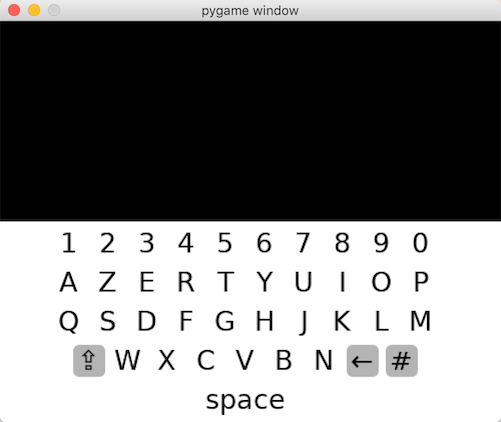
layout = VKeyboardLayout(VKeyboardLayout.AZERTY)
keyboard = VKeyboard(surface, consumer, layout)
The keyboard has the following optional parameters:
- show_text: display a text bar with the current text
- renderer : define a custom renderer (see chapter below)
- special_char_layout: define a custom layout for special characters
- joystick_navigation: enable navigation using a joystick
Event management
A VKeyboard object handles the following pygame event :
- MOUSEBUTTONDOWN
- MOUSEBUTTONUP
- FINGERDOWN
- FINGERUP
- KEYDOWN
- KEYUP
- JOYHATMOTION
- JOYBUTTONDOWN
- JOYBUTTONUP
In order to process those events, keyboard instance event handling method should be called like in the following example:
while True:

    events = pygame.event.get()

    # Update internal variables
    keyboard.update(events)

    # Draw the keyboard
    keyboard.draw(surface)

    #
    # Perform other tasks here
    #

    # Update the display
    pygame.display.flip()
It will update key state accordingly as the keyboard buffer as well. The buffer modification will be notified through the keyboard text consumer function.
The global performances can be improved avoiding to flip the entire display
at each loop by using the pygame.display.update() function.
while True:

    # Draw the keyboard
    rects = keyboard.draw(surface)

    # Update only the dirty rectangles of the display
    pygame.display.update(rects)
Note: the surface parameter of the draw() method is optional, it is used to clear/hide the keyboard when it is necessary and may be mandatory if the surface has changed.
Customize layout
The keyboard layout is the model that indicates keys are displayed and how they are dispatched
across the keyboard space. It consists in a VKeyboardLayout object which is built using list of string,
each string corresponding to a keyboard key row. VkeyboardLayout constructor signature is defined as following :
def __init__(self, model, key_size=None, padding=5, height_ratio=None, allow_uppercase=True, allow_special_chars=True, allow_space=True)
If the key_size or height_ratio parameters are not provided, they will be computed dynamically regarding of the target surface the keyboard will be rendered into (height_ratio is 50% by default).
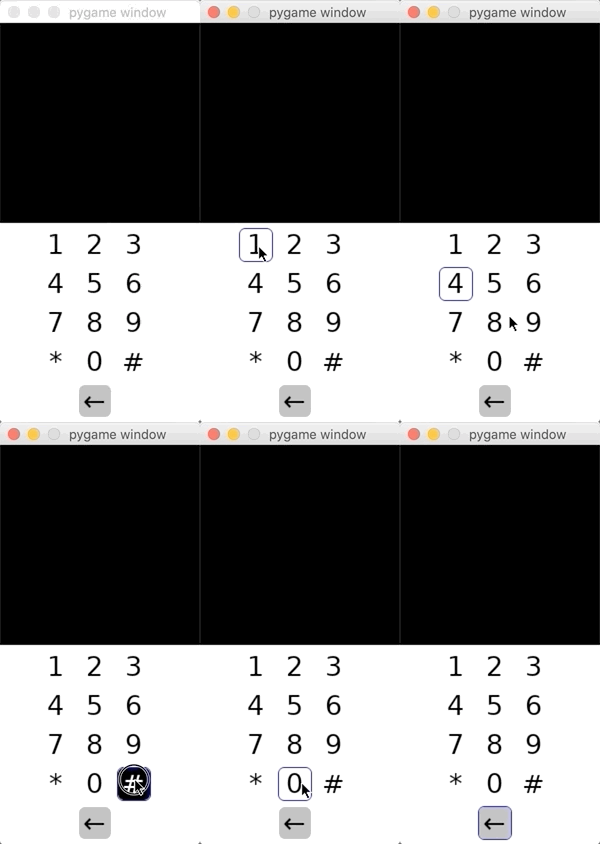
In order to only display a numerical Vkeyboard for example, you can use a custom layout like this :
model = ['123', '456', '789', '0']
layout = VKeyboardLayout(model)
Custom rendering using VKeyboardRenderer
If you want to customize keyboard rendering you could provide a VKeyboardRenderer instance at VKeyboardconstruction.
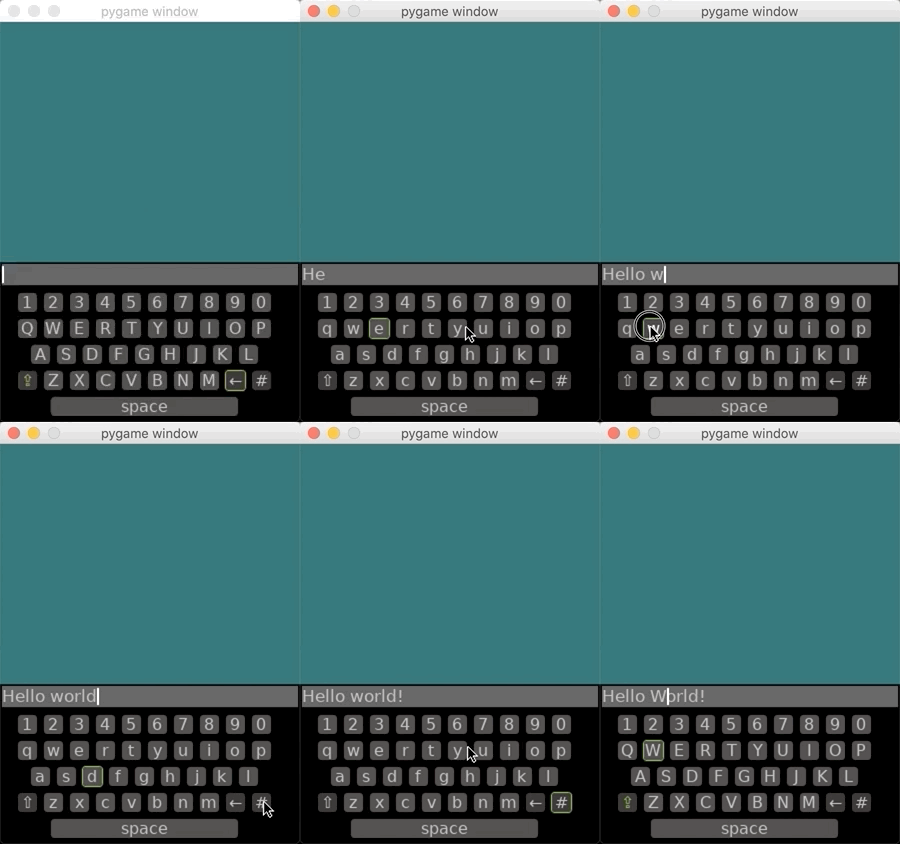
keyboard = VKeyboard(surface, consumer, layout, renderer=VKeyboardRenderer.DARK)
Here is the list of default renderers provided with pygame-vkeyboard:
- VKeyboardRenderer.DEFAULT
- VKeyboardRenderer.DARK
A custom VKeyboardRenderer can be built using following constructor :
renderer = VKeyboardRenderer(
    # Key font name/path.
    'arial',
    # Text color for key and text box (one per state: released, pressed).
    ((0, 0, 0), (255, 255, 255)),
    # Text box cursor color.
    (0, 0, 0),
    # Color to highlight the selected key.
    (20, 200, 98),
    # Keyboard background color.
    (50, 50, 50),
    # Key background color (one per state, as for the text color).
    ((255, 255, 255), (0, 0, 0)),
    # Text input background color.
    (220, 220, 220),
    # Optional special key text color (one per state, as for the text color).
    ((0, 250, 0), (255, 255, 255)),
    # Optional special key background color (one per state, as for the text color).
    ((255, 255, 255), (0, 0, 0)),
)
Please note that the default renderer implementation require a unicode font.
You can also create your own renderer. Just override VKeyboardRendererclass and override any of the following methods :
- draw_background(surface): Draws the background of the keyboard.
- draw_text(surface, text): Draws the text of the text input box.
- draw_cursor(surface, cursor): Draws the cursor of the text input box.
- draw_character_key(surface, key, special=False): Draws a key based on character value.
- draw_space_key(surface, key): Draws space bar.
- draw_back_key(surface, key): Draws back key.
- draw_uppercase_key(surface, key): Draw uppercase switch key.
- draw_special_char_key(surface, key): Draw special character switch key.
Getting/Setting data
Several information can be retrieved from the keyboard:
keyboard = VKeyboard(...)

# Get a pygame.Rect object in which the keyboard is included.
keyboard.get_rect()

# Get the current text.
keyboard.get_text()

# Set the current text (clear the existing one).
keyboard.set_text("Hello world!")

# Enable the keyboard, it will be displayed on next keyboard.draw() call.
keyboard.enable()

# Return True if the keyboard is enabled (thus displayed at screen).
keyboard.is_enabled()

# Disable and hide the keyboard (keyboard.update() and keyboard.draw() have no effect).
keyboard.disable()
Run examples
Several examples are provided with the pygame_vkeyboard library. To run the examples, simply execute these commands in a terminal:
python -m pygame_vkeyboard.examples.azerty
python -m pygame_vkeyboard.examples.numeric
python -m pygame_vkeyboard.examples.textinput
python -m pygame_vkeyboard.examples.resize
Contributing
If you develop you own renderer please share it ! I will keep a collection of rendering class in this repository. Don't hesitate to report bug, feedback, suggestion into the repository issues section.
1 maintainer

Release files for pygame-vkeyboard 2.0.9
For a detailed explanation of source distributions (sdists) and built distributions (wheels), please see the package formats documentation.
Source distribution (sdist)
| File | Size | Uploaded | |
|---|---|---|---|
| pygame-vkeyboard-2.0.9.tar.gz | 389.0 kB | Details |
Built distribution (wheel)
| File | Interpreter | ABI | Platform | Reset |
|---|---|---|---|---|
| pygame_vkeyboard-2.0.9-py2.py3-none-any.whl | Python 2, Python 3 | none | any | Details |
Total release size: 779.4 kB
Release files / pygame-vkeyboard-2.0.9.tar.gz
| Download URL | pygame-vkeyboard-2.0.9.tar.gz |
|---|---|
| Size | 389.0 kB |
| Tags | Source |
|
SHA-256 checksum How to use checksums |
628c8c84c69bfca8a9756cc65476293d504dcf123f8d1e52dfa485ebad61d802
|
|
BLAKE2b-256 checksum How to use checksums |
03d95138bfa42028841a15334e67881d2d05d5c98a45af966df6070c76220074
|
| Upload date | |
|
Uploaded using Trusted Publishing? What is trusted publishing? |
No |
| Uploaded via |
twine/3.4.1 importlib_metadata/4.5.0 pkginfo/1.7.0 requests/2.25.1 requests-toolbelt/0.9.1 tqdm/4.61.0 CPython/3.9.5
|
Release files / pygame_vkeyboard-2.0.9-py2.py3-none-any.whl
| Download URL | pygame_vkeyboard-2.0.9-py2.py3-none-any.whl |
|---|---|
| Size | 390.4 kB |
| Tags | Python 2 Python 3 |
|
SHA-256 checksum How to use checksums |
d70bb6212cfd27ded35f0c472878dc1f955fc1b21b7ffcde6506a6cc5e1d60db
|
|
BLAKE2b-256 checksum How to use checksums |
7f2ccd4f0d5ce06aa501b475a27e1369a30060a768a8f86ceb3eb1ff8e79682a
|
| Upload date | |
|
Uploaded using Trusted Publishing? What is trusted publishing? |
No |
| Uploaded via |
twine/3.4.1 importlib_metadata/4.5.0 pkginfo/1.7.0 requests/2.25.1 requests-toolbelt/0.9.1 tqdm/4.61.0 CPython/3.9.5
|














