
Visual keyboard highly customizable for pygame.

Project description
pygame-vkeyboard



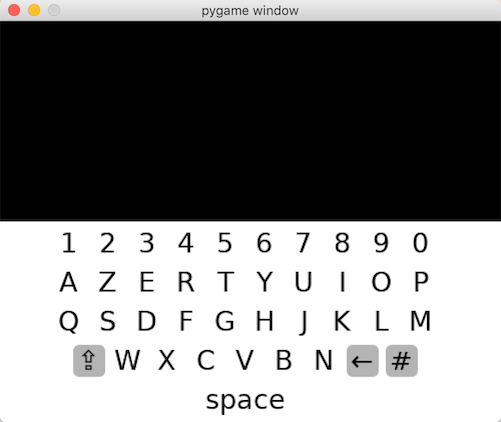
Visual keyboard for Pygame engine. Aims to be easy to use as highly customizable as well.
|
|
|
Install
pip install pygame-vkeyboard
Basic usage
VKeyboard only require a pygame surface to be displayed on and a text consumer function, as in the following example :
from pygame_vkeyboard import *

# Initializes your window object or surface your want
# vkeyboard to be displayed on top of.
surface = ...

def consumer(text):
    print('Current text : %s' % text)

# Initializes and activates vkeyboard
layout = VKeyboardLayout(VKeyboardLayout.AZERTY)
keyboard = VKeyboard(surface, consumer, layout)
The keyboard has the following optional parameters:
- show_text: display a text bar with the current text
- renderer : define a custom renderer (see chapter below)
- special_char_layout: define a custom layout for special characters
- joystick_navigation: enable navigation using a joystick
Event management
A VKeyboard object handles the following pygame event :
- MOUSEBUTTONDOWN
- MOUSEBUTTONUP
- KEYDOWN
- KEYUP
- JOYHATMOTION
- JOYBUTTONDOWN
- JOYBUTTONUP
In order to process those events, keyboard instance event handling method should be called like in the following example:
while True:

    events = pygame.event.get()

    # Update internal variables
    keyboard.update(events)

    # Draw the keyboard
    keyboard.draw(surface)

    #
    # Perform other tasks here
    #

    # Update the display
    pygame.display.flip()
It will update key state accordingly as the keyboard buffer as well. The buffer modification will be notified through the keyboard text consumer function.
The global performances can be improved avoiding to flip the entire display
at each loop by using the pygame.display.update() function.
while True:

    # Draw the keyboard
    rects = keyboard.draw(surface)

    # Update only the dirty rectangles of the display
    pygame.display.update(rects)
Note: the surface parameter of the draw() method is optional, it is used to clear/hide the keyboard when it is necessary and may be mandatory if the surface has changed.
Customize layout
The keyboard layout is the model that indicates keys are displayed and how they are dispatched
across the keyboard space. It consists in a VKeyboardLayout object which is built using list of string,
each string corresponding to a keyboard key row. VkeyboardLayout constructor signature is defined as following :
def __init__(self, model, key_size=None, padding=5, allow_uppercase=True, allow_special_chars=True, allow_space=True)
If the key_size parameter is not provided, it will be computed dynamically regarding of the target surface the keyboard will be rendered into.
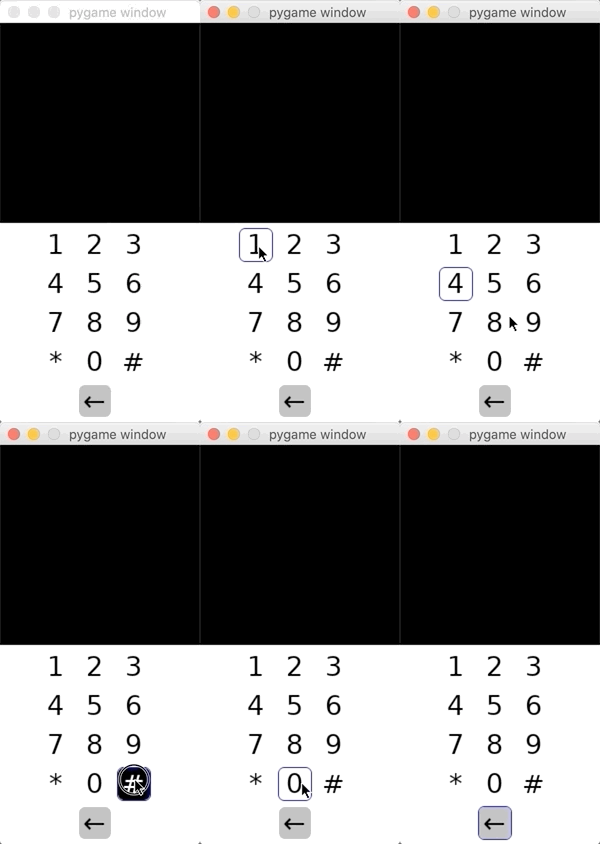
In order to only display a numerical Vkeyboard for example, you can use a custom layout like this :
model = ['123', '456', '789', '0']
layout = VKeyboardLayout(model)
Custom rendering using VKeyboardRenderer
If you want to customize keyboard rendering you could provide a VKeyboardRenderer instance at VKeyboardconstruction.
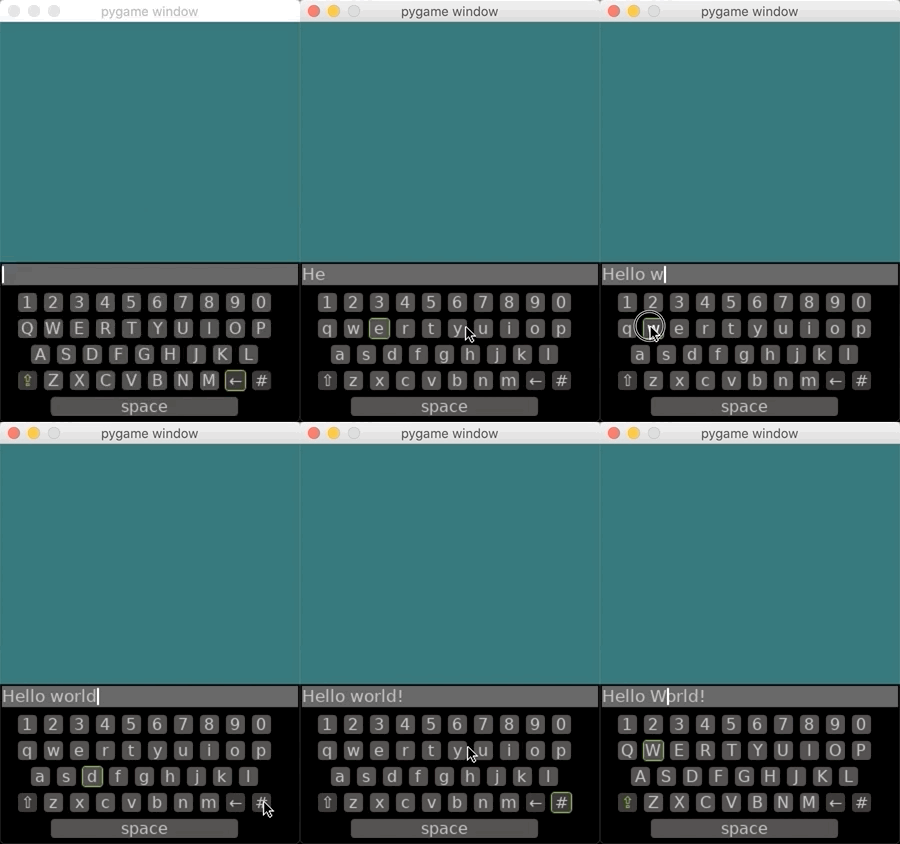
keyboard = VKeyboard(surface, consumer, layout, renderer=VKeyboardRenderer.DARK)
Here is the list of default renderers provided with pygame-vkeyboard:
- VKeyboardRenderer.DEFAULT
- VKeyboardRenderer.DARK
A custom VKeyboardRenderer can be built using following constructor :
renderer = VKeyboardRenderer(
    # Key font name/path.
    'arial',
    # Text color for key and text box (one per state: released, pressed).
    ((0, 0, 0), (255, 255, 255)),
    # Text box cursor color.
    (0, 0, 0),
    # Color to highlight the selected key.
    (20, 200, 98),
    # Keyboard background color.
    (50, 50, 50),
    # Key background color (one per state, as for the text color).
    ((255, 255, 255), (0, 0, 0)),
    # Text input background color.
    (220, 220, 220),
    # Optional special key text color (one per state, as for the text color).
    ((0, 250, 0), (255, 255, 255)),
    # Optional special key background color (one per state, as for the text color).
    ((255, 255, 255), (0, 0, 0)),
)
Please note that the default renderer implementation require a unicode font.
You can also create your own renderer. Just override VKeyboardRendererclass and override any of the following methods :
- draw_background(surface): Draws the background of the keyboard.
- draw_text(surface, text): Draws the text of the text input box.
- draw_cursor(surface, cursor): Draws the cursor of the text input box.
- draw_character_key(surface, key, special=False): Draws a key based on character value.
- draw_space_key(surface, key): Draws space bar.
- draw_back_key(surface, key): Draws back key.
- draw_uppercase_key(surface, key): Draw uppercase switch key.
- draw_special_char_key(surface, key): Draw special character switch key.
Getting/Setting data
Several information can be retrieved from the keyboard:
keyboard = VKeyboard(...)

# Get a pygame.Rect object in which the keyboard is included.
keyboard.get_rect()

# Get the current text.
keyboard.get_text()

# Set the current text (clear the existing one).
keyboard.set_text("Hello world!")

# Return True if the keyboard is enabled (thus displayed at screen).
keyboard.is_enabled()

# Disable and hide the keyboard (keyboard.update() and keyboard.draw() have no effect).
keyboard.disable()
Run examples
Several examples are provided with the pygame_vkeyboard library. To run the examples, simply execute these commands in a terminal:
python -m pygame_vkeyboard.examples.azerty
python -m pygame_vkeyboard.examples.numeric
python -m pygame_vkeyboard.examples.textinput
Contributing
If you develop you own renderer please share it ! I will keep a collection of rendering class in this repository. Don't hesitate to report bug, feedback, suggestion into the repository issues section.
Release history Release notifications | RSS feed


Download files
Download the file for your platform. If you're not sure which to choose, learn more about installing packages.
Source Distribution
Built Distribution
Filter files by name, interpreter, ABI, and platform.
If you're not sure about the file name format, learn more about wheel file names.
Copy a direct link to the current filters
File details
Details for the file pygame-vkeyboard-2.0.7.tar.gz.
File metadata
- Download URL: pygame-vkeyboard-2.0.7.tar.gz
- Upload date:
- Size: 388.3 kB
- Tags: Source
- Uploaded using Trusted Publishing? No
- Uploaded via: twine/3.2.0 pkginfo/1.5.0.1 requests/2.24.0 setuptools/49.6.0 requests-toolbelt/0.9.1 tqdm/4.48.2 CPython/3.8.5
File hashes
| Algorithm | Hash digest | |
|---|---|---|
| SHA256 |
7bdf8db5e508e4cbeb55051115bd38c2db3adbb5454f20862b1c846e426852f6
|
|
| MD5 |
ba868169ab8eb34685d739263f136259
|
|
| BLAKE2b-256 |
79d90feb580f3a63f9ac8230f66b79a6d3aaba147b9d9c804c003ef94c8558b3
|
File details
Details for the file pygame_vkeyboard-2.0.7-py2.py3-none-any.whl.
File metadata
- Download URL: pygame_vkeyboard-2.0.7-py2.py3-none-any.whl
- Upload date:
- Size: 388.3 kB
- Tags: Python 2, Python 3
- Uploaded using Trusted Publishing? No
- Uploaded via: twine/3.2.0 pkginfo/1.5.0.1 requests/2.24.0 setuptools/49.6.0 requests-toolbelt/0.9.1 tqdm/4.48.2 CPython/3.8.5
File hashes
| Algorithm | Hash digest | |
|---|---|---|
| SHA256 |
6a5f42a01a033970190fbb0b681796da7cdbb17b55e080d794fff950348a52e5
|
|
| MD5 |
354154074383a94ba129faa59dbc29d5
|
|
| BLAKE2b-256 |
bfa785dde4ce61e101d4672ecfa11a88a1695c54a8ab345173603edf8c854f8e
|






