
A tool for converting dictionary files aka glossaries.

Project description
PyGlossary




A tool for converting dictionary files aka glossaries.
The primary purpose is to be able to use our offline glossaries in any Open Source dictionary we like on any OS/device.
There are countless formats, and my time is limited, so I implement formats that seem more useful for myself, or for Open Source community. Also diversity of languages is taken into account. Pull requests are welcome.
Screenshots
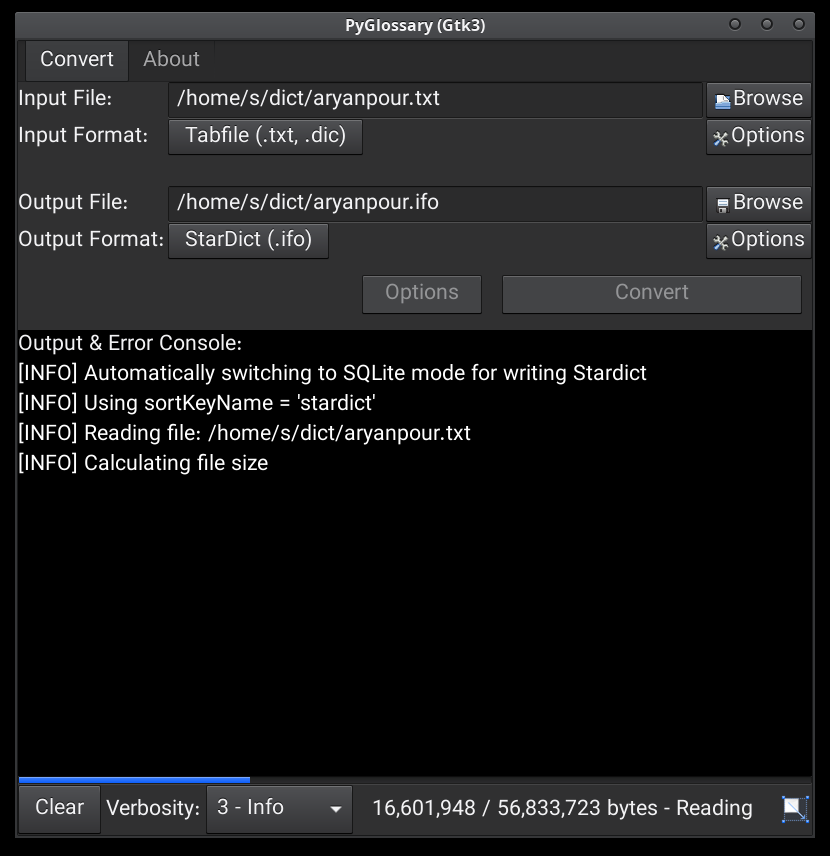
Linux - Gtk3-based interface
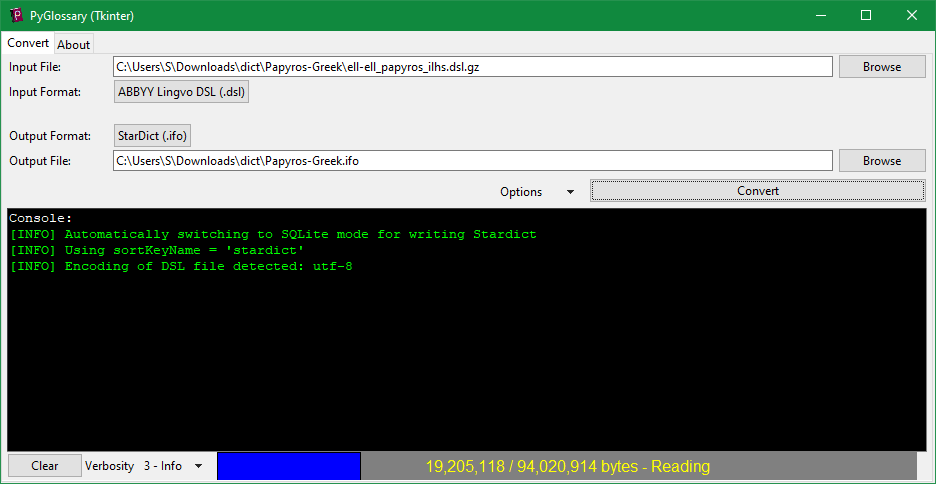
Windows - Tkinter-based interface
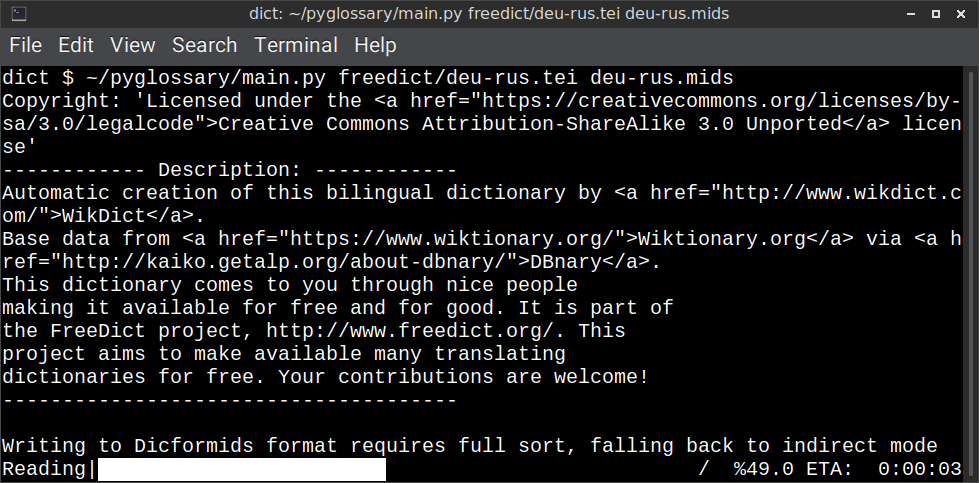
Linux - command-line interface
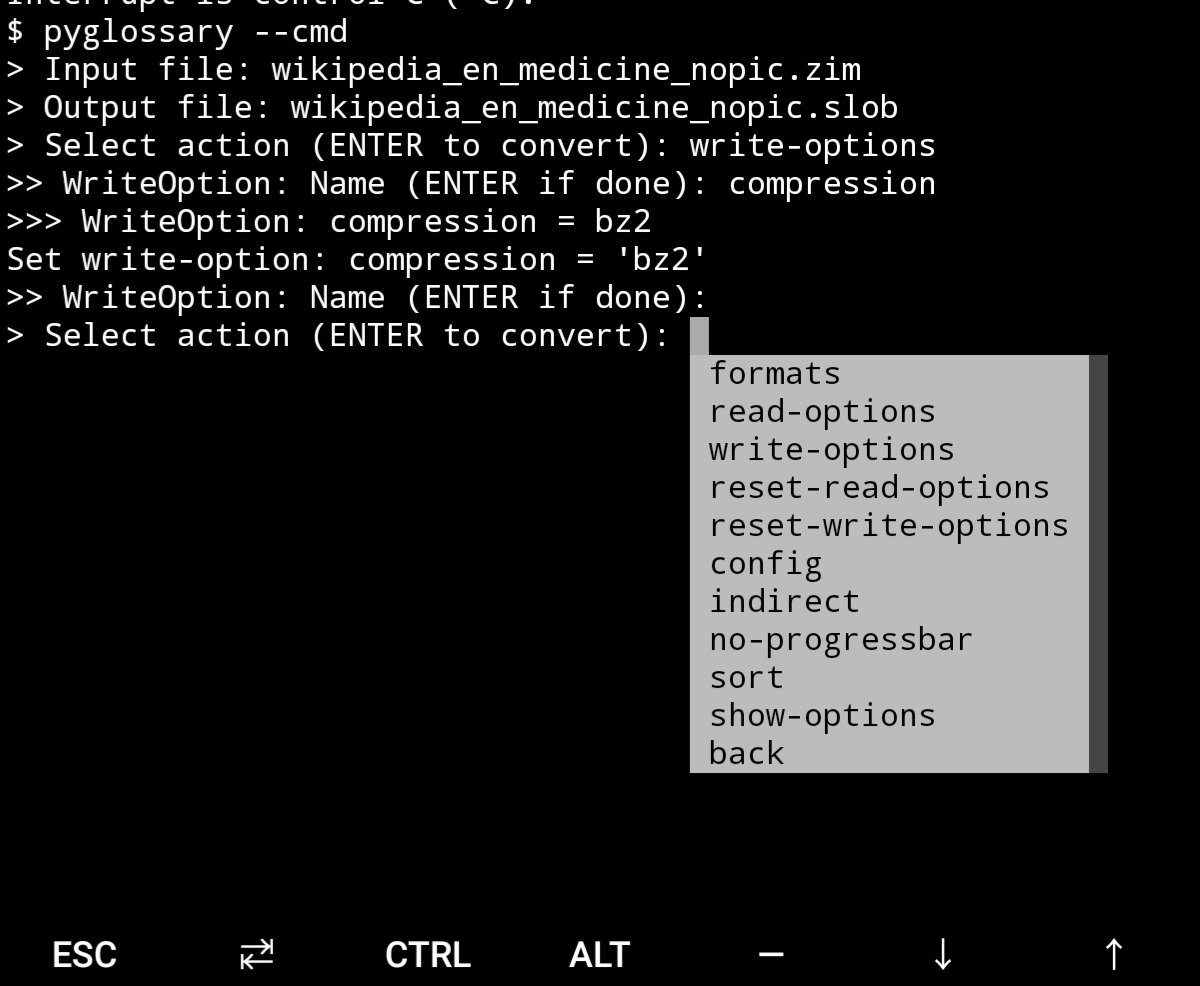
Android Termux - interactive command-line interface
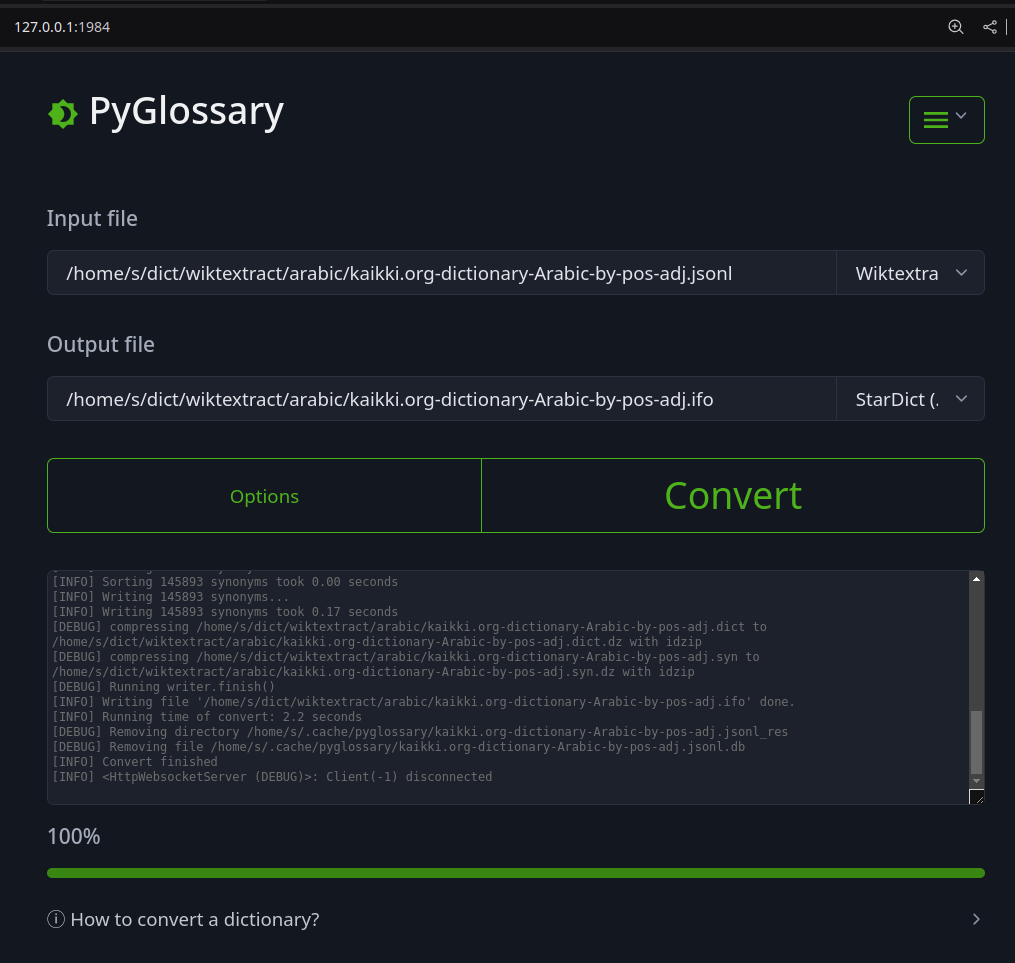
Web interface
Supported formats
| Format | Extension | Read | Write | |
|---|---|---|---|---|
| Aard 2 (slob) | 🔢 | .slob | ✅ | ✅ |
| AppleDict Binary | 📁 | .dictionary | ✅ | ❌ |
| AppleDict Source | 📁 | ✅ | ✅ | |
| Babylon BGL | 🔢 | .bgl | ✅ | ✅ |
| CSV | 📝 | .csv | ✅ | ✅ |
| DICT.org / Dictd server | 📁 | (📝.index) | ✅ | ✅ |
| DICT.org / dictfmt source | 📝 | (.dtxt) | ✅ | |
| dictunformat output file | 📝 | (.dictunformat) | ✅ | |
| DictionaryForMIDs | 📁 | (📁.mids) | ✅ | ✅ |
| DIKT JSON | 📝 | (.json) | ✅ | |
| EPUB-2 E-Book | 📦 | .epub | ❌ | ✅ |
| FreeDict | 📝 | .tei | ✅ | ❌ |
| FreeDict Markdown | 📝 | .tei | ✅ | ❌ |
| Gettext Source | 📝 | .po | ✅ | ✅ |
| HTML Directory (by file size) | 📁 | ❌ | ✅ | |
| JSON | 📝 | .json | ✅ | |
| Kobo E-Reader Dictionary | 📦 | .kobo.zip | ❌ | ✅ |
| Kobo E-Reader Dictfile | 📝 | .df | ✅ | ✅ |
| Lingoes Source | 📝 | .ldf | ✅ | ✅ |
| Mobipocket E-Book | 🔢 | .mobi | ❌ | ✅ |
| Octopus MDict | 🔢 | .mdx | ✅ | ❌ |
| PocketBook SDIC | 🔢 | .dic | ❌ | ✅ |
| QuickDic version 6 | 🔢 | .quickdic | ✅ | ✅ |
| SQL | 📝 | .sql | ❌ | ✅ |
| StarDict | 📁 | (📝.ifo) | ✅ | ✅ |
| StarDict Textual File | 📝 | (.xml) | ✅ | ✅ |
| Tabfile | 📝 | .txt, .tab | ✅ | ✅ |
| TMX | 📝 | .tmx | ✅ | |
| Wiktextract | 📝 | .jsonl | ✅ | ❌ |
| XDXF | 📝 | .xdxf | ✅ | ❌ |
| XLIFF | 📝 | .xlf, .xliff | ✅ | |
| Zim (Kiwix) | 🔢 | .zim | ✅ | |
| ABBYY Lingvo DSL 🇷🇺 | 📝 | .dsl | ✅ | ❌ |
| Almaany.com (Arabic) | 🛢️ | .db | ✅ | ❌ |
| cc-kedict 🇰🇷 | 📝 | ✅ | ❌ | |
| Dict.cc 🇩🇪 | 🛢️ | .db | ✅ | |
| DigitalNK 🇰🇵 | 🛢️ | .db | ✅ | |
| EDICT2 (CEDICT) 🇨🇳 | 📝 | (.u8) | ✅ | ❌ |
| JMDict 🇯🇵 | 📝 | ✅ | ❌ | |
| JMnedict 🇯🇵 | 📝 | ✅ | ❌ | |
| WordNet 🇬🇧 | 📁 | ✅ | ❌ | |
| WordFrequency.info 🇬🇧 | 📝 | .wordfrequency | ✅ | ❌ |
| @wordset dictionary 🇬🇧 | 📁 | ✅ | ||
| Yomichan / Yomitan 🇯🇵 | 📦 | (.zip) | ✅ | ✅ |
Legend:
- 📁 Directory
- 📝 Text file
- 📦 Package/archive file
- 🛢️ SQLite file
- 🔢 Binary file
- ✅ Supported
- ❌ Will not be supported
Note: SQLite-based formats are not detected by extension (.db);
So you need to select the format (with UI or --read-format flag).
Also don't confuse SQLite-based formats with SQLite mode.
Requirements
PyGlossary requires Python 3.12 or higher, and works in practically all mainstream operating systems, including GNU/Linux, Windows, Mac OS, FreeBSD and other common Unix-based operating systems.
As shown in screenshots, there are multiple User Interface types (multiple ways to use the program).
-
Gtk3-based interface, uses PyGI+Gtk3. Best option for most Linux users. See doc/gtk3.md for how to install it on Linux and Mac OS X.
-
Gtk4-based interface, uses PyGI+Gtk4. See doc/gtk4.md.
-
Qt6-based interface, good native-looking interface for all operating systems. Requires either PySide6 or PyQt6. Uses a wizard-based UI flow for simplicity of use.
-
Tkinter-based interface, meant to be used in the lack of more modern UI. Specially on Windows where Tkinter library is installed with Python itself. You can install Tkinter on Linux or Mac OS X.
-
Command-line interface, works in all operating systems without any specific requirements, just type
./main.py --helporpyglossary --help- Interactive command-line interface
- Requires:
pip install prompt_toolkit - Perfect for mobile devices (like Termux on Android) where no GUI is available
- Automatically selected if output file argument is not passed and one of these:
- On Linux and
$DISPLAYenvironment variable is empty or not set- For example when you are using a remote Linux machine over SSH
- On Mac and no
tkintermodule is found
- On Linux and
- Manually select with
--cmdor--ui=cmd- Minimally:
./main.py --cmd - You can still pass input file, or any flag/option
- Minimally:
- If both input and output files are passed, non-interactive cmd ui will be default.
- Pass
--interactiveto change it.
- Pass
- If you are writing a script, you can pass
--no-interactiveto force disable interactive ui- Then you have to pass both input and output file arguments
- Don't forget to use Up/Down or Tab keys in prompts!
- Up/Down key shows you recent values you have used
- Tab key shows available values/options
- You can press Control+C (on Linux/Windows) at any prompt to exit
- Requires:
- Interactive command-line interface
UI (User Interface) selection
When you run PyGlossary without any command-line arguments or options/flags, PyGlossary will try to run the first available interface:
- It tries to find PyGI+Gtk3 and open Gtk3-based interface.
- It tries to find PyGI+Gtk4 and open Gtk4-based interface.
- It tries to find PySide6 or PyQt6 and open Qt 6 interface.
- It tries to find Tkinter and open Tkinter-based interface.
- If it's run in command line (with stdin connected to a terminal) it tries to find
prompt_toolkitand run interactive command-line interface. - It runs a HTTP server and opens the web interface in your browser.
The order depends on operating system. Currently on Mac OS and Windows, Tkinter and the Qt are checked before Gtk.
You can explicitly select user interface type using --ui
./main.py --ui=gtk3./main.py --ui=gtk4./main.py --ui=gtkwhich currently selectsgtk3./main.py --ui=qt6or./main.py --ui=qt: Qt 6 wizard-based interface./main.py --ui=tk./main.py --ui=tk_wizard: new wizard-based Tkinter interface- Shortcut:
./main.py --tkw
- Shortcut:
./main.py --ui=web./main.py --ui=cmdwith no extra arguments opens interactive command-line interface
Installation on Windows
You can either download the latest setup.exe from Releases and install it via a wizard, or install it using Python and pip:
- Download and install latest Python
- Open Start -> type Command -> right-click on Command Prompt -> Run as administrator
- To ensure you have
pip, run:python -m ensurepip --upgrade - To install, run:
pip install --upgrade pyglossary - Now you should be able to run
pyglossarycommand - If command was not found, make sure Python environment variables are set up:
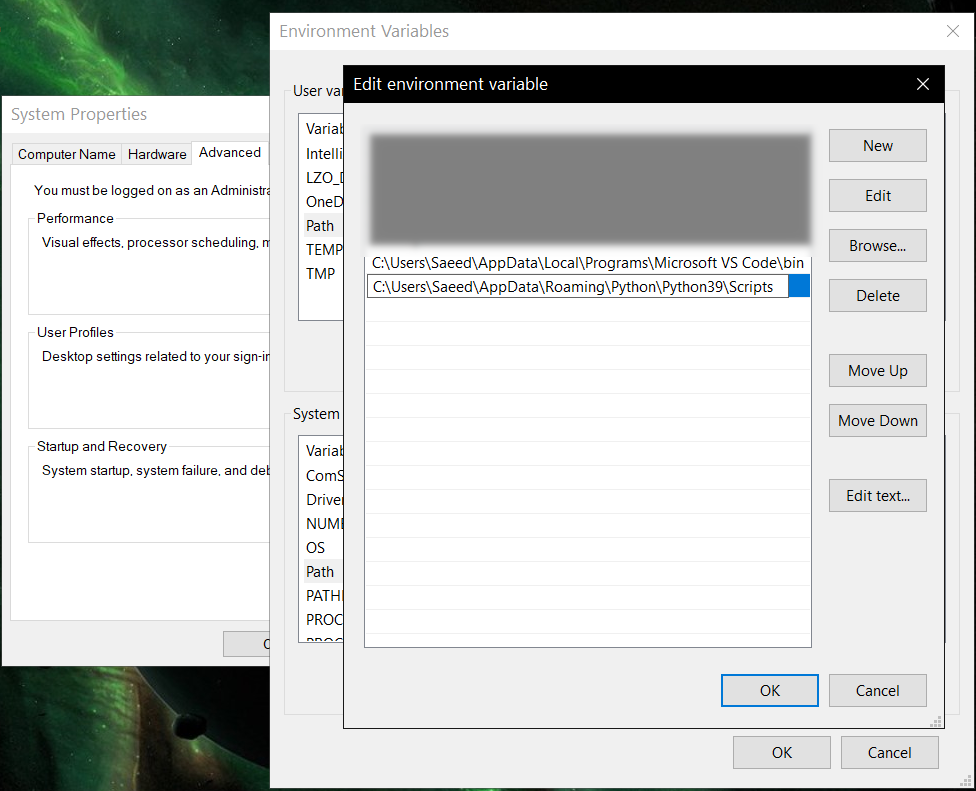
Installation on Mac OS (14)
If you download the DMG file from Releases and install it, Mac may refuse to run it, showing the app is damaged and cannot be opened error. In that case, move the unpacked bundle to /Applications, and run this from the Terminal:
/usr/bin/xattr -d com.apple.quarantine /Applications/PyGlossary.app
Now you should be able to open the app by right-clicking on /Applications/PyGlossary.app in Finder, selecting Open and confirming running an app unsigned by Apple (only needs to be done once).
Feature-specific requirements
-
Using Sort by Locale feature requires PyICU
-
Using
--remove-html-allflag requires:pip install lxml beautifulsoup4
Some formats have additional requirements. If you have trouble with any format, please check the link given for that format to see its documentations.
The Qt 6 wizard GUI (--ui=qt, --ui=qt6, --qt, or --qt6) needs PySide6 or PyQt6: pip install pyglossary[qt6] (or install PySide6 separately). On macOS, that extra also installs pyobjc-framework-Cocoa so the Dock and app switcher can show PyGlossary’s icon (standalone python/CLI runs do not ship an .app bundle icon otherwise).
Using Termux on Android? See doc/termux.md
Configuration
See doc/config.rst.
Direct and indirect modes
Indirect mode means that input glossary is completely read and loaded into RAM, then converted into output format. This was the only method available in old versions (before 3.0.0).
Direct mode means entries are one-at-a-time read, processed and written into output glossary.
Direct mode was added to limit memory usage for large glossaries; But it may reduce the conversion time for most cases as well.
Converting glossaries into these formats requires sorting entries:
That's why direct mode will not work for these formats, and PyGlossary has to switch to indirect mode (or it previously had to, see SQLite mode).
For other formats, direct mode will be default. You may override this by --indirect flag.
SQLite mode
As mentioned above, converting glossaries to some specific formats will need them to loaded into RAM.
This can be problematic if the glossary is too big to fit into RAM. That's when
you should try adding --sqlite flag to your command. Then it uses SQLite3 as intermediate
storage for storing, sorting and then fetching entries. This fixes the memory issue, and may
even reduce running time of conversion (depending on your home directory storage).
The temporary SQLite file is stored in cache directory then
deleted after conversion (unless you pass --no-cleanup flag).
SQLite mode is automatically enabled for writing these formats if auto_sqlite
config parameter is true (which is default).
This also applies to when you pass --sort flag for any format.
You may use --no-sqlite to override this and switch to indirect mode.
Currently you can not disable alternates in SQLite mode (--no-alts is ignored).
Sorting
There are two things than can activate sorting entries:
- Output format requires sorting (as explained above)
- You pass
--sortflag in command line.
In the case of passing --sort, you can also pass:
-
--sort-keyto select sort key aka sorting order (including locale), see doc/sort-key.md -
--sort-encodingto change the encoding used for sort- UTF-8 is the default encoding for all sort keys and all output formats (unless mentioned otherwise)
- This will only effect the order of entries, and will not corrupt words / definition
- Non-encodable characters are replaced with
?byte (only for sorting)
Cache directory
Cache directory is used for storing temporary files which are either moved or deleted
after conversion. You can pass --no-cleanup flag in order to keep them.
The path for cache directory:
- Linux or BSD:
~/.cache/pyglossary/ - Mac:
~/Library/Caches/PyGlossary/ - Windows:
C:\Users\USERNAME\AppData\Local\PyGlossary\Cache\
User plugins
If you want to add your own plugin without adding it to source code directory, or you want to use a plugin that has been removed from repository, you can place it in this directory:
- Linux or BSD:
~/.pyglossary/plugins/ - Mac:
~/Library/Preferences/PyGlossary/plugins/ - Windows:
C:\Users\USERNAME\AppData\Roaming\PyGlossary\plugins\
Linux packaging status
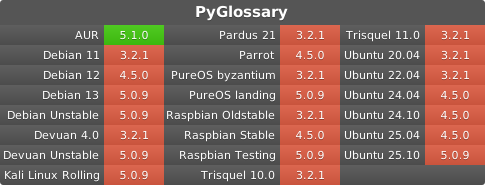
Using PyGlossary as a library
See doc/lib-usage.md for how to use PyGlossary as a Python library.
Plugin development
To learn how to develop plugins, see test plugin as a basic example, or CSV plugin for example.
Whenever you add a new plugin, or change options/metedata of an existing plugin, make sure to run ./scripts/gen script to update generated files (index and documentation) that we keep.
Internals
See doc/internals.md for information about internal glossary structure and entry filters.
Release history Release notifications | RSS feed


Download files
Download the file for your platform. If you're not sure which to choose, learn more about installing packages.
Source Distribution
Built Distribution
Filter files by name, interpreter, ABI, and platform.
If you're not sure about the file name format, learn more about wheel file names.
Copy a direct link to the current filters
File details
Details for the file pyglossary-5.4.0.tar.gz.
File metadata
- Download URL: pyglossary-5.4.0.tar.gz
- Upload date:
- Size: 633.9 kB
- Tags: Source
- Uploaded using Trusted Publishing? No
- Uploaded via: twine/6.1.0 CPython/3.13.12
File hashes
| Algorithm | Hash digest | |
|---|---|---|
| SHA256 |
463c115b6268df3df5447e77b3f01782b06e63c4eaeeb1ffdc60c54af410505e
|
|
| MD5 |
1c2210b064e71b128e5dd31cc6edd592
|
|
| BLAKE2b-256 |
2fcc0eac6445ef50f26d1c6f25427541294614e5fb4d6e702ba4f30ce872138f
|
File details
Details for the file pyglossary-5.4.0-py3-none-any.whl.
File metadata
- Download URL: pyglossary-5.4.0-py3-none-any.whl
- Upload date:
- Size: 872.5 kB
- Tags: Python 3
- Uploaded using Trusted Publishing? No
- Uploaded via: twine/6.1.0 CPython/3.13.12
File hashes
| Algorithm | Hash digest | |
|---|---|---|
| SHA256 |
2f247bf54d09866caf9dee5be95002c2c474fd3cfde4f5dc34addade94c30b56
|
|
| MD5 |
473ed0a42e3e7c005f79374be17b79d7
|
|
| BLAKE2b-256 |
9f209f60b428ac50619e3e47c717fe2326d95639df90a7662fed3515a0b112eb
|






