
pygments-promql



A PromQL lexer for Pygments.
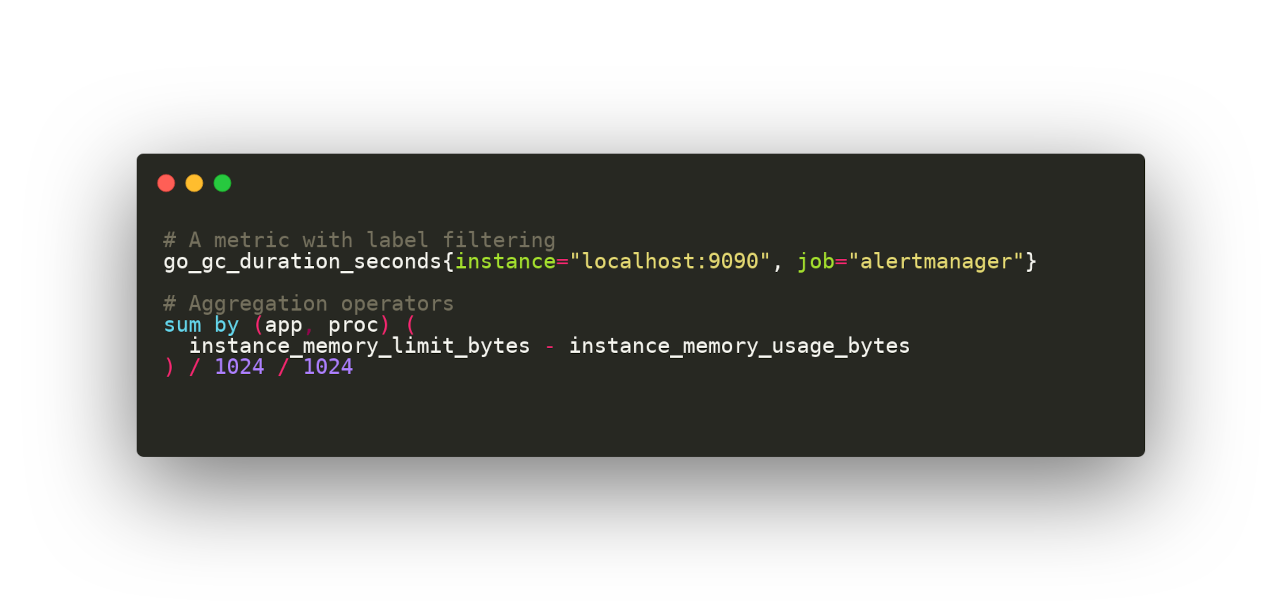
This Python package provides a Pygments lexer for the Prometheus Query Language. It allows Pygments and other tools (Sphinx, Chroma, etc) to highlight PromQL queries.
Installation
Using pip
To get the latest version from pypi.org:
pip install pygments-promql
Usage
Command-line
In a terminal you can echo and pipe a query directly from stdin:
echo 'prometheus_http_requests_total{code="200"}' | pygmentize -l promql
Or use a file, for example, create the example.promql file with queries from
tests/example.promql.
In this case the option -l promql is not needed because the lexer will be
detected based on the file extension.
Showing colorized output in a terminal:
pygmentize example.promql
To generate a PNG file:
pygmentize -f png -O "line_numbers=False,style=monokai" -o example.png example.promql
Python code
The following example:
from pygments import highlight
from pygments.formatters import HtmlFormatter
from pygments_promql import PromQLLexer

query = 'http_requests_total{handler="/api/comments"}'
print(highlight(query, PromQLLexer(), HtmlFormatter()))
Will generate this HTML output:
<div class="highlight">
<pre>
<span></span>
<span class="nv">http_requests_total</span>
<span class="p">{</span>
<span class="nl">handler</span>
<span class="o">=</span>
<span class="s">"/api/comments"</span>
<span class="p">}</span>
<span class="w"></span>
</pre>
</div>
Use HtmlFormatter(noclasses=True) to include CSS inline styles on every <span> tag.
Sphinx
In order to highlight PromQL syntax in your Sphinx documentation site
you just need to add this 3 lines of Python code at the end of your site's conf.py file:
from sphinx.highlighting import lexers
from pygments_promql import PromQLLexer
lexers['promql'] = PromQLLexer()
Then you will be able to use it like this:
Here's a PromQL example:

.. code-block:: promql

	# A metric with label filtering
	go_gc_duration_seconds{instance="localhost:9090"}
Testing
If you want to test, play or contribute to this repo:
git clone https://github.com/pabluk/pygments-promql.git
cd pygments-promql/
uv sync --locked --all-extras --dev
uv run pytest -v
1 maintainer

Release files for pygments-promql 0.2.6
For a detailed explanation of source distributions (sdists) and built distributions (wheels), please see the package formats documentation.
Source distribution (sdist)
| File | Size | Uploaded | |
|---|---|---|---|
| pygments_promql-0.2.6.tar.gz | 4.3 kB | Details |
Built distribution (wheel)
| File | Interpreter | ABI | Platform | Reset |
|---|---|---|---|---|
| pygments_promql-0.2.6-py3-none-any.whl | Python 3 | none | any | Details |
Total release size: 9.9 kB
Release files / pygments_promql-0.2.6.tar.gz
| Download URL | pygments_promql-0.2.6.tar.gz |
|---|---|
| Size | 4.3 kB |
| Tags | Source |
|
SHA-256 checksum How to use checksums |
dc6e515145f07ba843231f5ffced8ce1dd2ce7519b75c60aad210e0aa542119f
|
|
BLAKE2b-256 checksum How to use checksums |
fe2ebec87a81c6a4b4507afdcf442f104ef1b5dd7f3e4bafa14018b7f9e1e8f1
|
| Upload date | |
|
Uploaded using Trusted Publishing? What is trusted publishing? |
Yes |
| Uploaded via |
uv/0.11.2 {"installer":{"name":"uv","version":"0.11.2","subcommand":["publish"]},"python":null,"implementation":{"name":null,"version":null},"distro":{"name":"Ubuntu","version":"24.04","id":"noble","libc":null},"system":{"name":null,"release":null},"cpu":null,"openssl_version":null,"setuptools_version":null,"rustc_version":null,"ci":true}
|
Release files / pygments_promql-0.2.6-py3-none-any.whl
| Download URL | pygments_promql-0.2.6-py3-none-any.whl |
|---|---|
| Size | 5.6 kB |
| Tags | Python 3 |
|
SHA-256 checksum How to use checksums |
de0c69962011a84ad32ebb5f28733af511ab2850a035acc88379bdbc639bd290
|
|
BLAKE2b-256 checksum How to use checksums |
3f4bd97039e250eefb3b75f6e67ea005e1b7966eaebf32e8af891f494684ae7a
|
| Upload date | |
|
Uploaded using Trusted Publishing? What is trusted publishing? |
Yes |
| Uploaded via |
uv/0.11.2 {"installer":{"name":"uv","version":"0.11.2","subcommand":["publish"]},"python":null,"implementation":{"name":null,"version":null},"distro":{"name":"Ubuntu","version":"24.04","id":"noble","libc":null},"system":{"name":null,"release":null},"cpu":null,"openssl_version":null,"setuptools_version":null,"rustc_version":null,"ci":true}
|














