
A PromQL lexer for Pygments
Verified details
These details have been verified by PyPIProject links
GitHub Statistics
Maintainers

Project description
pygments-promql



A PromQL lexer for Pygments.
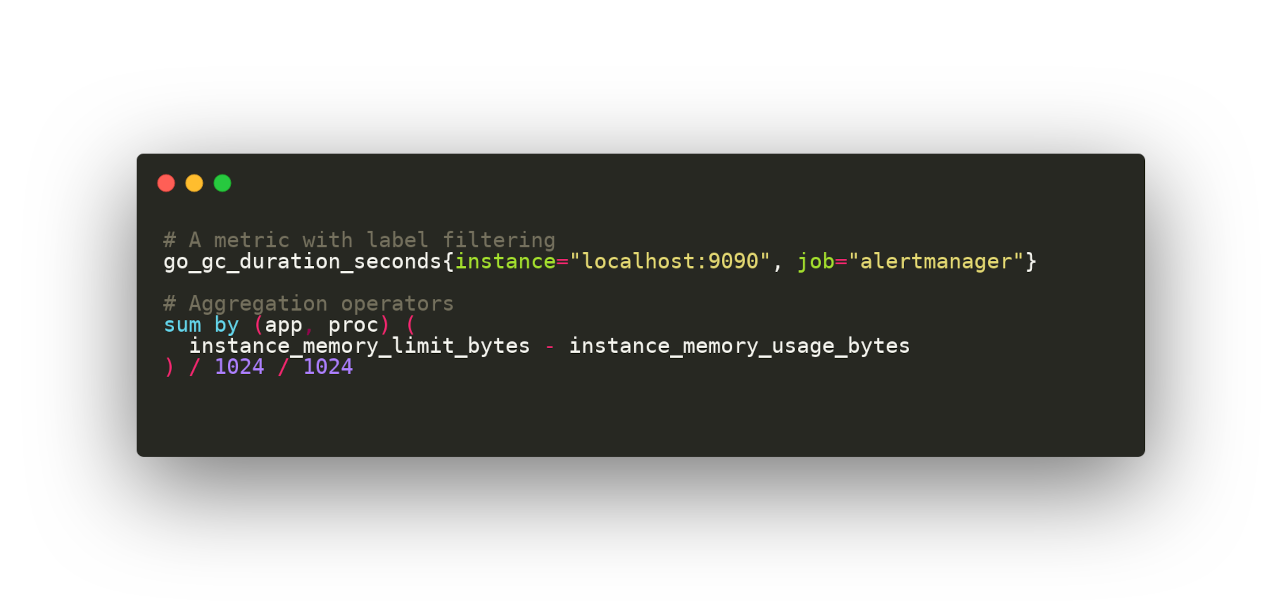
This Python package provides a Pygments lexer for the Prometheus Query Language. It allows Pygments and other tools (Sphinx, Chroma, etc) to highlight PromQL queries.
Installation
Using pip
To get the latest version from pypi.org:
pip install pygments-promql
Usage
Command-line
In a terminal you can echo and pipe a query directly from stdin:
echo 'prometheus_http_requests_total{code="200"}' | pygmentize -l promql
Or use a file, for example, create the example.promql file with queries from
tests/example.promql.
In this case the option -l promql is not needed because the lexer will be
detected based on the file extension.
Showing colorized output in a terminal:
pygmentize example.promql
To generate a PNG file:
pygmentize -f png -O "line_numbers=False,style=monokai" -o example.png example.promql
Python code
The following example:
from pygments import highlight
from pygments.formatters import HtmlFormatter
from pygments_promql import PromQLLexer

query = 'http_requests_total{handler="/api/comments"}'
print(highlight(query, PromQLLexer(), HtmlFormatter()))
Will generate this HTML output:
<div class="highlight">
<pre>
<span></span>
<span class="nv">http_requests_total</span>
<span class="p">{</span>
<span class="nl">handler</span>
<span class="o">=</span>
<span class="s">"/api/comments"</span>
<span class="p">}</span>
<span class="w"></span>
</pre>
</div>
Use HtmlFormatter(noclasses=True) to include CSS inline styles on every <span> tag.
Sphinx
In order to highlight PromQL syntax in your Sphinx documentation site
you just need to add this 3 lines of Python code at the end of your site's conf.py file:
from sphinx.highlighting import lexers
from pygments_promql import PromQLLexer
lexers['promql'] = PromQLLexer()
Then you will be able to use it like this:
Here's a PromQL example:

.. code-block:: promql

	# A metric with label filtering
	go_gc_duration_seconds{instance="localhost:9090"}
Testing
If you want to test, play or contribute to this repo:
git clone https://github.com/pabluk/pygments-promql.git
cd pygments-promql/
uv sync --locked --all-extras --dev
uv run pytest -v
Project details
Verified details
These details have been verified by PyPIProject links
GitHub Statistics
Maintainers
Release history Release notifications | RSS feed


Download files
Download the file for your platform. If you're not sure which to choose, learn more about installing packages.
Source Distribution
Built Distribution
Filter files by name, interpreter, ABI, and platform.
If you're not sure about the file name format, learn more about wheel file names.
Copy a direct link to the current filters
File details
Details for the file pygments_promql-0.2.5.tar.gz.
File metadata
- Download URL: pygments_promql-0.2.5.tar.gz
- Upload date:
- Size: 4.3 kB
- Tags: Source
- Uploaded using Trusted Publishing? Yes
- Uploaded via: uv/0.11.2 {"installer":{"name":"uv","version":"0.11.2","subcommand":["publish"]},"python":null,"implementation":{"name":null,"version":null},"distro":{"name":"Ubuntu","version":"24.04","id":"noble","libc":null},"system":{"name":null,"release":null},"cpu":null,"openssl_version":null,"setuptools_version":null,"rustc_version":null,"ci":true}
File hashes
| Algorithm | Hash digest | |
|---|---|---|
| SHA256 |
cbdb505889327b747b4850acbf356c18dfe6203922b7e0350d869fcc9254688f
|
|
| MD5 |
9907d25e93573cc1ea7648a5ff061fa5
|
|
| BLAKE2b-256 |
db00cd0b894172ed08f9961767994563935362167178e7e242ed4f89c01a7e53
|
File details
Details for the file pygments_promql-0.2.5-py3-none-any.whl.
File metadata
- Download URL: pygments_promql-0.2.5-py3-none-any.whl
- Upload date:
- Size: 5.6 kB
- Tags: Python 3
- Uploaded using Trusted Publishing? Yes
- Uploaded via: uv/0.11.2 {"installer":{"name":"uv","version":"0.11.2","subcommand":["publish"]},"python":null,"implementation":{"name":null,"version":null},"distro":{"name":"Ubuntu","version":"24.04","id":"noble","libc":null},"system":{"name":null,"release":null},"cpu":null,"openssl_version":null,"setuptools_version":null,"rustc_version":null,"ci":true}
File hashes
| Algorithm | Hash digest | |
|---|---|---|
| SHA256 |
86ff734d3db6a373db8eb86304a57379e645e8f48fa9212df6f389848af2d33e
|
|
| MD5 |
8c070754c3d9dab5a93014db7c1a94a6
|
|
| BLAKE2b-256 |
398cbc01c1ffb81276e6176b18265b32739f61e6617aaf2ca92ce5852dc1bb59
|






