
Imagedl: Search and download images from specific websites

Project description








📚 Documents: imagedl.readthedocs.io
🧪 Online API Health & Demo: charlespikachu.github.io/imagedl
Automatically runs daily checks on all registered imagedl modules (search + download)
via GitHub Actions and visualizes the latest results on this page.

学习收获更多有趣的内容, 欢迎关注微信公众号:Charles的皮卡丘
🆕 What's New
- 2026-02-11: Released pyimagedl v0.3.5 — added support for Everypixel image search and download, fixed the broken Foodiesfeed API, and performed general code optimizations
- 2026-01-28: Released pyimagedl v0.3.4 — added support for searching and downloading images from the Foodiesfeed site, along with some code optimizations.
- 2026-01-25: Released pyimagedl v0.3.3 — added image search and download support for Huaban site, and introduced curl_cffi and cookies as anti-scraping mitigation strategies.
📘 Introduction
Imagedl lets you search for and download images from specific websites. If you find it useful, please consider starring the repository to follow updates—thank you for your support!
🖼️ Supported Image Client
| ImageClient (EN) | ImageClient (CN) | Search | Download | Code Snippet |
|---|---|---|---|---|
| BaiduImageClient | 百度图片 | ✔️ | ✔️ | baidu.py |
| BingImageClient | 必应图片 | ✔️ | ✔️ | bing.py |
| DuckduckgoImageClient | DuckDuckGo图片 | ✔️ | ✔️ | duckduckgo.py |
| DanbooruImageClient | Danbooru动漫图片 | ✔️ | ✔️ | danbooru.py |
| DimTownImageClient | 次元小镇 | ✔️ | ✔️ | dimtown.py |
| EverypixelImageClient | Everypixel | ✔️ | ✔️ | everypixel.py |
| FoodiesfeedImageClient | Foodiesfeed美食图片 | ✔️ | ✔️ | foodiesfeed.py |
| GoogleImageClient | 谷歌图片 | ✔️ | ✔️ | google.py |
| GelbooruImageClient | Gelbooru动漫图片 | ✔️ | ✔️ | gelbooru.py |
| HuabanImageClient | 花瓣网 | ✔️ | ✔️ | huaban.py |
| I360ImageClient | 360图片 | ✔️ | ✔️ | i360.py |
| PixabayImageClient | Pixabay高清图片 | ✔️ | ✔️ | pixabay.py |
| PexelsImageClient | Pexels高清图片 | ✔️ | ✔️ | pexels.py |
| SogouImageClient | 搜狗图片 | ✔️ | ✔️ | sogou.py |
| SafebooruImageClient | Safebooru动漫图片 | ✔️ | ✔️ | safebooru.py |
| UnsplashImageClient | Unsplash图片 | ✔️ | ✔️ | unsplash.py |
| YandexImageClient | Yandex图片 | ✔️ | ✔️ | yandex.py |
| YahooImageClient | 雅虎图片 | ✔️ | ✔️ | yahoo.py |
📦 Install
You have three installation methods to choose from,
# from pip
pip install pyimagedl
# from github repo method-1
pip install git+https://github.com/CharlesPikachu/imagedl.git@main
# from github repo method-2
git clone https://github.com/CharlesPikachu/imagedl.git
cd imagedl
python setup.py install
⚡ Quick Start
After installing imagedl, you can use the following few lines of code to quickly get started with it,
from imagedl import imagedl

image_client = imagedl.ImageClient(image_source='BaiduImageClient')
image_client.startcmdui()
where image_source is used to specify the image search and download engine.
Of course, you can equivalently enter imagedl -i "BaiduImageClient" in the terminal to execute the above code.
imagedl --help displays the basic usage of the command-line tool.
Usage: imagedl [OPTIONS]

Options:
  --version                       Show the version and exit.
  -k, --keyword TEXT              The keywords for the image search. If left
                                  empty, an interactive terminal will open
                                  automatically.
  -i, --image-source, --image_source [bingimageclient|baiduimageclient|googleimageclient|
                                  i360imageclient|pixabayimageclient|yandeximageclient|
                                  duckduckgoimageclient|sogouimageclient|yahooimageclient|
                                  unsplashimageclient|danbooruimageclient|safebooruimageclient|
                                  gelbooruimageclient|pexelsimageclient|huabanimageclient|
                                  foodiesfeedimageclient|everypixelimageclient]
                                  The image search and download source.
                                  [default: BaiduImageClient]
  -s, --search-limits, --search_limits INTEGER RANGE
                                  Scale of image downloads.  [default: 1000;
                                  1<=x<=100000000.0]
  -n, --num-threadings, --num_threadings INTEGER RANGE
                                  Number of threads used.  [default: 5;
                                  1<=x<=256]
  -c, --init-image-client-cfg, --init_image_client_cfg TEXT
                                  Client config such as `work_dir` as a JSON
                                  string.
  -r, --request-overrides, --request_overrides TEXT
                                  Requests.get (or Requests.post) kwargs such
                                  as `headers` and `proxies` as a JSON string.
  --help                          Show this message and exit.
For class imagedl.ImageClient, the acceptable arguments include,
image_source(str, default:'BaiduImageClient'): The image search and download source, including['BaiduImageClient', 'BingImageClient', 'GoogleImageClient', 'I360ImageClient', 'PixabayImageClient', 'YandexImageClient', 'DuckduckgoImageClient', 'SogouImageClient', 'YahooImageClient', 'UnsplashImageClient', 'GelbooruImageClient', 'SafebooruImageClient', 'DanbooruImageClient', 'PexelsImageClient', 'DimTownImageClient', 'HuabanImageClient', 'FoodiesfeedImageClient', 'EverypixelImageClient'].init_image_client_cfg(dict, default:{}): Client initialization configuration such as{'work_dir': 'images', 'max_retries': 5}.search_limits(int, default:1000): Scale of image downloads.num_threadings(int, default:5): Number of threads used.request_overrides(dict, default:{}):requests.get(orrequests.post) kwargs such as{'headers': {'User-Agent': xxx}, 'proxies': {}}.
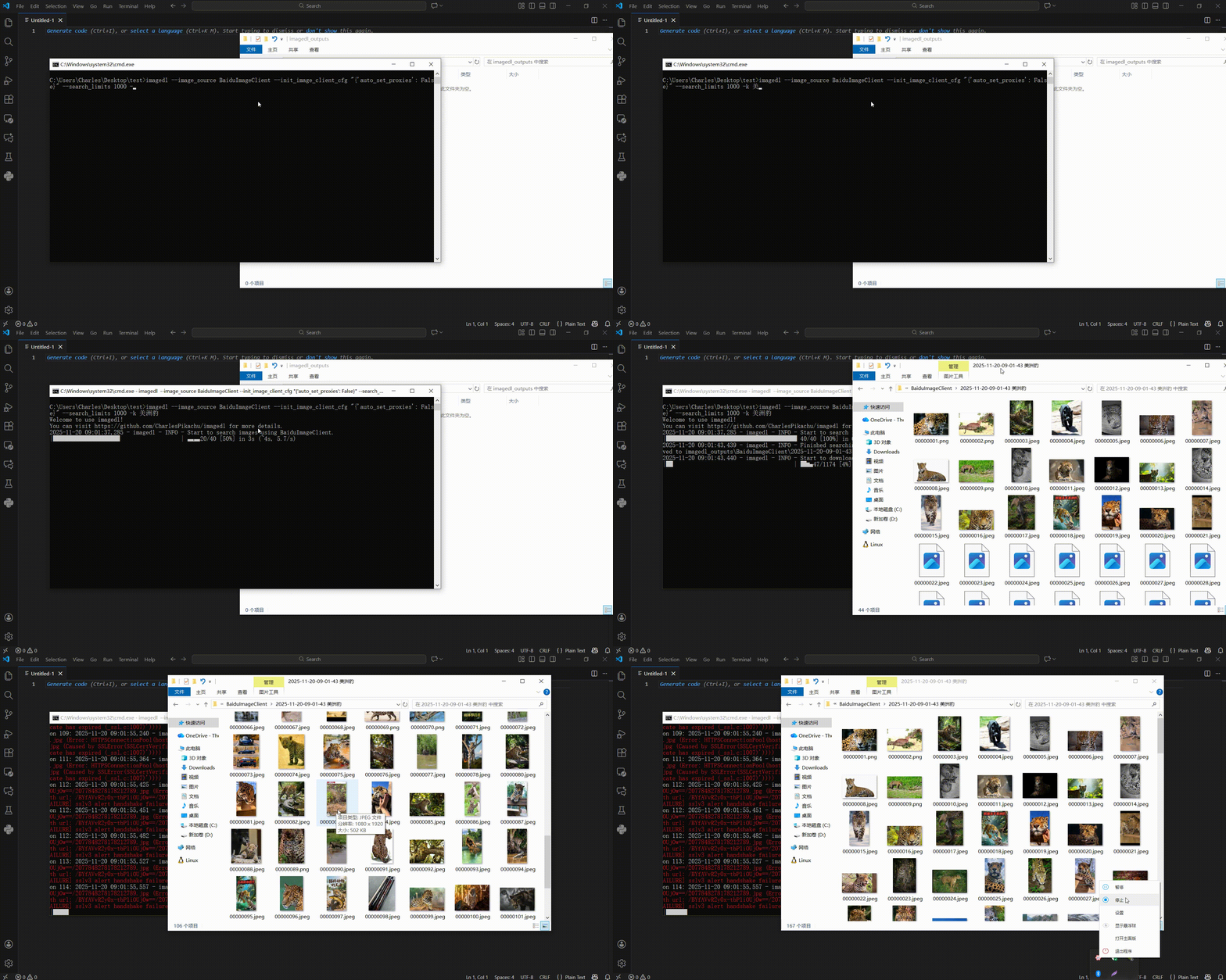
The demonstration is as follows,
If you just want to do an image search, you can also do it like this,
from imagedl import imagedl

image_client = imagedl.ImageClient(image_source='DuckduckgoImageClient', search_limits=1000, num_threadings=5)
image_infos = image_client.search('cut animals', search_limits_overrides=10, num_threadings_overrides=1)
print(image_infos)
In the code above, search_limits_overrides overrides the search_limits argument set when initializing imagedl.ImageClient, and num_threadings_overrides works in the same way.
The output of this code looks like,
[
    {
        "candidate_urls": [
            "https://img.freepik.com/.../cut-animal-cartoon-bundle-set_508290-2349.jpg",
            "https://tse2.mm.bing.net/th/id/OIP.vD-8G0MjAMREv1bYbKaqEwHaHa..."
        ],
        "raw_data": {
            "height": 626,
            "width": 626,
            "image": "https://img.freepik.com/.../cut-animal-cartoon-bundle-set_508290-2349.jpg",
            "image_token": "fbff471d31328...",
            "thumbnail": "https://tse2.mm.bing.net/th/id/OIP.vD-8G0MjAMREv1bYbKaqEwHaHa...",
            "thumbnail_token": "4ca07ad2aab9...",
            "source": "Bing",
            "title": "Premium Vector | Cut animal cartoon bundle set",
            "url": "https://www.freepik.com/premium-vector/cut-animal-cartoon-bundle-set_25750969.htm"
        },
        "identifier": "fbff471d31328...",
        "work_dir": "imagedl_outputs\\DuckduckgoImageClient\\2025-11-16-22-34-25 cutanimals",
        "file_path": "imagedl_outputs\\DuckduckgoImageClient\\2025-11-16-22-34-25 cutanimals\\00000001"
    },
    ...
]
Then you can also call the image downloading function to download the images found by the search. The code is as follows,
from imagedl import imagedl

image_client = imagedl.ImageClient(image_source='DuckduckgoImageClient', search_limits=1000, num_threadings=5)
image_infos = image_client.search('cut animals', search_limits_overrides=10, num_threadings_overrides=1)
image_client.download(image_infos=image_infos)
If you prefer not to use the unified interface, you can also import a specific image search engine directly, as in the following code,
from imagedl.modules.sources import (
    BingImageClient, I360ImageClient, YahooImageClient, BaiduImageClient, SogouImageClient, GoogleImageClient, YandexImageClient, PixabayImageClient,
    DuckduckgoImageClient, UnsplashImageClient, GelbooruImageClient, SafebooruImageClient, DanbooruImageClient, PexelsImageClient, DimTownImageClient,
    HuabanImageClient, FoodiesfeedImageClient, EverypixelImageClient
)

# bing tests
client = BingImageClient()
image_infos = client.search('Cute Dogs', search_limits=10, num_threadings=1)
client.download(image_infos, num_threadings=1)
# 360 tests
client = I360ImageClient()
image_infos = client.search('Cute Dogs', search_limits=10, num_threadings=1)
client.download(image_infos, num_threadings=1)
# baidu tests
client = BaiduImageClient()
image_infos = client.search('Cute Dogs', search_limits=10, num_threadings=1)
client.download(image_infos, num_threadings=1)
# sogou tests
client = SogouImageClient()
image_infos = client.search('Cute Dogs', search_limits=10, num_threadings=1)
client.download(image_infos, num_threadings=1)
# google tests
client = GoogleImageClient()
image_infos = client.search('Cute Dogs', search_limits=10, num_threadings=1)
client.download(image_infos, num_threadings=1)
# yandex tests
client = YandexImageClient()
image_infos = client.search('Cute Dogs', search_limits=10, num_threadings=1)
client.download(image_infos, num_threadings=1)
# pixabay tests
client = PixabayImageClient()
image_infos = client.search('Cute Dogs', search_limits=10, num_threadings=1)
client.download(image_infos, num_threadings=1)
# duckduckgo tests
client = DuckduckgoImageClient()
image_infos = client.search('Cute Dogs', search_limits=10, num_threadings=1)
client.download(image_infos, num_threadings=1)
# yahoo tests
client = YahooImageClient()
image_infos = client.search('Cute Dogs', search_limits=10, num_threadings=1)
client.download(image_infos, num_threadings=1)
# unsplash tests
client = UnsplashImageClient()
image_infos = client.search('Cute Dogs', search_limits=10, num_threadings=1)
client.download(image_infos, num_threadings=1)
# gelbooru tests
client = GelbooruImageClient()
image_infos = client.search('pikachu', search_limits=10, num_threadings=1)
client.download(image_infos, num_threadings=1)
# safebooru tests
client = SafebooruImageClient()
image_infos = client.search('pikachu', search_limits=10, num_threadings=1)
client.download(image_infos, num_threadings=1)
# danbooru tests
client = DanbooruImageClient()
image_infos = client.search('pikachu', search_limits=10, num_threadings=1)
client.download(image_infos, num_threadings=1)
# pexels tests
client = PexelsImageClient()
image_infos = client.search('animals', search_limits=10, num_threadings=1)
client.download(image_infos, num_threadings=1)
# dimtown tests
client = DimTownImageClient()
image_infos = client.search('JK', search_limits=10, num_threadings=1)
client.download(image_infos, num_threadings=1)
# huaban tests
client = HuabanImageClient()
image_infos = client.search('JK', search_limits=10, num_threadings=1)
client.download(image_infos, num_threadings=1)
# foodiesfeed tests
client = FoodiesfeedImageClient()
image_infos = client.search('pizza', search_limits=10, num_threadings=1)
client.download(image_infos, num_threadings=1)
# everypixel tests (cookies required)
client = EverypixelImageClient(default_search_cookies='client_id=e30f48e30aba6693e1302ac195e2e452; session_id=6ce6d099-06a7-404d-a63c-eb3a31e0acb9; userStatus=0; _ga=GA1.1.859071961.1770791608; cookie_popup_shown=1; _ga_7VBKBQ1JV6=GS2.1.s1770792674$o1$g1$t1770794235$j60$l0$h0; cf_clearance=enQ5xgDuEaSfid3kS7wxefIMDpRiHB3Yx4OxHUIqSTU-1770796404-1.2.1.1-ouhuNokK67vPqQ7zJYVq9FF3RG3tyOR_PrVj81VN_S2.NhMug.T_Y5kVzWdiRq0Br0hT0XPzaKIFDjC5WzUg6LR12K1olooapyvrxjCJzWlWGASxMc1Nc7iCBLWSd46oNqacv0cfwlPhw0vsjFaCxs0BXTqTEvRmlNLniamkr8vCv6gziegTOEUsXnL127W_MLqG_Ld17FYcG3XDYHHu1gCI3I7Jm5qTn.3q0mflsmY; _ga_FLYERKMCP5=GS2.1.s1770791608$o1$g1$t1770796826$j57$l0$h0')
image_infos = client.search('animals', search_limits=10, num_threadings=1)
client.download(image_infos, num_threadings=1)
💡 Recommended Projects
| Project | ⭐ Stars | 📦 Version | ⏱ Last Update | 🛠 Repository |
|---|---|---|---|---|
| 🎵 Musicdl 轻量级无损音乐下载器 |
 |
 |
 |
🛠 Repository |
| 🎬 Videodl 轻量级高清无水印视频下载器 |
 |
 |
 |
🛠 Repository |
| 🖼️ Imagedl 轻量级海量图片搜索下载器 |
 |
|
 |
🛠 Repository |
| 🌐 FreeProxy 全球海量高质量免费代理采集器 |
 |
 |
 |
🛠 Repository |
| 🌐 MusicSquare 简易音乐搜索下载和播放网页 |
 |
|
 |
🛠 Repository |
| 🌐 FreeGPTHub 真正免费的GPT统一接口 |
 |
 |
 |
🛠 Repository |
📚 Citation
If you use this project in your research, please cite the repository.
@misc{imagedl2022,
    author = {Zhenchao Jin},
    title = {Imagedl: Search and download images from specific websites},
    year = {2022},
    publisher = {GitHub},
    journal = {GitHub repository},
    howpublished = {\url{https://github.com/CharlesPikachu/imagedl/}},
}
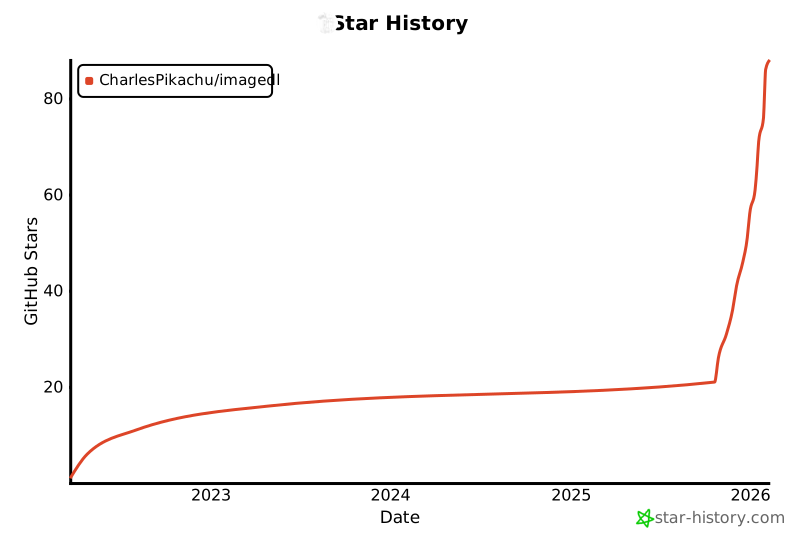
🌟 Star History
☕ Appreciation (赞赏 / 打赏)
| WeChat Appreciation QR Code (微信赞赏码) | Alipay Appreciation QR Code (支付宝赞赏码) |
|---|---|
 |
 |
📱 WeChat Official Account (微信公众号):
Charles的皮卡丘 (Charles_pikachu)

Release history Release notifications | RSS feed


Download files
Download the file for your platform. If you're not sure which to choose, learn more about installing packages.
Source Distribution
Built Distribution
Filter files by name, interpreter, ABI, and platform.
If you're not sure about the file name format, learn more about wheel file names.
Copy a direct link to the current filters
File details
Details for the file pyimagedl-0.3.5.tar.gz.
File metadata
- Download URL: pyimagedl-0.3.5.tar.gz
- Upload date:
- Size: 42.1 kB
- Tags: Source
- Uploaded using Trusted Publishing? No
- Uploaded via: twine/6.2.0 CPython/3.10.14
File hashes
| Algorithm | Hash digest | |
|---|---|---|
| SHA256 |
f95aa2ddc54025c7a675fa120d5d46e766038d0c41d486d09f26d31e5aa8d910
|
|
| MD5 |
c1d9bc3e2ba99e03752c19fe6531beb8
|
|
| BLAKE2b-256 |
2a3e8dc2c5b9286887c8bd2df78704e744aef67c425898547ab248f94114cd76
|
File details
Details for the file pyimagedl-0.3.5-py3-none-any.whl.
File metadata
- Download URL: pyimagedl-0.3.5-py3-none-any.whl
- Upload date:
- Size: 56.6 kB
- Tags: Python 3
- Uploaded using Trusted Publishing? No
- Uploaded via: twine/6.2.0 CPython/3.10.14
File hashes
| Algorithm | Hash digest | |
|---|---|---|
| SHA256 |
bef8f7932b459a66c65cd1f464435889d1a7cc813bd6ccf10b6356922baec0de
|
|
| MD5 |
40c50d72a9d5d5cdfd660c197924834b
|
|
| BLAKE2b-256 |
dcc5a50c9a5f003baea94352932c77b86bebf024bd27876135bf5bea53b7e375
|






