
Imagedl: Search and download images from specific websites

Project description










📚 Documents: imagedl.readthedocs.io
🧪 Online API Health & Demo: charlespikachu.github.io/imagedl
Automatically runs daily checks on all registered imagedl modules (search + download)
via GitHub Actions and visualizes the latest results on this page.

学习收获更多有趣的内容, 欢迎关注微信公众号:Charles的皮卡丘
🆕 What's New
- 2026-04-09: Released pyimagedl v0.4.5 — fix a bug where the behavior of maintain session was inconsistent with expectations; add two new image search and download sources, jikan.moe and wiki.
- 2026-04-08: Released pyimagedl v0.4.4 — added support for three new image search and download sites: yande.re, loc.gov, and gbif.org; optimized parts of the code for better IDE hints.
- 2026-04-05: Released pyimagedl v0.4.3 — added search and download functionality for four new image websites, including NASA, iNaturalist, Picjumbo, and Openverse.
📘 Introduction
⚡ Imagedl is a lightweight image search and download tool designed for efficient large-scale image collection from specific websites. It supports multiple major sources, including Google, Baidu, Bing, 360, Pixabay, Yandex, Sogou, Yahoo, DuckDuckGo, Unsplash, Safebooru, Gelbooru, Danbooru, Huaban, Foodiesfeed, Everypixel, Weibo, and more. With support for diverse content such as web images, food, animals, architecture, nature, anime-style artwork, and high-resolution photography, Imagedl is well suited for constructing training and testing datasets for large models. If you find it useful, please star the repository ⭐ to support development and keep up with future updates.
🖼️ Supported Image Client
📦 Install
You have three installation methods to choose from,
# from pip
pip install pyimagedl
# from github repo method-1
pip install git+https://github.com/CharlesPikachu/imagedl.git@main
# from github repo method-2
git clone https://github.com/CharlesPikachu/imagedl.git
cd imagedl
python setup.py install
Please note that some image sources need to be crawled using DrissionPage, such as EverypixelImageClient and GoogleImageClient.
If DrissionPage cannot find a suitable browser in the current environment, it will automatically download the latest compatible beta version of Google Chrome for the current system.
So if you notice that the program is downloading a browser, there is no need to be overly concerned.
⚡ Quick Start
imagedl is built around imagedl.ImageClient.
In the current implementation, ImageClient accepts one or more sources through image_sources, and lets you configure each source with init_image_clients_cfg, clients_threadings, requests_overrides, and search_filters.
When no source is specified, the default source is BaiduImageClient.
The simplest working example
Start with one source like "BaiduImageClient" and "BingImageClient" and a small search limit. This is the easiest way to confirm that your environment is set up correctly.
import random
from imagedl import imagedl

client = imagedl.ImageClient(image_sources=["BaiduImageClient"], init_image_clients_cfg={})
search_results = client.search(keyword="cute cats", search_limits_per_source=10)
downloaded_results = client.download(image_infos=search_results)

print(f"found {sum(len(v) for v in search_results.values())} items")
print(f"downloaded {len(downloaded_results)} items")
print('random example >>> ')
print(random.choice(downloaded_results))
In the current API, search() returns a dictionary whose keys are source names and whose values are lists of ImageInfo objects. The updated download() method can now accept either:
- the original dictionary returned by
search() - a flat list of
ImageInfoobjects
So the normal workflow is now simply: search -> download
CLI options
The package also defines a command-line interface with these main options:
Usage: imagedl [OPTIONS]

Options:
  --version                       Show the version and exit.
  -k, --keyword TEXT              The keywords for the image search. If left
                                  empty, an interactive terminal will open
                                  automatically.
  -s, --image-sources, --image_sources TEXT
                                  The image search and download sources.
                                  [default: BaiduImageClient]
  -c, --init-image-clients-cfg, --init_image_clients_cfg TEXT
                                  Config such as `work_dir` for each image
                                  client as a JSON string.
  -o, --requests-overrides, --requests_overrides TEXT
                                  Requests.get / Requests.post kwargs such as
                                  `headers` and `proxies` for each image
                                  client as a JSON string.
  -t, --clients-threadings, --clients_threadings TEXT
                                  Number of threads used for each image client
                                  as a JSON string.
  -f, --search-filters, --search_filters TEXT
                                  Search filters for each image client as a
                                  JSON string.
  -l, --search-limits-per-source, --search_limits_per_source INTEGER RANGE
                                  Scale of image downloads.  [default: 1000;
                                  1<=x<=100000000.0]
  --help                          Show this message and exit.
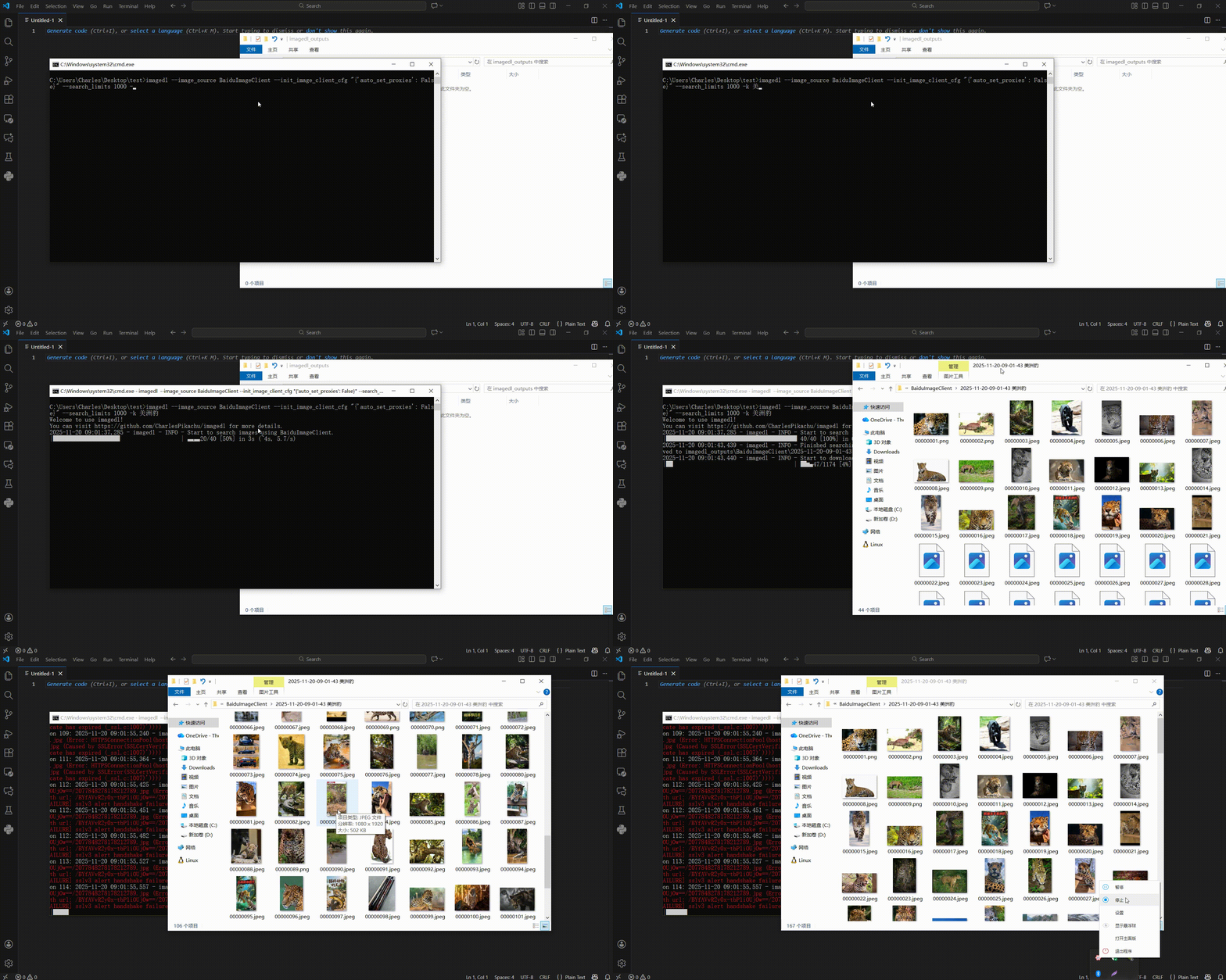
The demonstration of running imagedl -k "猫咪" -s "BaiduImageClient" -l 1000 is as follows,
What happens during search and download
Each source searches independently, using its own thread count, request overrides, and filters. During searching, duplicate items are removed, and each result is assigned a unique save path automatically. During downloading, the package groups results by source, tries the candidate image URLs one by one, detects the real file extension from the downloaded content, and then saves the file.
Where files are saved
By default, files are saved under imagedl_outputs. The actual folder structure is:
imagedl_outputs/
  <SourceName>/
    <timestamp> <keyword>/
      00000001.<ext>
      00000002.<ext>
      ...
      search_results.pkl
      download_results.pkl
The search stage writes search_results.pkl, and the download stage writes download_results.pkl.
Image filenames are numbered automatically, and the extension is added after the file content is successfully recognized.
Main arguments of ImageClient
The most important arguments are:
image_sources: a string or list of source names, such as"BaiduImageClient"or["BaiduImageClient", "DuckduckgoImageClient"]init_image_clients_cfg: per-source initialization settings such aswork_dir,max_retries,maintain_session,cookies, and curl-cffi-related optionsclients_threadings: per-source thread counts used for search and downloadrequests_overrides: per-source request arguments such as custom headers or proxiessearch_filters: per-source filter settingssearch_limits_per_source: the number of images to search for each source when callingsearch()
Internally, each source is initialized with defaults such as work_dir="imagedl_outputs", max_retries=5, maintain_session=False, auto_set_proxies=False, random_update_ua=False, logger_handle=LoggerHandle() and disabled curl-cffi options unless you override them.
Save images to a custom folder
You can set a different output folder for each source through init_image_clients_cfg.
from imagedl import imagedl

client = imagedl.ImageClient(
    image_sources=["BaiduImageClient"],
    init_image_clients_cfg={
        "BaiduImageClient": {
            "work_dir": "my_images",
            "max_retries": 8
        }
    }
)

search_results = client.search("sunset beach", search_limits_per_source=10)
client.download(image_infos=search_results)
This is the recommended way to control where your files are saved.
Search from multiple sources
You can search several sources at once. In that case, it is usually best to configure thread count and output directory per source. Here is a simple example:
from imagedl import imagedl

client = imagedl.ImageClient(
    image_sources=["BaiduImageClient", "DuckduckgoImageClient"],
    init_image_clients_cfg={
        "BaiduImageClient": {"work_dir": "outputs/baidu"},
        "DuckduckgoImageClient": {"work_dir": "outputs/ddg"}
    },
    clients_threadings={
        "BaiduImageClient": 4,
        "DuckduckgoImageClient": 4
    }
)

search_results = client.search(
    keyword="golden retriever",
    search_limits_per_source={
        "BaiduImageClient": 10,
        "DuckduckgoImageClient": 10
    }
)

client.download(image_infos=search_results)
When search_limits_per_source is a single number, that same limit is applied to every source. When it is a dictionary, each source uses its own limit.
Add request headers or proxies
Use requests_overrides when you need custom headers, cookies, or proxies for a specific source.
from imagedl import imagedl

client = imagedl.ImageClient(
    image_sources=["BaiduImageClient"],
    init_image_clients_cfg={},
    requests_overrides={
        "BaiduImageClient": {
            "headers": {
                "User-Agent": "Mozilla/5.0"
            },
            "proxies": {
                "http": "http://127.0.0.1:7890",
                "https": "http://127.0.0.1:7890"
            }
        }
    }
)

search_results = client.search("mountains", search_limits_per_source=5)
client.download(image_infos=search_results)
The package forwards these values to the underlying request calls for that source.
A simple way to use one source directly
If you only want to test or use a single website, you can import a concrete source client directly from imagedl.modules.sources. This is a very simple and beginner-friendly way to start.
from imagedl.modules.sources import BaiduImageClient

client = BaiduImageClient()
image_infos = client.search('Cute Dogs', search_limits=10, num_threadings=1)
client.download(image_infos, num_threadings=1)
In this direct-source style:
search()returns a list ofImageInfoobjectsdownload()takes that list directly- you do not need
imagedl.ImageClient - you do not need to pass
image_sources
This style is convenient when you only care about one source and want the shortest possible code.
You can choose from many built-in source clients:
from imagedl.modules.sources import (
    BingImageClient, I360ImageClient, YahooImageClient, BaiduImageClient, SogouImageClient, GoogleImageClient, YandexImageClient, PixabayImageClient, FreeImagesImageClient, PicJumboImageClient, EverypixelImageClient,
    DuckduckgoImageClient, UnsplashImageClient, GelbooruImageClient, SafebooruImageClient, DanbooruImageClient, PexelsImageClient, DimTownImageClient, StockSnapImageClient, LifeOfPixImageClient, OpenverseImageClient,
    FoodiesfeedImageClient, FreeNatureStockImageClient, WeiboImageClient, GratisoGraphyImageClient, INaturalistImageClient, NASAImageClient, HuabanImageClient, GBIFImageClient, LocGovImageClient, WikipediaImageClient,
	YandeImageClient, JikanImageClient
)
To list all image sources supported by your current pyimagedl version:
python -c "from imagedl.modules import ImageClientBuilder; print(ImageClientBuilder.REGISTERED_MODULES.keys())"
Here are some simple examples:
from imagedl.modules.sources import (
    BingImageClient, I360ImageClient, YahooImageClient, BaiduImageClient, SogouImageClient, GoogleImageClient, YandexImageClient, PixabayImageClient, FreeImagesImageClient, PicJumboImageClient, EverypixelImageClient,
    DuckduckgoImageClient, UnsplashImageClient, GelbooruImageClient, SafebooruImageClient, DanbooruImageClient, PexelsImageClient, DimTownImageClient, StockSnapImageClient, LifeOfPixImageClient, OpenverseImageClient,
    FoodiesfeedImageClient, FreeNatureStockImageClient, WeiboImageClient, GratisoGraphyImageClient, INaturalistImageClient, NASAImageClient, HuabanImageClient, GBIFImageClient, LocGovImageClient, WikipediaImageClient,
	YandeImageClient, JikanImageClient
)

# bing
client = BingImageClient()
image_infos = client.search('Cute Dogs', search_limits=10, num_threadings=1)
client.download(image_infos, num_threadings=1)

# 360
client = I360ImageClient()
image_infos = client.search('Cute Dogs', search_limits=10, num_threadings=1)
client.download(image_infos, num_threadings=1)

# baidu
client = BaiduImageClient()
image_infos = client.search('Cute Dogs', search_limits=10, num_threadings=1)
client.download(image_infos, num_threadings=1)

# sogou
client = SogouImageClient()
image_infos = client.search('Cute Dogs', search_limits=10, num_threadings=1)
client.download(image_infos, num_threadings=1)

# google
client = GoogleImageClient()
image_infos = client.search('Cute Dogs', search_limits=10, num_threadings=1)
client.download(image_infos, num_threadings=1)

# yandex
client = YandexImageClient()
image_infos = client.search('Cute Dogs', search_limits=10, num_threadings=1)
client.download(image_infos, num_threadings=1)

# pixabay
client = PixabayImageClient()
image_infos = client.search('Cute Dogs', search_limits=10, num_threadings=1)
client.download(image_infos, num_threadings=1)

# duckduckgo
client = DuckduckgoImageClient()
image_infos = client.search('Cute Dogs', search_limits=10, num_threadings=1)
client.download(image_infos, num_threadings=1)

# yahoo
client = YahooImageClient()
image_infos = client.search('Cute Dogs', search_limits=10, num_threadings=1)
client.download(image_infos, num_threadings=1)

# unsplash
client = UnsplashImageClient()
image_infos = client.search('Cute Dogs', search_limits=10, num_threadings=1)
client.download(image_infos, num_threadings=1)

# gelbooru
client = GelbooruImageClient()
image_infos = client.search('pikachu', search_limits=10, num_threadings=1)
client.download(image_infos, num_threadings=1)

# safebooru
client = SafebooruImageClient()
image_infos = client.search('pikachu', search_limits=10, num_threadings=1)
client.download(image_infos, num_threadings=1)

# danbooru
client = DanbooruImageClient()
image_infos = client.search('pikachu', search_limits=10, num_threadings=1)
client.download(image_infos, num_threadings=1)

# pexels
client = PexelsImageClient()
image_infos = client.search('animals', search_limits=10, num_threadings=1)
client.download(image_infos, num_threadings=1)

# dimtown
client = DimTownImageClient()
image_infos = client.search('JK', search_limits=10, num_threadings=1)
client.download(image_infos, num_threadings=1)

# huaban
client = HuabanImageClient()
image_infos = client.search('JK', search_limits=10, num_threadings=1)
client.download(image_infos, num_threadings=1)

# foodiesfeed
client = FoodiesfeedImageClient()
image_infos = client.search('pizza', search_limits=10, num_threadings=1)
client.download(image_infos, num_threadings=1)

# everypixel
client = EverypixelImageClient()
image_infos = client.search('animals', search_limits=10, num_threadings=1)
client.download(image_infos, num_threadings=1)

# freenaturestock
client = FreeNatureStockImageClient()
image_infos = client.search('mountains', search_limits=10, num_threadings=1)
client.download(image_infos, num_threadings=1)

# weibo (cookies required)
client = WeiboImageClient(default_search_cookies='xxxx')
image_infos = client.search('animals', search_limits=10, num_threadings=1)
client.download(image_infos, num_threadings=1)

# stocksnap
client = StockSnapImageClient()
image_infos = client.search('mountains', search_limits=10, num_threadings=1)
client.download(image_infos, num_threadings=1)

# freeimages
client = FreeImagesImageClient()
image_infos = client.search('mountains', search_limits=10, num_threadings=1)
client.download(image_infos, num_threadings=1)

# lifeofpix
client = LifeOfPixImageClient()
image_infos = client.search('mountains', search_limits=10, num_threadings=1)
client.download(image_infos, num_threadings=1)

# gratisography
client = GratisoGraphyImageClient()
image_infos = client.search('mountains', search_limits=10, num_threadings=1)
client.download(image_infos, num_threadings=1)

# picjumbo
client = PicJumboImageClient()
image_infos = client.search('mountains', search_limits=10, num_threadings=1)
client.download(image_infos, num_threadings=1)

# openverse
client = OpenverseImageClient()
image_infos = client.search('pikachu', search_limits=10, num_threadings=1)
client.download(image_infos, num_threadings=1)

# inaturalist
client = INaturalistImageClient()
image_infos = client.search('Red Panda', search_limits=10, num_threadings=1)
client.download(image_infos, num_threadings=1)

# nasa
client = NASAImageClient()
image_infos = client.search('James Webb', search_limits=10, num_threadings=1)
client.download(image_infos, num_threadings=1)

# gbif
client = GBIFImageClient()
image_infos = client.search('jellyfish', search_limits=10, num_threadings=1)
client.download(image_infos, num_threadings=1)

# loc.gov
client = LocGovImageClient()
image_infos = client.search('apollo 11', search_limits=10, num_threadings=1)
client.download(image_infos, num_threadings=1)

# yande
client = YandeImageClient()
image_infos = client.search('pikachu', search_limits=10, num_threadings=1)
client.download(image_infos, num_threadings=1)

# wiki
client = WikipediaImageClient()
image_infos = client.search('pikachu', search_limits=10, num_threadings=1)
client.download(image_infos, num_threadings=1)

# jikan
client = JikanImageClient()
image_infos = client.search('pikachu', search_limits=10, num_threadings=1)
client.download(image_infos, num_threadings=1)
A good rule is:
- use
imagedl.ImageClientwhen you want a unified interface for one or more sources - use a direct source client when you want the shortest code for one specific source
💡 Recommended Projects
| Project | ⭐ Stars | 📦 Version | ⏱ Last Update | 🛠 Repository |
|---|---|---|---|---|
| 🎵 Musicdl 轻量级无损音乐下载器 |
 |
 |
 |
🛠 Repository |
| 🎬 Videodl 轻量级高清无水印视频下载器 |
 |
 |
 |
🛠 Repository |
| 🖼️ Imagedl 轻量级海量图片搜索下载器 |
 |
|
 |
🛠 Repository |
| 🌐 FreeProxy 全球海量高质量免费代理采集器 |
 |
 |
 |
🛠 Repository |
| 🌐 MusicSquare 简易音乐搜索下载和播放网页 |
 |
|
 |
🛠 Repository |
| 🌐 FreeGPTHub 真正免费的GPT统一接口 |
 |
 |
 |
🛠 Repository |
📚 Citation
If you use this project in your research, please cite the repository.
@misc{imagedl2022,
    author = {Zhenchao Jin},
    title = {Imagedl: Search and download images from specific websites},
    year = {2022},
    publisher = {GitHub},
    journal = {GitHub repository},
    howpublished = {\url{https://github.com/CharlesPikachu/imagedl/}},
}
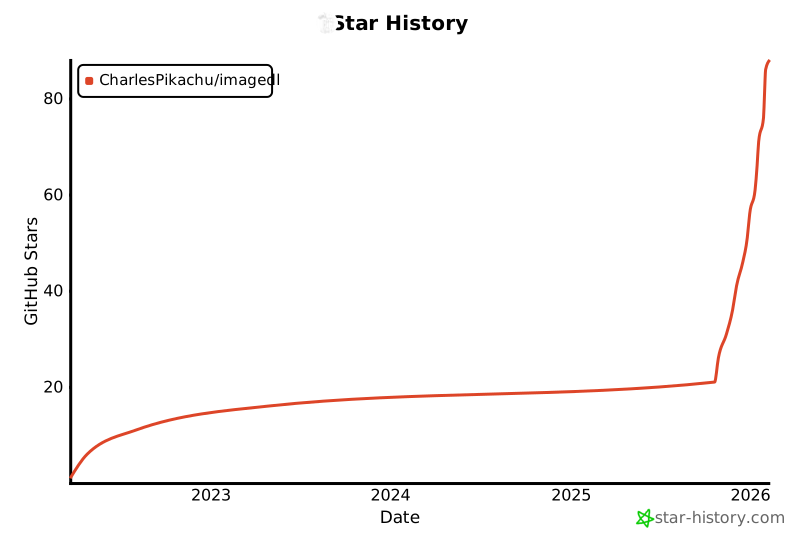
🌟 Star History
☕ Appreciation (赞赏 / 打赏)
| WeChat Appreciation QR Code (微信赞赏码) | Alipay Appreciation QR Code (支付宝赞赏码) |
|---|---|
 |
 |
📱 WeChat Official Account (微信公众号):
Charles的皮卡丘 (Charles_pikachu)

Release history Release notifications | RSS feed


Download files
Download the file for your platform. If you're not sure which to choose, learn more about installing packages.
Source Distribution
Built Distribution
Filter files by name, interpreter, ABI, and platform.
If you're not sure about the file name format, learn more about wheel file names.
Copy a direct link to the current filters
File details
Details for the file pyimagedl-0.4.5.tar.gz.
File metadata
- Download URL: pyimagedl-0.4.5.tar.gz
- Upload date:
- Size: 71.0 kB
- Tags: Source
- Uploaded using Trusted Publishing? No
- Uploaded via: twine/6.2.0 CPython/3.12.12
File hashes
| Algorithm | Hash digest | |
|---|---|---|
| SHA256 |
f7413489bce09a751dd3ebb3db60db8795340f3b3d1f8d1649902c60a5324e52
|
|
| MD5 |
e572f95bd8f83436c681e920c637a08d
|
|
| BLAKE2b-256 |
b90856442f75a7ed03a37f32c20766a378ec80eca5cbf05a11169a3e2d1848ae
|
File details
Details for the file pyimagedl-0.4.5-py3-none-any.whl.
File metadata
- Download URL: pyimagedl-0.4.5-py3-none-any.whl
- Upload date:
- Size: 93.6 kB
- Tags: Python 3
- Uploaded using Trusted Publishing? No
- Uploaded via: twine/6.2.0 CPython/3.12.12
File hashes
| Algorithm | Hash digest | |
|---|---|---|
| SHA256 |
a9729ff50be54bdfde80029028b9788d55b620a34687fc0e04dc18cd53dbdc1c
|
|
| MD5 |
919b2f08ae5a52d798b1cb4b38d48cfb
|
|
| BLAKE2b-256 |
824a2fd1b978c619ed302709b2d1e9b2716ea576b641e07ec3944f404d31dd44
|






