
Pylinkage





Pylinkage lets you design planar linkage mechanisms by specifying the motion you need. Tell it where you want a coupler point to go, and it finds mechanism dimensions automatically using classical synthesis theory (Burmester, Freudenstein) and metaheuristic optimization (PSO, differential evolution). You can then simulate, analyze, visualize, and export to DXF or STEP for fabrication.
from pylinkage.synthesis import path_generation
from pylinkage.visualizer import show_linkage

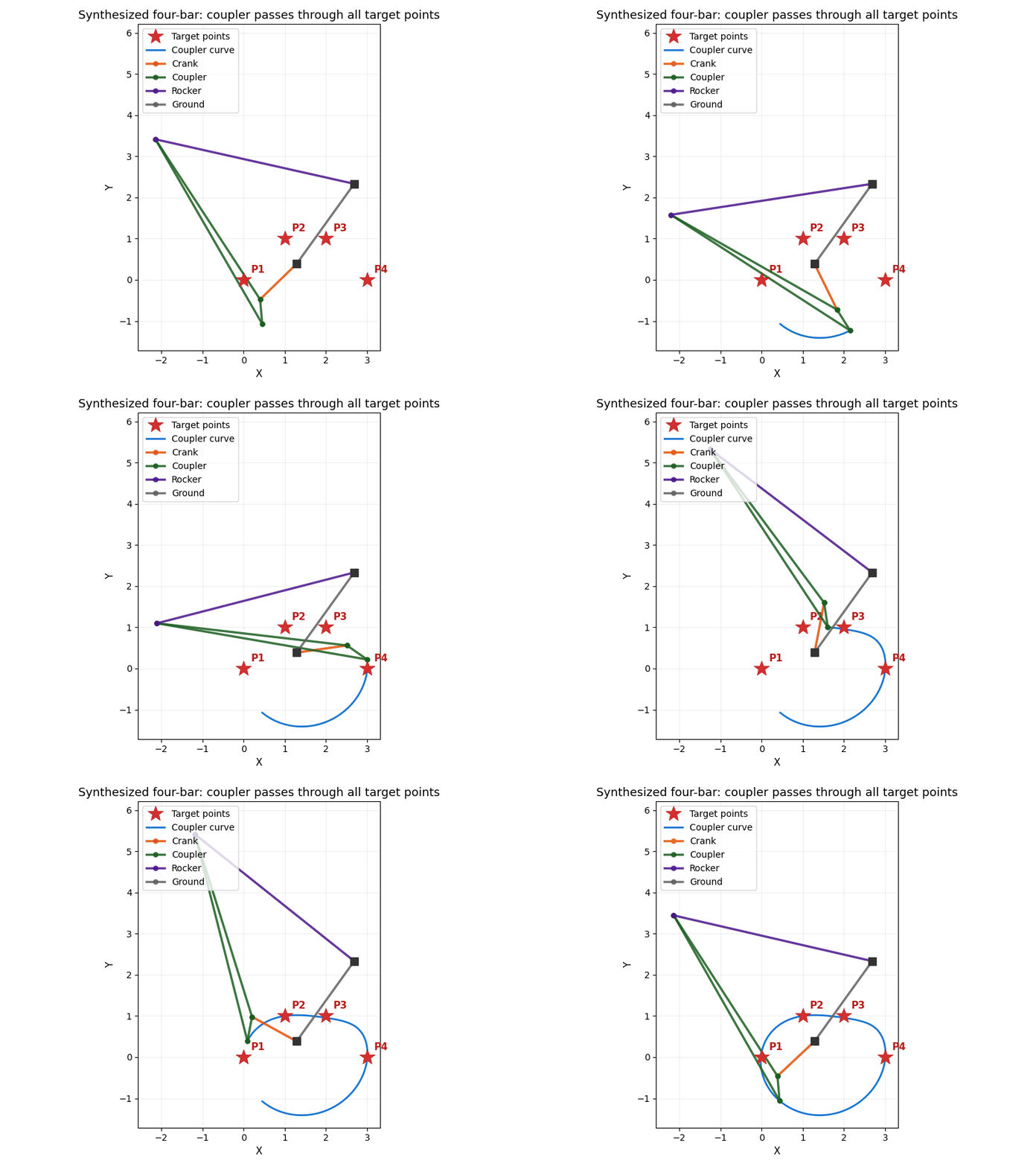
# "I need a coupler that passes through these four points"
result = path_generation([(0, 0), (1, 1), (2, 1), (3, 0)])
show_linkage(result.solutions[0])
To run that example: pip install pylinkage[scipy,viz]. Synthesis needs SciPy and
plotting needs Matplotlib; both are optional extras, so a plain
pip install pylinkage gives you the core library without them.
Installation
pip install pylinkage            # Core only: define, simulate, and build linkages
pip install pylinkage[full]      # Everything: all optional backends included
Install only what you need:
| Extra | What it adds |
|---|---|
numba |
JIT-compiled solvers (1.5-2.5M steps/sec) |
scipy |
Differential evolution optimizer, synthesis solvers |
symbolic |
SymPy-based closed-form expressions and gradient optimization |
viz |
Matplotlib visualization and animation |
plotly |
Interactive HTML visualization |
svg |
Publication-quality SVG export via drawsvg |
moo |
Multi-objective optimization (NSGA-II/III via pymoo) |
Extras can be combined: pip install pylinkage[viz,scipy,numba]
For development:
git clone https://github.com/HugoFara/pylinkage.git
cd pylinkage
uv sync  # or pip install -e ".[full,dev]"
Quick Start
Define and Visualize a Four-Bar Linkage
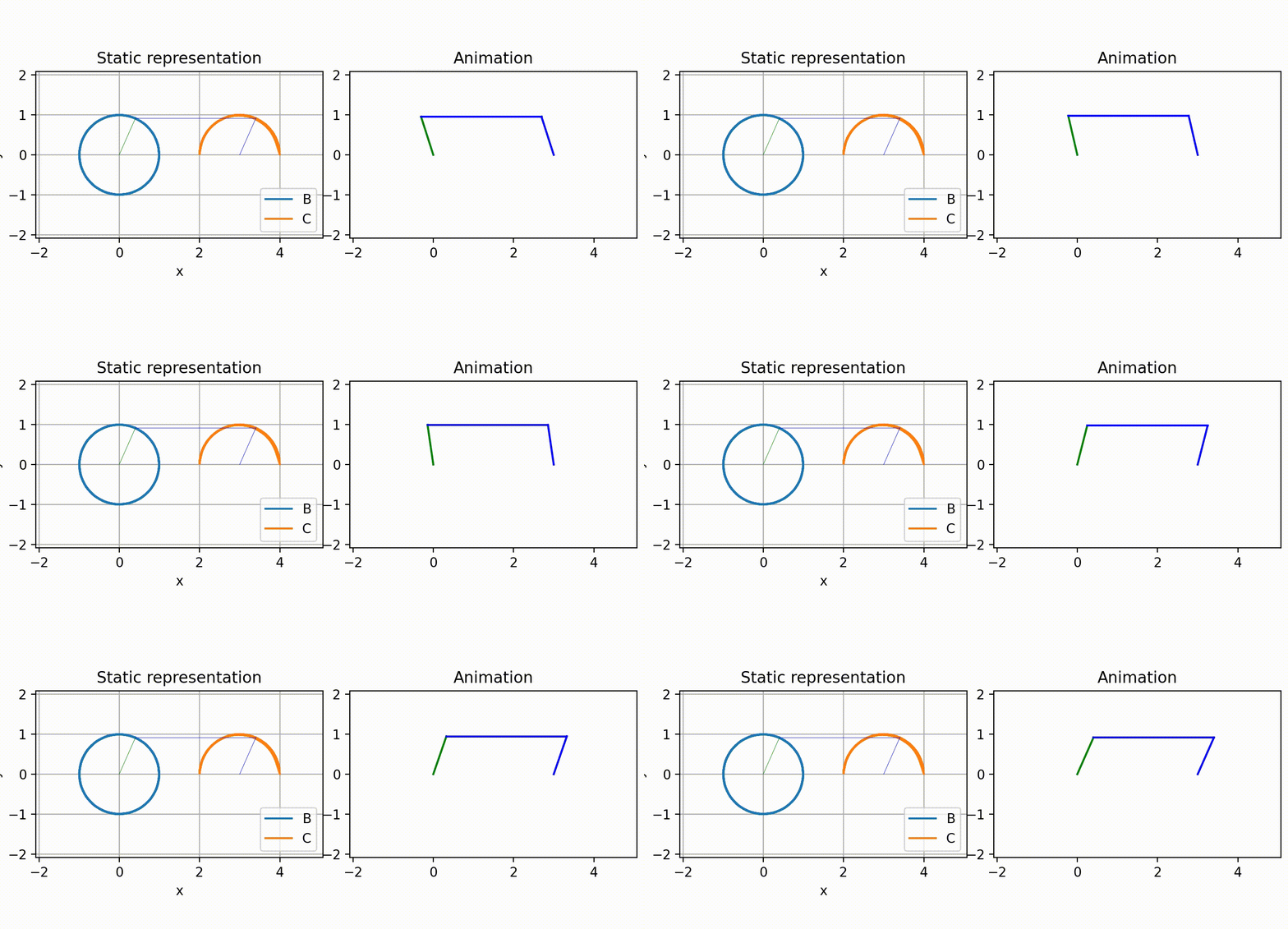
Using the component-based API (recommended). Visualization requires pip install pylinkage[viz].
from pylinkage.components import Ground
from pylinkage.actuators import Crank
from pylinkage.dyads import RRRDyad
from pylinkage.simulation import Linkage
from pylinkage.visualizer import show_linkage

# Define ground pivots
O1 = Ground(0, 0, name="O1")
O2 = Ground(3, 0, name="O2")

# Create crank (motor-driven input)
crank = Crank(anchor=O1, radius=1.0, angular_velocity=0.31, name="crank")

# Create rocker via RRR dyad (circle-circle intersection)
rocker = RRRDyad(
    anchor1=crank.output,
    anchor2=O2,
    distance1=3.0,
    distance2=1.0,
    name="rocker"
)

my_linkage = Linkage([O1, O2, crank, rocker], name="Four-Bar")
show_linkage(my_linkage)
Alternative: Links-First Builder
For a more mechanical engineering-oriented approach, use MechanismBuilder to define links with their lengths first, then connect them:
from pylinkage.mechanism import MechanismBuilder

# Define links by their lengths, then connect with joints
mechanism = (
    MechanismBuilder("four-bar")
    .add_ground_link("ground", ports={"O1": (0, 0), "O2": (4, 0)})
    .add_driver_link("crank", length=1.0, motor_port="O1", omega=0.1)
    .add_link("coupler", length=3.5)
    .add_link("rocker", length=3.0)
    .connect("crank.tip", "coupler.0")
    .connect("coupler.1", "rocker.0")
    .connect("rocker.1", "ground.O2")
    .build()
)

# Joint positions are computed automatically from link lengths
for positions in mechanism.step():
    print(positions)
Optimize with PSO
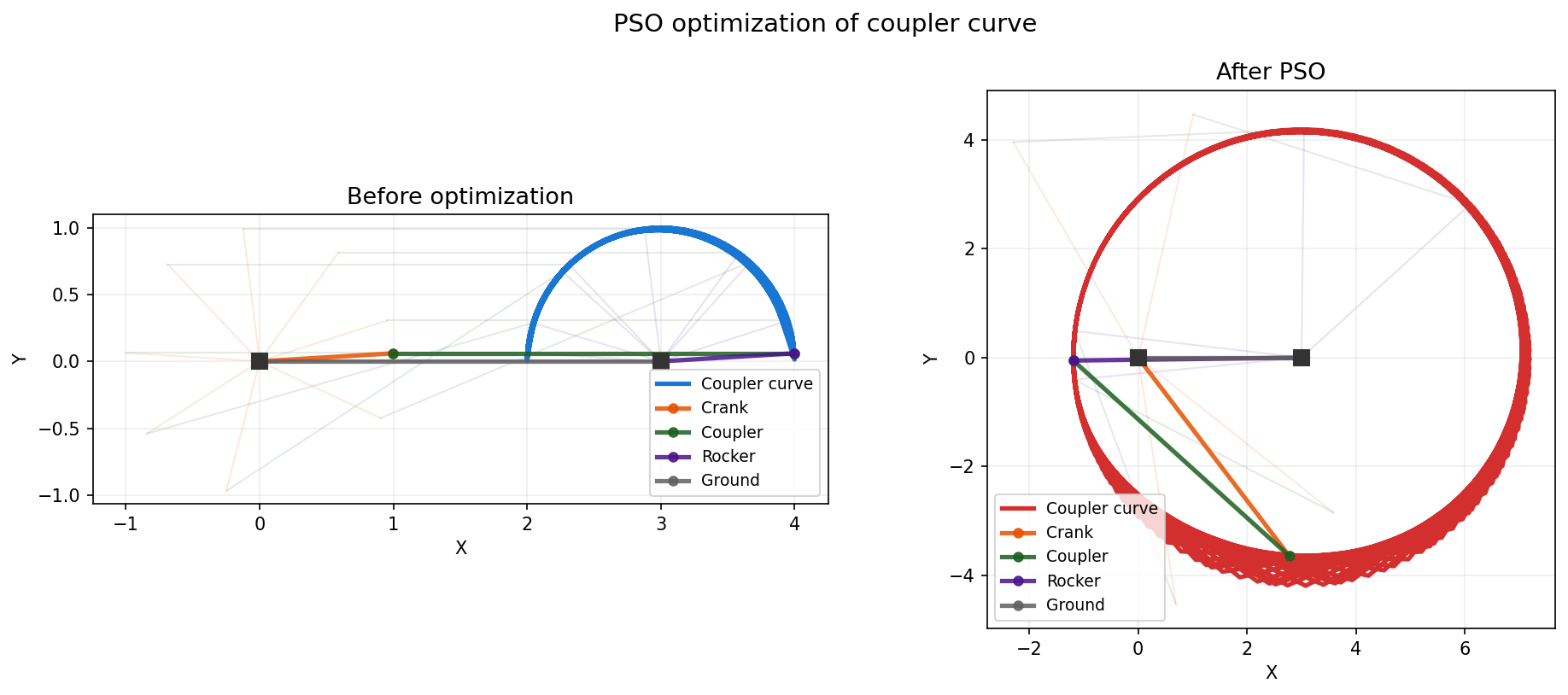
PSO is built-in (no extra needed).
import pylinkage as pl

@pl.kinematic_minimization
def fitness(loci, **_):
    tip_locus = tuple(x[-1] for x in loci)
    return pl.bounding_box(tip_locus)[0]  # Minimize min_y

bounds = pl.generate_bounds(my_linkage.get_constraints())
ensemble = pl.particle_swarm_optimization(
    eval_func=fitness, linkage=my_linkage, bounds=bounds, order_relation=min
)
best = ensemble.top(1)[0]
my_linkage.set_constraints(best.dimensions)
Symbolic Analysis
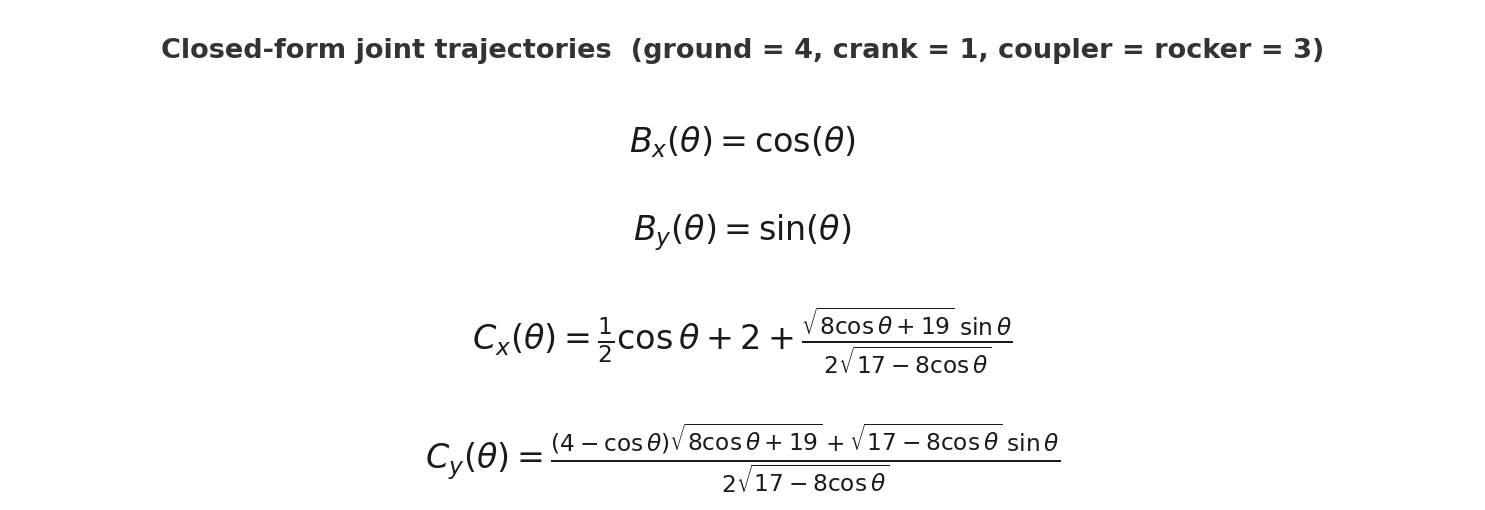
Requires pip install pylinkage[symbolic]. Get closed-form trajectory expressions:
from pylinkage.symbolic import fourbar_symbolic, compute_trajectory_numeric
import numpy as np

linkage = fourbar_symbolic(ground_length=4, crank_length=1, coupler_length=3, rocker_length=3)
params = {"L1": 1.0, "L2": 3.0, "L3": 3.0}
trajectories = compute_trajectory_numeric(linkage, params, np.linspace(0, 2*np.pi, 100))
Tutorials
The docs/notebooks/ directory contains hands-on tutorials that walk through each major feature:
| # | Notebook | What you'll learn |
|---|---|---|
| 01 | Straight-Line Synthesis | Design a mechanism that traces a straight line from scratch |
| 02 | Optimize a Coupler Curve | Use PSO to shape a four-bar coupler path |
| 03 | Tolerance Analysis | Monte Carlo analysis for manufacturing variation |
| 04 | Cam-Follower Timing | Design cam profiles with motion laws |
| 05 | Symbolic Coupler Curve | Closed-form trajectory expressions with SymPy |
| 06 | Function Generation | Match input/output angle relationships (Freudenstein) |
| 07 | Motion Generation | Guide a rigid body through specified poses (Burmester) |
| 08 | Velocity & Acceleration | Compute joint velocities and accelerations |
| 09 | Transmission Angle & DOF | Evaluate mechanism quality and mobility |
| 10 | Mechanism Builder | Link-first definition with MechanismBuilder |
| 11 | Multi-Objective Optimization | Pareto-optimal design with NSGA-II and scipy |
| 12 | Three Synthesis Problems | Side-by-side comparison of path, function, and motion synthesis |
| 13 | Population Abstractions | Batch simulation, ranking, and filtering of mechanism families |
| 14 | Topology Enumeration | Enumerate and synthesize across all valid topologies |
| 15 | Hypergraph Composition | Compose mechanisms hierarchically from reusable hypergraph components |
What Else Can It Do?
Pylinkage also supports velocity and acceleration analysis, cam-follower mechanisms with configurable motion laws, transmission angle evaluation, Monte Carlo tolerance analysis for manufacturing, multi-objective optimization (NSGA-II/III via pymoo), and export to DXF and STEP for CNC and CAD workflows. See the tutorials for details.
Architecture
Level 0: Geometry       → Pure math primitives (numba-accelerated when installed)
Level 1: Solver         → Assur group solvers (numba-accelerated when installed)
Level 2: Components     → Ground, Crank, RRRDyad, LinearActuator, cam-followers
Level 3: Simulation     → Linkage orchestration, step(), step_fast()
Level 4: Applications   → Optimization, Synthesis, Symbolic, Visualization
Performance: With the numba extra, step_fast() achieves 1.5-2.5M steps/sec (4-7x faster than step()). Without numba, the same code runs in pure Python/NumPy.
Full module reference
| Module | Purpose | Extras needed |
|---|---|---|
pylinkage.components |
Base components: Ground, Component |
— |
pylinkage.actuators |
Motor drivers: Crank, LinearActuator |
— |
pylinkage.dyads |
Assur groups: RRRDyad, RRPDyad, FixedDyad |
— |
pylinkage.simulation |
Linkage class for simulation via step() / step_fast() |
— |
pylinkage.mechanism |
Low-level Links+Joints model and MechanismBuilder |
— |
pylinkage.solver |
High-performance numba-compiled simulation backend | numba |
pylinkage.optimization |
PSO, differential evolution, grid search | scipy (DE only) |
pylinkage.synthesis |
Classical synthesis: function/path/motion generation | scipy |
pylinkage.symbolic |
SymPy-based symbolic computation and gradient optimization | symbolic |
pylinkage.visualizer |
Matplotlib, Plotly, SVG, DXF, and STEP export | viz, plotly, svg |
pylinkage.assur |
Assur group decomposition and graph representation | — |
pylinkage.hypergraph |
Hierarchical component-based linkage definition | — |
Requirements
- Python >= 3.10
- Core: numpy, tqdm
- Optional (via extras): numba, scipy, sympy, matplotlib, plotly, drawsvg
Related Projects
- pylinkage-editor — Visual linkage design tool with an easy-to-use interface. Draw mechanisms interactively, run synthesis from the GUI, and export results.
- leggedsnake — Dynamic walking simulation built on pylinkage. Adds pymunk physics, genetic algorithm optimization, and walking-specific fitness evaluation.
Contributing
Contributions welcome! Please see CONTRIBUTING.md and respect the CODE_OF_CONDUCT.md.
1 maintainer

Metadata
1 maintainer
Release files for pylinkage 1.1.1
For a detailed explanation of source distributions (sdists) and built distributions (wheels), please see the package formats documentation.
Source distribution (sdist)
| File | Size | Uploaded | |
|---|---|---|---|
| pylinkage-1.1.1.tar.gz | 28.3 MB | Details |
Built distribution (wheel)
| File | Interpreter | ABI | Platform | Reset |
|---|---|---|---|---|
| pylinkage-1.1.1-py3-none-any.whl | Python 3 | none | any | Details |
Total release size: 28.6 MB
Release files / pylinkage-1.1.1.tar.gz
| Download URL | pylinkage-1.1.1.tar.gz |
|---|---|
| Size | 28.3 MB |
| Tags | Source |
|
SHA-256 checksum How to use checksums |
55314ffcc524b0fae175286db75c84884a20cc841e739816551e9c29265bd790
|
|
BLAKE2b-256 checksum How to use checksums |
ad21627ef7a1da7bc5ffbb010f607187d35ed0ae6fb504b57764ae907a61a4d2
|
| Upload date | |
|
Uploaded using Trusted Publishing? What is trusted publishing? |
No |
| Uploaded via |
twine/7.0.0 CPython/3.13.14
|
Release files / pylinkage-1.1.1-py3-none-any.whl
| Download URL | pylinkage-1.1.1-py3-none-any.whl |
|---|---|
| Size | 371.7 kB |
| Tags | Python 3 |
|
SHA-256 checksum How to use checksums |
12ae4fa1604f4282c44016b314db3f8d2006cd4ed4110bee11bf25e9b801ddc4
|
|
BLAKE2b-256 checksum How to use checksums |
983f81ae3379b42b01943349b1f48e2f0f2321a6966015b67edeaf066025ff10
|
| Upload date | |
|
Uploaded using Trusted Publishing? What is trusted publishing? |
No |
| Uploaded via |
twine/7.0.0 CPython/3.13.14
|














