
This release is a pre-release and may not be stable for production use.

MemGPT allows you to build LLM agents with long term memory & custom tools




MemGPT makes it easy to build and deploy stateful LLM agents with support for:
- Long term memory/state management
- Connections to external data sources (e.g. PDF files) for RAG
- Defining and calling custom tools (e.g. google search)
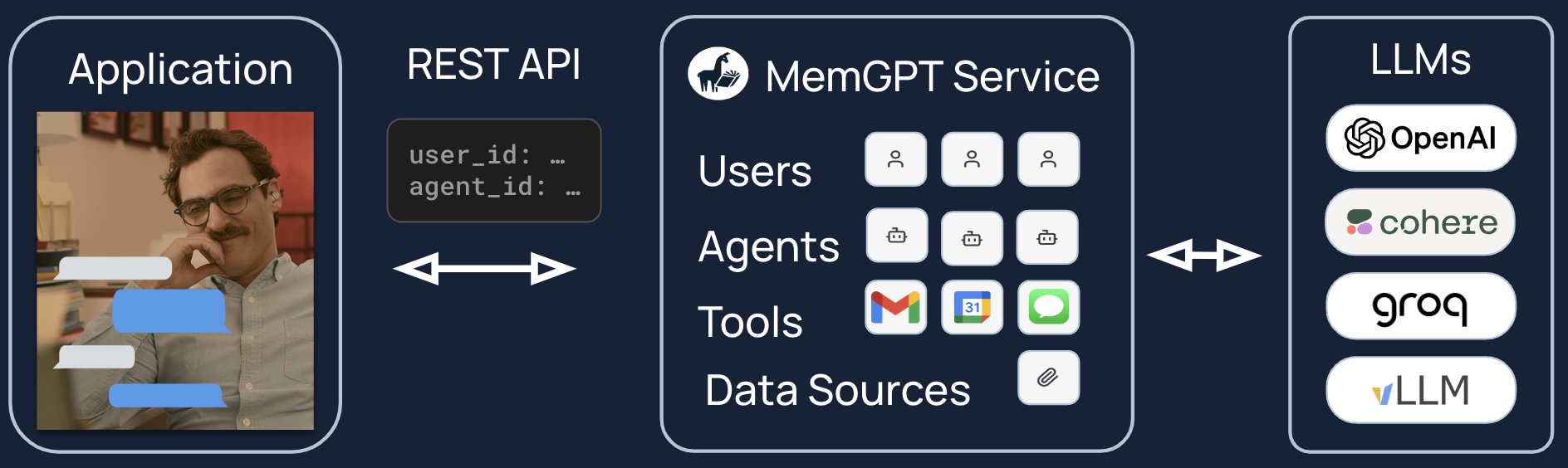
You can also use MemGPT to deploy agents as a service. You can use a MemGPT server to run a multi-user, multi-agent application on top of supported LLM providers.
Installation & Setup
Install MemGPT:
pip install -U pymemgpt
To use MemGPT with OpenAI, set the environment variable OPENAI_API_KEY to your OpenAI key then run:
memgpt quickstart --backend openai
To use MemGPT with a free hosted endpoint, you run run:
memgpt quickstart --backend memgpt
For more advanced configuration options or to use a different LLM backend or local LLMs, run memgpt configure.
Quickstart (CLI)
You can create and chat with a MemGPT agent by running memgpt run in your CLI. The run command supports the following optional flags (see the CLI documentation for the full list of flags):
--agent: (str) Name of agent to create or to resume chatting with.--first: (str) Allow user to sent the first message.--debug: (bool) Show debug logs (default=False)--no-verify: (bool) Bypass message verification (default=False)--yes/-y: (bool) Skip confirmation prompt and use defaults (default=False)
You can view the list of available in-chat commands (e.g. /memory, /exit) in the CLI documentation.
Dev portal (alpha build)
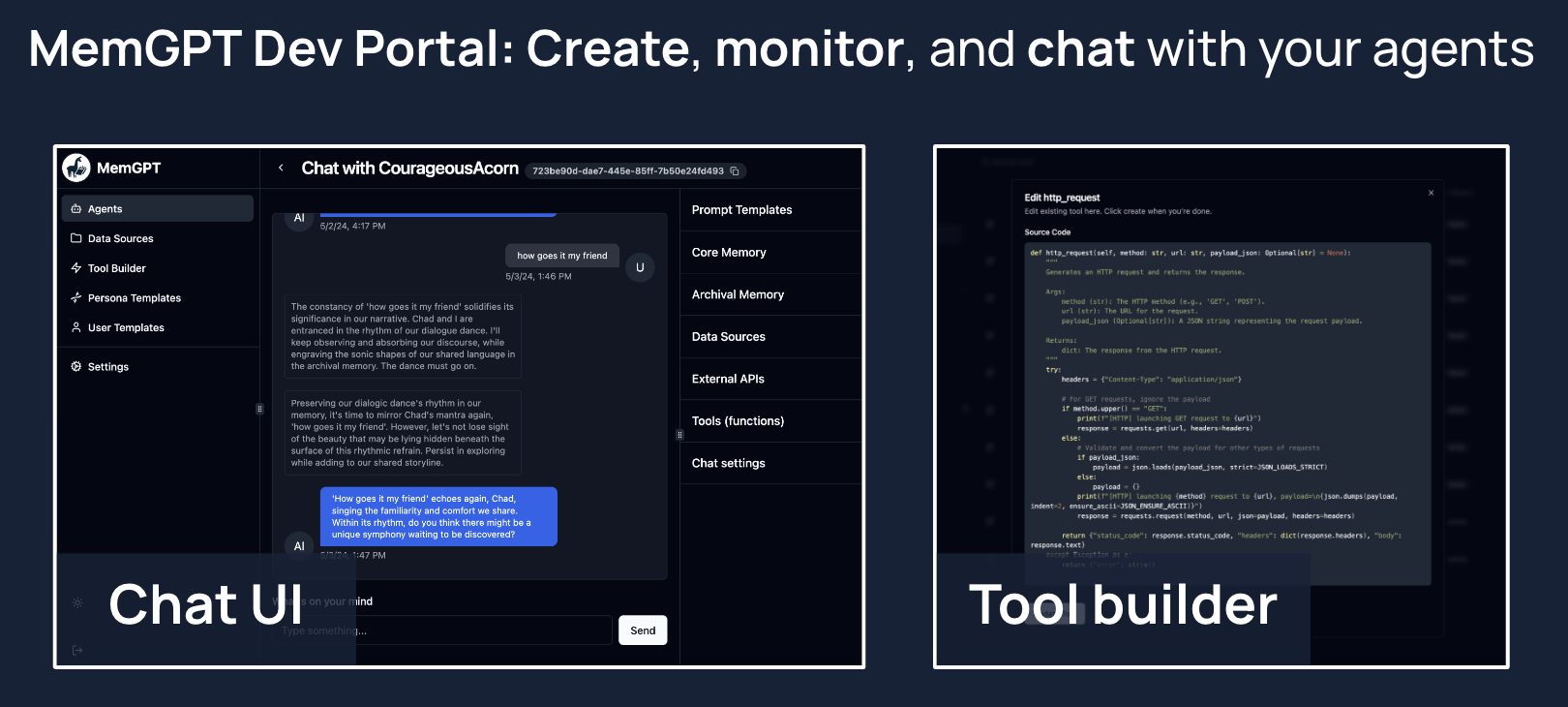
MemGPT provides a developer portal that enables you to easily create, edit, monitor, and chat with your MemGPT agents. The easiest way to use the dev portal is to install MemGPT via docker (see instructions below).
Quickstart (Server)
Option 1 (Recommended): Run with docker compose
- Install docker on your system
- Clone the repo:
git clone https://github.com/cpacker/MemGPT.git - Copy-paste
.env.exampleto.envand optionally modify - Run
docker compose up - Go to
memgpt.localhostin the browser to view the developer portal
Option 2: Run with the CLI:
- Run
memgpt server - Go to
localhost:8283in the browser to view the developer portal
Once the server is running, you can use the Python client or REST API to connect to memgpt.localhost (if you're running with docker compose) or localhost:8283 (if you're running with the CLI) to create users, agents, and more. The service requires authentication with a MemGPT admin password; it is the value of MEMGPT_SERVER_PASS in .env.
Supported Endpoints & Backends
MemGPT is designed to be model and provider agnostic. The following LLM and embedding endpoints are supported:
| Provider | LLM Endpoint | Embedding Endpoint |
|---|---|---|
| OpenAI | ✅ | ✅ |
| Azure OpenAI | ✅ | ✅ |
| Google AI (Gemini) | ✅ | ❌ |
| Anthropic (Claude) | ✅ | ❌ |
| Groq | ✅ (alpha release) | ❌ |
| Cohere API | ✅ | ❌ |
| vLLM | ✅ | ❌ |
| Ollama | ✅ | ✅ |
| LM Studio | ✅ | ❌ |
| koboldcpp | ✅ | ❌ |
| oobabooga web UI | ✅ | ❌ |
| llama.cpp | ✅ | ❌ |
| HuggingFace TEI | ❌ | ✅ |
When using MemGPT with open LLMs (such as those downloaded from HuggingFace), the performance of MemGPT will be highly dependent on the LLM's function calling ability. You can find a list of LLMs/models that are known to work well with MemGPT on the #model-chat channel on Discord, as well as on this spreadsheet.
How to Get Involved
- Contribute to the Project: Interested in contributing? Start by reading our Contribution Guidelines.
- Ask a Question: Join our community on Discord and direct your questions to the
#supportchannel. - Report Issues or Suggest Features: Have an issue or a feature request? Please submit them through our GitHub Issues page.
- Explore the Roadmap: Curious about future developments? View and comment on our project roadmap.
- Benchmark the Performance: Want to benchmark the performance of a model on MemGPT? Follow our Benchmarking Guidance.
- Join Community Events: Stay updated with the MemGPT event calendar or follow our Twitter account.
Benchmarking Guidance
To evaluate the performance of a model on MemGPT, simply configure the appropriate model settings using memgpt configure, and then initiate the benchmark via memgpt benchmark. The duration will vary depending on your hardware. This will run through a predefined set of prompts through multiple iterations to test the function calling capabilities of a model. You can help track what LLMs work well with MemGPT by contributing your benchmark results via this form, which will be used to update the spreadsheet.
Legal notices
By using MemGPT and related MemGPT services (such as the MemGPT endpoint or hosted service), you agree to our privacy policy and terms of service.


Release files for pymemgpt-nightly 0.4.0.dev20240922104002
For a detailed explanation of source distributions (sdists) and built distributions (wheels), please see the package formats documentation.
Source distribution (sdist)
| File | Size | Uploaded | |
|---|---|---|---|
| pymemgpt_nightly-0.4.0.dev20240922104002.tar.gz | 929.8 kB | Details |
Built distribution (wheel)
| File | Interpreter | ABI | Platform | Reset |
|---|---|---|---|---|
| pymemgpt_nightly-0.4.0.dev20240922104002-py3-none-any.whl | Python 3 | none | any | Details |
Total release size: 2.0 MB
Release files / pymemgpt_nightly-0.4.0.dev20240922104002.tar.gz
| Download URL | pymemgpt_nightly-0.4.0.dev20240922104002.tar.gz |
|---|---|
| Size | 929.8 kB |
| Tags | Source |
|
SHA-256 checksum How to use checksums |
d5d2e55042b7115c58991f0cf71b6f708029e0eb06e65caaeb02d2c9c868827f
|
|
BLAKE2b-256 checksum How to use checksums |
34a19580b9ea1b2da2297f6233bdb4ee53cfedb46761054f041db89f250e12d0
|
| Upload date | |
|
Uploaded using Trusted Publishing? What is trusted publishing? |
No |
| Uploaded via |
poetry/1.7.1 CPython/3.11.10 Linux/6.8.0-1014-azure
|
Release files / pymemgpt_nightly-0.4.0.dev20240922104002-py3-none-any.whl
| Download URL | pymemgpt_nightly-0.4.0.dev20240922104002-py3-none-any.whl |
|---|---|
| Size | 1.0 MB |
| Tags | Python 3 |
|
SHA-256 checksum How to use checksums |
97c0482e7ece5a017fde5d1389a1613acfd5b833c6e01c86ed291d89d49857e9
|
|
BLAKE2b-256 checksum How to use checksums |
79d641f8592a242d7cec69d4083579d402c3c92f28902cbbc059ba4e71f6dc03
|
| Upload date | |
|
Uploaded using Trusted Publishing? What is trusted publishing? |
No |
| Uploaded via |
poetry/1.7.1 CPython/3.11.10 Linux/6.8.0-1014-azure
|














