
This release has been yanked by its maintainers, and will be ignored by installers, except when explicitly specified.
Consider using release 2.0.2b0 instead.
Reason given by maintainers: [bugs] import torch should be make optional
Latest News
Key Features
- Pythonic eager execution – Rapid model development
- Unified hardware support – Arm CPU, OpenCL GPU, QNN NPU
- Advanced optimizations – Quantization, pruning, speculative execution
- NPU-ready IR – Seamless integration with NPU frameworks
- Deployment toolkit – SDK + CLI inference tool
Tested Devices
| Device | OS | CPU | GPU | NPU |
|---|---|---|---|---|
| PC-X86-w/oAVX512 | Ubuntu 22.04 |  |
- | - |
| Nvidia A40 | Ubuntu 22.04 | - | |
- |
| Xiaomi14-8Elite | Android 15 | |
- |  |
| OnePlus13-8Elite | Android 15 | |
- | |
| MacMini-M4 | MacOS 15.5 | |
- | - |
Quick Starts
Serving LLMs with mllm-cli
We have developed a C SDK wrapper for the MLLM C++ SDK to enable seamless integration with Golang. Leveraging this wrapper, we've built the mllm-cli command-line tool in Golang, which is about to be released soon.
Inference with VLM using C++ API
The following example demonstrates how to perform inference on a multimodal vision-language model (VLM), specifically Qwen2-VL, using the mllm framework's C++ API. The process includes loading the model configuration, initializing the tokenizer, loading pretrained weights, processing image-text inputs, and performing streaming text generation.
auto qwen2vl_cfg        = Qwen2VLConfig(config_path);
auto qwen2vl_tokenizer  = Qwen2VLTokenizer(tokenizer_path);
auto qwen2vl            = Qwen2VLForCausalLM(qwen2vl_cfg);

qwen2vl.load(mllm::load(model_path));
auto inputs = qwen2vl_tokenizer.convertMessage({.prompt = prompt_text, .img_file_path = image_path});

for (auto& step : qwen2vl.chat(inputs)) {
  std::wcout << qwen2vl_tokenizer.detokenize(step.cur_token_id) << std::flush;
}
more examples can be found in examples
Custom Models
MLLM offers a highly Pythonic API to simplify model implementation for users. For instance, consider the following concise VisionMLP implementation:
class VisionMlp final : public nn::Module {
  int32_t dim_;
  int32_t hidden_dim_;

  nn::QuickGELU act_;
  nn::Linear fc_1_;
  nn::Linear fc_2_;

 public:
  VisionMlp() = default;

  inline VisionMlp(const std::string& name, const Qwen2VLConfig& cfg) : nn::Module(name) {
    dim_ = cfg.visual_embed_dim;
    hidden_dim_ = cfg.visual_embed_dim * cfg.visual_mlp_ratio;

    fc_1_ = reg<nn::Linear>("fc1", dim_, hidden_dim_, true, cfg.linear_impl_type);
    fc_2_ = reg<nn::Linear>("fc2", hidden_dim_, dim_, true, cfg.linear_impl_type);
    act_ = reg<nn::QuickGELU>("act");
  }

  std::vector<Tensor> forward(const std::vector<Tensor>& inputs, const std::vector<AnyValue>& args) override {
    return {fc_2_(act_(fc_1_(inputs[0])))};
  }
};
To utilize this VisionMLP, instantiate and execute it as follows:
auto mlp = VisionMlp(the_mlp_name, your_cfg);
print(mlp);
auto out = mlp(Tensor::random({1, 1024, 1024}));
print(out);
Model Tracing
MLLM enables computational graph extraction through its trace API, converting dynamic model execution into an optimized static representation. This is essential for model optimization, serialization, and deployment. For example:
auto ir = mllm::ir::trace(mlp, Tensor::random({1, 1024, 1024}));
print(ir);
Installation
Arm Android
pip install -r requirements.txt
python task.py tasks/build_android.yaml
If you need to compile QNN Backends, please install the QNN SDK first. For instructions on setting up the QNN environment, please refer to QNN README.
Once the environment is configured, you can compile MLLM using the following command.
pip install -r requirements.txt
python task.py tasks/build_android_qnn.yaml
X86 PC
pip install -r requirements.txt
python task.py tasks/build_x86.yaml
OSX(Apple Silicon)
pip install -r requirements-mini.txt
python task.py tasks/build_osx_apple_silicon.yaml
if you want to use apple's accelerate library, you can use the following command.
pip install -r requirements-mini.txt
python task.py tasks/build_osx_apple_silicon_accelerate.yaml
Use Docker
The MLLM Team provides Dockerfile to help you get started quickly, and we recommend using Docker images. In the ./docker/ folder, we provide images for arm (cross-compile to arm, host: x86) and qnn (cross-compile to arm, host: x86). Both ARM and QNN images support compilation of X86 Backends.
git clone https://github.com/UbiquitousLearning/mllm.git
cd mllm/docker
docker build -t mllm_arm -f Dockerfile.arm .
docker run -it --cap-add=SYS_ADMIN --network=host --cap-add=SYS_PTRACE --shm-size=4G --security-opt seccomp=unconfined --security-opt apparmor=unconfined --name mllm_arm_dev mllm_arm bash
Important Notes:
- Dockerfile.arm includes NDK downloads. By using this image, you agree to NDK's additional terms.
- QNN SDK contains proprietary licensing terms. We don't bundle it in Dockerfile.qnn - please configure QNN SDK manually.
The details of how to use Dockerfile can be found in Easy Setup with Docker and DevContainer for MLLM
Building the C++ SDK
You can build the SDK using the following commands:
pip install -r requirements.txt
python task.py tasks/build_sdk_<platform>.yaml
# Example for macOS on Apple Silicon:
python task.py tasks/build_sdk_osx_apple_silicon.yaml
By default, the SDK installs to the root directory of the mllm project. To customize the installation path, modify the -DCMAKE_INSTALL_PREFIX option in the task YAML file.
Once installed, integrate this library into your CMake project using find_package(mllm). Below is a minimal working example:
cmake_minimum_required(VERSION 3.21)
project(fancy_algorithm VERSION 1.0.0 LANGUAGES CXX C ASM)

# Set C++20 standard and enable compile commands export
set(CMAKE_CXX_STANDARD 20)
set(CMAKE_EXPORT_COMPILE_COMMANDS ON)

# Find mllm library
find_package(mllm REQUIRED)

add_executable(fancy_algorithm main.cpp)

# Link against Mllm runtime and CPU backend targets
target_link_libraries(fancy_algorithm PRIVATE mllm::MllmRT mllm::MllmCPUBackend)
Building the Documentation
You can build the documentation using the following commands:
pip install -r docs/requirements.txt
python task.py tasks/build_doc.yaml
If you need to generate Doxygen documentation, please ensure that Doxygen is installed on your system. Then, set the enable_doxygen option to true in the tasks/build_doc.yaml configuration file. Running python task.py tasks/build_doc.yaml afterward will generate the C++ API documentation.
Model Convert
mllm provides a set of model converters to convert models from other popular model formats to MLLM. Before you start, please make sure you have installed the pymllm !!!.
bash ./scripts/install_pymllm.sh
future:
Once PyPI approves the creation of the mllm organization, we will publish it there. Afterwards, you can use the command below to install it in the future.
pip install pymllm
After installing pymllm, you can use the following command to convert the model:
mllm-convertor --input_path <your_model> --output_path <your_output_model> --cfg_path <your_config> --pipeline <builtin_pipeline>
For more usage instructions, please refer to mllm-convertor --help.
Tools
Join us & Contribute
Acknowledgements
mllm reuses many low-level kernel implementation from ggml on ARM CPU. It also utilizes stb and wenet for pre-processing images and audios. mllm also has benefitted from following projects: llama.cpp and MNN.
License
Overall Project License
This project is licensed under the terms of the MIT License. Please see the LICENSE file in the root directory for the full text of the MIT License.
Apache 2.0 Licensed Components
Certain component(wenet) of this project is licensed under the Apache License 2.0. These component is clearly identified in their respective subdirectories along with a copy of the Apache License 2.0. For the full text of the Apache License 2.0, please refer to the LICENSE-APACHE file located in the relevant subdirectories.
Citation
@article{xu2025fast,
  title={Fast On-device LLM Inference with NPUs},
  author={Xu, Daliang and Zhang, Hao and Yang, Liming and Liu, Ruiqi and Huang, Gang and Xu, Mengwei and Liu, Xuanzhe},
  booktitle={International Conference on Architectural Support for Programming Languages and Operating Systems (ASPLOS)},
  year={2025}
}
@misc{yi2023mllm,
  title = {mllm: fast and lightweight multimodal LLM inference engine for mobile and edge devices},
  author = {Rongjie Yi and Xiang Li and Zhenyan Lu and Hao Zhang and Daliang Xu and Liming Yang and Weikai Xie and Chenghua Wang and Xuanzhe Liu and Mengwei Xu},
  year = {2023},
  publisher = {mllm Team},
  url = {https://github.com/UbiquitousLearning/mllm}
}
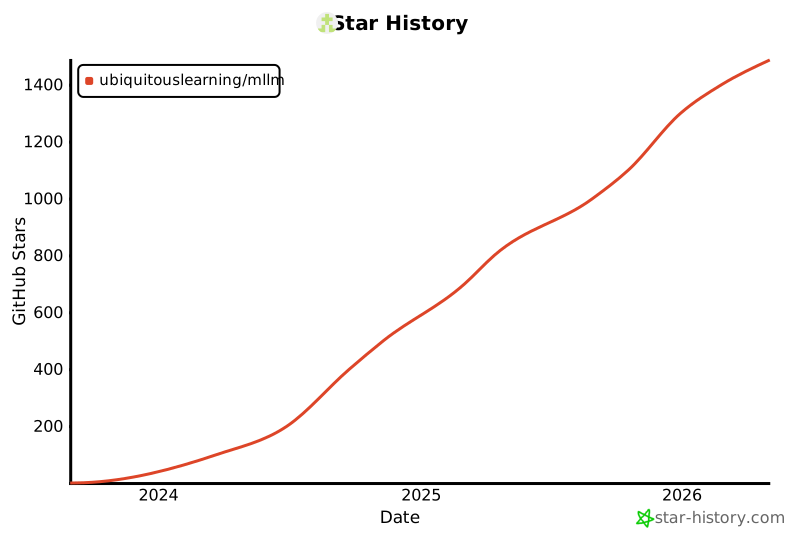
Star History
Metadata
Release files for pymllm 0.1.0.dev20251013
For a detailed explanation of source distributions (sdists) and built distributions (wheels), please see the package formats documentation.
Built distribution (wheel)
| File | Interpreter | ABI | Platform | Reset |
|---|---|---|---|---|
| pymllm-0.1.0.dev20251013-py3-none-macosx_15_0_arm64.whl | Python 3 | none | macOS 15.0+ ARM64 | Details |
Release files / pymllm-0.1.0.dev20251013-py3-none-macosx_15_0_arm64.whl
| Download URL | pymllm-0.1.0.dev20251013-py3-none-macosx_15_0_arm64.whl |
|---|---|
| Size | 4.6 MB |
| Tags | Python 3 macOS 15.0+ ARM64 |
|
SHA-256 checksum How to use checksums |
27cbe8925d11f95df8dec2912be04fb4d45ec1175150378190c6e38c2b6d381e
|
|
BLAKE2b-256 checksum How to use checksums |
273447aa9b2c8a4d2b42fbdeaa5ddc9f7ef7b8001170a638b99c16decf62d0de
|
| Upload date | |
|
Uploaded using Trusted Publishing? What is trusted publishing? |
Yes |
| Uploaded via |
twine/6.1.0 CPython/3.13.7
|
Provenance
Provenance describes where a file came from. On PyPI, provenance is shared via attestations, which provide a verifiable record of the build or publishing details. View details, limitations and caveats.


PyPI Publish Attestation
PyPI verified that this artifact, at this checksum, originated from the publisher listed below.
Signed by GitHub Actions, verified by PyPI on Oct 13, 2025.
Transparency logSecurity for pymllm 0.1.0.dev20251013
Provenance
Provenance describes where a file came from. On PyPI, provenance is shared via attestations, which provide a verifiable record of the build or publishing details. View details, limitations and caveats.
Full provenance
All 1 file in this release has been uploaded with provenance metadata.
Attestation for pymllm-0.1.0.dev20251013-py3-none-macosx_15_0_arm64.whl
PyPI Publish Attestation
PyPI verified that this artifact, at this checksum, originated from the publisher listed below.
Signed by GitHub Actions, verified by PyPI on Oct 13, 2025.
Transparency logA note on package security
PyPI is a repository for distributing packages, not a service for auditing them. While third-party security researchers and our staff do their best to detect and remove malicious packages, PyPI cannot guarantee the quality, security or suitability of any given package.














