
Fast and lightweight multimodal LLM inference engine for mobile and edge devices
Reason this release was yanked:
[bugs] torch import error
Project description
Latest News
Key Features
- Pythonic eager execution – Rapid model development
- Unified hardware support – Arm CPU, OpenCL GPU, QNN NPU
- Advanced optimizations – Quantization, pruning, speculative execution
- NPU-ready IR – Seamless integration with NPU frameworks
- Deployment toolkit – SDK + CLI inference tool
Tested Devices
| Device | OS | CPU | GPU | NPU |
|---|---|---|---|---|
| PC-X86-w/oAVX512 | Ubuntu 22.04 |  |
- | - |
| Nvidia A40 | Ubuntu 22.04 | - | |
- |
| Xiaomi14-8Elite | Android 15 | |
- |  |
| OnePlus13-8Elite | Android 15 | |
- | |
| MacMini-M4 | MacOS 15.5 | |
- | - |
Quick Starts
Serving LLMs with mllm-cli
We have developed a C SDK wrapper for the MLLM C++ SDK to enable seamless integration with Golang. Leveraging this wrapper, we've built the mllm-cli command-line tool in Golang, which is about to be released soon.
Inference with VLM using C++ API
The following example demonstrates how to perform inference on a multimodal vision-language model (VLM), specifically Qwen2-VL, using the mllm framework's C++ API. The process includes loading the model configuration, initializing the tokenizer, loading pretrained weights, processing image-text inputs, and performing streaming text generation.
auto qwen2vl_cfg        = Qwen2VLConfig(config_path);
auto qwen2vl_tokenizer  = Qwen2VLTokenizer(tokenizer_path);
auto qwen2vl            = Qwen2VLForCausalLM(qwen2vl_cfg);

qwen2vl.load(mllm::load(model_path));
auto inputs = qwen2vl_tokenizer.convertMessage({.prompt = prompt_text, .img_file_path = image_path});

for (auto& step : qwen2vl.chat(inputs)) {
  std::wcout << qwen2vl_tokenizer.detokenize(step.cur_token_id) << std::flush;
}
more examples can be found in examples
Custom Models
MLLM offers a highly Pythonic API to simplify model implementation for users. For instance, consider the following concise VisionMLP implementation:
class VisionMlp final : public nn::Module {
  int32_t dim_;
  int32_t hidden_dim_;

  nn::QuickGELU act_;
  nn::Linear fc_1_;
  nn::Linear fc_2_;

 public:
  VisionMlp() = default;

  inline VisionMlp(const std::string& name, const Qwen2VLConfig& cfg) : nn::Module(name) {
    dim_ = cfg.visual_embed_dim;
    hidden_dim_ = cfg.visual_embed_dim * cfg.visual_mlp_ratio;

    fc_1_ = reg<nn::Linear>("fc1", dim_, hidden_dim_, true, cfg.linear_impl_type);
    fc_2_ = reg<nn::Linear>("fc2", hidden_dim_, dim_, true, cfg.linear_impl_type);
    act_ = reg<nn::QuickGELU>("act");
  }

  std::vector<Tensor> forward(const std::vector<Tensor>& inputs, const std::vector<AnyValue>& args) override {
    return {fc_2_(act_(fc_1_(inputs[0])))};
  }
};
To utilize this VisionMLP, instantiate and execute it as follows:
auto mlp = VisionMlp(the_mlp_name, your_cfg);
print(mlp);
auto out = mlp(Tensor::random({1, 1024, 1024}));
print(out);
Model Tracing
MLLM enables computational graph extraction through its trace API, converting dynamic model execution into an optimized static representation. This is essential for model optimization, serialization, and deployment. For example:
auto ir = mllm::ir::trace(mlp, Tensor::random({1, 1024, 1024}));
print(ir);
Installation
Arm Android
pip install -r requirements.txt
python task.py tasks/build_android.yaml
If you need to compile QNN Backends, please install the QNN SDK first. For instructions on setting up the QNN environment, please refer to QNN README.
Once the environment is configured, you can compile MLLM using the following command.
pip install -r requirements.txt
python task.py tasks/build_android_qnn.yaml
X86 PC
pip install -r requirements.txt
python task.py tasks/build_x86.yaml
OSX(Apple Silicon)
pip install -r requirements-mini.txt
python task.py tasks/build_osx_apple_silicon.yaml
if you want to use apple's accelerate library, you can use the following command.
pip install -r requirements-mini.txt
python task.py tasks/build_osx_apple_silicon_accelerate.yaml
Use Docker
The MLLM Team provides Dockerfile to help you get started quickly, and we recommend using Docker images. In the ./docker/ folder, we provide images for arm (cross-compile to arm, host: x86) and qnn (cross-compile to arm, host: x86). Both ARM and QNN images support compilation of X86 Backends.
git clone https://github.com/UbiquitousLearning/mllm.git
cd mllm/docker
docker build -t mllm_arm -f Dockerfile.arm .
docker run -it --cap-add=SYS_ADMIN --network=host --cap-add=SYS_PTRACE --shm-size=4G --security-opt seccomp=unconfined --security-opt apparmor=unconfined --name mllm_arm_dev mllm_arm bash
Important Notes:
- Dockerfile.arm includes NDK downloads. By using this image, you agree to NDK's additional terms.
- QNN SDK contains proprietary licensing terms. We don't bundle it in Dockerfile.qnn - please configure QNN SDK manually.
The details of how to use Dockerfile can be found in Easy Setup with Docker and DevContainer for MLLM
Building the C++ SDK
You can build the SDK using the following commands:
pip install -r requirements.txt
python task.py tasks/build_sdk_<platform>.yaml
# Example for macOS on Apple Silicon:
python task.py tasks/build_sdk_osx_apple_silicon.yaml
By default, the SDK installs to the root directory of the mllm project. To customize the installation path, modify the -DCMAKE_INSTALL_PREFIX option in the task YAML file.
Once installed, integrate this library into your CMake project using find_package(mllm). Below is a minimal working example:
cmake_minimum_required(VERSION 3.21)
project(fancy_algorithm VERSION 1.0.0 LANGUAGES CXX C ASM)

# Set C++20 standard and enable compile commands export
set(CMAKE_CXX_STANDARD 20)
set(CMAKE_EXPORT_COMPILE_COMMANDS ON)

# Find mllm library
find_package(mllm REQUIRED)

add_executable(fancy_algorithm main.cpp)

# Link against Mllm runtime and CPU backend targets
target_link_libraries(fancy_algorithm PRIVATE mllm::MllmRT mllm::MllmCPUBackend)
Building the Documentation
You can build the documentation using the following commands:
pip install -r docs/requirements.txt
python task.py tasks/build_doc.yaml
If you need to generate Doxygen documentation, please ensure that Doxygen is installed on your system. Then, set the enable_doxygen option to true in the tasks/build_doc.yaml configuration file. Running python task.py tasks/build_doc.yaml afterward will generate the C++ API documentation.
Model Convert
mllm provides a set of model converters to convert models from other popular model formats to MLLM. Before you start, please make sure you have installed the pymllm !!!.
bash ./scripts/install_pymllm.sh
future:
Once PyPI approves the creation of the mllm organization, we will publish it there. Afterwards, you can use the command below to install it in the future.
pip install pymllm
After installing pymllm, you can use the following command to convert the model:
mllm-convertor --input_path <your_model> --output_path <your_output_model> --cfg_path <your_config> --pipeline <builtin_pipeline>
For more usage instructions, please refer to mllm-convertor --help.
Tools
Join us & Contribute
Acknowledgements
mllm reuses many low-level kernel implementation from ggml on ARM CPU. It also utilizes stb and wenet for pre-processing images and audios. mllm also has benefitted from following projects: llama.cpp and MNN.
License
Overall Project License
This project is licensed under the terms of the MIT License. Please see the LICENSE file in the root directory for the full text of the MIT License.
Apache 2.0 Licensed Components
Certain component(wenet) of this project is licensed under the Apache License 2.0. These component is clearly identified in their respective subdirectories along with a copy of the Apache License 2.0. For the full text of the Apache License 2.0, please refer to the LICENSE-APACHE file located in the relevant subdirectories.
Citation
@article{xu2025fast,
  title={Fast On-device LLM Inference with NPUs},
  author={Xu, Daliang and Zhang, Hao and Yang, Liming and Liu, Ruiqi and Huang, Gang and Xu, Mengwei and Liu, Xuanzhe},
  booktitle={International Conference on Architectural Support for Programming Languages and Operating Systems (ASPLOS)},
  year={2025}
}
@misc{yi2023mllm,
  title = {mllm: fast and lightweight multimodal LLM inference engine for mobile and edge devices},
  author = {Rongjie Yi and Xiang Li and Zhenyan Lu and Hao Zhang and Daliang Xu and Liming Yang and Weikai Xie and Chenghua Wang and Xuanzhe Liu and Mengwei Xu},
  year = {2023},
  publisher = {mllm Team},
  url = {https://github.com/UbiquitousLearning/mllm}
}
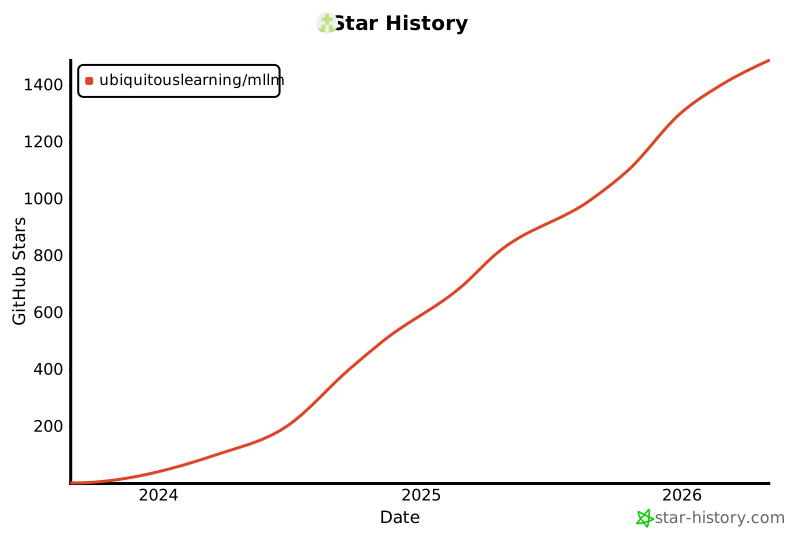
Star History
Project details
Release history Release notifications | RSS feed


Download files
Download the file for your platform. If you're not sure which to choose, learn more about installing packages.
Source Distributions
Built Distribution
Filter files by name, interpreter, ABI, and platform.
If you're not sure about the file name format, learn more about wheel file names.
Copy a direct link to the current filters
File details
Details for the file pymllm-2.0.0-py3-none-macosx_15_0_arm64.whl.
File metadata
- Download URL: pymllm-2.0.0-py3-none-macosx_15_0_arm64.whl
- Upload date:
- Size: 4.6 MB
- Tags: Python 3, macOS 15.0+ ARM64
- Uploaded using Trusted Publishing? Yes
- Uploaded via: twine/6.1.0 CPython/3.13.7
File hashes
| Algorithm | Hash digest | |
|---|---|---|
| SHA256 |
d30d979bbb960192f9dd1d7208aa6fe852cc253e5b57c1b281f0b3c1fa025d3f
|
|
| MD5 |
ad915ecf5a5df57c593a4c695c228413
|
|
| BLAKE2b-256 |
1efc695b0770dda5ea05049be58164759780e90eec658663c691289b580b4220
|
Provenance
The following attestation bundles were made for pymllm-2.0.0-py3-none-macosx_15_0_arm64.whl:
Publisher:
pymllm-macos-nightly.yml on UbiquitousLearning/mllm
-
Statement:
-
Statement type:
https://in-toto.io/Statement/v1 -
Predicate type:
https://docs.pypi.org/attestations/publish/v1 -
Subject name:
pymllm-2.0.0-py3-none-macosx_15_0_arm64.whl -
Subject digest:
d30d979bbb960192f9dd1d7208aa6fe852cc253e5b57c1b281f0b3c1fa025d3f - Sigstore transparency entry: 601554350
- Sigstore integration time:
-
Permalink:
UbiquitousLearning/mllm@20151996efe626eaac1ebe1e07295f12a3bdf5ca -
Branch / Tag:
refs/heads/v2 - Owner: https://github.com/UbiquitousLearning
-
Access:
public
-
Token Issuer:
https://token.actions.githubusercontent.com -
Runner Environment:
github-hosted -
Publication workflow:
pymllm-macos-nightly.yml@20151996efe626eaac1ebe1e07295f12a3bdf5ca -
Trigger Event:
push
-
Statement type:






