
PyMoDAQ



Linux |
PyQt5 |
PyQt6 |
PySide6 |
|---|---|---|---|
Python 3.10 |
|||
Python 3.11 |
|||
Python 3.12 |
|||
Python 3.13 |


Windows |
PyQt5 |
PyQt6 |
PySide6 |
|---|---|---|---|
Python 3.10 |
|||
Python 3.11 |
|||
Python 3.12 |
|||
Python 3.13 |


PyMoDAQ, Modular Data Acquisition with Python, is a set of python modules used to interface any kind of experiments. It simplifies the interaction with detector and actuator hardware to go straight to the data acquisition of interest.
It has two purposes:
First, to provide a complete interface to perform automated measurements or logging data without having to write a user/interface for each new experiment, this is under the Dashboard_module environment and its extensions.
Second, to provide various tools (modules) to easily build custom apps
It is organised a shown below:
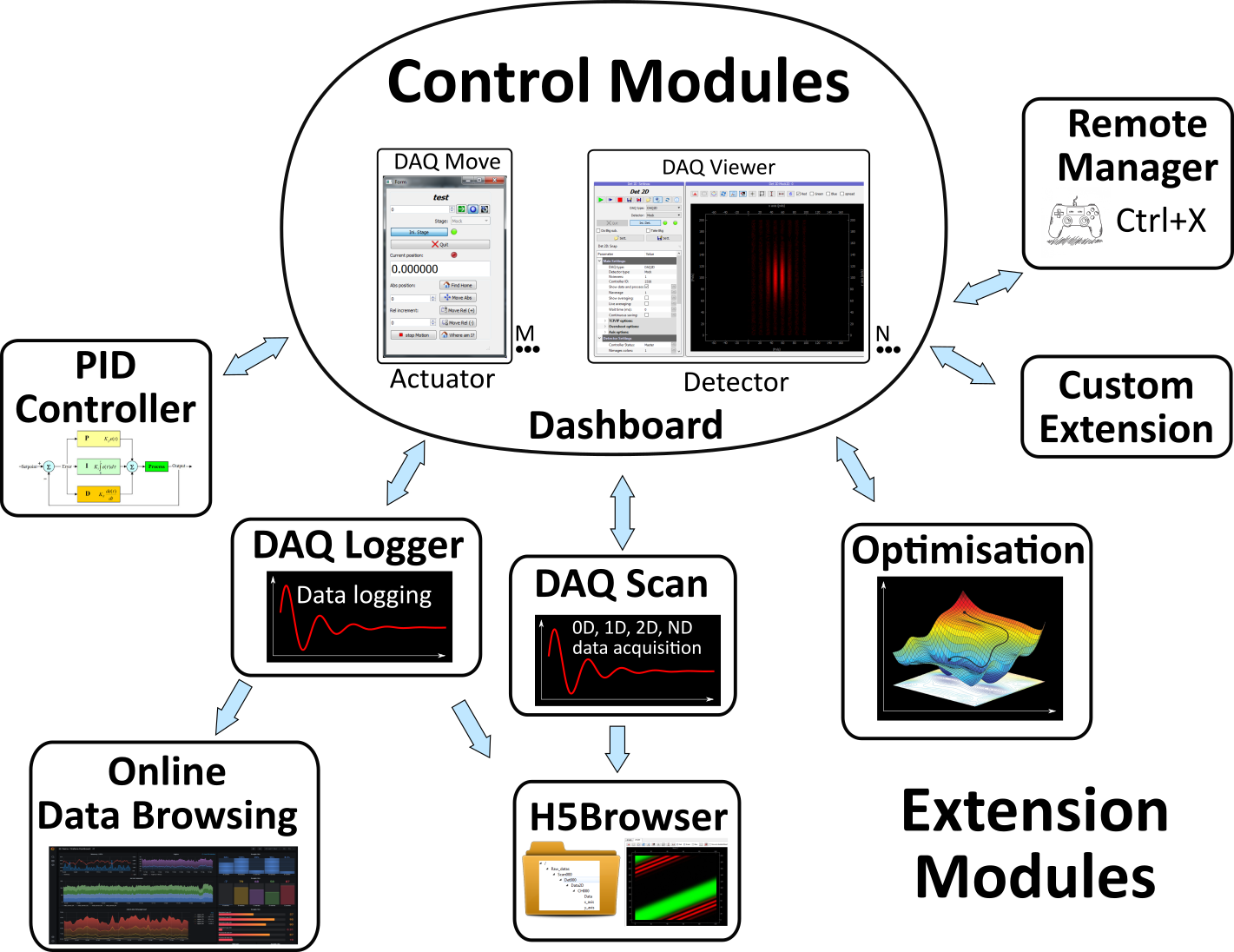
PyMoDAQ’s Dashboard and its extensions: DAQ_Scan for automated acquisitions, DAQ_Logger for data logging and many other.
The main component is the Dashboard : This is a graphical component that will initialize actuators and detectors given the need of your particular experiment. You configure the dashboard using an interface for quick launch of various configurations (numbers and types of control modules).
The detectors and the actuators are represented and manipulated using two control modules:
DAQ_Move_module : used to control/drive an actuator (stand alone and/or automated). Any number of these modules can be instantiated in the Dashboard
DAQ_Viewer_module : used to control/drive a detector (stand alone and/or automated).
Any number of these modules can be instantiated in the Dashboard.
The Dashboard allows you to start dedicated extensions that will make use of the control modules:
DAQ_Logger_module : This module lets you log data from one or many detectors defined in the dashboard. You can log data in a binary hierarchical hdf5 file or towards a sql database
DAQ_Scan_module : This module lets you configure automated data acquisition from one or many detectors defined in the dashboard as a function or one or more actuators defined also in the dashboard.
and many others to simplify any application development.
Published under the MIT FREE SOFTWARE LICENSE
GitHub repo: https://github.com/PyMoDAQ
Documentation: http://pymodaq.cnrs.fr/
Metadata
Release files for pymodaq 5.2.13
For a detailed explanation of source distributions (sdists) and built distributions (wheels), please see the package formats documentation.
Source distribution (sdist)
| File | Size | Uploaded | Provenance | Actions |
|---|---|---|---|---|
| pymodaq-5.2.13.tar.gz | 347.0 kB | Without provenance | Details for pymodaq-5.2.13.tar.gz |
Built distribution (wheel)
| File | Interpreter | ABI | Platform | Actions Reset |
|---|---|---|---|---|
| pymodaq-5.2.13-py3-none-any.whl | Python 3 | none | any | Details for pymodaq-5.2.13-py3-none-any.whl |
Total release size: 766.0 kB
Release files / pymodaq-5.2.13.tar.gz
| Download URL | pymodaq-5.2.13.tar.gz |
|---|---|
| Size | 347.0 kB |
| Tags | Source |
|
SHA-256 checksum How to use checksums |
ac0d77b3cb0403a383332742511dd385269235c4d5da5fb9aed49f20ad05f4eb
|
|
BLAKE2b-256 checksum How to use checksums |
0f08a50e0ec6c629a1b06691647001544be48cd6723114f43488ebb180cb684e
|
| Upload date | |
|
Uploaded using Trusted Publishing? What is trusted publishing? |
No |
| Uploaded via |
Hatch/1.18.1 {"ci":true,"cpu":"x86_64","distro":{"id":"resolute","libc":{"lib":"glibc","version":"2.43"},"name":"Ubuntu","version":"26.04"},"implementation":{"name":"CPython","version":"3.12.15"},"installer":{"name":"hatch","version":"1.18.1"},"openssl_version":"OpenSSL 3.5.5 27 Jan 2026","python":"3.12.15","system":{"name":"Linux","release":"7.0.0-1017-azure"}} HTTPX2/2.16.0
|
Release files / pymodaq-5.2.13-py3-none-any.whl
| Download URL | pymodaq-5.2.13-py3-none-any.whl |
|---|---|
| Size | 419.0 kB |
| Tags | Python 3 |
|
SHA-256 checksum How to use checksums |
30e1e13b47544e75722b0f516c86fe8e7cda546a932c88d29224a429a5b31a94
|
|
BLAKE2b-256 checksum How to use checksums |
d25e765faa41e5bca73394a82d2905c2961ffadb58efb0aefc6acd20de5c1bb5
|
| Upload date | |
|
Uploaded using Trusted Publishing? What is trusted publishing? |
No |
| Uploaded via |
Hatch/1.18.1 {"ci":true,"cpu":"x86_64","distro":{"id":"resolute","libc":{"lib":"glibc","version":"2.43"},"name":"Ubuntu","version":"26.04"},"implementation":{"name":"CPython","version":"3.12.15"},"installer":{"name":"hatch","version":"1.18.1"},"openssl_version":"OpenSSL 3.5.5 27 Jan 2026","python":"3.12.15","system":{"name":"Linux","release":"7.0.0-1017-azure"}} HTTPX2/2.16.0
|
Security for pymodaq 5.2.13
Provenance
Provenance describes where a file came from. On PyPI, provenance is shared via attestations, which provide a verifiable record of the build or publishing details. View details, limitations and caveats.
No provenance found
None of the files in this release were uploaded with provenance metadata.
A note on package security
PyPI is a repository for distributing packages, not a service for auditing them. While third-party security researchers and our staff do their best to detect and remove malicious packages, PyPI cannot guarantee the quality, security or suitability of any given package.
To learn more about protecting yourself from malicious actors, visit our package security documentation.














