
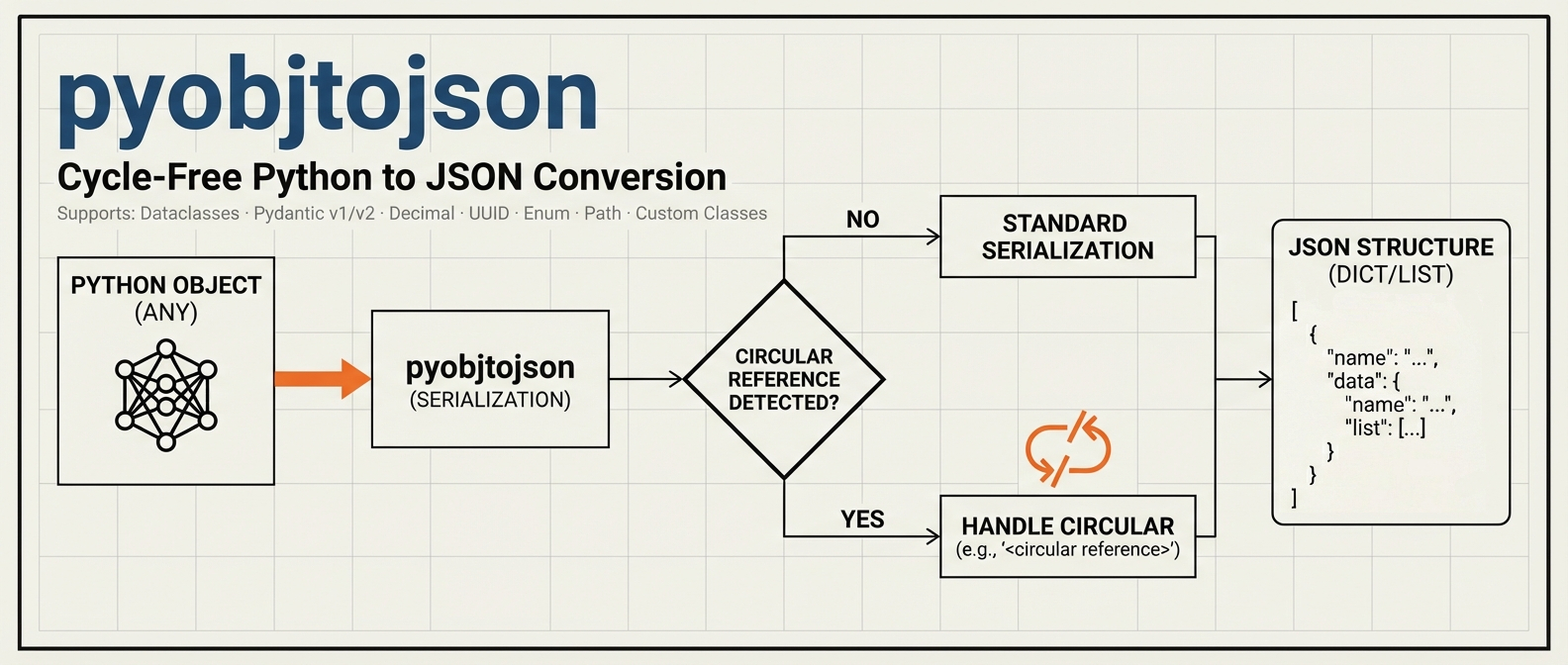
pyobjtojson





A lightweight Python library that simplifies the process of serializing any Python object into a JSON-friendly structure without getting tripped up by circular references. With built-in support for dataclasses, Pydantic (v1 & v2), and standard Python collections, pyobjtojson helps you convert your objects into a cycle-free, JSON-ready format for logging, storage, or data transfer.
Features
- Automatic Circular Reference Detection
Detects and replaces cyclical structures with
"<circular reference>"to prevent infinite loops. - Broad Compatibility
Works seamlessly with dictionaries, lists, custom classes, dataclasses, and Pydantic models (including both
model_dump()from v2 anddict()from v1). - Extended Standard Types Support
Native support for
datetime,date,time,UUID,Decimal,bytes,Enum,Path,set, andfrozenset. - JSON-Safe Dictionary Keys
Non-string keys (
UUID,datetime,Enum, tuples, and other objects) are converted so the returned structure always survivesjson.dumps. - Full Type Hints Support Complete type annotations for better IDE autocomplete, type checking with mypy, and improved code documentation.
- Non-Intrusive Serialization
No special inheritance or overrides needed. Uses reflection and standard Python methods (
__dict__,asdict(),to_dict(), etc.) where available. - Easy to Integrate
Just call
obj_to_json()on your data structure. No additional configuration required.
Installation with uv:
uv add pyobjtojson
Quickstart
1. Basic Usage
from pyobjtojson import obj_to_json

# A simple dictionary with lists
data = {
    "key1": "value1",
    "key2": [1, 2, 3],
    "nested": {"inner_key": "inner_value"}
}

# obj_to_json returns a JSON-serializable structure (nested dicts, lists and
# primitives), not a JSON string. Pass it to json.dumps() when you need text:
json_obj = obj_to_json(data)

import json
json_text = json.dumps(json_obj)
Output (example):
{
  "key1": "value1",
  "key2": [
    1,
    2,
    3
  ],
  "nested": {
    "inner_key": "inner_value"
  }
}
2. Handling Circular References
from pyobjtojson import obj_to_json

a = {"name": "A"}
b = {"circular": a}
a["b"] = b  # Creates a circular reference

obj_to_json(a, check_circular=True)  # check_circular is True by default.
Output:
{
  "name": "A",
  "b": {
    "circular": "<circular reference>"
  }
}
The marker replaces the first object that is already being serialized on the
current path: a is an ancestor of itself, so the reference back to it inside
b is cut right there.
3. Working with Dataclasses and Pydantic
from dataclasses import dataclass
from pydantic import BaseModel
from pyobjtojson import obj_to_json

@dataclass
class MyDataClass:
    title: str
    value: int

class MyModel(BaseModel):
    name: str
    age: int

dataclass_instance = MyDataClass(title="Test", value=123)
pydantic_instance = MyModel(name="Alice", age=30)

obj = {
    "dataclass": dataclass_instance,
    "pydantic": pydantic_instance
}

obj_to_json(obj)
Output:
{
  "dataclass": {
    "title": "Test",
    "value": 123
  },
  "pydantic": {
    "name": "Alice",
    "age": 30
  }
}
4. Standard Python Types
pyobjtojson now supports many standard Python types out of the box:
from datetime import datetime, date, time
from decimal import Decimal
from enum import Enum
from pathlib import Path
from uuid import UUID
from pyobjtojson import obj_to_json

class Status(Enum):
    ACTIVE = "active"
    INACTIVE = "inactive"

data = {
    "timestamp": datetime(2024, 1, 15, 10, 30, 45),
    "date": date(2024, 1, 15),
    "time": time(14, 30, 0),
    "id": UUID("12345678-1234-5678-1234-567812345678"),
    "price": Decimal("99.99"),
    "binary": b"Hello",
    "status": Status.ACTIVE,
    "path": Path("/home/user/file.txt"),
    "tags": {"python", "json", "api"}
}

obj_to_json(data)
Output:
{
  "timestamp": "2024-01-15T10:30:45",
  "date": "2024-01-15",
  "time": "14:30:00",
  "id": "12345678-1234-5678-1234-567812345678",
  "price": 99.99,
  "binary": "SGVsbG8=",
  "status": "active",
  "path": "/home/user/file.txt",
  "tags": ["api", "json", "python"]
}
Supported Standard Types:
- datetime, date, time -> ISO format strings
- UUID -> string representation
- Decimal -> float (default) or string (with
decimal_as_float=False) - bytes, bytearray -> base64 encoded strings
- Enum -> underlying value
- Path -> string representation
- set, frozenset -> sorted lists
5. Dictionary Keys
JSON object keys must be strings, so pyobjtojson normalizes non-string keys
to keep the result compatible with json.dumps:
str,int,float,bool, andNonekeys are kept as-is (json.dumpsalready coerces the non-string primitives to strings itself). The exception is a non-finite float key (inf,-inf,nan), which follows thenon_finitepolicy like any other non-finite float.- Typed keys such as
UUID,datetime,Enum,Decimal, andPathare converted to their natural scalar form (e.g.UUID-> string,datetime-> ISO string), respectingdecimal_as_float. - Any remaining composite key (a tuple,
frozenset, or custom object) is stringified as a last resort.
from uuid import UUID
from pyobjtojson import obj_to_json

data = {
    UUID("12345678-1234-5678-1234-567812345678"): "by uuid",
    (1, 2): "by tuple",
    42: "by int",
}

obj_to_json(data)
Output:
{
  "12345678-1234-5678-1234-567812345678": "by uuid",
  "[1, 2]": "by tuple",
  "42": "by int"
}
Note: If two distinct keys normalize to the same string, the last one wins. Primitive keys are the exception: they pass through unconverted, so a dict mixing
1and"1"keeps both entries andjson.dumpsthen emits a duplicate"1"key, exactly as it does when given that dict directly. Strict parsers may reject such a document, andjson.loadskeeps only the last entry.
API Reference
obj_to_json(obj, check_circular=True, decimal_as_float=True, non_finite="null")
Returns a cycle-free structure (nested dictionaries/lists) that is JSON-serializable.
Parameters:
-
obj(Any): The object to serialize to JSON-like structures. -
check_circular(bool, optional): If True (default), detect and mark circular references as"<circular reference>". -
decimal_as_float(bool, optional): If True (default), convertDecimaltofloat. If False, convert to string for high precision. -
non_finite(str, optional): How to represent non-finite floats (inf,-inf,nan), which have no JSON literal. One of:"null"(default): convert toNone, matching JavaScript'sJSON.stringify."string": convert to"Infinity","-Infinity", or"NaN"."keep": leave the float as-is. Note this is not valid JSON and will raise withjson.dumps(..., allow_nan=False).
An unknown value raises
ValueError.
Returns:
dict | list | Any: A JSON-serializable structure.
Non-finite floats
inf, -inf, and nan are valid Python floats but have no representation in
the JSON spec. Left untouched they break json.dumps(..., allow_nan=False) and
produce the non-standard Infinity/NaN tokens that strict parsers reject. By
default pyobjtojson converts them to null so the output is always valid,
portable JSON:
from pyobjtojson import obj_to_json

data = {"ratio": float("inf"), "value": float("nan"), "ok": 1.5}

obj_to_json(data)                      # {"ratio": None, "value": None, "ok": 1.5}
obj_to_json(data, non_finite="string") # {"ratio": "Infinity", "value": "NaN", "ok": 1.5}
Type Hints
pyobjtojson is fully typed and passes strict mypy checking. This provides:
- Better IDE Support: Autocomplete and inline documentation
- Type Safety: Catch errors before runtime with mypy
- Clear API: Type annotations serve as documentation
from typing import Any
from pyobjtojson import obj_to_json

# Your IDE will provide autocomplete and type checking
def serialize_data(data: dict[str, Any]) -> Any:
    return obj_to_json(
        data,
        check_circular=True,    # bool
        decimal_as_float=False  # bool
    )
To check types in your project:
mypy your_code.py
Contributing
Contributions, bug reports, and feature requests are welcome! Feel free to open an issue or submit a pull request.
License
1 maintainer

Metadata
1 maintainer
Release files for pyobjtojson 0.10.2
For a detailed explanation of source distributions (sdists) and built distributions (wheels), please see the package formats documentation.
Source distribution (sdist)
| File | Size | Uploaded | Provenance | |
|---|---|---|---|---|
| pyobjtojson-0.10.2.tar.gz | 26.6 kB | Without provenance | Details |
Built distribution (wheel)
| File | Interpreter | ABI | Platform | Reset |
|---|---|---|---|---|
| pyobjtojson-0.10.2-py3-none-any.whl | Python 3 | none | any | Details |
Total release size: 38.9 kB
Release files / pyobjtojson-0.10.2.tar.gz
| Download URL | pyobjtojson-0.10.2.tar.gz |
|---|---|
| Size | 26.6 kB |
| Tags | Source |
|
SHA-256 checksum How to use checksums |
07854921da6874c9e1a31161b2c9b77233849b275dd108d4d1471f20d7014ecb
|
|
BLAKE2b-256 checksum How to use checksums |
6ccf84e96281590019464c6f4e9af4461113a3dac44161154568f1f3f550804a
|
| Upload date | |
|
Uploaded using Trusted Publishing? What is trusted publishing? |
Yes |
| Uploaded via |
uv/0.11.26 {"installer":{"name":"uv","version":"0.11.26","subcommand":["publish"]},"python":null,"implementation":{"name":null,"version":null},"distro":{"name":"Ubuntu","version":"24.04","id":"noble","libc":null},"system":{"name":null,"release":null},"cpu":null,"openssl_version":null,"setuptools_version":null,"rustc_version":null,"ci":true}
|
Release files / pyobjtojson-0.10.2-py3-none-any.whl
| Download URL | pyobjtojson-0.10.2-py3-none-any.whl |
|---|---|
| Size | 12.3 kB |
| Tags | Python 3 |
|
SHA-256 checksum How to use checksums |
5eb284e4877da1a335e3b668b2ae3fc66d22eeaa26de681e518d1a01ca46242a
|
|
BLAKE2b-256 checksum How to use checksums |
6e1ce3983004f28962f9a5cafb47ebbfbafb4dde8d58b831540ae0f843d34cb4
|
| Upload date | |
|
Uploaded using Trusted Publishing? What is trusted publishing? |
Yes |
| Uploaded via |
uv/0.11.26 {"installer":{"name":"uv","version":"0.11.26","subcommand":["publish"]},"python":null,"implementation":{"name":null,"version":null},"distro":{"name":"Ubuntu","version":"24.04","id":"noble","libc":null},"system":{"name":null,"release":null},"cpu":null,"openssl_version":null,"setuptools_version":null,"rustc_version":null,"ci":true}
|
Security for pyobjtojson 0.10.2
Provenance
Provenance describes where a file came from. On PyPI, provenance is shared via attestations, which provide a verifiable record of the build or publishing details. View details, limitations and caveats.
No provenance found
None of the files in this release were uploaded with provenance metadata.
A note on package security
PyPI is a repository for distributing packages, not a service for auditing them. While third-party security researchers and our staff do their best to detect and remove malicious packages, PyPI cannot guarantee the quality, security or suitability of any given package.














