
A Python library that simplifies serializing any Python object to JSON-friendly structures, gracefully handling circular references.
Verified details
These details have been verified by PyPIProject links
GitHub Statistics
Maintainers

Project description
pyobjtojson





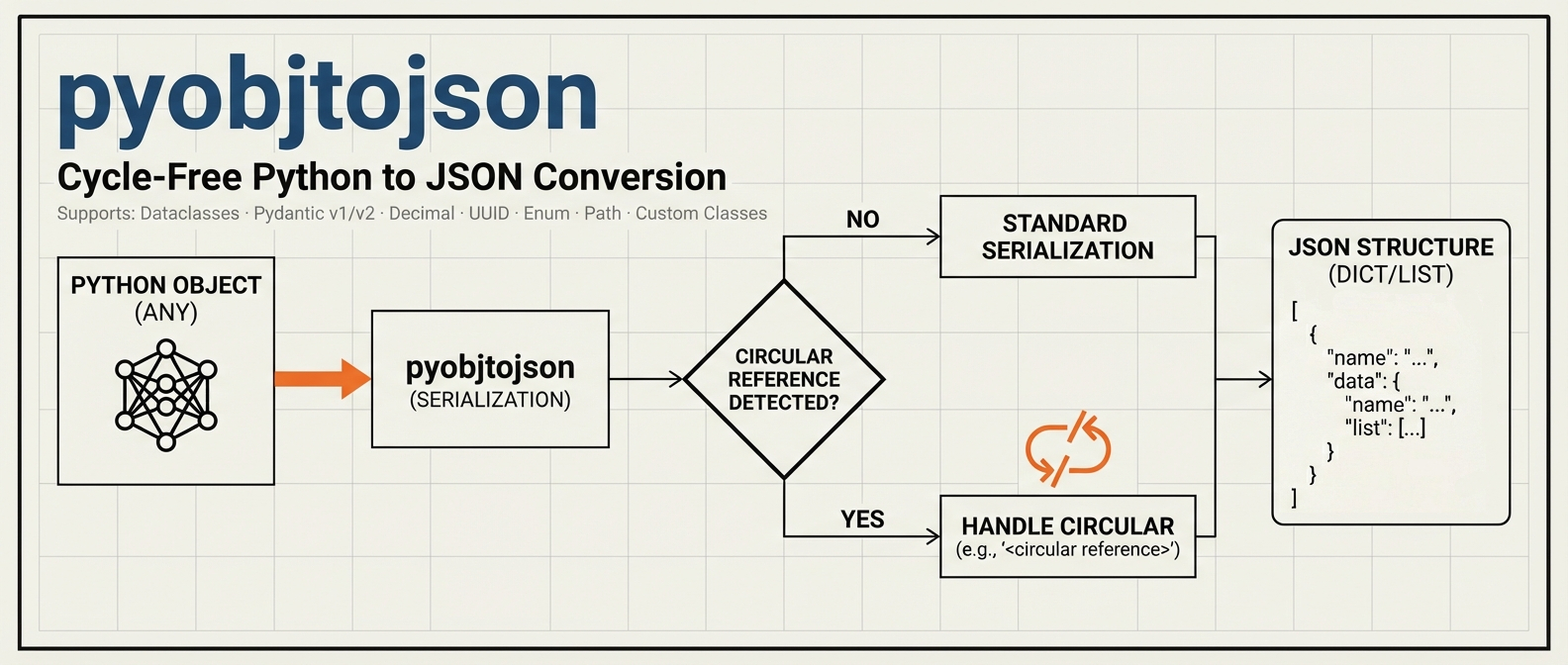
A lightweight Python library that simplifies the process of serializing any Python object into a JSON-friendly structure without getting tripped up by circular references. With built-in support for dataclasses, Pydantic (v1 & v2), and standard Python collections, pyobjtojson helps you convert your objects into a cycle-free, JSON-ready format for logging, storage, or data transfer.
Features
- Automatic Circular Reference Detection
Detects and replaces cyclical structures with
"<circular reference>"to prevent infinite loops. - Broad Compatibility
Works seamlessly with dictionaries, lists, custom classes, dataclasses, and Pydantic models (including both
model_dump()from v2 anddict()from v1). - Extended Standard Types Support
Native support for
datetime,date,time,UUID,Decimal,bytes,Enum,Path,set, andfrozenset. - JSON-Safe Dictionary Keys
Non-string keys (
UUID,datetime,Enum, tuples, and other objects) are converted so the returned structure always survivesjson.dumps. - Full Type Hints Support Complete type annotations for better IDE autocomplete, type checking with mypy, and improved code documentation.
- Non-Intrusive Serialization
No special inheritance or overrides needed. Uses reflection and standard Python methods (
__dict__,asdict(),to_dict(), etc.) where available. - Easy to Integrate
Just call
obj_to_json()on your data structure. No additional configuration required.
Installation with uv:
uv add pyobjtojson
Quickstart
1. Basic Usage
from pyobjtojson import obj_to_json

# A simple dictionary with lists
data = {
    "key1": "value1",
    "key2": [1, 2, 3],
    "nested": {"inner_key": "inner_value"}
}

# obj_to_json returns a JSON-serializable structure (nested dicts, lists and
# primitives), not a JSON string. Pass it to json.dumps() when you need text:
json_obj = obj_to_json(data)

import json
json_text = json.dumps(json_obj)
Output (example):
{
  "key1": "value1",
  "key2": [
    1,
    2,
    3
  ],
  "nested": {
    "inner_key": "inner_value"
  }
}
2. Handling Circular References
from pyobjtojson import obj_to_json

a = {"name": "A"}
b = {"circular": a}
a["b"] = b  # Creates a circular reference

obj_to_json(a, check_circular=True)  # check_circular is True by default.
Output:
{
  "name": "A",
  "b": {
    "circular": "<circular reference>"
  }
}
The marker replaces the first object that is already being serialized on the
current path: a is an ancestor of itself, so the reference back to it inside
b is cut right there.
3. Working with Dataclasses and Pydantic
from dataclasses import dataclass
from pydantic import BaseModel
from pyobjtojson import obj_to_json

@dataclass
class MyDataClass:
    title: str
    value: int

class MyModel(BaseModel):
    name: str
    age: int

dataclass_instance = MyDataClass(title="Test", value=123)
pydantic_instance = MyModel(name="Alice", age=30)

obj = {
    "dataclass": dataclass_instance,
    "pydantic": pydantic_instance
}

obj_to_json(obj)
Output:
{
  "dataclass": {
    "title": "Test",
    "value": 123
  },
  "pydantic": {
    "name": "Alice",
    "age": 30
  }
}
4. Standard Python Types
pyobjtojson now supports many standard Python types out of the box:
from datetime import datetime, date, time
from decimal import Decimal
from enum import Enum
from pathlib import Path
from uuid import UUID
from pyobjtojson import obj_to_json

class Status(Enum):
    ACTIVE = "active"
    INACTIVE = "inactive"

data = {
    "timestamp": datetime(2024, 1, 15, 10, 30, 45),
    "date": date(2024, 1, 15),
    "time": time(14, 30, 0),
    "id": UUID("12345678-1234-5678-1234-567812345678"),
    "price": Decimal("99.99"),
    "binary": b"Hello",
    "status": Status.ACTIVE,
    "path": Path("/home/user/file.txt"),
    "tags": {"python", "json", "api"}
}

obj_to_json(data)
Output:
{
  "timestamp": "2024-01-15T10:30:45",
  "date": "2024-01-15",
  "time": "14:30:00",
  "id": "12345678-1234-5678-1234-567812345678",
  "price": 99.99,
  "binary": "SGVsbG8=",
  "status": "active",
  "path": "/home/user/file.txt",
  "tags": ["api", "json", "python"]
}
Supported Standard Types:
- datetime, date, time → ISO format strings
- UUID → string representation
- Decimal → float (default) or string (with
decimal_as_float=False) - bytes, bytearray → base64 encoded strings
- Enum → underlying value
- Path → string representation
- set, frozenset → sorted lists
5. Dictionary Keys
JSON object keys must be strings, so pyobjtojson normalizes non-string keys
to keep the result compatible with json.dumps:
str,int,float,bool, andNonekeys are kept as-is (json.dumpsalready coerces the non-string primitives to strings itself). The exception is a non-finite float key (inf,-inf,nan), which follows thenon_finitepolicy like any other non-finite float.- Typed keys such as
UUID,datetime,Enum,Decimal, andPathare converted to their natural scalar form (e.g.UUID→ string,datetime→ ISO string), respectingdecimal_as_float. - Any remaining composite key (a tuple,
frozenset, or custom object) is stringified as a last resort.
from uuid import UUID
from pyobjtojson import obj_to_json

data = {
    UUID("12345678-1234-5678-1234-567812345678"): "by uuid",
    (1, 2): "by tuple",
    42: "by int",
}

obj_to_json(data)
Output:
{
  "12345678-1234-5678-1234-567812345678": "by uuid",
  "[1, 2]": "by tuple",
  "42": "by int"
}
Note: If two distinct keys normalize to the same string, the last one wins. Primitive keys are the exception: they pass through unconverted, so a dict mixing
1and"1"keeps both entries andjson.dumpsthen emits a duplicate"1"key, exactly as it does when given that dict directly. Strict parsers may reject such a document, andjson.loadskeeps only the last entry.
API Reference
obj_to_json(obj, check_circular=True, decimal_as_float=True, non_finite="null")
Returns a cycle-free structure (nested dictionaries/lists) that is JSON-serializable.
Parameters:
-
obj(Any): The object to serialize to JSON-like structures. -
check_circular(bool, optional): If True (default), detect and mark circular references as"<circular reference>". -
decimal_as_float(bool, optional): If True (default), convertDecimaltofloat. If False, convert to string for high precision. -
non_finite(str, optional): How to represent non-finite floats (inf,-inf,nan), which have no JSON literal. One of:"null"(default): convert toNone, matching JavaScript'sJSON.stringify."string": convert to"Infinity","-Infinity", or"NaN"."keep": leave the float as-is. Note this is not valid JSON and will raise withjson.dumps(..., allow_nan=False).
An unknown value raises
ValueError.
Returns:
dict | list | Any: A JSON-serializable structure.
Non-finite floats
inf, -inf, and nan are valid Python floats but have no representation in
the JSON spec. Left untouched they break json.dumps(..., allow_nan=False) and
produce the non-standard Infinity/NaN tokens that strict parsers reject. By
default pyobjtojson converts them to null so the output is always valid,
portable JSON:
from pyobjtojson import obj_to_json

data = {"ratio": float("inf"), "value": float("nan"), "ok": 1.5}

obj_to_json(data)                      # {"ratio": None, "value": None, "ok": 1.5}
obj_to_json(data, non_finite="string") # {"ratio": "Infinity", "value": "NaN", "ok": 1.5}
Type Hints
pyobjtojson is fully typed and passes strict mypy checking. This provides:
- Better IDE Support: Autocomplete and inline documentation
- Type Safety: Catch errors before runtime with mypy
- Clear API: Type annotations serve as documentation
from typing import Any
from pyobjtojson import obj_to_json

# Your IDE will provide autocomplete and type checking
def serialize_data(data: dict[str, Any]) -> Any:
    return obj_to_json(
        data,
        check_circular=True,    # bool
        decimal_as_float=False  # bool
    )
To check types in your project:
mypy your_code.py
Contributing
Contributions, bug reports, and feature requests are welcome! Feel free to open an issue or submit a pull request.
License
Project details
Verified details
These details have been verified by PyPIProject links
GitHub Statistics
Maintainers
Release history Release notifications | RSS feed


Download files
Download the file for your platform. If you're not sure which to choose, learn more about installing packages.
Source Distribution
Built Distribution
Filter files by name, interpreter, ABI, and platform.
If you're not sure about the file name format, learn more about wheel file names.
Copy a direct link to the current filters
File details
Details for the file pyobjtojson-0.10.1.tar.gz.
File metadata
- Download URL: pyobjtojson-0.10.1.tar.gz
- Upload date:
- Size: 26.6 kB
- Tags: Source
- Uploaded using Trusted Publishing? Yes
- Uploaded via: uv/0.11.26 {"installer":{"name":"uv","version":"0.11.26","subcommand":["publish"]},"python":null,"implementation":{"name":null,"version":null},"distro":{"name":"Ubuntu","version":"24.04","id":"noble","libc":null},"system":{"name":null,"release":null},"cpu":null,"openssl_version":null,"setuptools_version":null,"rustc_version":null,"ci":true}
File hashes
| Algorithm | Hash digest | |
|---|---|---|
| SHA256 |
224b9632c7890a9eb36a63331d1bee04d73719d8edc269e3caee9a9d82b89786
|
|
| MD5 |
4c37418b17cfe8c86d744d51a7a19d8a
|
|
| BLAKE2b-256 |
b181b59209d542aaa11b8d59f6a4dddb943e073a9e1f8c17ccc36bfd2759a365
|
File details
Details for the file pyobjtojson-0.10.1-py3-none-any.whl.
File metadata
- Download URL: pyobjtojson-0.10.1-py3-none-any.whl
- Upload date:
- Size: 12.3 kB
- Tags: Python 3
- Uploaded using Trusted Publishing? Yes
- Uploaded via: uv/0.11.26 {"installer":{"name":"uv","version":"0.11.26","subcommand":["publish"]},"python":null,"implementation":{"name":null,"version":null},"distro":{"name":"Ubuntu","version":"24.04","id":"noble","libc":null},"system":{"name":null,"release":null},"cpu":null,"openssl_version":null,"setuptools_version":null,"rustc_version":null,"ci":true}
File hashes
| Algorithm | Hash digest | |
|---|---|---|
| SHA256 |
8d2ad63342babd5dafa2613ca4515f032a2ca6317b8ae3b6a197b4e3a37a3a96
|
|
| MD5 |
bc1617355d822c1959d273495e9e3c54
|
|
| BLAKE2b-256 |
a1fcdbeb814e4ae0a9f115378be4d04f5e7bd202167c74f8a9e428e48a30d2d6
|






