
Generate SVG Entity Relationship Diagrams from PostgreSQL database dump files

Project description
pypgsvg - Lightweight PostgreSQL ERD Generator
pypgsvg is a lightweight, enterprise-ready Python tool that generates interactive Entity Relationship Diagrams (ERDs) from PostgreSQL schema dump files. With only Graphviz as a dependency, it's perfect for enterprise scripting, CI/CD pipelines, and rapid deployment scenarios.
🚀 Enterprise Features
- Zero-dependency Python tool (except Graphviz)
- Interactive SVG output with navigation and selection tools
- Scriptable and automatable for enterprise workflows
- Quick deployment - install and run in seconds
- Self-contained - no database connections required
- Cross-platform support (Windows, macOS, Linux)
✨ Interactive Features
🎯 Selection & Navigation Tools
- Smart table/edge selection - Click any element to view detailed SQL
- Miniature overview with viewport indicator for large schemas
- Drag & drop containers - Reposition windows anywhere
- Resizable panels - Customize your workspace layout
📋 Copy & Export Tools
- One-click copy - Copy table definitions, foreign keys, or trigger SQL
- Download selection details - Export selected elements as formatted text
- Emoji-free output - Enterprise-friendly plain text exports
🖱️ Interactive Controls
- Minimize/maximize any panel to focus on your work
- Close buttons for distraction-free viewing
- Pan and zoom with mouse or miniature navigator
- Keyboard shortcuts (ESC/R to reset view)
🎨 Visual Enhancements
- Color-coded tables with accessible contrast
- Hover effects for better element identification
- Professional styling suitable for documentation and presentations
📦 Installation
Lightweight setup - only 2 steps:
-
Install
pypgsvg:pip install pypgsvg
-
Install Graphviz (the only external dependency):
- macOS:
brew install graphviz - Ubuntu/Debian:
sudo apt-get install graphviz - CentOS/RHEL:
sudo yum install graphviz - Windows: Download from Graphviz.org
- macOS:
That's it! Ready for enterprise deployment.
🛠️ Enterprise Usage
Quick Start - Schema Analysis
# Generate interactive ERD from schema dump
pypgsvg schema.dump --output database_erd --view

# Enterprise automation (CI/CD ready)
pypgsvg schema.dump --output docs/database_diagram --rankdir TB --node-sep 4
Advanced Enterprise Options
# Large schema optimization
pypgsvg large_schema.dump --packmode graph --rank-sep 3 --hide-standalone

# Custom layout for documentation
pypgsvg schema.dump --rankdir LR --fontsize 20 --node-fontsize 16 --output presentation_erd
Usage
Get Your PostgreSQL Schema
If you don't have a schema dump, generate one with pg_dump:
# Standard schema export (most common)
pg_dump -h your-host -d database -U username -s --no-owner --no-privileges > schema.dump

# Comprehensive export with triggers and functions
pg_dump -h your-host -d database -U username -s -O -F plain --disable-triggers --encoding=UTF8 > schema.dump
Or use our sample schema for testing.
Interactive ERD Generation
Basic usage:
pypgsvg schema.dump --output my_database_erd --view
Enterprise production:
pypgsvg schema.dump \
  --output docs/database_architecture \
  --rankdir TB \
  --node-sep 4 \
  --packmode graph \
  --rank-sep 3 \
  --hide-standalone
The generated SVG includes:
- 🖱️ Interactive selection - Click tables/edges to view SQL details
- 📱 Miniature navigator - Overview panel for large schemas
- 📋 Copy/download tools - Export selected elements
- 🎨 Resizable panels - Customize your workspace
- ⌨️ Keyboard shortcuts - ESC/R to reset view
Note: For full interactivity, open the SVG file locally in your browser. GitHub restricts JavaScript for security.
🎬 Quick Demo
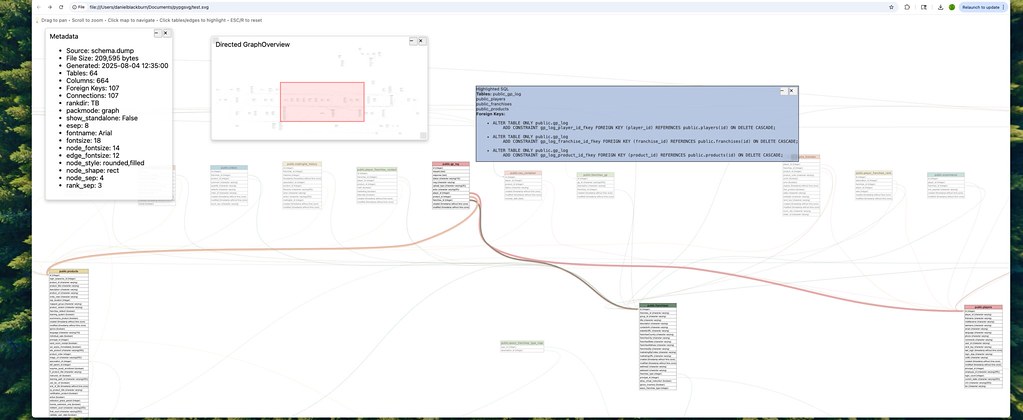
Try it yourself:
# Download sample and generate interactive ERD
wget https://github.com/blackburnd/pypgsvg/raw/main/Samples/schema.dump
pypgsvg schema.dump --output demo_erd --view
Scriptable API
Perfect for automation and enterprise workflows:
from pypgsvg import parse_sql_dump, generate_erd_with_graphviz

# Parse schema dump
with open("schema.dump", "r", encoding='utf-8') as file:
    sql_content = file.read()

# Extract database structure
tables, foreign_keys, triggers, errors = parse_sql_dump(sql_content)

# Generate interactive ERD
if not errors:
    generate_erd_with_graphviz(
        tables=tables,
        foreign_keys=foreign_keys,
        output_file="enterprise_diagram",
        rankdir='TB',
        packmode='graph'
    )
    print("✅ Enterprise ERD generated successfully!")
else:
    print("⚠️ Parsing errors:", errors)
🎯 Interactive Components
The generated SVG includes several interactive panels that can be moved, resized, and minimized:
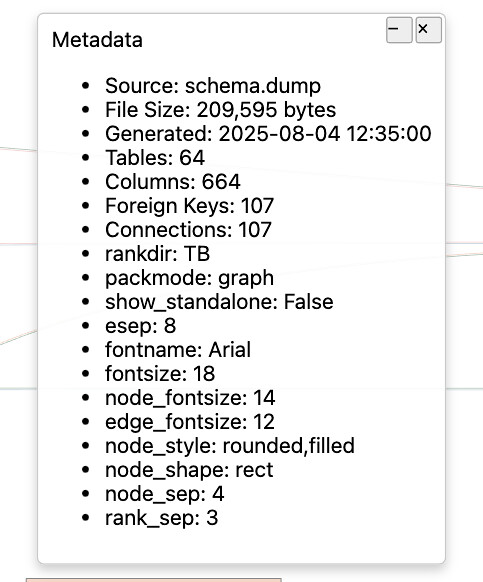
📊 Metadata Panel
Displays comprehensive information about your database schema:
- Schema statistics (table count, columns, relationships)
- Generation parameters used
- File information and timestamps
- Interactive controls (minimize, close, drag to reposition)
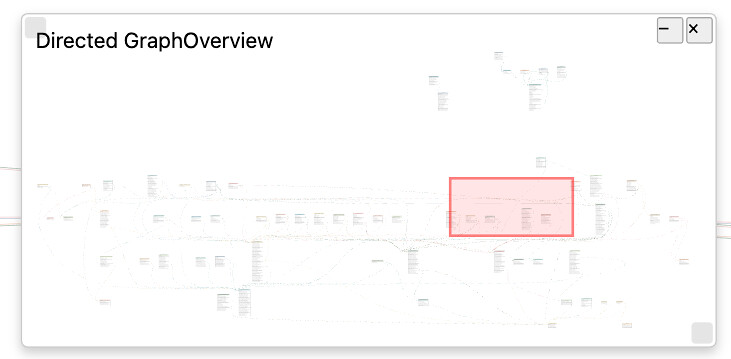
🗺️ Miniature Overview
Navigate large schemas effortlessly:
- Interactive minimap with viewport indicator
- Click to jump to specific schema areas
- Drag viewport for precise navigation
- Resizable panel - make it larger for detailed navigation
🔍 Selection Details
View and export detailed SQL information:
- Table definitions with column details and constraints
- Foreign key relationships with full SQL syntax
- Trigger information including execution details
- Copy button for instant clipboard access
- Download button for formatted text export
- Enterprise-friendly emoji-free output option
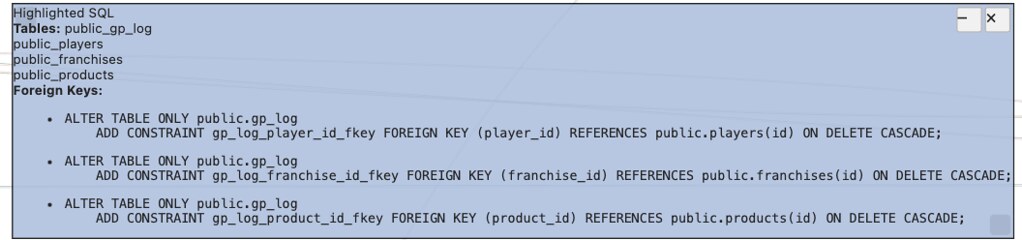
Example selection output:
📊 Selected Tables
==================
public_franchises
public_association_map
public_ecommerce
...

🔗 Foreign Key Relationships
============================
🔑 franchise_id → id
ALTER TABLE ONLY public.association_map
    ADD CONSTRAINT association_map_franchise_id_fkey
    FOREIGN KEY (franchise_id) REFERENCES public.franchises(id)
    ON DELETE CASCADE;
🏢 Enterprise Deployment
CI/CD Integration
# GitHub Actions example
- name: Generate Database Documentation
  run: |
    pip install pypgsvg
    sudo apt-get install graphviz
    pypgsvg schemas/production.dump --output docs/database_erd

# Docker deployment
FROM python:3.9-slim
RUN apt-get update && apt-get install -y graphviz && rm -rf /var/lib/apt/lists/*
RUN pip install pypgsvg
COPY schema.dump .
RUN pypgsvg schema.dump --output database_diagram
Automation Scripts
#!/bin/bash
# Enterprise schema documentation automation
DATE=$(date +%Y%m%d)
pg_dump -h $DB_HOST -d $DB_NAME -U $DB_USER -s > schema_$DATE.dump
pypgsvg schema_$DATE.dump --output docs/database_erd_$DATE --hide-standalone
echo "✅ Database documentation updated: docs/database_erd_$DATE.svg"
🧪 Testing & Quality
Enterprise-grade testing with comprehensive coverage:
# Run full test suite (no dependencies required)
python -m pytest tests/tests/

# Generate detailed coverage report
python -m pytest tests/tests/ --cov=src --cov-report=html
open htmlcov/index.html
Quality metrics:
- ✅ 95%+ code coverage
- ✅ 70+ comprehensive tests
- ✅ Enterprise PYTHONPATH support
- ✅ Cross-platform compatibility
🏗️ Architecture & Performance
Lightweight Design
📦 pypgsvg/
├── 🐍 Pure Python core (~450 lines)
├── 🎨 CSS styling (~200 lines)
├── ⚡ JavaScript interactivity (~2000 lines)
├── 🧪 Comprehensive tests (~1000+ lines)
└── 📚 Zero runtime dependencies (except Graphviz)
Performance characteristics:
- Fast parsing - Processes large schemas in seconds
- Memory efficient - Minimal footprint for enterprise deployment
- Scalable output - Handles schemas with hundreds of tables
- Quick startup - No database connections or heavy frameworks
Enterprise-Ready Features
- 🔒 Security-focused - No network requirements, processes local files only
- 📋 Audit-friendly - Deterministic output for version control
- 🚀 Container-ready - Minimal Docker image size
- ⚙️ Configurable - Extensive customization options
- 📊 Monitoring - Built-in error reporting and validation
⚙️ Configuration & Customization
Advanced Layout Options
# Horizontal layout for wide displays
pypgsvg schema.dump --rankdir LR --node-sep 3 --rank-sep 2

# Compact layout for presentations
pypgsvg schema.dump --packmode graph --fontsize 16 --node-fontsize 14

# Large schema optimization
pypgsvg schema.dump --hide-standalone --esep 8 --rank-sep 4
Table Filtering (Automatic)
Enterprise-focused exclusions for cleaner diagrams:
- Views (
vw_*) - Database views - Backup tables (
*_bk,*_backup) - Temporary backup data - Utility tables (
*_temp,*_tmp) - Temporary processing tables - Log tables (
*_log,*_audit) - Audit and logging tables - Duplicate tables (
*_dups,*_duplicates) - Data cleanup tables - Version tables (
*_old,*_archive) - Historical data tables
Color & Accessibility
- WCAG-compliant color palette with proper contrast ratios
- Automatic text color calculation for readability
- Color-blind friendly palette selection
- High-contrast mode for professional presentations
🔧 Supported Database Features
SQL Parsing Capabilities
- ✅ CREATE TABLE statements with all PostgreSQL data types
- ✅ ALTER TABLE constraints and foreign keys
- ✅ Triggers with BEFORE/AFTER/INSTEAD OF events
- ✅ Primary keys and unique constraints
- ✅ Complex data types (JSON, arrays, custom types)
- ✅ Quoted identifiers and schema-qualified names
- ✅ Unicode support with proper encoding handling
Advanced SQL Features
-- Fully supported constructs
CREATE TABLE "complex_table" (
    id SERIAL PRIMARY KEY,
    data JSONB NOT NULL,
    tags TEXT[],
    created_at TIMESTAMP WITH TIME ZONE DEFAULT NOW()
);

-- Trigger support
CREATE TRIGGER update_modified_time
    BEFORE UPDATE ON complex_table
    FOR EACH ROW EXECUTE FUNCTION update_timestamp();

-- Foreign key variations
ALTER TABLE orders
    ADD CONSTRAINT fk_customer
    FOREIGN KEY (customer_id)
    REFERENCES customers(id)
    ON DELETE CASCADE ON UPDATE RESTRICT;
🚨 Error Handling & Reliability
Production-ready error management:
- Graceful degradation - Continues processing despite individual parsing errors
- Detailed error reporting - Specific line numbers and context
- Encoding resilience - Handles various character encodings
- Malformed SQL recovery - Attempts to extract partial information
- Validation checks - Ensures output integrity
Enterprise logging:
# Built-in error collection for monitoring
tables, foreign_keys, triggers, errors = parse_sql_dump(sql_content)

if errors:
    for error in errors:
        log.warning(f"Schema parsing issue: {error}")
    # Continue with partial results
🤝 Contributing
We welcome enterprise users and contributors:
- Code quality - Follow PEP 8 and maintain >95% test coverage
- Enterprise focus - Consider automation and deployment scenarios
- Performance - Optimize for large schemas and CI/CD usage
- Documentation - Update examples for enterprise use cases
- Testing - Add tests for new SQL patterns and edge cases
📋 Dependencies
Minimal dependency footprint for enterprise deployment:
Required
- Python 3.8+ (standard in most enterprise environments)
- Graphviz (system package, widely available)
Development/Testing Only
pytest>=7.0.0- Testing frameworkpytest-cov>=4.0.0- Coverage reporting
That's it! No heavy frameworks, databases, or complex runtime dependencies.
📄 License & Enterprise Usage
This project is released under the MIT License, making it suitable for:
- ✅ Commercial use in enterprise environments
- ✅ Modification for internal requirements
- ✅ Distribution within organizations
- ✅ Private use without attribution requirements
Perfect for enterprise adoption with minimal legal overhead.
Release history Release notifications | RSS feed


Download files
Download the file for your platform. If you're not sure which to choose, learn more about installing packages.
Source Distribution
Built Distribution
Filter files by name, interpreter, ABI, and platform.
If you're not sure about the file name format, learn more about wheel file names.
Copy a direct link to the current filters
File details
Details for the file pypgsvg-1.1.1.tar.gz.
File metadata
- Download URL: pypgsvg-1.1.1.tar.gz
- Upload date:
- Size: 310.5 kB
- Tags: Source
- Uploaded using Trusted Publishing? No
- Uploaded via: twine/6.1.0 CPython/3.13.2
File hashes
| Algorithm | Hash digest | |
|---|---|---|
| SHA256 |
e0c5a7115342456f644e27adadfc76957d661a8eee173be8ecf7cd08d8ded4f8
|
|
| MD5 |
1969832666edf7f9bfd1c32bc32c58a5
|
|
| BLAKE2b-256 |
240e5699ef7479607638a878212ad5ab797c5955127474dd98794b573235d13c
|
File details
Details for the file pypgsvg-1.1.1-py3-none-any.whl.
File metadata
- Download URL: pypgsvg-1.1.1-py3-none-any.whl
- Upload date:
- Size: 23.5 kB
- Tags: Python 3
- Uploaded using Trusted Publishing? No
- Uploaded via: twine/6.1.0 CPython/3.13.2
File hashes
| Algorithm | Hash digest | |
|---|---|---|
| SHA256 |
4b0e79e75752b1f39bf756c1869f139bbea4e04936be6ad88fb8b9bc9b2dcb10
|
|
| MD5 |
3043a16e97a3a56d2c3a47ba35980982
|
|
| BLAKE2b-256 |
5fd542a217bd3cea3969e3e80313b67728d38b7b6f733626ac6114162c0c4f70
|







