
PyPihub - Local PyPI Server
PyPihub is a simple local PyPI server with caching and package upload capabilities. This server allows you to host your Python packages locally, cache packages from the official PyPI, and supports package uploads via twine.
This version uses Flask. If you install via pip, use: pip install pypihub[flask]
When installing with pip, PyPihub will not interrupt the download or installation process. If the requested package is not found in the cache or package directory, PyPihub will fetch it directly from pypi.org and simultaneously serve it to the client. This means the client does not have to wait for the server to finish downloading before receiving the package. All downloaded packages from pypi.org will also be saved to the cache for future use.
Key Features
- Multi-platform: Supports any platform (Linux, Windows, Mac, etc.)
- Local Package Hosting: Host your own Python packages locally
- PyPI Caching: Automatic caching of packages from official PyPI for faster access
- Twine Support: Upload packages using
twinewith authentication - Web Interface: Simple web interface for browsing packages
- Flexible Configuration: Configuration via INI files, environment variables, or command arguments
Architecture
Components
flowchart TB
    subgraph Clients
        direction LR
        B["Browser"]
        P["pip"]
        T["twine / curl"]
    end

    subgraph Server["PyPihub: gunicorn with gthread workers"]
        direction LR
        subgraph UI["Web interface (pypihub/web.py)"]
            V["Pages and health check<br/>/ , /project/NAME/ , /healthz<br/>Jinja templates, vendored Bootstrap"]
        end
        subgraph Index["Package index (pypihub/pypihub.py)"]
            S["Download side<br/>/simple/NAME/<br/>/packages/NAME/FILE<br/>/cache/NAME/FILE"]
            U["Upload and sign-in<br/>POST / , POST /upload/NAME/<br/>/signin , basic auth"]
        end
    end

    subgraph Data["/data volume"]
        direction LR
        L[("packages/<br/>uploaded files")]
        C[("cache/<br/>files from PyPI")]
        D[("pypihub.db<br/>users, package records")]
    end

    X["pypi.org: simple index<br/>files.pythonhosted.org: files"]

    B --> V
    P --> S
    T --> U
    V -. "read-only scan" .-> Data
    S -- "read, and save new downloads" --> Data
    U -- "write files, check users" --> Data
    S -. "index lookup, file download" .-> X
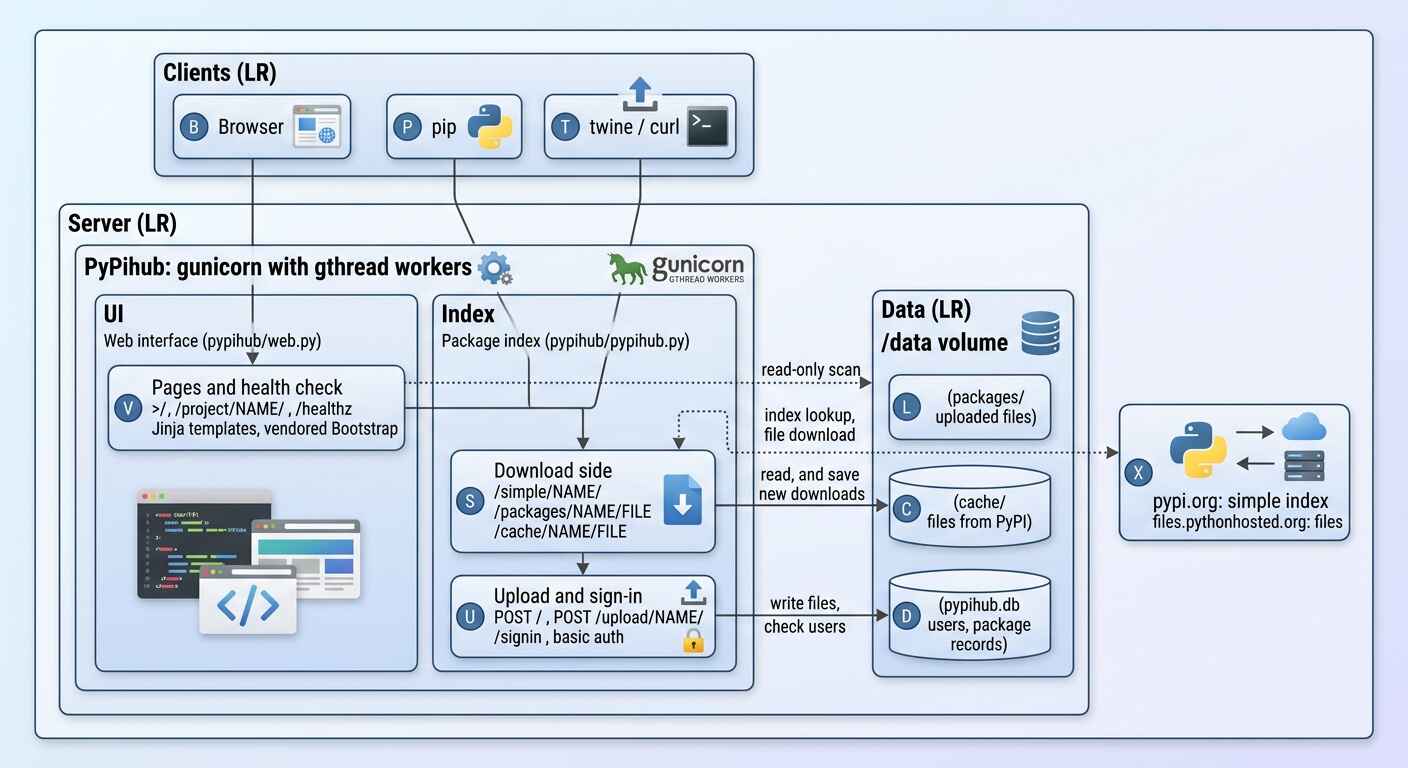
The web interface only reads the two package directories, so it never changes how pip and twine talk to the server.
What happens on pip install
sequenceDiagram
    participant pip
    participant Srv as PyPihub
    participant Disk as /data (packages, cache)
    participant Up as pypi.org and files.pythonhosted.org

    pip->>Srv: GET /simple/my-pkg/
    Srv->>Disk: list local and cached files (name matched per PEP 503)
    Srv->>Up: GET simple index of my-pkg
    Up-->>Srv: file list
    Srv-->>pip: HTML with links to /packages/... and /cache/...

    pip->>Srv: GET /cache/my-pkg/my_pkg-1.0-py3-none-any.whl
    alt file is already in the cache
        Srv->>Disk: read file
        Srv-->>pip: file
    else first request for this file
        Srv->>Up: download file (streamed)
        Up-->>Srv: bytes
        Srv-->>pip: the same bytes, as they arrive
        Srv->>Disk: write the file to the cache
    end

Files you uploaded are served from /packages/... straight from disk and never touch PyPI.
Build and release pipeline
flowchart LR
    PR["push to master<br/>or pull request"] --> CI["ci.yml<br/>lint, tests, wheel smoke test,<br/>Docker build and run"]
    TG["push to master<br/>or tag v*"] --> DK["docker.yml<br/>build linux/amd64 and linux/arm64"]
    DK --> GH[("ghcr.io image")]
    RL["GitHub release published"] --> PB["publish.yml<br/>tag must equal __version__.py,<br/>build, twine check"]
    PB --> PY[("PyPI<br/>trusted publishing")]


Installation
Requirements
Python 3.10 or newer.
pip install -r requirements.txt
Download and Setup
git clone <repository-url>
cd pypihub
Or you can install with pip:
$ pip install pypihub[flask]
Configuration
1. Configuration File (pypihub.ini)
Create a pypihub.ini as an alternative config file, or it will be created automatically in the same directory as pypihub.py:
[dirs]
base = /path/to/base/directory
local_pkg = /path/to/local/packages
cache = /path/to/cache

[urls]
pypi_simple = https://pypi.org/simple

[server]
host = 0.0.0.0
port = 5000

[auths]
users = pypihub,pypihub;user2,pass2
2. Settings File (settings.py)
Alternatively, create a settings.py file (see example below):
BASE_DIR = "/path/to/base"
LOCAL_PKG_DIR = "/path/to/packages"
CACHE_DIR = "/path/to/cache"
PYPI_SIMPLE_URL = "https://pypi.org/simple"
HOST = "0.0.0.0"
PORT = 5000
AUTHS = [("pypihub", "pypihub"), ("user2", "pass2")]
CONFIGFILE = "pypihub.ini"
3. Environment Variables
export BASE_DIR="/path/to/base"
export LOCAL_PKG_DIR="/path/to/packages"
export CACHE_DIR="/path/to/cache"
export PYPI_SIMPLE_URL="https://pypi.org/simple"
export HOST="0.0.0.0"
export PORT="5000"
export CONFIGFILE="pypihub.ini"
Usage
Running the Server
# Using default settings
python pypihub serve

# With custom configuration
# Option: '-c /path/to/config.ini'
python pypihub -c /path/to/config.ini -H 127.0.0.1 -P 8080

# Verbose mode
python pypihub -v

# Show help
python pypihub -h
Command Line Arguments
-c, --config          Path to configuration file
-b, --base-dir        Base directory for server
-l, --local-pkg-dir   Directory for local packages
-C, --cache-dir       Directory for cached packages
-p, --pypi-simple-url PyPI simple index URL
-H, --host            Host to run server on
-P, --port            Port to run server on
-V, --version         Show PyPihub version
-v, --verbose         Enable verbose output
Package Upload
Using Twine
- Configure ~/.pypirc:
[distutils]
index-servers = pypihub

[pypihub]
repository = http://localhost:5000/
username = pypihub
password = pypihub
- Upload package:
# Build package first
python setup.py sdist bdist_wheel

# Upload to pypihub
twine upload --repository pypihub dist/*
Manual Upload via HTTP
curl -X POST \
  -u pypihub:pypihub \
  -F "file=@package-1.0.0-py3-none-any.whl" \
  http://localhost:5000/upload/package-name/
Installing Packages from PyPihub
Configure pip
Add to ~/.pip/pip.conf (Linux/Mac) or %APPDATA%\pip\pip.ini (Windows):
[global]
extra-index-url = http://localhost:5000/simple/
trusted-host = localhost
Install Package
# Install from pypihub (with fallback to PyPI)
pip install package-name

# Install only from pypihub
pip install --index-url http://localhost:5000/simple/ package-name

# Install with extra index
pip install --extra-index-url http://localhost:5000/simple/ package-name
Web Interface
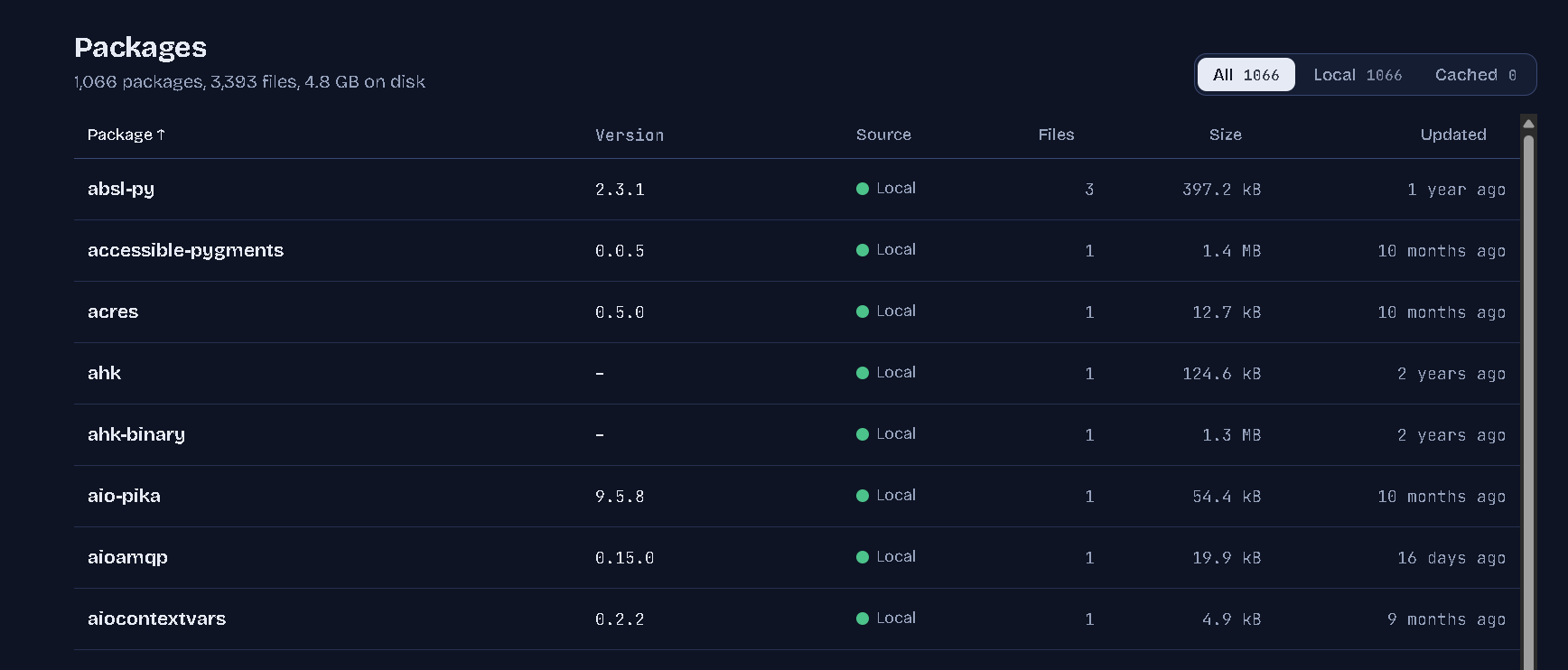
Open the server address in a browser. The interface follows the system light or dark setting and has a
theme switch in the header (System, Light, Dark; the choice is remembered). Press / to jump to the search box.
Typing a name that is not stored yet shows the exact pip install command, because installing it through
PyPihub fetches it from PyPI and caches it.
It is built on Bootstrap 5.3 with self-hosted fonts and icons, all vendored under pypihub/static
(see pypihub/static/vendor/README.md), so it works on a network without internet access.
| Variable | Purpose |
|---|---|
PYPIHUB_UI_CACHE_TTL |
Seconds a directory scan is reused by the interface (default 5, 0 disables) |
PYPIHUB_TRUST_PROXY |
Set to 1 behind a reverse proxy so links use X-Forwarded-Proto, X-Forwarded-Host and X-Forwarded-Prefix |
SECRET_KEY |
Signs sign-in cookies. Without it a random key is generated for each process |
Docker
cp .env.example .env        # set PYPIHUB_ADMIN_USER and PYPIHUB_ADMIN_PASSWORD
docker compose up -d
Or without compose:
docker run -d --name pypihub -p 5000:5000 -v pypihub-data:/data \
  -e PYPIHUB_ADMIN_USER=admin -e PYPIHUB_ADMIN_PASSWORD='change-me' \
  ghcr.io/cumulus13/pypihub_flask:latest
- Everything is stored in
/data(uploaded packages, PyPI cache, user database, config). The container runs as UID 10001; for a bind mount runchown -R 10001:10001 <host directory>first. - The account in
PYPIHUB_ADMIN_USERis created, or has its password reset, each time the container starts. UsePYPIHUB_ADMIN_PASSWORD_FILEto read the password from a Docker secret. Add more users withdocker exec -it pypihub pypihub user -u NAME. - Without
SECRET_KEYa key is generated once and kept in the volume. - Served by gunicorn (
WEB_CONCURRENCYworkers,GUNICORN_THREADSthreads each). Images forlinux/amd64andlinux/arm64are published to GHCR::edgefrommaster,:X.Y.Z,:X.Yand:latestfrom release tags.
Development, Tests and CI
pip install -r requirements-dev.txt
pytest
GitHub Actions: ci.yml (lint, tests on Python 3.10 to 3.13 and Windows, wheel build and smoke test, Docker build and run),
docker.yml (publish the image to GHCR) and publish.yml (publish a GitHub release to PyPI through trusted publishing).
API Endpoints
Web Interface
GET /- Package browser: search, filter by local/cached, sort, copy-ready pip and twine commandsGET /project/<name>/- Files of one package with download linksGET /healthz- JSON health check (used by the DockerHEALTHCHECK)
Package Management
POST /upload/<package>/- Upload package (with auth)POST /upload/- Upload package via twine (with auth)GET /packages/<package>/<filename>- Serve local package filesGET /cache/<package>/<filename>- Serve cached package files
Package Index
GET /simple/<package>/- Simple index for specific package
Directory Structure
Source tree:
.
├── pypihub/
│   ├── pypihub.py          # Package index, upload and authentication (Flask app)
│   ├── web.py              # Web interface blueprint: /, /project/NAME/, /healthz
│   ├── database.py         # SQLAlchemy models (users, packages)
│   ├── logger.py           # Logging setup
│   ├── settings.py         # Settings file (optional)
│   ├── pypihub.ini         # Configuration file (optional)
│   ├── templates/          # Jinja templates for the web interface
│   └── static/             # CSS, JS, fonts, icons (Bootstrap vendored, see vendor/README.md)
├── tests/                  # pytest suite
├── docker/entrypoint.sh    # Container entrypoint
├── Dockerfile
├── docker-compose.yml
└── .github/workflows/      # ci.yml, docker.yml, publish.yml
Data directories (the /data volume in Docker):
packages/                   # Uploaded packages
└── package-name/
    ├── package-1.0.0.tar.gz
    └── package-1.0.0-py3-none-any.whl
cache/                      # Files fetched from PyPI
└── requests/
    └── requests-2.28.1-py3-none-any.whl
pypihub.db                  # Users and package records (SQLite by default)
Authentication
Default credentials:
- Username:
pypihub - Password:
pypihub
Change the default credentials before using in production.
To change credentials, edit configuration in settings.py, pypihub.ini, or environment variables.
example 'pypihub.ini' for authentication
[auths]
users = userame password
Logging
PyPihub uses custom logging with levels:
- EMERGENCY
- CRITICAL
- ERROR
- WARNING
- NOTICE
- INFO
- DEBUG
Set verbose mode with -v for debug logging.
Troubleshooting
Package not found
- Ensure package exists in local directory or is available on PyPI
- Check
PYPI_SIMPLE_URLconfiguration
Upload failed
- Check authentication credentials
- Ensure
LOCAL_PKG_DIRdirectory is writable - Check if file already exists (409 error)
Cache not working
- Ensure
CACHE_DIRdirectory is writable - Check internet connection for downloading from PyPI
Port already in use
- Change port with
-Pparameter or configuration - Check processes using port:
lsof -i :5000
Development
Dependencies
- Flask - Web framework
- BeautifulSoup4 - HTML parsing
- Requests - HTTP client
- Rich - Console output formatting
- ConfigSet - Configuration management
- PyDebugger - Debug utilities
Contributing
- Fork repository
- Create feature branch
- Commit changes
- Push to branch
- Create Pull Request
- Describe your changes in the Pull Request.
License
PyPihub is released under the GNU Lesser General Public License v3.0 (LGPL-3.0).
You should have received a copy of the GNU Lesser General Public License along with this program.
If not, see https://www.gnu.org/licenses/.
For commercial licensing options, please contact: cumulus13@gmail.com
Support
For issues and questions, please create/open an issue in the repository or contact cumulus13@gmail.com.
PyPihub - Simplifying local Python package management
Warning: Do not expose this server to the public internet without proper authentication and security measures.
Author


1 maintainer

Metadata
1 maintainer
Release files for pypihub 0.23.7
For a detailed explanation of source distributions (sdists) and built distributions (wheels), please see the package formats documentation.
Source distribution (sdist)
| File | Size | Uploaded | Provenance | |
|---|---|---|---|---|
| pypihub-0.23.7.tar.gz | 238.9 kB | Without provenance | Details |
Built distribution (wheel)
| File | Interpreter | ABI | Platform | Reset |
|---|---|---|---|---|
| pypihub-0.23.7-py3-none-any.whl | Python 3 | none | any | Details |
Total release size: 473.5 kB
Release files / pypihub-0.23.7.tar.gz
| Download URL | pypihub-0.23.7.tar.gz |
|---|---|
| Size | 238.9 kB |
| Tags | Source |
|
SHA-256 checksum How to use checksums |
a4d2fec33f52879a04416653ef9fc2a772da06e5b8cc809cf3831cde56147bf8
|
|
BLAKE2b-256 checksum How to use checksums |
c3a6933aa3de1377567316f372efc91db86c5a87e2123382ab16ed001c1cdfa0
|
| Upload date | |
|
Uploaded using Trusted Publishing? What is trusted publishing? |
No |
| Uploaded via |
twine/4.0.2 CPython/3.11.4
|
Release files / pypihub-0.23.7-py3-none-any.whl
| Download URL | pypihub-0.23.7-py3-none-any.whl |
|---|---|
| Size | 234.6 kB |
| Tags | Python 3 |
|
SHA-256 checksum How to use checksums |
9ffb56cbf08d195145a913f5df20e7c12d2c91e048c8485210c98a4b14deb217
|
|
BLAKE2b-256 checksum How to use checksums |
d6703bc9e2f2ea60b084372308e2cd687023255424de17c152358db9788fd8a9
|
| Upload date | |
|
Uploaded using Trusted Publishing? What is trusted publishing? |
No |
| Uploaded via |
twine/4.0.2 CPython/3.11.4
|
Security for pypihub 0.23.7
Provenance
Provenance describes where a file came from. On PyPI, provenance is shared via attestations, which provide a verifiable record of the build or publishing details. View details, limitations and caveats.
No provenance found
None of the files in this release were uploaded with provenance metadata.
A note on package security
PyPI is a repository for distributing packages, not a service for auditing them. While third-party security researchers and our staff do their best to detect and remove malicious packages, PyPI cannot guarantee the quality, security or suitability of any given package.














