
A high-performance FastAPI-based server for monitoring and managing Tesla Powerwall systems

Project description
PyPowerwall Server
A high-performance FastAPI-based server for monitoring and managing Tesla Powerwall systems. Designed as the next-generation evolution of the pypowerwall proxy with multi-gateway support, real-time monitoring, and a beautiful modern UI.
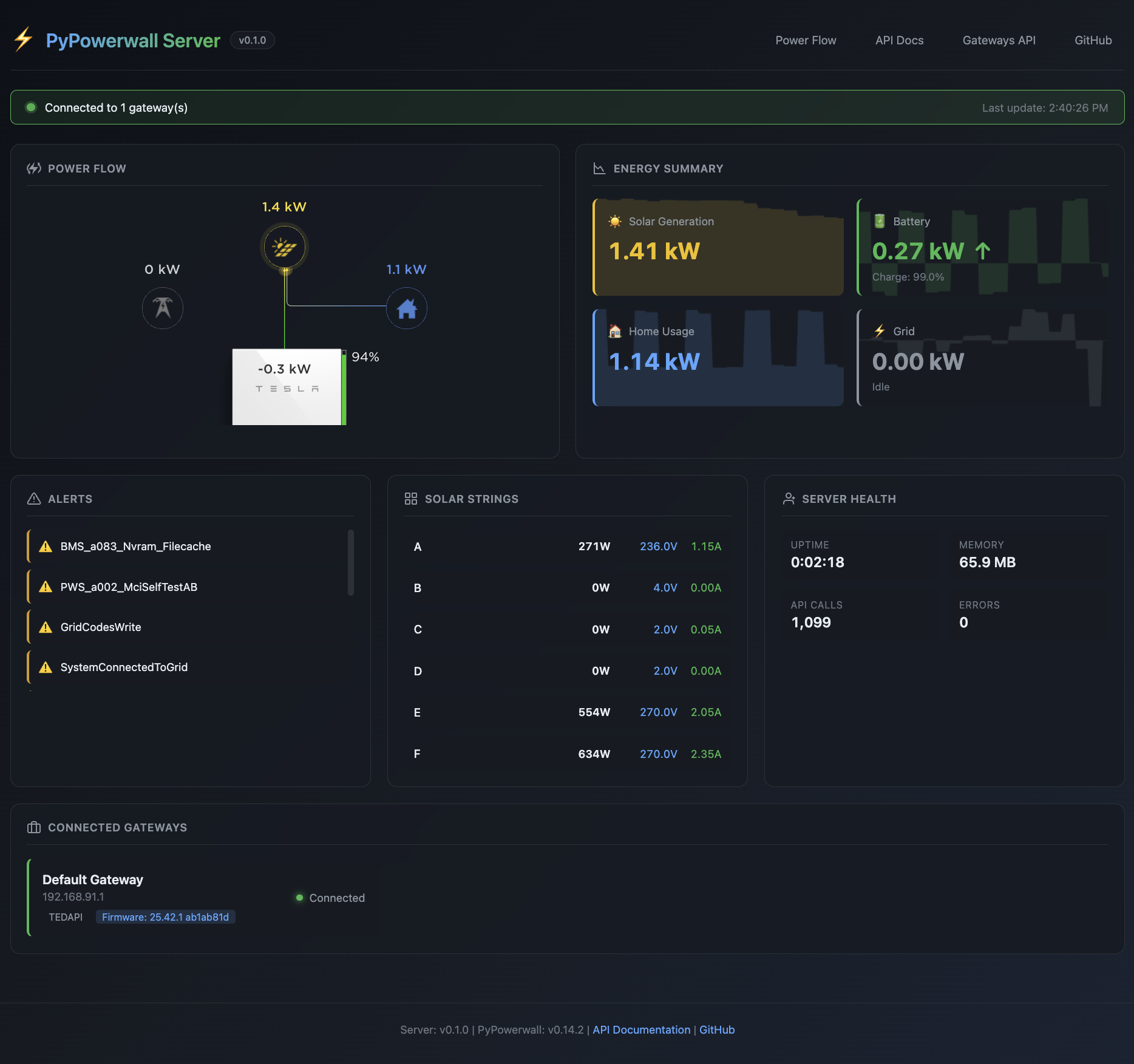
Features
- Multi-Gateway Support - Monitor multiple Powerwall installations from a single server with per-gateway configuration and aggregated metrics
- Connection Modes - TEDAPI (local), Cloud Mode (remote), and FleetAPI support with automatic failover and graceful degradation
- Real-Time Updates - WebSocket streaming with 1-second updates and background polling with intelligent caching
- Complete API - Full backward compatibility with pypowerwall proxy plus new multi-gateway and aggregate endpoints
- Modern Web UI - Tesla Power Flow animation, management console, and auto-generated API documentation at /docs
- Container Ready - Docker and docker-compose support with configurable deployment via environment variables or YAML
- Planned: MQTT Integration - Publish metrics to MQTT brokers for Home Assistant and other automation systems
Quick Start
Docker (Recommended)
# TEDAPI Mode (Local Gateway) - requires host network to access gateway at 192.168.91.1
docker run -d \
  --name pypowerwall-server \
  --network host \
  -e PW_HOST=192.168.91.1 \
  -e PW_GW_PWD=your_gateway_password \
  jasonacox/pypowerwall-server

# Cloud Mode - connects via internet, includes persistent auth storage
docker run -d \
  --name pypowerwall-server \
  -p 8675:8675 \
  -v ~/.pypowerwall:/auth \
  -e PW_EMAIL="your@email.com" \
  -e PW_AUTHPATH=/auth \
  jasonacox/pypowerwall-server

# Complete Cloud Mode setup (one-time authentication)
docker exec -it pypowerwall-server python -m pypowerwall setup
Visit http://localhost:8675
Multiple Powerwalls
# Multiple local gateways - requires host network
docker run -d \
  --name pypowerwall-server \
  --network host \
  -e PW_GATEWAYS='[
    {"id": "home", "name": "Home Gateway", "host": "192.168.91.1", "gw_pwd": "gateway_password_1"},
    {"id": "cabin", "name": "Cabin Gateway", "host": "192.168.91.2", "gw_pwd": "gateway_password_2"}
  ]' \
  jasonacox/pypowerwall-server
Command Line
# Install
pip install pypowerwall-server

# Single Powerwall
pypowerwall-server --host 192.168.91.1 --gw-pwd your_gateway_password

# Multiple Powerwalls
pypowerwall-server --config gateways.yaml
Configuration
Note: Most users will use TEDAPI to connect to their Powerwall gateway, which is accessible at the standard IP address
192.168.91.1on your local network. You'll need your gateway password (found in the Tesla app under your gateway settings).
Cloud Authentication Setup (Optional, for Control Operations)
If you want to control your Powerwall (set reserve level, operating mode, etc.), you'll need Tesla Cloud authentication:
One-time setup:
python3 -m pypowerwall setup
This will:
- Open your browser to authenticate with Tesla
- Generate
.pypowerwall.authand.pypowerwall.sitetoken files - Store them in the default location or a specified directory
Then configure the server:
PW_AUTHPATH=/path/to/auth/directory # Directory containing the auth files
For Docker, mount the auth directory:
docker run -v /host/path/to/auth:/auth \
  -e PW_AUTHPATH=/auth \
  ...
Environment Variables
Single Gateway Mode (Read-Only via TEDAPI):
PW_HOST=192.168.91.1
PW_GW_PWD=your_gateway_password
PW_TIMEZONE=America/Los_Angeles
PW_PORT=8675              # Default port (proxy-compatible)
PW_BIND_ADDRESS=0.0.0.0  # Listen on all interfaces
Single Gateway Mode (With Cloud Control):
PW_HOST=192.168.91.1
PW_GW_PWD=your_gateway_password          # For TEDAPI data reads
PW_EMAIL=your-tesla-account@email.com
PW_AUTHPATH=/path/to/auth/files            # Directory with .pypowerwall.auth/.site
PW_TIMEZONE=America/Los_Angeles
Multi-Gateway Mode:
PW_GATEWAYS='[
  {
    "id": "home",
    "name": "Home System",
    "host": "192.168.91.1",
    "gw_pwd": "gw_pwd_1",
    "email": "tesla@email.com",
    "authpath": "/auth"
  },
  {
    "id": "cabin",
    "name": "Cabin System",
    "host": "192.168.91.1",
    "gw_pwd": "gw_pwd_2",
    "email": "tesla@email.com",
    "authpath": "/auth"
  }
]'
Configuration File (gateways.yaml)
server:
  host: 0.0.0.0
  port: 8675
  cors_origins:
    - http://localhost:3000

gateways:
  - id: home
    name: Home System
    host: 192.168.91.1
    gw_pwd: gw_pwd_1
    email: tesla@email.com
    authpath: /auth
    timezone: America/Los_Angeles

  - id: cabin
    name: Cabin System
    host: 192.168.91.1
    gw_pwd: gw_pwd_2
    email: tesla@email.com
    authpath: /auth
    timezone: America/Denver

  - id: cloud-site
    name: Cloud Mode Site
    email: user@example.com
    authpath: /auth
    cloud_mode: true
Authentication:
gw_pwd: For TEDAPI local gateway accessemail+authpath: For Tesla Cloud API (control operations)- Run
python3 -m pypowerwall setupto authenticate and generate auth files - Specify directory containing
.pypowerwall.authand.pypowerwall.sitefiles
- Run
API Endpoints
Legacy Proxy Compatibility
All existing proxy endpoints work unchanged:
GET /vitals- Device vitalsGET /aggregates- Power aggregatesGET /soe- State of energyGET /freq- Frequency dataGET /pod- Battery pod dataPOST /control/reserve- Set battery reserve- ... and all others
Multi-Gateway Endpoints
Gateway Selection:
GET /api/gateways- List all configured gatewaysGET /api/gateways/{id}- Gateway detailsGET /api/gateways/{id}/vitals- Gateway-specific vitalsGET /api/gateways/{id}/aggregates- Gateway-specific power data
Aggregated Data:
GET /api/aggregate/power- Combined power across all gatewaysGET /api/aggregate/soe- Total battery capacity and chargeGET /api/aggregate/status- Health status of all gateways
WebSocket Endpoints:
WS /ws/gateway/{id}- Real-time data stream for specific gatewayWS /ws/aggregate- Real-time aggregated data stream
Interactive API Documentation
- Swagger UI: http://localhost:8675/docs
- ReDoc: http://localhost:8675/redoc
- OpenAPI JSON: http://localhost:8675/openapi.json
Design Decisions
Cloud Authentication with Auth Tokens
The server supports Tesla Cloud authentication for control operations:
TEDAPI (Local): For fast data reads from 192.168.91.1
- Requires:
host+password(gateway password) - Fast response times (local network)
- No internet dependency
- Used for monitoring metrics
Cloud (Control): For control operations via Tesla API
- Requires:
email+authpath - Setup: Run
python3 -m pypowerwall setupto authenticate - Generates:
.pypowerwall.authand.pypowerwall.sitetoken files - Used for: Setting reserve level, operating mode, etc.
Configuration:
# TEDAPI only (monitoring)
PW_HOST=192.168.91.1
PW_GW_PWD=gateway_password

# TEDAPI + Cloud (monitoring + control)
PW_HOST=192.168.91.1
PW_GW_PWD=gateway_password
PW_EMAIL=tesla@email.com
PW_AUTHPATH=/path/to/auth  # Directory with .pypowerwall.auth/.site files
Async + Sync Library Integration
FastAPI is async, but pypowerwall is synchronous. This is handled using asyncio.run_in_executor() to run blocking pypowerwall calls in thread pools, preventing event loop blocking. This is the standard pattern for integrating sync libraries with async frameworks and works perfectly.
Stateless Server Architecture
The server maintains no persistent state or historical data. All historical data for graphs is stored in browser localStorage, allowing:
- Server restarts without data loss (data persists in browser)
- Horizontal scaling (no shared state required)
- Minimal server resource usage
- Simple deployment model
Control Features & Security
Default: Read-only - The server operates in monitoring mode by default.
Optional Control Mode: Enable with environment variables:
CONTROL_ENABLED=true
CONTROL_TOKEN=your-secure-random-token
When control is enabled:
- All control operations require authentication via token
- Token must be sent in
Authorizationheader - Legacy POST endpoints are disabled (redirect to
/controlendpoint) - UI requires authentication for control features
Similar to the proxy server's auth model but token-based for better security.
Data Aggregation Strategy
Multi-gateway aggregation uses smart aggregation that will evolve over time:
Current implementation (v0.1.0):
- Battery %: Simple average (TODO: weighted by capacity)
- Power flows: Simple sum (works for independent systems)
- Grid power: Calculated as site - solar
Future considerations documented in code:
- Capacity-weighted averages
- Different strategies per metric type
- Handling mixed local/cloud gateways
- Time synchronization across gateways
- Outlier detection
This area is expected to need tuning as real-world multi-gateway deployments provide feedback.
Performance & Caching
- Polling interval: 5 seconds (configurable later if needed)
- WebSocket updates: Real-time to UI (1-second interval)
- No server-side caching: Fresh data on every request
- Browser caching: Historical data in localStorage
UI Framework
Vanilla JavaScript - lightweight, no build step, fast loading. Charts and advanced features can be added incrementally without framework overhead.
Architecture
pypowerwall-server/
├── app/
│   ├── main.py                 # FastAPI application entry point
│   ├── config.py               # Configuration management
│   ├── api/
│   │   ├── __init__.py
│   │   ├── legacy.py           # Legacy proxy endpoints
│   │   ├── gateways.py         # Multi-gateway endpoints
│   │   ├── aggregates.py       # Aggregated data endpoints
│   │   └── websockets.py       # WebSocket handlers
│   ├── core/
│   │   ├── __init__.py
│   │   └── gateway_manager.py  # Connection manager with caching
│   ├── models/
│   │   ├── __init__.py
│   │   └── gateway.py          # All data models
│   ├── utils/
│   │   ├── __init__.py
│   │   └── transform.py        # UI data transformations
│   └── static/
│       ├── index.html          # Management console
│       ├── example.html        # iFrame demo
│       └── powerflow/          # Power flow UI assets
├── tests/
│   ├── conftest.py
│   ├── test_api_aggregates.py
│   ├── test_api_gateways.py
│   ├── test_api_legacy.py
│   ├── test_basic.py
│   ├── test_config.py
│   ├── test_edge_cases.py
│   └── test_gateway_manager.py
├── Dockerfile
├── docker-compose.yml
├── requirements.txt
├── requirements-dev.txt
└── README.md
Development
Setup
# Navigate to server directory
cd tools/server

# Create virtual environment
python -m venv venv
source venv/bin/activate  # or `venv\Scripts\activate` on Windows

# Install dependencies
pip install -r requirements-dev.txt

# Run development server with auto-reload
uvicorn app.main:app --reload --port 8675
Running Tests
# Run all tests
pytest

# Run with coverage
pytest --cov=app --cov-report=html

# Run specific test file
pytest tests/test_api.py -v
Building Docker Image
docker build -t pypowerwall-server .
docker run -p 8675:8675 pypowerwall-server
Migration from Proxy
PyPowerwall Server maintains full backward compatibility with the existing proxy:
- Same API Endpoints - All proxy routes work identically
- Environment Variables - Same configuration options
- Drop-in Replacement - Change container image, keep configs
- Telegraf/Grafana - No changes needed to integrations
Migration Steps:
# Stop old proxy
docker stop pypowerwall-proxy

# Start new server (same port)
docker run -d \
  --name pypowerwall-server \
  -p 8675:8675 \
  -e PW_HOST=192.168.91.1 \
  -e PW_GW_PWD=your_gateway_password \
  jasonacox/pypowerwall-server
Performance
The server is designed for efficiency with background polling and caching:
- Cached Responses - API endpoints return instantly from cache (no pypowerwall blocking)
- Background Polling - Default 5-second interval (configurable via PW_CACHE_EXPIRE)
- Thread Pool - Sized dynamically: max(10, num_gateways * 3) workers
- WebSocket Updates - Push data every 1 second to connected clients
- Graceful Degradation - Serves last known good data when gateways are offline
- Concurrent Gateway Polling - All gateways polled in parallel using asyncio
Technology Stack
- FastAPI - Modern, fast web framework
- Uvicorn - Lightning-fast ASGI server
- Pydantic - Data validation and settings management
- pypowerwall - Core Powerwall communication library
- aiohttp - Async HTTP client for concurrent gateway polling
- WebSockets - Real-time data streaming
- Modern UI - HTML5, CSS3, Vanilla JavaScript
Contributing
See CONTRIBUTING.md for development guidelines.
License
MIT License - See LICENSE for details.
Support
- Issues: https://github.com/jasonacox/pypowerwall-server/issues
- Discussions: https://github.com/jasonacox/pypowerwall-server/discussions
- Wiki: https://github.com/jasonacox/pypowerwall-server/wiki
Note: This project maintains the existing pypowerwall proxy unchanged. The proxy will continue to receive bug fixes and firmware updates while pypowerwall-server is developed as its modern replacement.
Release history Release notifications | RSS feed


Download files
Download the file for your platform. If you're not sure which to choose, learn more about installing packages.
Source Distribution
Built Distribution
Filter files by name, interpreter, ABI, and platform.
If you're not sure about the file name format, learn more about wheel file names.
Copy a direct link to the current filters
File details
Details for the file pypowerwall_server-0.1.0.tar.gz.
File metadata
- Download URL: pypowerwall_server-0.1.0.tar.gz
- Upload date:
- Size: 51.3 kB
- Tags: Source
- Uploaded using Trusted Publishing? No
- Uploaded via: twine/6.1.0 CPython/3.10.12
File hashes
| Algorithm | Hash digest | |
|---|---|---|
| SHA256 |
2d6d3adf4907bc7b73cbbd27f38820b43b92e97442ac3367d03a428d3936dd28
|
|
| MD5 |
161f6f2df2dbb2cc16e17b4d17ceefee
|
|
| BLAKE2b-256 |
d2afce059b3ef90f57157a266d70e13f3195069c4a306d8f690ecbf9591f0751
|
File details
Details for the file pypowerwall_server-0.1.0-py3-none-any.whl.
File metadata
- Download URL: pypowerwall_server-0.1.0-py3-none-any.whl
- Upload date:
- Size: 48.6 kB
- Tags: Python 3
- Uploaded using Trusted Publishing? No
- Uploaded via: twine/6.1.0 CPython/3.10.12
File hashes
| Algorithm | Hash digest | |
|---|---|---|
| SHA256 |
dd73bea72895ac3fbbb076ddd521679ef61a0a06e4741fc4b71845af8252a507
|
|
| MD5 |
4d993b20d0708751772b54838d6be0cd
|
|
| BLAKE2b-256 |
4cd68ae33c75089a5678846990ae25dc6f5904e1b81b022443231c0b057f0255
|






