
PyPScan
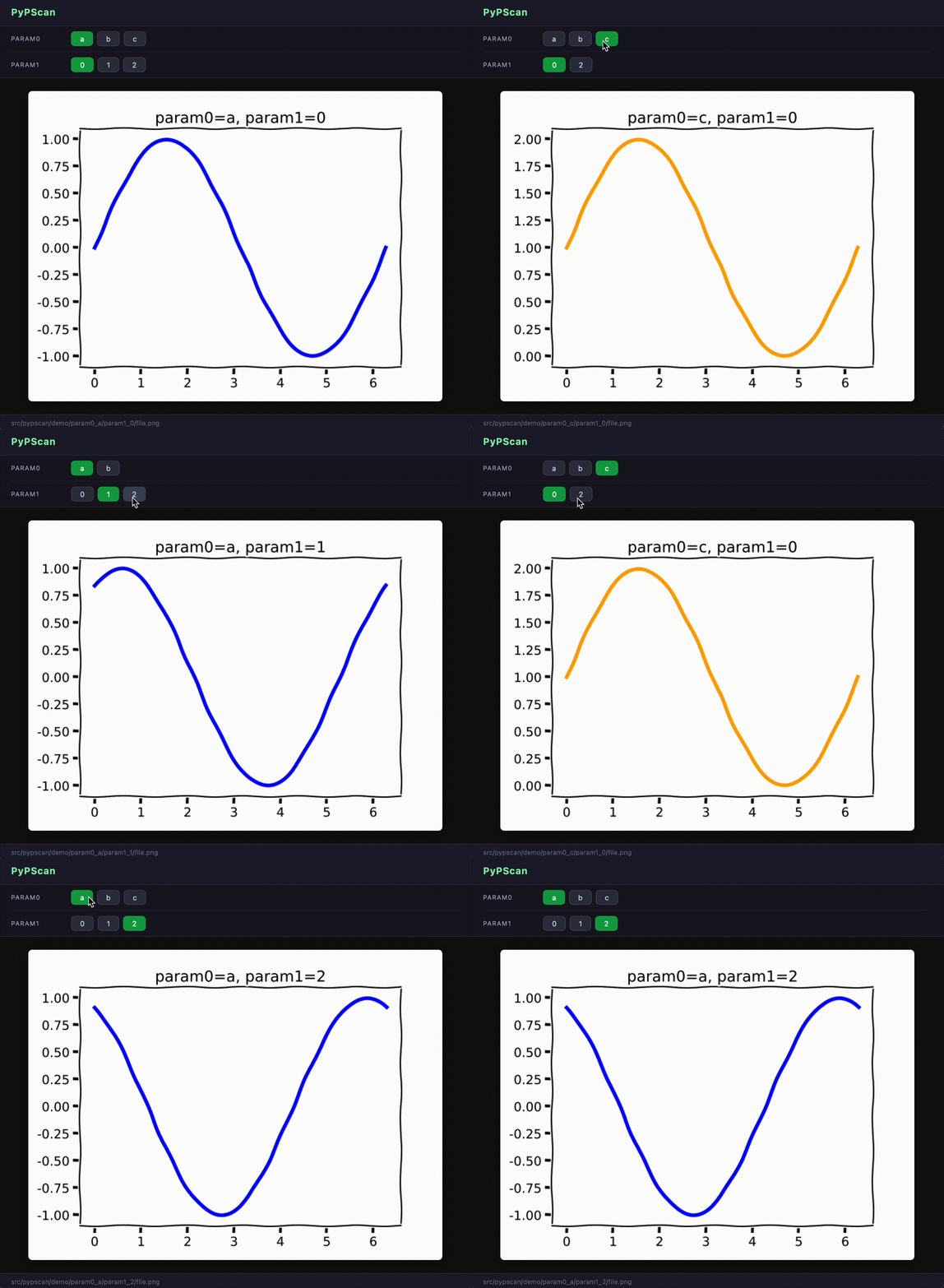
PyPScan is a parametric file browser.
Originally developed as "pscan" by the VISPA Group.
Available as a Jupyter widget, a terminal UI, and a web browser UI:
Install
Base package (no UI dependencies):
pip install pypscan
With Jupyter support:
pip install pypscan[jupyter]
With terminal UI support:
pip install pypscan[tui]
Everything at once:
pip install pypscan[all]
How it works
PyPScan walks a directory tree and extracts named parameters from file paths using a regular expression. Each (?P<name>...) group becomes a browsable dimension. The UI then lets you select values for each parameter interactively, filtering available options to only show valid combinations.
Usage
Jupyter notebook
from pypscan import PyPScan

REGEX = (
    r"param0_(?P<param0>.+)"
    r"/param1_(?P<param1>\d+)"
    r"/file\.png"
)

browser = PyPScan(regex=REGEX, base_path="demo/")
browser.run()
Subclass PyPScan and override display_content(path) to add support for custom file formats.
Terminal UI
pypscan --regex "param0_(?P<param0>.+)/param1_(?P<param1>\d+)/file\.png" \
        --base-path demo/ \
        --ui tui
Requires pip install pypscan[tui]. Press q to quit, r to rescan.
Web browser UI
pypscan --regex "param0_(?P<param0>.+)/param1_(?P<param1>\d+)/file\.png" \
        --base-path demo/ \
        --ui web
Opens a local browser tab automatically. No extra dependencies beyond the base install.
Use --port PORT to change the default port (8765).
Python API (no UI)
Access the scanner and index directly:
from pypscan import Scanner, ParametricIndex

scanner = Scanner(
    regex=r"param0_(?P<param0>.+)/param1_(?P<param1>\d+)/file\.png",
    base_path="demo/",
)
index = ParametricIndex(scanner.scan())

# All available options
print(index.get_options())
# {'param0': ['a', 'b', 'c'], 'param1': ['0', '1', '2']}

# Filter options given a partial selection
print(index.get_options({"param0": "a"}))
# {'param1': ['0', '1', '2']}

# Resolve a full selection to a file path
path = index.resolve({"param0": "a", "param1": "0"})
1 maintainer

Metadata
1 maintainer
Release files for pypscan 2026.0.2
For a detailed explanation of source distributions (sdists) and built distributions (wheels), please see the package formats documentation.
Source distribution (sdist)
| File | Size | Uploaded | |
|---|---|---|---|
| pypscan-2026.0.2.tar.gz | 336.0 kB | Details |
Built distribution (wheel)
| File | Interpreter | ABI | Platform | Reset |
|---|---|---|---|---|
| pypscan-2026.0.2-py3-none-any.whl | Python 3 | none | any | Details |
Total release size: 677.1 kB
Release files / pypscan-2026.0.2.tar.gz
| Download URL | pypscan-2026.0.2.tar.gz |
|---|---|
| Size | 336.0 kB |
| Tags | Source |
|
SHA-256 checksum How to use checksums |
8b1db71a7aa250360eae91be3d5ac863b582ffd65a9d75f07f71bdcd6caf63c1
|
|
BLAKE2b-256 checksum How to use checksums |
548019de5b26ddbc3679382c2ac10c84d9b34a144bcacc6439ceb4a78b927fb7
|
| Upload date | |
|
Uploaded using Trusted Publishing? What is trusted publishing? |
No |
| Uploaded via |
twine/6.2.0 CPython/3.14.3
|
Release files / pypscan-2026.0.2-py3-none-any.whl
| Download URL | pypscan-2026.0.2-py3-none-any.whl |
|---|---|
| Size | 341.0 kB |
| Tags | Python 3 |
|
SHA-256 checksum How to use checksums |
5b0e1d3ce6c74cc62723f9d7cb3e7214e717f21776137925148677b5ca9aa08c
|
|
BLAKE2b-256 checksum How to use checksums |
4ba1810f95fb73282e5712bcd5c6e6f34cdf2ceccfa72c5b6a0a9e7f87fe0892
|
| Upload date | |
|
Uploaded using Trusted Publishing? What is trusted publishing? |
No |
| Uploaded via |
twine/6.2.0 CPython/3.14.3
|














