
Parametric file browser written in pure python.

Project description
PyPScan
PyPScan is a parametric file browser.
Originally developed as "pscan" by the VISPA Group.
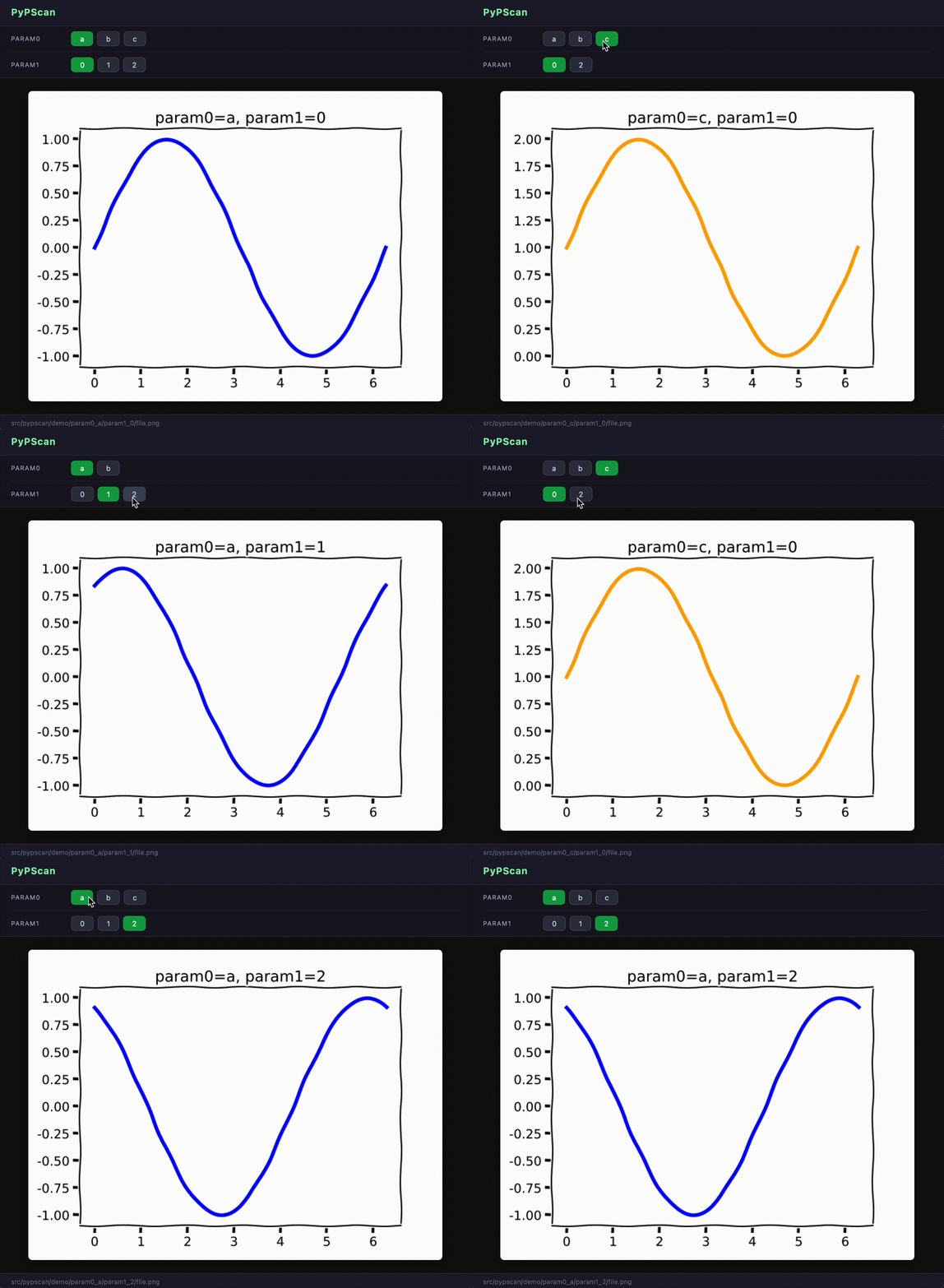
Available as a Jupyter widget, a terminal UI, and a web browser UI:
Install
Base package (no UI dependencies):
pip install pypscan
With Jupyter support:
pip install pypscan[jupyter]
With terminal UI support:
pip install pypscan[tui]
Everything at once:
pip install pypscan[all]
How it works
PyPScan walks a directory tree and extracts named parameters from file paths using a regular expression. Each (?P<name>...) group becomes a browsable dimension. The UI then lets you select values for each parameter interactively, filtering available options to only show valid combinations.
Usage
Jupyter notebook
from pypscan import PyPScan

REGEX = (
    r"param0_(?P<param0>.+)"
    r"/param1_(?P<param1>\d+)"
    r"/file\.png"
)

browser = PyPScan(regex=REGEX, base_path="demo/")
browser.run()
Subclass PyPScan and override display_content(path) to add support for custom file formats.
Terminal UI
pypscan --regex "param0_(?P<param0>.+)/param1_(?P<param1>\d+)/file\.png" \
        --base-path demo/ \
        --ui tui
Requires pip install pypscan[tui]. Press q to quit, r to rescan.
Web browser UI
pypscan --regex "param0_(?P<param0>.+)/param1_(?P<param1>\d+)/file\.png" \
        --base-path demo/ \
        --ui web
Opens a local browser tab automatically. No extra dependencies beyond the base install.
Use --port PORT to change the default port (8765).
Python API (no UI)
Access the scanner and index directly:
from pypscan import Scanner, ParametricIndex

scanner = Scanner(
    regex=r"param0_(?P<param0>.+)/param1_(?P<param1>\d+)/file\.png",
    base_path="demo/",
)
index = ParametricIndex(scanner.scan())

# All available options
print(index.get_options())
# {'param0': ['a', 'b', 'c'], 'param1': ['0', '1', '2']}

# Filter options given a partial selection
print(index.get_options({"param0": "a"}))
# {'param1': ['0', '1', '2']}

# Resolve a full selection to a file path
path = index.resolve({"param0": "a", "param1": "0"})
Release history Release notifications | RSS feed


Download files
Download the file for your platform. If you're not sure which to choose, learn more about installing packages.
Source Distribution
Built Distribution
Filter files by name, interpreter, ABI, and platform.
If you're not sure about the file name format, learn more about wheel file names.
Copy a direct link to the current filters
File details
Details for the file pypscan-2026.0.1.tar.gz.
File metadata
- Download URL: pypscan-2026.0.1.tar.gz
- Upload date:
- Size: 336.0 kB
- Tags: Source
- Uploaded using Trusted Publishing? No
- Uploaded via: twine/6.2.0 CPython/3.14.3
File hashes
| Algorithm | Hash digest | |
|---|---|---|
| SHA256 |
a2056f75f225feef0ada8cbb29f1a4b216a329f816e66979367a67c4f705bc5e
|
|
| MD5 |
e542209b6d47f319b098ee46c1c06d98
|
|
| BLAKE2b-256 |
af3d203be414929f32bfcd18837f242c80f675b226046e780aa50ca3fb1e278b
|
File details
Details for the file pypscan-2026.0.1-py3-none-any.whl.
File metadata
- Download URL: pypscan-2026.0.1-py3-none-any.whl
- Upload date:
- Size: 341.0 kB
- Tags: Python 3
- Uploaded using Trusted Publishing? No
- Uploaded via: twine/6.2.0 CPython/3.14.3
File hashes
| Algorithm | Hash digest | |
|---|---|---|
| SHA256 |
d3221838af8846b5a7e79053d57fd4fb51c10fc29fd4a41dacd18350ee53c40e
|
|
| MD5 |
a4615dbf79a8fe933fc679e637e070f4
|
|
| BLAKE2b-256 |
b0518bd60afbb7b9e3c02881a5846e61e7e2beea92a6494fe851ec1195641a1a
|






