
pyqt-frameless-window
PyQt(+PySide) Frameless Window
Feature
-
Frameless
-
Using Windows API (for Windows OS effect - shadow, rounded, animation, etc.)
-
Supports PyQt5, PySide2, PySide6
-
User can make it enable/disable to move, resize
-
Supports QWidget, QDialog, QMainWindow
-
Support title bar. You can decide either show or hide it.
Note
I have no macOS and Linux to test so i couldn't manage to support them as well.
Maybe i can use the virtual machine or something to do it.
I strongly recommend legacy version if your OS is not Windows and that's saying a lot.
Requirements
-
PyQt5 - Use QtWinExtras to use Windows API feature in Qt (Qt6 doesn't support QtWinExtras anymore, sadly)
-
qtpy - To use PyQt5, PySide2(Qt version 5), PySide6(Qt version 6)
-
pywin32 - For using Windows API feature
Setup
New version (using Windows API)
python -m pip install pyqt-frameless-window
(For new version) Recommend to clone rather than installing with pip. Still working!
Legacy version
python -m pip install pyqt-frameless-window==0.0.61
Class Overview
Recommend to use FramelessWidget, the others have multiple inheritance, so it can cause unexpected problem (haven't found any so far, though)
-
FramelessWidget(hint=None) - frameless QWidget
-
FramelessDialog(hint=None) - frameless QDialog
-
FramelessMainWindow(hint=None) - frameless QMainWindow
About hint
You can give the list of buttons on the right top of the menu bar with hint like ['full_screen', 'min', 'max', 'close'].
['min', 'max', 'close'] will set by default if you don't give any arguments.
Available arguments (v0.0.78)
-
full_screen (still buggy, for example you can resize the full-screen window if you put the cusror to the very edge of the window)
-
min
-
max
-
close
You can set the list of them with setTitleBarHint(hint: list) as well. (v0.0.82)
Method Overview
== FramelessWidget, FramelessDialog, FramelessMainWindow ==
For Windows & The Others
-
setResizable(f: bool)- Set resizable/none-resizable. -
isResizable() -> bool- Check if window is resizable or not -
setPressToMove(f: bool)- Set movable/non-movable -
isPressToMove() -> bool- Check if window is movable or not -
New Version Only
-
setWindowIcon(filename: str)- Set the icon to the title bar. This method is overriden. -
setWindowTitle(title: str)- Set the title to the title bar. This method is overriden. -
setFixedSize(width, height)- Set the fixed width and height. This method is overriden to callsetResizable(false). -
setTitleBarVisible(f: bool)- Set the title bar's visibility. If window is movable, window moving policy will also be decided by this.-
If you set this true and window is movable, you should click and drag only the title bar to move the window.
-
If you set this false and window is movable, you can click and drag the part of the window which is not occupied by widget to move the window.
-
-
getTitleBar()- Get the title bar. -
setTitleBarHint(hint: list)- Set the standard buttons(min, max, close...) of corner widget.
-
The Others
-
setMargin(margin: int)- Set the margin which allows cursor to change its shape to resize form -
setFrameColor(color)- Set the background color. color argument type can be both QColor and str. -
getFrameColor-> QColor - Get the background color. -
setVerticalExpandedEnabled(f: bool)- Make it able to expand vertically when double-clicking the top or bottom edges of the window.
== TitleBar (New Version Only) ==
-
getIcon() -> QLabel- Get the icon. -
getTitle() -> QLabel- Get the title. -
setTitleBarFont(font: QFont)- Set the font of the title bar. -
setIconSize(w, h)- Set the size of icon on the title bar.
Note: Do not use any functions other than the above.
Example
Note: This example is for Windows only.
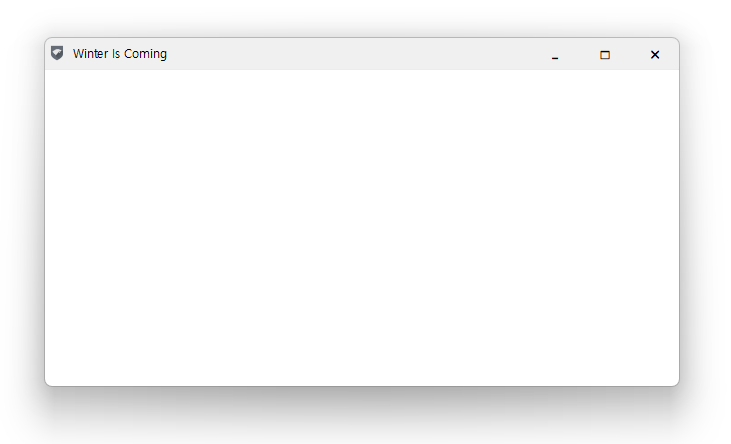
PyQt5 Code Sample
FramelessDialog
import sys


# IMPORTANT!!!!!!!!!

# to prevent the "QWidget: Must construct a QApplication before a QWidget" error, you should put the code below

from PyQt5.QtCore import Qt


from pyqt_frameless_window import FramelessDialog

from PyQt5.QtWidgets import QApplication, QTextEdit


class Window(FramelessDialog):

    def __init__(self):

        super().__init__()

        self.__initUi()


    def __initUi(self):

        self.setWindowTitle('Winter Is Coming')

        self.setWindowIcon('./Stark-icon.png')


        # if you want to customize the title bar

        # titleBar = self.getTitleBar()

        # titleBar.setTitleBarFont(QFont('Arial', 24))

        # titleBar.setIconSize(32, 32)


        lay = self.layout()

        lay.addWidget(QTextEdit())

        self.setLayout(lay)


if __name__ == "__main__":

    app = QApplication(sys.argv)

    window = Window()

    window.show()

    sys.exit(app.exec())
FramelessWidget
FramelessWidget code sample will be identical with FramelessDialog except for its name.
FramelessMainWindow
import sys


# IMPORTANT!!!!!!!!!

# to prevent the "QWidget: Must construct a QApplication before a QWidget" error, you should put the code below

from PyQt5.QtCore import Qt


from pyqt_frameless_window import FramelessMainWindow

from PyQt5.QtWidgets import QApplication, QTextEdit


class Window(FramelessMainWindow):

    def __init__(self):

        super().__init__()

        self.__initUi()


    def __initUi(self):

        self.setWindowTitle('Winter Is Coming')

        self.setWindowIcon('./Stark-icon.png')


        # if you want to customize the title bar

        # titleBar = self.getTitleBar()

        # titleBar.setTitleBarFont(QFont('Arial', 24))

        # titleBar.setIconSize(32, 32)


        mainWidget = self.centralWidget()

        lay = mainWidget.layout()

        lay.addWidget(QTextEdit())

        mainWidget.setLayout(lay)

        self.setCentralWidget(mainWidget)


if __name__ == "__main__":

    app = QApplication(sys.argv)

    window = Window()

    window.show()

    sys.exit(app.exec())
PySide6 Code Sample
FramelessDialog
import sys


# IMPORTANT!!!!!!!!!

# to prevent the "QWidget: Must construct a QApplication before a QWidget" error, you should put the code below

from PySide6.QtCore import Qt


from pyqt_frameless_window import FramelessDialog

from PySide6.QtWidgets import QApplication, QTextEdit


class Window(FramelessDialog):

    def __init__(self):

        super().__init__()

        self.__initUi()


    def __initUi(self):

        self.setWindowTitle('Winter Is Coming')

        self.setWindowIcon('./Stark-icon.png')


        # if you want to customize the title bar

        # titleBar = self.getTitleBar()

        # titleBar.setTitleBarFont(QFont('Arial', 24))

        # titleBar.setIconSize(32, 32)


        lay = self.layout()

        lay.addWidget(QTextEdit())

        self.setLayout(lay)


if __name__ == "__main__":

    app = QApplication(sys.argv)

    window = Window()

    window.show()

    sys.exit(app.exec())
FramelessMainWindow
import sys


# IMPORTANT!!!!!!!!!

# to prevent the "QWidget: Must construct a QApplication before a QWidget" error, you should put the code below

from PySide6.QtCore import Qt


from pyqt_frameless_window import FramelessMainWindow

from PySide6.QtWidgets import QApplication, QTextEdit


class Window(FramelessMainWindow):

    def __init__(self):

        super().__init__()

        self.__initUi()


    def __initUi(self):

        self.setWindowTitle('Winter Is Coming')

        self.setWindowIcon('./Stark-icon.png')


        # if you want to customize the title bar

        # titleBar = self.getTitleBar()

        # titleBar.setTitleBarFont(QFont('Arial', 24))

        # titleBar.setIconSize(32, 32)


        mainWidget = self.centralWidget()

        lay = mainWidget.layout()

        lay.addWidget(QTextEdit())

        mainWidget.setLayout(lay)

        self.setCentralWidget(mainWidget)


if __name__ == "__main__":

    app = QApplication(sys.argv)

    window = Window()

    window.show()

    sys.exit(app.exec())
Result
Title bar
No title bar
If you make the title bar not visible with setTitleBarVisible(False)
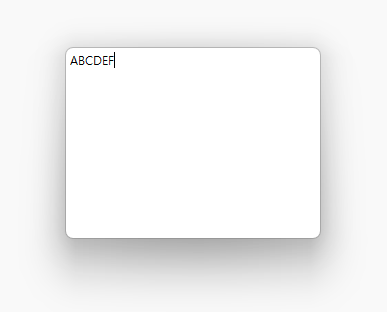
Try to move and resize it.
Note: Result image was tested in Windows 11, PySide6.
See Also
Legacy version(0.0.61) README - not using Windows API, qtpy, just good old PyQt5. Enable to resize and move as always. (clunky in Windows though) Only for PyQt5 by the way.
Don't use multiple inheritance!!
TODO list
-
Make QWebEngineView work in win32 app (Windows 10) - QDockWidget, QMdiSubWindow
-
Switching the customized title bar's theme only
1 maintainer

Metadata
1 maintainer
Release files for pyqt-frameless-window 0.0.85
For a detailed explanation of source distributions (sdists) and built distributions (wheels), please see the package formats documentation.
Source distribution (sdist)
| File | Size | Uploaded | |
|---|---|---|---|
| pyqt-frameless-window-0.0.85.tar.gz | 16.0 kB | Details |
Built distribution (wheel)
| File | Interpreter | ABI | Platform | Reset |
|---|---|---|---|---|
| pyqt_frameless_window-0.0.85-py3-none-any.whl | Python 3 | none | any | Details |
Total release size: 33.4 kB
Release files / pyqt-frameless-window-0.0.85.tar.gz
| Download URL | pyqt-frameless-window-0.0.85.tar.gz |
|---|---|
| Size | 16.0 kB |
| Tags | Source |
|
SHA-256 checksum How to use checksums |
270101d7545acff02c448c37cdb72cdeb0492529f0c8422a8732ce3124315b57
|
|
BLAKE2b-256 checksum How to use checksums |
36a43f09bd3d2e771d51ec906c8cd1e3c6befe43f2a1b26792d886c3efa7b032
|
| Upload date | |
|
Uploaded using Trusted Publishing? What is trusted publishing? |
No |
| Uploaded via |
twine/4.0.2 CPython/3.10.4
|
Release files / pyqt_frameless_window-0.0.85-py3-none-any.whl
| Download URL | pyqt_frameless_window-0.0.85-py3-none-any.whl |
|---|---|
| Size | 17.3 kB |
| Tags | Python 3 |
|
SHA-256 checksum How to use checksums |
4bb23e222703dbc3f33816cc97704ea15dfb57c16bcf44812750e084fc939d23
|
|
BLAKE2b-256 checksum How to use checksums |
f765c62f180f6b389b81bc954b0a0b2ad8875d657c669d736d0920ac6865d832
|
| Upload date | |
|
Uploaded using Trusted Publishing? What is trusted publishing? |
No |
| Uploaded via |
twine/4.0.2 CPython/3.10.4
|














