
PyQtHCaptcha
PyQtHCaptcha is a Python library that provides a native hCaptcha widget for desktop applications using PyQt6.
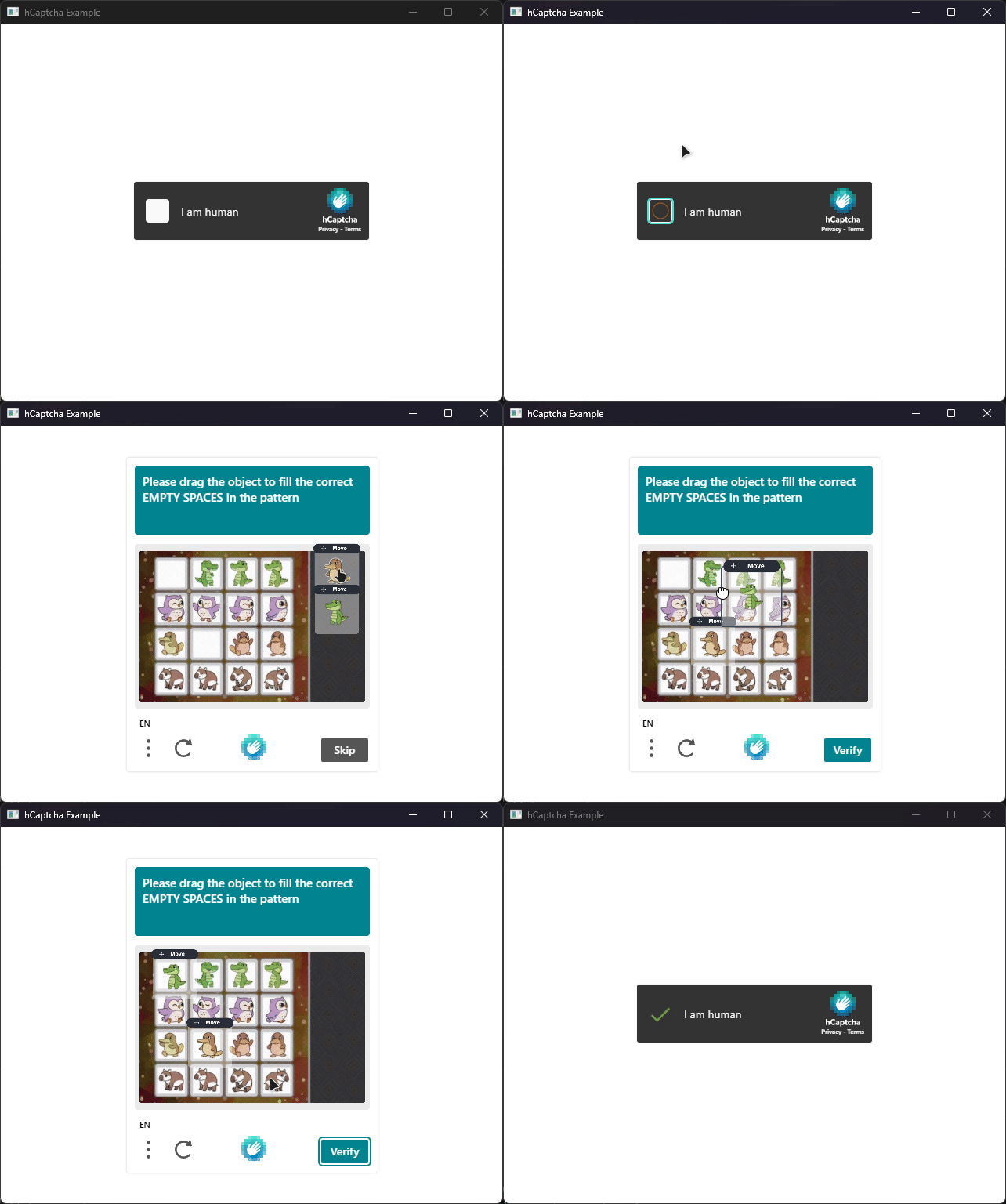
Features
- Supports all configuration parameters of the native mobile SDK, including enterprise features like
rqdataand custom endpoints - Supports passive mode captchas with invisibles challenges
- Fully typed with modern Python type hints
- Works with
qasyncfor seamless integration into async applications
Installation
pip install pyqt-hcaptcha
Usage
Injecting a hCaptcha widget into your PyQt application is straightforward. Below is a minimal example demonstrating how to set up the widget and connect to its signals:
from PyQtHCaptcha import HCaptchaConfig, HCaptchaError, HCaptchaWebView

# Define your callbacks
def on_loaded():
    print("hCaptcha widget loaded successfully")

def on_success(token: str):
    print(f"Solution received: {token[:40]}...")

def on_failure(error: HCaptchaError):
    print(f"hCaptcha Error: {error.name}")

def on_expired():
    print("hCaptcha token expired")

# Create a configuration for the hCaptcha widget
config = HCaptchaConfig(
    sitekey="10000000-ffff-ffff-ffff-000000000001",
    url="https://accounts.hcaptcha.com/demo",
    theme="dark",
)

# Initialize the hCaptcha widget with the configuration
view = HCaptchaWebView(config)

# Connect signals to your callbacks
view.onLoaded.connect(on_loaded)
view.onSuccess.connect(on_success)
view.onFailure.connect(on_failure)
view.onExpired.connect(on_expired)

# Show the widget
view.setWindowTitle("hCaptcha Example")
view.resize(400, 600)
view.show()
See the examples/ directory for more complete examples.
Documentation
The documentation is available here.
1 maintainer

Metadata
1 maintainer
Release files for pyqt-hcaptcha 1.2.0
For a detailed explanation of source distributions (sdists) and built distributions (wheels), please see the package formats documentation.
Source distribution (sdist)
| File | Size | Uploaded | |
|---|---|---|---|
| pyqt_hcaptcha-1.2.0.tar.gz | 10.9 kB | Details |
Built distribution (wheel)
| File | Interpreter | ABI | Platform | Reset |
|---|---|---|---|---|
| pyqt_hcaptcha-1.2.0-py3-none-any.whl | Python 3 | none | any | Details |
Total release size: 21.0 kB
Release files / pyqt_hcaptcha-1.2.0.tar.gz
| Download URL | pyqt_hcaptcha-1.2.0.tar.gz |
|---|---|
| Size | 10.9 kB |
| Tags | Source |
|
SHA-256 checksum How to use checksums |
8cb7d37a1edeab302256693aff19dcafffbbfcb27c89b01bc11cbb8c9c0e6a8e
|
|
BLAKE2b-256 checksum How to use checksums |
df86de6f0e315c235c1e863883dc889bfd112380f1fdf2cba73da823825f6302
|
| Upload date | |
|
Uploaded using Trusted Publishing? What is trusted publishing? |
Yes |
| Uploaded via |
twine/6.1.0 CPython/3.13.7
|
Provenance
Provenance describes where a file came from. On PyPI, provenance is shared via attestations, which provide a verifiable record of the build or publishing details. View details, limitations and caveats.


PyPI Publish Attestation
PyPI verified that this artifact, at this checksum, originated from the publisher listed below.
Signed by GitHub Actions, verified by PyPI on Feb 22, 2026.
Transparency logRelease files / pyqt_hcaptcha-1.2.0-py3-none-any.whl
| Download URL | pyqt_hcaptcha-1.2.0-py3-none-any.whl |
|---|---|
| Size | 10.1 kB |
| Tags | Python 3 |
|
SHA-256 checksum How to use checksums |
5573ba47417f44d95cff622702bd3ce95535bc48e57655bebf4c235a84b405d4
|
|
BLAKE2b-256 checksum How to use checksums |
a1598387a2e82ce29385d74f727a2457dedcf6f3214a7281ce0f61e4849cd4f7
|
| Upload date | |
|
Uploaded using Trusted Publishing? What is trusted publishing? |
Yes |
| Uploaded via |
twine/6.1.0 CPython/3.13.7
|
Provenance
Provenance describes where a file came from. On PyPI, provenance is shared via attestations, which provide a verifiable record of the build or publishing details. View details, limitations and caveats.
PyPI Publish Attestation
PyPI verified that this artifact, at this checksum, originated from the publisher listed below.
Signed by GitHub Actions, verified by PyPI on Feb 22, 2026.
Transparency log













