
Modern hCaptcha SDK for PyQt applications

Project description
PyQtHCaptcha
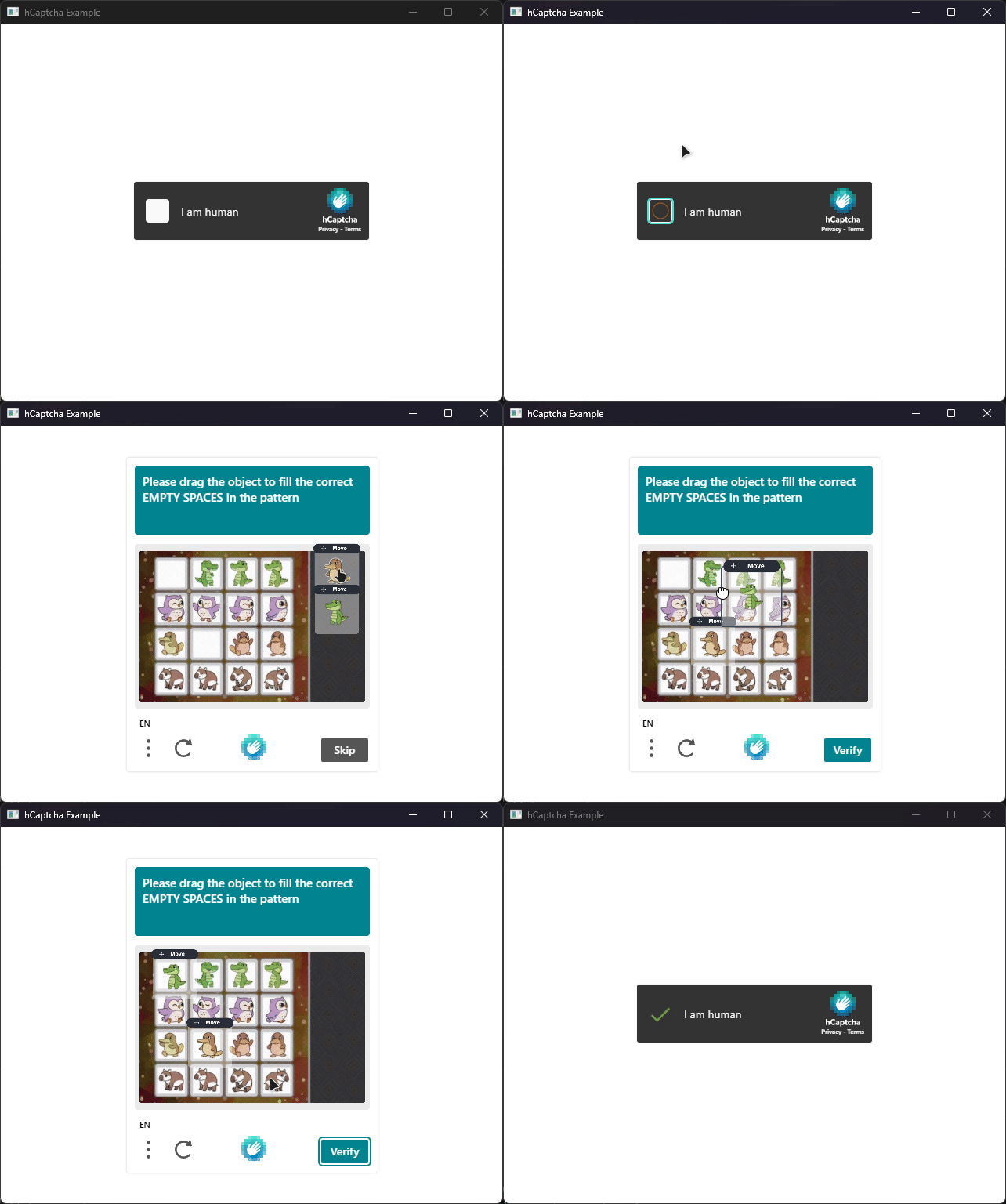
PyQtHCaptcha is a Python library that provides a native hCaptcha widget for desktop applications using PyQt6.
Features
- Supports all configuration parameters of the native mobile SDK, including enterprise features like
rqdataand custom endpoints - Supports passive mode captchas with invisibles challenges
- Fully typed with modern Python type hints
- Works with
qasyncfor seamless integration into async applications
Installation
pip install pyqt-hcaptcha
Usage
Injecting a hCaptcha widget into your PyQt application is straightforward. Below is a minimal example demonstrating how to set up the widget and connect to its signals:
from PyQtHCaptcha import HCaptchaConfig, HCaptchaError, HCaptchaWebView

# Define your callbacks
def on_loaded():
    print("hCaptcha widget loaded successfully")

def on_success(token: str):
    print(f"Solution received: {token[:40]}...")

def on_failure(error: HCaptchaError):
    print(f"hCaptcha Error: {error.name}")

def on_expired():
    print("hCaptcha token expired")

# Create a configuration for the hCaptcha widget
config = HCaptchaConfig(
    sitekey="10000000-ffff-ffff-ffff-000000000001",
    url="https://accounts.hcaptcha.com/demo",
    theme="dark",
)

# Initialize the hCaptcha widget with the configuration
view = HCaptchaWebView(config)

# Connect signals to your callbacks
view.onLoaded.connect(on_loaded)
view.onSuccess.connect(on_success)
view.onFailure.connect(on_failure)
view.onExpired.connect(on_expired)

# Show the widget
view.setWindowTitle("hCaptcha Example")
view.resize(400, 600)
view.show()
See the examples/ directory for more complete examples.
Documentation
The documentation is available here.


Download files
Download the file for your platform. If you're not sure which to choose, learn more about installing packages.
Source Distribution
Built Distribution
Filter files by name, interpreter, ABI, and platform.
If you're not sure about the file name format, learn more about wheel file names.
Copy a direct link to the current filters
File details
Details for the file pyqt_hcaptcha-1.0.1.tar.gz.
File metadata
- Download URL: pyqt_hcaptcha-1.0.1.tar.gz
- Upload date:
- Size: 9.9 kB
- Tags: Source
- Uploaded using Trusted Publishing? Yes
- Uploaded via: twine/6.1.0 CPython/3.13.7
File hashes
| Algorithm | Hash digest | |
|---|---|---|
| SHA256 |
ad944f7eda975d2031b5dd2935ee5f61e81872b55616dd6e475ee19a09340107
|
|
| MD5 |
f5a007b5202ac734e4b9b4cd4d10750e
|
|
| BLAKE2b-256 |
850d3607444d9f379f9e9948da3e046170366780f44f6d02b74827d7f0e636c7
|
Provenance
The following attestation bundles were made for pyqt_hcaptcha-1.0.1.tar.gz:
Publisher:
publish.yml on dolfies/pyqt-hcaptcha
-
Statement:
-
Statement type:
https://in-toto.io/Statement/v1 -
Predicate type:
https://docs.pypi.org/attestations/publish/v1 -
Subject name:
pyqt_hcaptcha-1.0.1.tar.gz -
Subject digest:
ad944f7eda975d2031b5dd2935ee5f61e81872b55616dd6e475ee19a09340107 - Sigstore transparency entry: 976167070
- Sigstore integration time:
-
Permalink:
dolfies/pyqt-hcaptcha@389b95fe382f89c66d1fe68a33356dc98a9a0294 -
Branch / Tag:
refs/tags/v1.0.1 - Owner: https://github.com/dolfies
-
Access:
public
-
Token Issuer:
https://token.actions.githubusercontent.com -
Runner Environment:
github-hosted -
Publication workflow:
publish.yml@389b95fe382f89c66d1fe68a33356dc98a9a0294 -
Trigger Event:
release
-
Statement type:
File details
Details for the file pyqt_hcaptcha-1.0.1-py3-none-any.whl.
File metadata
- Download URL: pyqt_hcaptcha-1.0.1-py3-none-any.whl
- Upload date:
- Size: 9.9 kB
- Tags: Python 3
- Uploaded using Trusted Publishing? Yes
- Uploaded via: twine/6.1.0 CPython/3.13.7
File hashes
| Algorithm | Hash digest | |
|---|---|---|
| SHA256 |
ba185e8cc8df8c8f3603c644d8479062be8f1ecda7ce95e97d18ca36d51ff3b7
|
|
| MD5 |
fd3d08fae428044378036c222ce003ce
|
|
| BLAKE2b-256 |
b052654854c99efece88afccfe8bd8eed00260340a45a4f1d4c9418ca71e794a
|
Provenance
The following attestation bundles were made for pyqt_hcaptcha-1.0.1-py3-none-any.whl:
Publisher:
publish.yml on dolfies/pyqt-hcaptcha
-
Statement:
-
Statement type:
https://in-toto.io/Statement/v1 -
Predicate type:
https://docs.pypi.org/attestations/publish/v1 -
Subject name:
pyqt_hcaptcha-1.0.1-py3-none-any.whl -
Subject digest:
ba185e8cc8df8c8f3603c644d8479062be8f1ecda7ce95e97d18ca36d51ff3b7 - Sigstore transparency entry: 976167072
- Sigstore integration time:
-
Permalink:
dolfies/pyqt-hcaptcha@389b95fe382f89c66d1fe68a33356dc98a9a0294 -
Branch / Tag:
refs/tags/v1.0.1 - Owner: https://github.com/dolfies
-
Access:
public
-
Token Issuer:
https://token.actions.githubusercontent.com -
Runner Environment:
github-hosted -
Publication workflow:
publish.yml@389b95fe382f89c66d1fe68a33356dc98a9a0294 -
Trigger Event:
release
-
Statement type:






