
pyqt-svg-button
PyQt button which supports svg icon
Qt's setIcon of button widget doesn't help that much in terms of setting SVG image as an icon. It's just another good old fashioned pixmap icon.
So i overrided the method to set SVG icon with the power of CSS.
By the way, parent class of this is QPushButton and SvgAbstractButton. (Multiple inheritance)
(the repo/package name has changed on 2022/05/18 from pyqt-svg-icon-pushbutton)
Default background color of this is transparent.
If you want to use svg supporting QToolButton instead of QPushButton, use pyqt-svg-toolbutton.
Requirements
- PyQt5 >= 5.8
Setup
python -m pip install pyqt-svg-button
Usage
-
SvgButton(base_widget: QWidget = None)- Constructor. Base widget is the widget that the button's background color based of when button get hovered/pressed by mouse cursor. If value is default(None), background color of button which is getting hovered/pressed will set to #DDDDDD, #FFFFFF. -
setIcon(icon: str)- set the icon. Icon should be a SVG file's name. This is overriding method. -
setPadding(padding: int)- set the button's padding. -
setBorderRadius(border_radius: int) -
setBackground(background=None)- you can givebackgroundargument's value either 'transparent' or 6-digits or 3-digits hex color string or color's name like 'red', 'green'. If you don't give any arguments(None), background will automatically be set based on base widget's color if you give base widget argument toSvgButtonconstructor. -
setAsCircle()- set button's shape as circle.
Included Packages
Example
Code Sample
from PyQt5.QtWidgets import QWidget, QApplication, QHBoxLayout


from pyqt_svg_button.svgButton import SvgButton


class SvgButtonExample(QWidget):

    def __init__(self):

        super().__init__()

        self.__initUi()


    def __initUi(self):

        newButton = SvgButton()

        newButton.setIcon('new.svg')


        openButton = SvgButton()

        openButton.setIcon('open.svg')


        saveButton = SvgButton()

        saveButton.setIcon('save.svg')


        lay = QHBoxLayout()

        lay.addWidget(newButton)

        lay.addWidget(openButton)

        lay.addWidget(saveButton)


        self.setLayout(lay)


if __name__ == "__main__":

    import sys


    app = QApplication(sys.argv)

    ex = SvgButtonExample()

    ex.show()

    sys.exit(app.exec_())
Result
Sorry for the video quality.
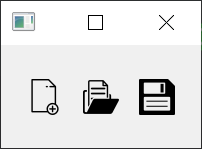
Image quality is not perfect, but much better than video. Image above is slightly bigger than actual size.
1 maintainer

Metadata
1 maintainer
Release files for pyqt-svg-button 0.0.26
For a detailed explanation of source distributions (sdists) and built distributions (wheels), please see the package formats documentation.
Source distribution (sdist)
| File | Size | Uploaded | |
|---|---|---|---|
| pyqt-svg-button-0.0.26.tar.gz | 3.4 kB | Details |
Built distribution (wheel)
| File | Interpreter | ABI | Platform | Reset |
|---|---|---|---|---|
| pyqt_svg_button-0.0.26-py3-none-any.whl | Python 3 | none | any | Details |
Total release size: 7.4 kB














