
PyQt button which supports svg icon (not a fake low quality svg icon)

Project description
pyqt-svg-button
PyQt button which supports svg icon
Qt's setIcon of button widget doesn't help that much in terms of setting SVG image as an icon. It's just another good old fashioned pixmap icon.
So i overrided the method to set SVG icon with the power of CSS.
By the way, parent class of this is QPushButton. I will update QToolButton of this when i'm ready to do so.
(the repo/package name has changed on 2022/05/18 from pyqt-svg-icon-pushbutton)
Requirements
- PyQt5 >= 5.8
Setup
python -m pip install pyqt-svg-button
Usage
-
SvgButton(base_widget: QWidget = None)- Constructor. Base widget is the widget that the button's background color based of when button get hovered/pressed by mouse cursor. If value is default(None), background color of button which is getting hovered/pressed will set to #DDDDDD, #FFFFFF. -
setIcon(icon: str)- set the icon. Icon should be a SVG file's name. This is overriding method. -
setPadding(padding: int)- set the button's padding. -
setBorderRadius(border_radius: int) -
setBackground(background=None)- you can givebackgroundargument's value either 'transparent' or 6-digits or 3-digits hex color string or color's name like 'red', 'green'. As you see, default is set toNone. If you set the value as default, background will automatically be set. -
setAsCircle()- set button's shape as circle.
Included Packages
Example
Code Sample
from PyQt5.QtWidgets import QWidget, QApplication, QHBoxLayout


from pyqt_svg_button.svgButton import SvgButton


class SvgButtonExample(QWidget):

    def __init__(self):

        super().__init__()

        self.__initUi()


    def __initUi(self):

        newButton = SvgButton()

        newButton.setIcon('new.svg')


        openButton = SvgButton()

        openButton.setIcon('open.svg')


        saveButton = SvgButton()

        saveButton.setIcon('save.svg')


        lay = QHBoxLayout()

        lay.addWidget(newButton)

        lay.addWidget(openButton)

        lay.addWidget(saveButton)


        self.setLayout(lay)


if __name__ == "__main__":

    import sys


    app = QApplication(sys.argv)

    ex = SvgButtonExample()

    ex.show()

    sys.exit(app.exec_())
Result
Sorry for the video quality.
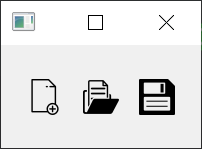
Image quality is not perfect, but much better than video. Image above is slightly bigger than actual size.
Release history Release notifications | RSS feed


Download files
Download the file for your platform. If you're not sure which to choose, learn more about installing packages.
Source Distribution
Built Distribution
Filter files by name, interpreter, ABI, and platform.
If you're not sure about the file name format, learn more about wheel file names.
Copy a direct link to the current filters






