

PyrateLimiter
The request rate limiter using Leaky-bucket algorithm.
Full project documentation can be found at pyratelimiter.readthedocs.io.





Contents
- PyrateLimiter
Features
- Tracks any number of rate limits and intervals you want to define
- Independently tracks rate limits for multiple services or resources
- Handles exceeded rate limits by either raising errors or adding delays
- Several usage options including a normal function call, a decorator, or a contextmanager
- Async support
- Includes optional SQLite and Redis backends, which can be used to persist limit tracking across multiple threads, processes, or application restarts
Installation
Install using pip:
pip install pyrate-limiter
Or using conda:
conda install --channel conda-forge pyrate-limiter
Basic usage
Defining rate limits
Consider some public API (like LinkedIn, GitHub, etc.) that has rate limits like the following:
- 500 requests per hour
- 1000 requests per day
- 10000 requests per month
You can define these rates using the RequestRate class, and add them to a Limiter:
from pyrate_limiter import Duration, RequestRate, Limiter

hourly_rate = RequestRate(500, Duration.HOUR) # 500 requests per hour
daily_rate = RequestRate(1000, Duration.DAY) # 1000 requests per day
monthly_rate = RequestRate(10000, Duration.MONTH) # 10000 requests per month

limiter = Limiter(hourly_rate, daily_rate, monthly_rate)
or
from pyrate_limiter import Duration, RequestRate, Limiter

rate_limits = (
      RequestRate(500, Duration.HOUR), # 500 requests per hour
      RequestRate(1000, Duration.DAY), # 1000 requests per day
      RequestRate(10000, Duration.MONTH), # 10000 requests per month
)

limiter = Limiter(*rate_limits)
Note that these rates need to be ordered by interval length; in other words, an hourly rate must come before a daily rate, etc.
Applying rate limits
Then, use Limiter.try_acquire() wherever you are making requests (or other rate-limited operations).
This will raise an exception if the rate limit is exceeded.
import requests

def request_function():
    limiter.try_acquire('identity')
    requests.get('https://example.com')

while True:
    request_function()
Alternatively, you can use Limiter.ratelimit() as a function decorator:
@limiter.ratelimit('identity')
def request_function():
    requests.get('https://example.com')
See Additional usage options below for more details.
Identities
Note that both try_acquire() and ratelimit() take one or more identity arguments. Typically this is
the name of the service or resource that is being rate-limited. This allows you to track rate limits
for these resources independently. For example, if you have a service that is rate-limited by user:
def request_function(user_ids):
    limiter.try_acquire(*user_ids)
    for user_id in user_ids:
        requests.get(f'https://example.com?user_id={user_id}')
Handling exceeded limits
When a rate limit is exceeded, you have two options: raise an exception, or add delays.
Bucket analogy
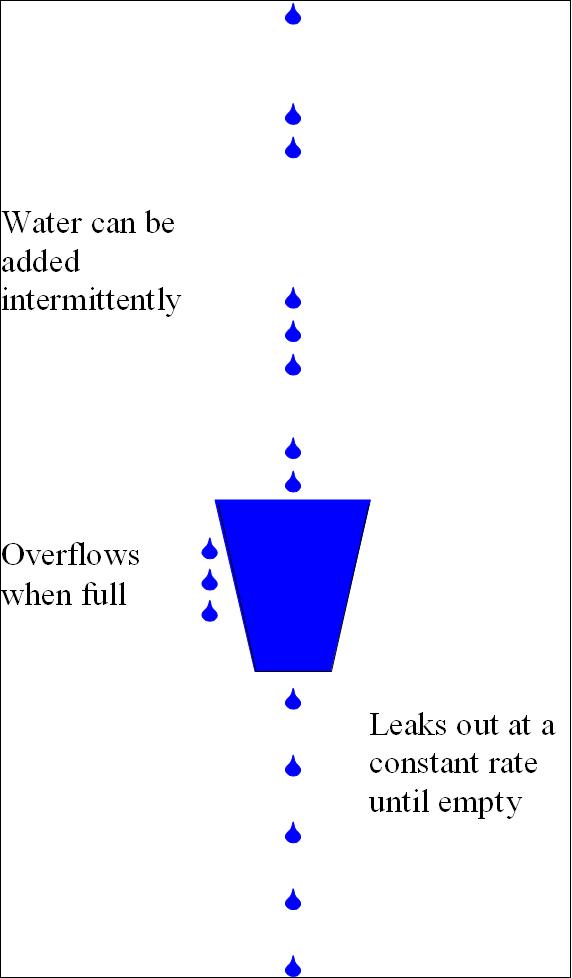
At this point it's useful to introduce the analogy of "buckets" used for rate-limiting. Here is a quick summary:
- This library implements the Leaky Bucket algorithm.
- It is named after the idea of representing some kind of fixed capacity -- like a network or service -- as a bucket.
- The bucket "leaks" at a constant rate. For web services, this represents the ideal or permitted request rate.
- The bucket is "filled" at an intermittent, unpredicatble rate, representing the actual rate of requests.
- When the bucket is "full", it will overflow, representing canceled or delayed requests.
Rate limit exceptions
By default, a BucketFullException will be raised when a rate limit is exceeded.
The error contains a meta_info attribute with the following information:
identity: The identity it receivedrate: The specific rate that has been exceededremaining_time: The remaining time until the next request can be sent
Here's an example that will raise an exception on the 4th request:
from pyrate_limiter import (Duration, RequestRate,
                            Limiter, BucketFullException)

rate = RequestRate(3, Duration.SECOND)
limiter = Limiter(rate)

for _ in range(4):
    try:
        limiter.try_acquire('vutran')
    except BucketFullException as err:
        print(err)
        # Output: Bucket for vutran with Rate 3/1 is already full
        print(err.meta_info)
        # Output: {'identity': 'vutran', 'rate': '3/1', 'remaining_time': 2.9,
        #          'error': 'Bucket for vutran with Rate 3/1 is already full'}
The rate part of the output is constructed as: limit / interval. On the above example, the limit
is 3 and the interval is 1, hence the Rate 3/1.
Rate limit delays
You may want to simply slow down your requests to stay within the rate limits instead of canceling
them. In that case you can use the delay argument. Note that this is only available for
Limiter.ratelimit():
@limiter.ratelimit('identity', delay=True)
def my_function():
    do_stuff()
If you exceed a rate limit with a long interval (daily, monthly, etc.), you may not want to delay
that long. In this case, you can set a max_delay (in seconds) that you are willing to wait in
between calls:
@limiter.ratelimit('identity', delay=True, max_delay=360)
def my_function():
    do_stuff()
In this case, calls may be delayed by at most 360 seconds to stay within the rate limits; any longer
than that, and a BucketFullException will be raised instead. Without specifying max_delay, calls
will be delayed as long as necessary.
Additional usage options
Besides Limiter.try_acquire(), some additional usage options are available using Limiter.ratelimit():
Decorator
Limiter.ratelimit() can be used as a decorator:
@limiter.ratelimit('identity')
def my_function():
    do_stuff()
As with Limiter.try_acquire(), if calls to the wrapped function exceed the rate limits you
defined, a BucketFullException will be raised.
Contextmanager
Limiter.ratelimit() also works as a contextmanager:
def my_function():
    with limiter.ratelimit('identity', delay=True):
        do_stuff()
Async decorator/contextmanager
Limiter.ratelimit() also support async functions, either as a decorator or contextmanager:
@limiter.ratelimit('identity', delay=True)
async def my_function():
    await do_stuff()

async def my_function():
    async with limiter.ratelimit('identity'):
        await do_stuff()
When delays are enabled for an async function, asyncio.sleep() will be used instead of time.sleep().
Backends
A few different bucket backends are available, which can be selected using the bucket_class
argument for Limiter. Any additional backend-specific arguments can be passed
via bucket_kwargs.
Memory
The default bucket is stored in memory, backed by a queue.Queue. A list implementation is also available:
from pyrate_limiter import Limiter, MemoryListBucket

limiter = Limiter(bucket_class=MemoryListBucket)
SQLite
If you need to persist the bucket state, a SQLite backend is available.
By default it will store the state in the system temp directory, and you can use
the path argument to use a different location:
from pyrate_limiter import Limiter, SQLiteBucket

limiter = Limiter(bucket_class=SQLiteBucket)
By default, the database will be stored in the system temp directory. You can specify a different
path via bucket_kwargs:
limiter = Limiter(
    bucket_class=SQLiteBucket,
    bucket_kwargs={'path': '/path/to/db.sqlite'},
)
Concurrency
This backend is thread-safe.
If you want to use SQLite with multiprocessing, some additional protections are needed. For
these cases, a separate FileLockSQLiteBucket class is available. This requires installing the
py-filelock library.
limiter = Limiter(bucket_class=FileLockSQLiteBucket)
Redis
If you have a larger, distributed application, Redis is an ideal backend. This option requires redis-py.
Note that this backend requires a bucket_name argument, which will be used as a prefix for the
Redis keys created. This can be used to disambiguate between multiple services using the same Redis
instance with pyrate-limiter.
Important: you might want to consider adding expire_time for each buckets. In a scenario where some identity produces a request rate that is too sparsed, it is a good practice to expire the bucket which holds such identity's info to save memory.
from pyrate_limiter import Limiter, RedisBucket, Duration, RequestRate

rates = [
    RequestRate(5, 10 * Duration.SECOND),
    RequestRate(8, 20 * Duration.SECOND),
]

limiter = Limiter(
    *rates
    bucket_class=RedisBucket,
    bucket_kwargs={
        'bucket_name':
        'my_service',
        'expire_time': rates[-1].interval,
    },
)
Connection settings
If you need to pass additional connection settings, you can use the redis_pool bucket argument:
from redis import ConnectionPool

redis_pool = ConnectionPool(host='localhost', port=6379, db=0)

rate = RequestRate(5, 10 * Duration.SECOND)

limiter = Limiter(
    rate,
    bucket_class=RedisBucket,
    bucket_kwargs={'redis_pool': redis_pool, 'bucket_name': 'my_service'},
)
Redis clusters
Redis clusters are also supported, which requires redis-py-cluster:
from pyrate_limiter import Limiter, RedisClusterBucket

limiter = Limiter(bucket_class=RedisClusterBucket)
Custom backends
If these don't suit your needs, you can also create your own bucket backend by extending pyrate_limiter.bucket.AbstractBucket.
Additional features
Time sources
By default, monotonic time is used, to ensure requests are always logged in the correct order.
You can specify a custom time source with the time_function argument. For example, you may want to
use the current UTC time for consistency across a distributed application using a Redis backend.
from datetime import datetime
from pyrate_limiter import Duration, Limiter, RequestRate

rate = RequestRate(5, Duration.SECOND)
limiter_datetime = Limiter(rate, time_function=lambda: datetime.utcnow().timestamp())
Or simply use the basic time.time() function:
from time import time

rate = RequestRate(5, Duration.SECOND)
limiter_time = Limiter(rate, time_function=time)
Examples
To prove that pyrate-limiter is working as expected, here is a complete example to demonstrate rate-limiting with delays:
from time import perf_counter as time
from pyrate_limiter import Duration, Limiter, RequestRate

limiter = Limiter(RequestRate(5, Duration.SECOND))
n_requests = 27

@limiter.ratelimit("test", delay=True)
def limited_function(start_time):
    print(f"t + {(time() - start_time):.5f}")

start_time = time()
for _ in range(n_requests):
    limited_function(start_time)

print(f"Ran {n_requests} requests in {time() - start_time:.5f} seconds")
And an equivalent example for async usage:
import asyncio
from time import perf_counter as time
from pyrate_limiter import Duration, Limiter, RequestRate

limiter = Limiter(RequestRate(5, Duration.SECOND))
n_requests = 27

@limiter.ratelimit("test", delay=True)
async def limited_function(start_time):
    print(f"t + {(time() - start_time):.5f}")

async def test_ratelimit():
    start_time = time()
    tasks = [limited_function(start_time) for _ in range(n_requests)]
    await asyncio.gather(*tasks)
    print(f"Ran {n_requests} requests in {time() - start_time:.5f} seconds")

asyncio.run(test_ratelimit())


Release files for pyrate-limiter 2.9.0
For a detailed explanation of source distributions (sdists) and built distributions (wheels), please see the package formats documentation.
Source distribution (sdist)
| File | Size | Uploaded | |
|---|---|---|---|
| pyrate_limiter-2.9.0.tar.gz | 19.3 kB | Details |
Built distribution (wheel)
| File | Interpreter | ABI | Platform | Reset |
|---|---|---|---|---|
| pyrate_limiter-2.9.0-py3-none-any.whl | Python 3 | none | any | Details |
Total release size: 36.3 kB
Release files / pyrate_limiter-2.9.0.tar.gz
| Download URL | pyrate_limiter-2.9.0.tar.gz |
|---|---|
| Size | 19.3 kB |
| Tags | Source |
|
SHA-256 checksum How to use checksums |
a5ca4f53723cd1c565ae25654b1ee22ca221d904270cb13361e1d7c5ce34f4b4
|
|
BLAKE2b-256 checksum How to use checksums |
4ffb2880a4e9c894eed6e64d48075a6813443a4c52919112a06771a342acb11a
|
| Upload date | |
|
Uploaded using Trusted Publishing? What is trusted publishing? |
No |
| Uploaded via |
poetry/1.3.2 CPython/3.10.9 Linux/5.15.0-1031-azure
|
Release files / pyrate_limiter-2.9.0-py3-none-any.whl
| Download URL | pyrate_limiter-2.9.0-py3-none-any.whl |
|---|---|
| Size | 17.0 kB |
| Tags | Python 3 |
|
SHA-256 checksum How to use checksums |
90bc85de0739cbda32bc80b9df19a8307150c0b503d4d22fc31e2135d7d9524d
|
|
BLAKE2b-256 checksum How to use checksums |
bc143d2a7a4bf3b64c2187d4832754ac866cd4f361fa3a81e2028c4428f75eb9
|
| Upload date | |
|
Uploaded using Trusted Publishing? What is trusted publishing? |
No |
| Uploaded via |
poetry/1.3.2 CPython/3.10.9 Linux/5.15.0-1031-azure
|














