
English | 日本語 | 简体中文 | Français

Code quality analysis for Python in the age of AI coding.
Building with Cursor, Claude, or ChatGPT? pyscn keeps AI-generated code maintainable with structural analysis.



Quick Start
# Run analysis without installation
uvx pyscn@latest analyze .
# or
pipx run pyscn analyze .
Demo
Features
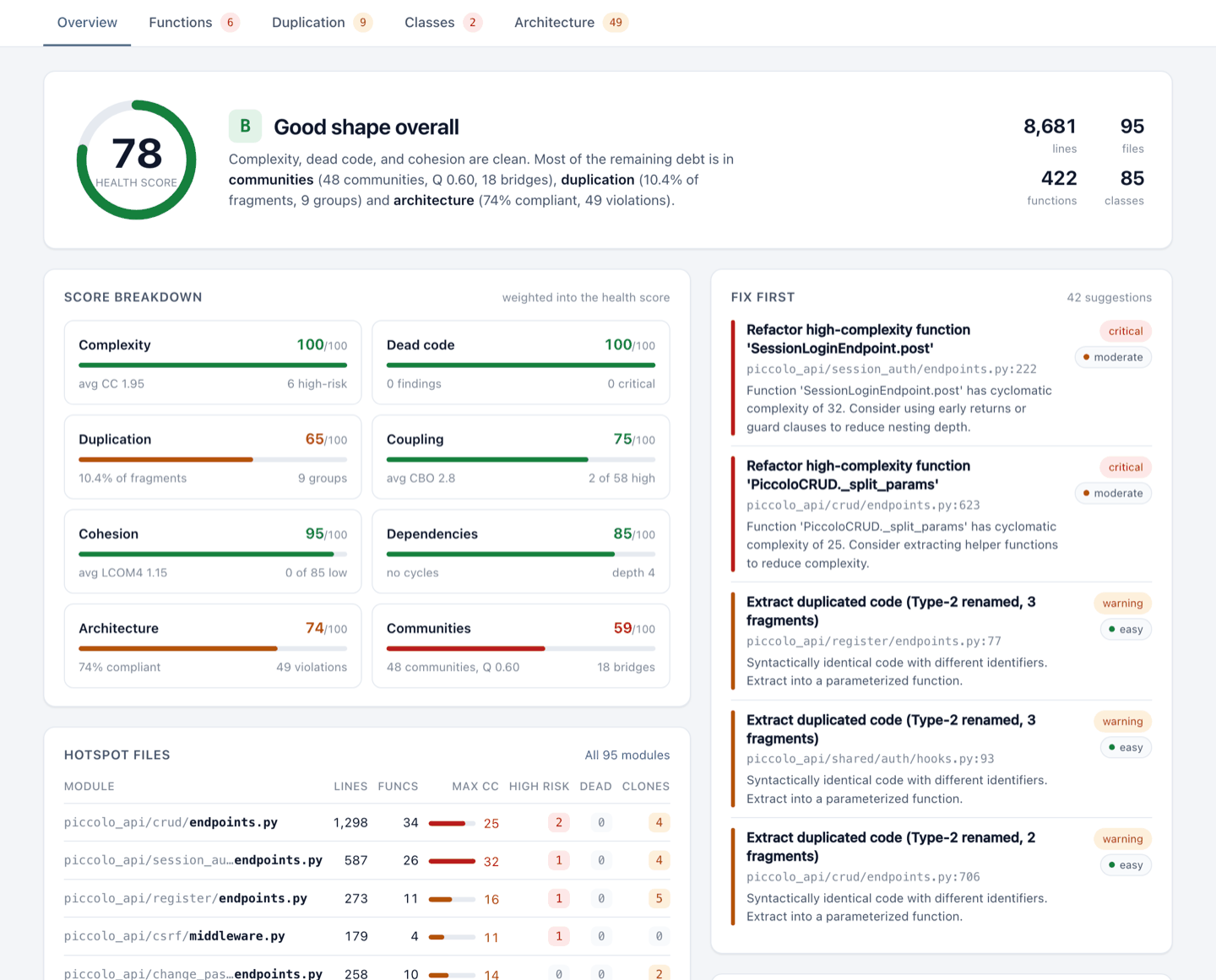
One command scores your whole codebase (0-100 with an A-F grade) and generates an HTML report that shows what to fix first.
pyscn looks at your code from five angles:
- 🧹 Dead code - unreachable code you can safely delete
- 📋 Duplicate code - copy-pasted and structurally similar code worth merging (Type 1-4 clone detection)
- 🌀 Complexity - functions and executable class suites that are hard to read and test (cyclomatic and cognitive complexity)
- 🔥 Module and directory hotspots - per-file quality and per-directory complexity rollups for prioritizing refactors
- 🏗️ Architecture - circular imports, layer rule violations (clean / layered / hexagonal / MVC presets), and auto-detected module communities that reveal how your code is actually structured
- 🧩 Class design - classes that do too much or depend on too much (CBO coupling, LCOM4 cohesion)
100,000+ lines/sec • Built with Go + tree-sitter
Other Languages
pyscn is the Python analyzer of polyscan. For JavaScript, TypeScript, Go, Rust and C++, run:
npx polyscan analyze .
Same five angles, same 0-100 score, one HTML report.
Polyscan for GitHub
Polyscan App files a weekly audit report as a GitHub Issue. Free for public repositories.
AI Agent Integration
pyscn ships Agent Skills that teach AI coding agents when and how to run each analysis: health checks, refactoring, architecture review, and CI-friendly reports.
Agent Skills (Recommended)
uvx add-skills ludo-technologies/pyscn
This installs the Skills into your project. They work with Claude Code, Cursor, Codex, Gemini CLI, and many other agents (add --agent cursor etc. to target one, --global for all projects).
Then just ask your agent:
-
"Analyze the code quality of the app/ directory"
-
"Find duplicate code and help me refactor it"
-
"Show me complex code and help me simplify it"
MCP Server (Optional)
For tighter integration, the bundled pyscn-mcp server exposes the same analyses as MCP tools to Claude Code, Cursor, ChatGPT, and other MCP clients.
Claude Code plugin (sets up the MCP server and the Skills together):
claude plugin marketplace add ludo-technologies/pyscn
claude plugin install pyscn-mcp@pyscn-marketplace
Manual setup for Claude Code:
claude mcp add pyscn-mcp uvx -- pyscn-mcp
Cursor / Claude Desktop: add to your MCP settings (~/.config/claude-desktop/config.json or Cursor settings):
{
  "mcpServers": {
    "pyscn-mcp": {
      "command": "uvx",
      "args": ["pyscn-mcp"],
      "env": {
        "PYSCN_CONFIG": "/path/to/.pyscn.toml"
      }
    }
  }
}
Dive deeper in mcp/README.md for setup walkthroughs and docs/MCP_INTEGRATION.md for architecture details.
Installation
# Install with pipx (recommended)
pipx install pyscn

# Or with uv
uv tool install pyscn
macOS Intel (x86_64): PyPI wheels are built for Apple Silicon only (the Intel wheel was dropped in v1.5.1), so
uvx,pipx,uv, andpipcannot install pyscn on Intel Macs. Usebrew install pyscnorgo install github.com/ludo-technologies/pyscn/cmd/pyscn@latestinstead.
Alternative installation methods
Build from source
git clone https://github.com/ludo-technologies/pyscn.git
cd pyscn
make build
Go install
go install github.com/ludo-technologies/pyscn/cmd/pyscn@latest
Common Commands
pyscn analyze
Run comprehensive analysis with HTML report
pyscn analyze .                              # All analyses with HTML report
pyscn analyze --json .                       # Generate JSON report
pyscn analyze --json --output - . | jq       # JSON report on stdout
pyscn analyze --json --html --no-open .      # JSON and HTML reports from one run
pyscn analyze --select complexity .          # Only complexity analysis
pyscn analyze --select deps .                # Only dependency analysis
pyscn analyze --select complexity,deps,deadcode . # Multiple analyses
pyscn analyze --skip-communities .           # Skip module community detection
pyscn check
Fast CI-friendly quality gate
pyscn check .                         # Quick pass/fail check
pyscn check --max-complexity 15 .     # Custom thresholds
pyscn check --max-cycles 0 .          # Only allow 0 cycle dependency
pyscn check --select deps .           # Check only for circular dependencies
pyscn check --select di .             # Detect DI anti-patterns (opt-in)
pyscn check --allow-circular-deps .   # Allow circular dependencies (warning only)
pyscn init
Create configuration file
pyscn init # Generate .pyscn.toml
💡 Run
pyscn --helporpyscn <command> --helpfor complete options
Configuration
Create a .pyscn.toml file or add [tool.pyscn] to your pyproject.toml:
# .pyscn.toml
[complexity]
max_complexity = 15

[dead_code]
min_severity = "warning"

[output]
directory = "reports"
⚙️ Run
pyscn initto generate a full configuration file with all available options
Documentation
📖 pyscn documentation site — installation, rule catalog, CLI reference, configuration, output specification
For contributors: Development Guide • Architecture • Testing
Enterprise Support
For commercial support, custom integrations, or consulting services, contact us at contact@ludo-tech.org
License
MIT License — see LICENSE
Built with ❤️ using Go and tree-sitter
1 maintainer

Metadata
1 maintainer
Release files for pyscn 1.33.1
For a detailed explanation of source distributions (sdists) and built distributions (wheels), please see the package formats documentation.
Built distributions (wheels)
| File | Actions Reset | |||
|---|---|---|---|---|
| pyscn-1.33.1-py3-none-win_amd64.whl | Python 3 | none | Windows x86-64 | Details for pyscn-1.33.1-py3-none-win_amd64.whl |
| pyscn-1.33.1-py3-none-manylinux_2_34_x86_64.whl | Python 3 | none | Linux glibc 2.34+ x86-64 | Details for pyscn-1.33.1-py3-none-manylinux_2_34_x86_64.whl |
| pyscn-1.33.1-py3-none-manylinux_2_34_aarch64.whl | Python 3 | none | Linux glibc 2.34+ ARM64 | Details for pyscn-1.33.1-py3-none-manylinux_2_34_aarch64.whl |
| pyscn-1.33.1-py3-none-macosx_11_0_arm64.whl | Python 3 | none | macOS 11.0+ ARM64 | Details for pyscn-1.33.1-py3-none-macosx_11_0_arm64.whl |
Total release size: 44.0 MB
Release files / pyscn-1.33.1-py3-none-win_amd64.whl
| Download URL | pyscn-1.33.1-py3-none-win_amd64.whl |
|---|---|
| Size | 12.2 MB |
| Tags | Python 3 Windows x86-64 |
|
SHA-256 checksum How to use checksums |
ab7b4ad7062a8af3f148628f768ad7c876879b92876bb5a33c438f4f8c64fccd
|
|
BLAKE2b-256 checksum How to use checksums |
5e30bfc93c71a75feadb55498b3f8a8dcae43be0906ee25b9dcbe378cea3493f
|
| Upload date | |
|
Uploaded using Trusted Publishing? What is trusted publishing? |
No |
| Uploaded via |
twine/7.0.0 CPython/3.13.16
|
Release files / pyscn-1.33.1-py3-none-manylinux_2_34_x86_64.whl
| Download URL | pyscn-1.33.1-py3-none-manylinux_2_34_x86_64.whl |
|---|---|
| Size | 11.3 MB |
| Tags | Linux glibc 2.34+ x86-64 Python 3 |
|
SHA-256 checksum How to use checksums |
6b920c49ce671bcd888e4364b06fb67463730a968ab0564afdbb6e503590f749
|
|
BLAKE2b-256 checksum How to use checksums |
0de5e34713a67ccedd709384d7eff3e975996244ca92fee6aec9830e8456997e
|
| Upload date | |
|
Uploaded using Trusted Publishing? What is trusted publishing? |
No |
| Uploaded via |
twine/7.0.0 CPython/3.13.16
|
Release files / pyscn-1.33.1-py3-none-manylinux_2_34_aarch64.whl
| Download URL | pyscn-1.33.1-py3-none-manylinux_2_34_aarch64.whl |
|---|---|
| Size | 10.1 MB |
| Tags | Linux glibc 2.34+ ARM64 Python 3 |
|
SHA-256 checksum How to use checksums |
738fc54ea43bb002ebcae99964f33c7713709582f7edbe57409f77f93bb10474
|
|
BLAKE2b-256 checksum How to use checksums |
5ca2f27c9e1be52b61b1b5021ced008bd8286c8899637153261f3bf94ea5e285
|
| Upload date | |
|
Uploaded using Trusted Publishing? What is trusted publishing? |
No |
| Uploaded via |
twine/7.0.0 CPython/3.13.16
|
Release files / pyscn-1.33.1-py3-none-macosx_11_0_arm64.whl
| Download URL | pyscn-1.33.1-py3-none-macosx_11_0_arm64.whl |
|---|---|
| Size | 10.3 MB |
| Tags | Python 3 macOS 11.0+ ARM64 |
|
SHA-256 checksum How to use checksums |
46dd95d49015e1173fda97af4363bb3dc8c018509b41d290e8661ddc352ea524
|
|
BLAKE2b-256 checksum How to use checksums |
84e1c0aad8f17f57b73888fc5ff12345c984594b8053f7876185b218cc3c3c1f
|
| Upload date | |
|
Uploaded using Trusted Publishing? What is trusted publishing? |
No |
| Uploaded via |
twine/7.0.0 CPython/3.13.16
|
Security for pyscn 1.33.1
Provenance
Provenance describes where a file came from. On PyPI, provenance is shared via attestations, which provide a verifiable record of the build or publishing details. View details, limitations and caveats.
No provenance found
None of the files in this release were uploaded with provenance metadata.
A note on package security
PyPI is a repository for distributing packages, not a service for auditing them. While third-party security researchers and our staff do their best to detect and remove malicious packages, PyPI cannot guarantee the quality, security or suitability of any given package.
To learn more about protecting yourself from malicious actors, visit our package security documentation.














