
MCP server for serial device communication
Verified details
These details have been verified by PyPIProject links
GitHub Statistics
Maintainers

Project description
serial-mcp
MCP server for serial port communication. Lets LLMs talk to hardware — microcontrollers, routers, modems, embedded Linux, anything with a UART.
Why use this and not any of the many others out there?
- Real useful tools that the LLM can use like waiting/expecting data.
- Better test suite, and I test the commands myself.
- I actually use this day to day for real hardware hacking.
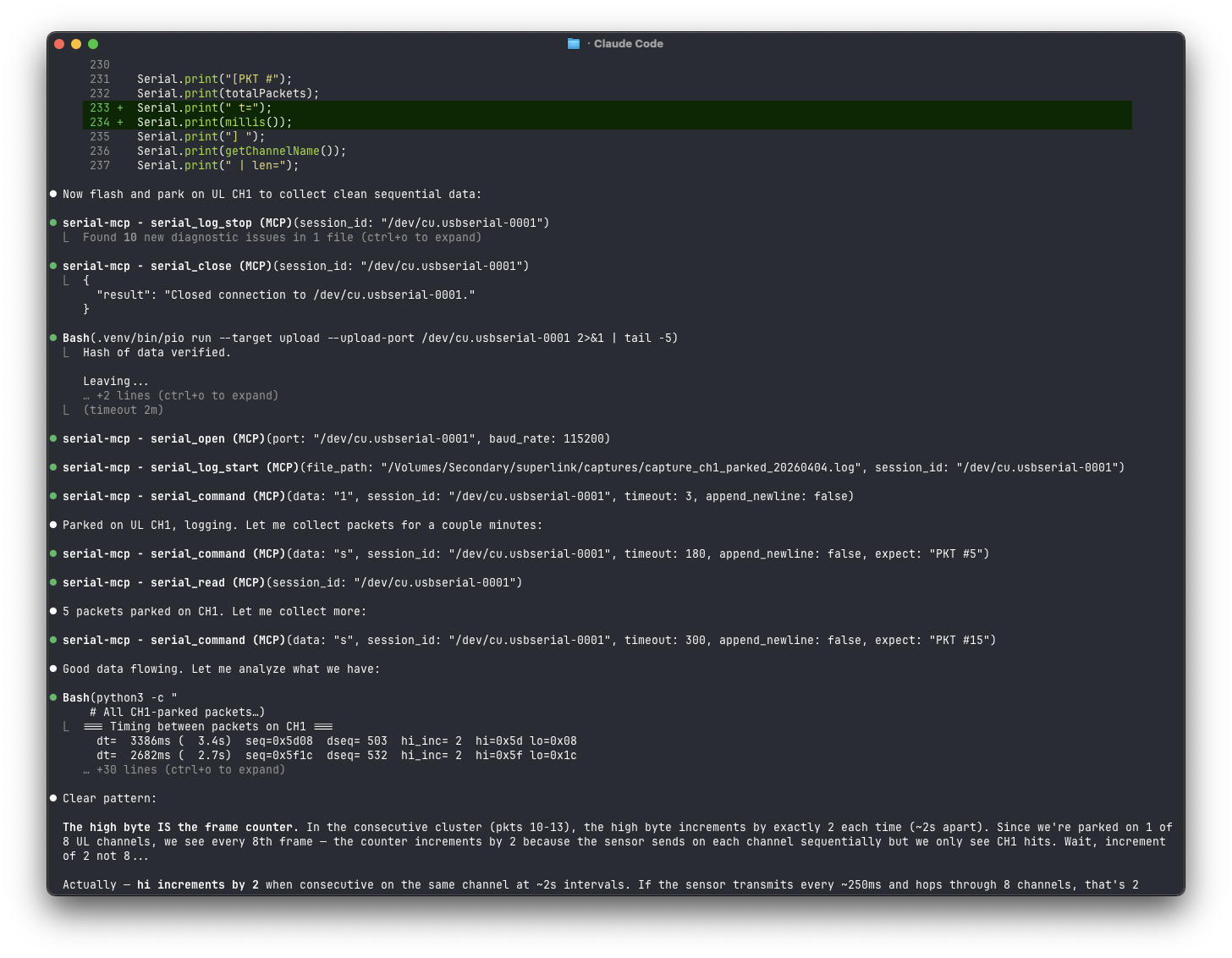
What it does
Exposes serial ports as MCP tools so an AI assistant can:
- Discover connected USB-serial adapters and identify them by VID/PID
- Connect to devices with configurable baud rate, data bits, stop bits, parity
- Send commands and wait for responses (with regex-based expect patterns)
- Read/write raw hex for binary protocols (Modbus, bootloader commands, etc.)
- Control hardware signals (DTR/RTS) — reset Arduinos, enter ESP32 bootloader mode
- Auto-detect baud rate by trying common rates and scoring readability
- Transfer files with XMODEM (checksum or CRC-16)
- Log received data to a file for capture / postmortem analysis
- Manage multiple sessions simultaneously across different ports
Install
With uv (recommended)
Install globally so the serial-mcp command is available everywhere:
uv tool install serial-mcp
Or from a local clone:
uv tool install /path/to/serial-mcp
With pip
pip install serial-mcp
From source (editable)
git clone https://github.com/alxgmpr/serial-mcp.git
cd serial-mcp
uv pip install -e .
Configure
Claude Code
claude mcp add serial-mcp -- serial-mcp
That's it. Verify with claude mcp list.
If you installed from source instead of globally, use the full path:
claude mcp add serial-mcp -- python3 -m serial_mcp.server
Claude Desktop (claude_desktop_config.json)
{
  "mcpServers": {
    "serial": {
      "command": "serial-mcp"
    }
  }
}
With uvx (no install)
{
  "mcpServers": {
    "serial": {
      "command": "uvx",
      "args": ["serial-mcp"]
    }
  }
}
Tools
All tools are prefixed with serial_ to avoid name collisions with other MCP servers. Each tool includes MCP annotations (readOnlyHint, destructiveHint, etc.).
Port discovery
| Tool | Description |
|---|---|
list_serial_ports |
List available serial ports with USB metadata (VID/PID, manufacturer) |
serial_detect_baud |
Auto-detect baud rate by trying common rates and scoring ASCII readability |
Connection management
| Tool | Description |
|---|---|
serial_open |
Open a serial connection (baud, data bits, stop bits, parity, timeout) |
serial_close |
Close a connection |
serial_change_settings |
Change baud/parity/etc. on a live connection without closing it |
serial_list_sessions |
List all open sessions |
serial_status |
Detailed connection health, byte counts, uptime |
Read / write (text)
| Tool | Description |
|---|---|
serial_command |
Send a string, wait for response. Supports expect regex for prompt detection |
serial_write |
Fire-and-forget text write |
serial_read |
Read buffered data (advances cursor) |
serial_read_since |
Read historical data since a timestamp (non-destructive) |
serial_wait_for |
Block until a regex pattern appears in incoming data |
Read / write (binary)
| Tool | Description |
|---|---|
serial_write_hex |
Write raw bytes as hex ("AA 55 01 03") |
serial_read_hex |
Read buffered data as hex string |
Hardware signals
| Tool | Description |
|---|---|
serial_set_signals |
Control DTR/RTS (reset micros, enter bootloader, etc.) |
serial_get_signals |
Read DTR, RTS, CTS, DSR, RI, CD |
serial_send_break |
Send a serial break (interrupt U-Boot, Cisco ROMMON, etc.) |
Session utilities
| Tool | Description |
|---|---|
serial_clear_history |
Flush the receive buffer and free memory |
Logging
| Tool | Description |
|---|---|
serial_log_start |
Capture all received data to a file (like minicom's capture) |
serial_log_stop |
Stop logging and return file path, byte count, and duration |
File transfer
| Tool | Description |
|---|---|
serial_xmodem_send |
Send a file via XMODEM (checksum or CRC-16 mode) |
serial_xmodem_receive |
Receive a file via XMODEM (checksum or CRC-16 mode) |
The reader thread is paused for the duration of an XMODEM transfer so the protocol has exclusive port access — serial_read and logging won't capture anything during the transfer.
Prompts
Three prompts are registered to guide common workflows:
| Prompt | Description |
|---|---|
scan_devices |
Walk through identifying all connected serial devices by VID/PID |
detect_baud_rate |
Run baud detection on a port and interpret the results |
interactive_shell |
Open a connection and probe for the device prompt |
Usage examples
Interactive shell on a Linux device
1. list_serial_ports()                        → find /dev/ttyUSB0
2. serial_open(port="/dev/ttyUSB0")           → connect at 115200 8N1
3. serial_command(data="", expect="[$#]")     → get the shell prompt
4. serial_command(data="uname -a", expect="\\$")
Arduino / microcontroller
1. list_serial_ports()                        → find /dev/ttyACM0
2. serial_open(port="/dev/ttyACM0", baud_rate=9600)
3. serial_command(data="STATUS", timeout=2)
4. serial_set_signals(dtr=False)              → reset the board
5. serial_set_signals(dtr=True)
6. serial_wait_for(pattern="Ready", timeout=5)
Unknown baud rate
1. serial_detect_baud(port="/dev/ttyUSB0")    → recommends 9600
2. serial_open(port="/dev/ttyUSB0", baud_rate=9600)
Binary protocol (Modbus, etc.)
1. serial_open(port="/dev/ttyUSB0", baud_rate=9600)
2. serial_write_hex(hex_string="01 03 00 00 00 0A C5 CD")
3. serial_read_hex(timeout=2)
ESP32 bootloader entry
1. serial_open(port="/dev/ttyUSB0", baud_rate=115200)
2. serial_set_signals(dtr=False, rts=True)
3. serial_set_signals(dtr=True, rts=False)
4. serial_set_signals(dtr=False)
5. serial_wait_for(pattern="waiting for download", timeout=3)
How it works
Each serial_open() call creates a SerialSession with a background thread that continuously reads from the port into a timestamped ring buffer (default 10MB cap). This means:
- No data loss — bytes are captured even between tool calls
- Non-destructive reads —
serial_read_since()can replay history without advancing the cursor - Pattern matching —
serial_command()andserial_wait_for()scan the buffer for regex matches in real-time - Multiple sessions — each port gets its own thread and buffer
All tools are async. Blocking serial I/O runs in asyncio.to_thread() so the event loop stays free.
Testing
Run the unit tests (no hardware required — they use a MockSerial fixture):
uv pip install -e ".[dev]"
pytest -v
Smoke-test the live server with the MCP Inspector:
DANGEROUSLY_OMIT_AUTH=true npx @modelcontextprotocol/inspector -- python3 -m serial_mcp.server
Set command to python3 and args to -m serial_mcp.server in the inspector UI, then connect.
Requirements
License
MIT
Project details
Verified details
These details have been verified by PyPIProject links
GitHub Statistics
Maintainers
Release history Release notifications | RSS feed


Download files
Download the file for your platform. If you're not sure which to choose, learn more about installing packages.
Source Distribution
Built Distribution
Filter files by name, interpreter, ABI, and platform.
If you're not sure about the file name format, learn more about wheel file names.
Copy a direct link to the current filters
File details
Details for the file pyserial_mcp-0.4.0.tar.gz.
File metadata
- Download URL: pyserial_mcp-0.4.0.tar.gz
- Upload date:
- Size: 43.7 kB
- Tags: Source
- Uploaded using Trusted Publishing? Yes
- Uploaded via: twine/6.1.0 CPython/3.13.12
File hashes
| Algorithm | Hash digest | |
|---|---|---|
| SHA256 |
0a352fe0fb1a657f84e7397cce23b79f6f90af5785c3fc11073fe53a8fa47ce5
|
|
| MD5 |
f95ab64fbd03a63b4a60810f3d9e2935
|
|
| BLAKE2b-256 |
88354791f4abe7595befbab4777c9e062b9522b2e763f8287e1c6bf647b7481d
|
Provenance
The following attestation bundles were made for pyserial_mcp-0.4.0.tar.gz:
Publisher:
release.yml on alxgmpr/serial-mcp
-
Statement:
-
Statement type:
https://in-toto.io/Statement/v1 -
Predicate type:
https://docs.pypi.org/attestations/publish/v1 -
Subject name:
pyserial_mcp-0.4.0.tar.gz -
Subject digest:
0a352fe0fb1a657f84e7397cce23b79f6f90af5785c3fc11073fe53a8fa47ce5 - Sigstore transparency entry: 1403219672
- Sigstore integration time:
-
Permalink:
alxgmpr/serial-mcp@89b91846283d691bbcc60f4146dbbc74e559550c -
Branch / Tag:
refs/tags/v0.4.0 - Owner: https://github.com/alxgmpr
-
Access:
public
-
Token Issuer:
https://token.actions.githubusercontent.com -
Runner Environment:
github-hosted -
Publication workflow:
release.yml@89b91846283d691bbcc60f4146dbbc74e559550c -
Trigger Event:
push
-
Statement type:
File details
Details for the file pyserial_mcp-0.4.0-py3-none-any.whl.
File metadata
- Download URL: pyserial_mcp-0.4.0-py3-none-any.whl
- Upload date:
- Size: 20.0 kB
- Tags: Python 3
- Uploaded using Trusted Publishing? Yes
- Uploaded via: twine/6.1.0 CPython/3.13.12
File hashes
| Algorithm | Hash digest | |
|---|---|---|
| SHA256 |
9dbeb8ee4c567cdd723b52190a0bebc2980116e08eb1f4cbf3b295962257ea69
|
|
| MD5 |
1cb4c493cbc2a1c2c768754dc6d235ad
|
|
| BLAKE2b-256 |
08d94a19bf85aa4cc1497b8cf10f32946e73b1ce719f748c7878e394695f933f
|
Provenance
The following attestation bundles were made for pyserial_mcp-0.4.0-py3-none-any.whl:
Publisher:
release.yml on alxgmpr/serial-mcp
-
Statement:
-
Statement type:
https://in-toto.io/Statement/v1 -
Predicate type:
https://docs.pypi.org/attestations/publish/v1 -
Subject name:
pyserial_mcp-0.4.0-py3-none-any.whl -
Subject digest:
9dbeb8ee4c567cdd723b52190a0bebc2980116e08eb1f4cbf3b295962257ea69 - Sigstore transparency entry: 1403219774
- Sigstore integration time:
-
Permalink:
alxgmpr/serial-mcp@89b91846283d691bbcc60f4146dbbc74e559550c -
Branch / Tag:
refs/tags/v0.4.0 - Owner: https://github.com/alxgmpr
-
Access:
public
-
Token Issuer:
https://token.actions.githubusercontent.com -
Runner Environment:
github-hosted -
Publication workflow:
release.yml@89b91846283d691bbcc60f4146dbbc74e559550c -
Trigger Event:
push
-
Statement type:






