
pysewer
- pysewer
- How to contribute to pysewer?
Summary
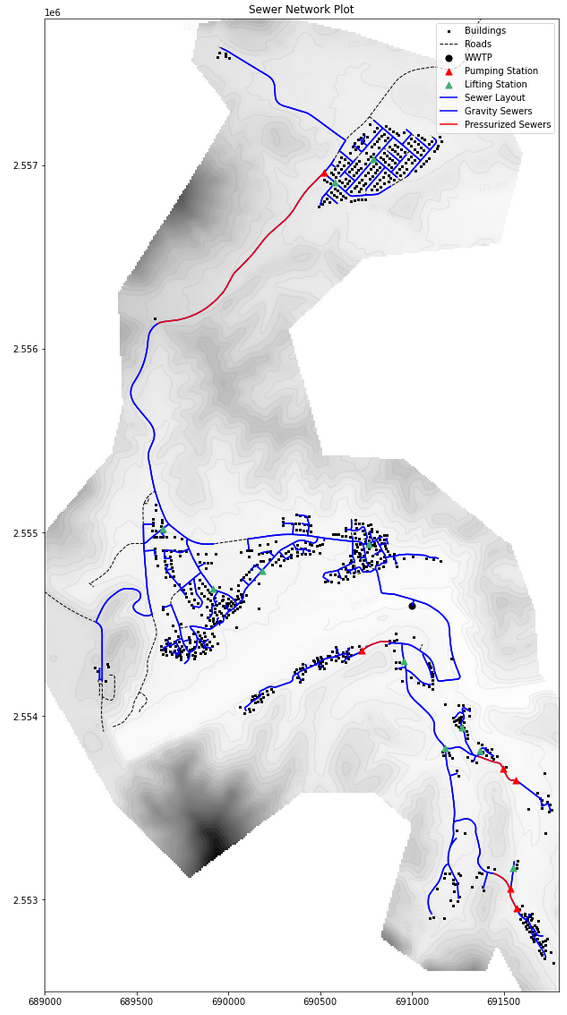
The aim of pysewer is to provide a framework automatically generate cost-efficient sewer network layouts on minimal data requirements.
It is build around an algorithm for generation of viable sewer-network layouts. The approximated sewer network is represented by sources (households/buildings), potential pathways, and one or multiple sinks. The algorithm approximates the directed steinertree (the steiner arborescence) between all sources and the sink by using an repeated shortest path heuristic (RSPH).
Documentation
The documentation can be found at ddspot.github.io/pysewer (built by the codebase.helmholtz.cloud CI and served statically via the GitHub mirror; Helmholtz users can also use the internal Pages, which requires a Helmholtz AAI login).
An example of how to use pysewer for generating a sewer network layout can be found here: example_sewer_network_generation.
Installation
Quick install from PyPI
pip install pysewer            # core
pip install "pysewer[plot]"    # with plotting (matplotlib)
The geospatial dependencies (GDAL via rasterio/fiona/pyogrio, GEOS via shapely) come as binary wheels. For a fully pinned, reproducible environment, or if wheels are unavailable on your platform, use the conda + uv setup below.
Development install
pysewer uses a two-layer environment: the geospatial C-library stack (GDAL, PROJ, GEOS, rasterio, fiona, geopandas, shapely, …) is installed with conda/mamba from environment.yml, and the pure-Python layer (plus the editable install of pysewer itself) with uv from pyproject.toml. Never install the geospatial C-libraries with pip.
Step 1: Clone the repository and navigate to the root directory
git clone https://codebase.helmholtz.cloud/wasp/pysewer.git
cd pysewer
Step 2: Create the conda environment (native layer)
mamba env create -f environment.yml # creates the "pysewer" env
For reproducible builds, conda-lock.yml pins the exact conda layer
(regenerate with make lock).
Step 3: Install pysewer with uv (PyPI layer)
uv pip install --python "$(conda info --base)/envs/pysewer/bin/python" -e '.[dev]'
Alternatively, make env-local (see mk/env.mk) performs both steps, and on
HPC/SLURM systems use source bin/bootstrap_env.sh pysewer which creates the
env under /work/$USER/conda_envs and runs the uv step.
Light install (without plotting)
matplotlib is an optional dependency: import pysewer and the full
preprocessing → routing → design → export chain work without it, which keeps
installs small when pysewer is embedded in another tool (e.g. the
Elan QGIS plugin, where QGIS already ships
matplotlib). The plotting module is loaded lazily on first use; to enable it,
install the plot extra:
uv pip install -e '.[plot]' # or: pip install 'pysewer[plot]'
Calling a plotting function without matplotlib raises an ImportError that
points to this extra. The conda environment above already includes
matplotlib, so nothing extra is needed in the standard setup.
Please see the documentation for more details.
Input Data and data representation
The following input data is required:
- A Digital Elevation Model (DEM)
- Point Data on Building locations
- Road Network Data
Preprocessing
The main objective of sewer layout generation is to connect all buildings to a waste water treatment plant (WWTP) while keeping system cost low. The initial graph represents all potential sewer lines in our model domain.
Preprocessing comes down to:
- "connecting" buildings to the street network
- clustering of buildings surpassing a predefined threshold
- contracting the street network for more efficient graph traversal
After preprocessing, all relevant data is and stored as a MultiDiGraph to allow for asymmetric edge values (e.g. elevation profile and subsequently costs).
Graph Attributes
Node Attributes:
    "node_type": "building","wwtp"
    "elevation"
    "pumping_station": bool
    "lifting_station":bool
Edge Attributes:
    "geometry": detailed shapely line
    "length"
    "diameter"
    "pressurized": bool   # authoritative design flag (pump upstream)
    "profile"
    "private_sewer":bool
    "weight": value representing arbitrary cost function
The connection graph additionally carries a needs_pump flag per candidate
edge — a terrain-feasibility input used to weight routing (pump penalty).
It is stripped from the final designed network: there, pressurized (plus
the pumping_station/lifting_station node flags) is the design result.
Routing Solver
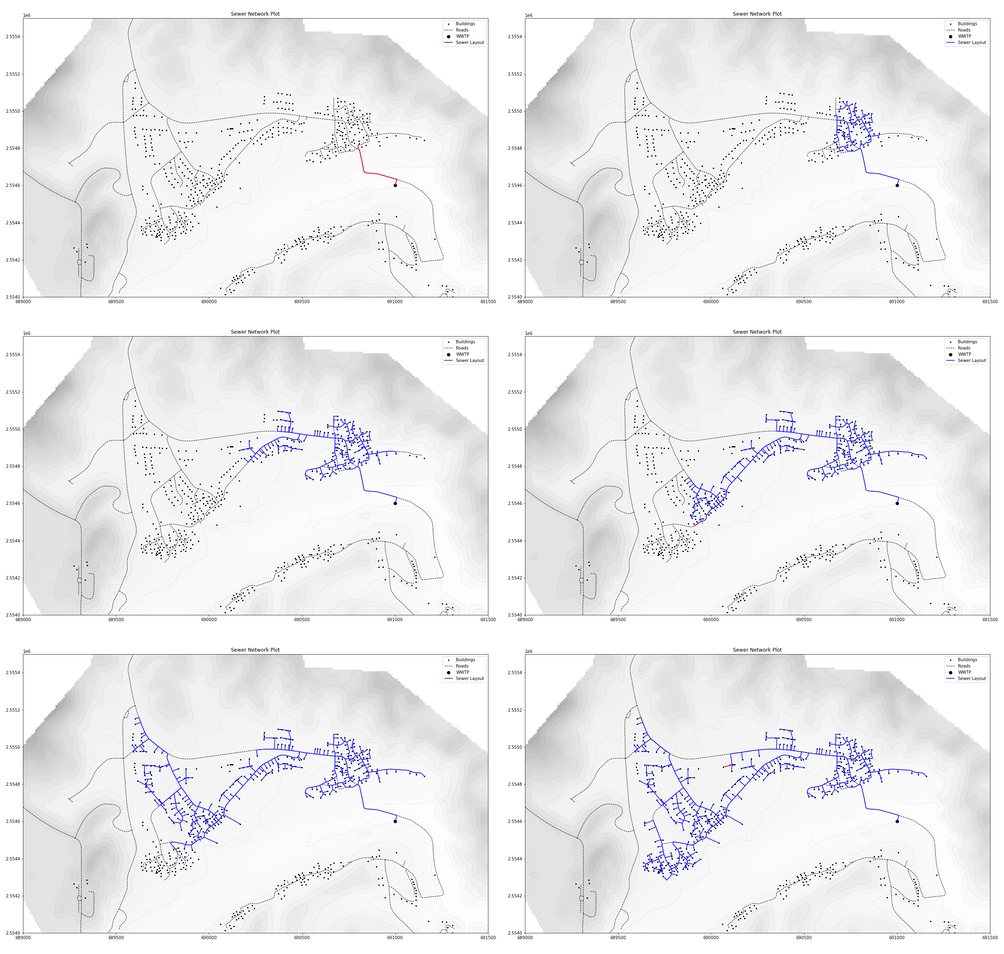
The package comes with two solvers to find estimates for the underlying steiner tree problem (more specifically minimum steiner arboresence).
- RSPH
- RSPH Fast
The RSPH solver iteratively connects the nearest unconnected node (in terms of distance and pump penalty) to the closest connected network node. The solver can account for multiple sinks and is therefore well suited to generate decentralized network scenarios.
The RSPH Fast solver derives the network by combining all shortest paths to a single sink. Faster, but only allows for a single sink.
Pump penalty demonstration
To validate the effect of the pump penalty logic we provide a synthetic regression in test_scripts/demo_pump_penalty_effect.py.
Running
python3 test_scripts/demo_pump_penalty_effect.py
creates a small toy network in which a pumped shortcut competes with a gravity detour.
After the penalty escalation rerun, the solver switches to the gravity route and the pump count drops from two edges to zero.
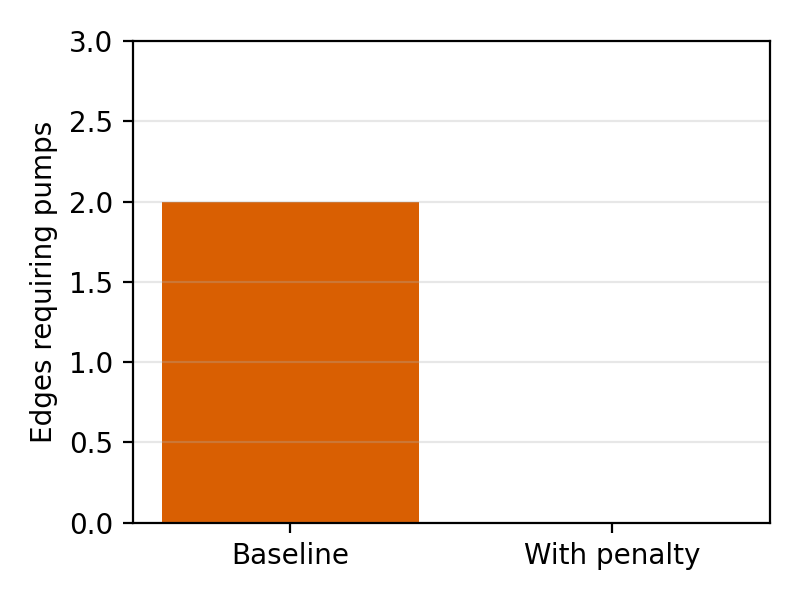
The script also exports docs/pump_penalty_demo.png (when matplotlib is available) so the figure can be regenerated from source.
Hydraulic constraints & validation
Recent updates added geometric and hydraulic checks to reduce unrealistic layouts:
- Geometry (connection graph): cover must stay above
min_cover(default 0.25 m); short edges are flagged if <min_pipe_length(default 2 m); excessively steep slopes are flagged (max_slope). Cover violations are recorded per edge but do not force a pump — burial depth is governed bytmin. - Hydraulics (sizing): gravity pipes are picked to satisfy d/D ≤
max_depth_ratio(default 0.75) and velocities within [velocity_min,velocity_max] (defaults 0.7–3 m/s). Violations are recorded on edges (hydraulic_violations), along with computedvelocityandd_over_D. - Inspection: the example notebook now includes cells that summarize pump/constraint flags on the connection graph and hydraulic violations after sizing.
Profile smoothing is not applied; the checks run on the sampled profile (spacing dx). Increase dx if you want a smoother profile check.
Plotting
Plotting requires matplotlib (included in the conda environment; on a light
install add it via pip install 'pysewer[plot]'). The module is loaded
lazily on first use.
info = pysewer.get_sewer_info(G)
info["Routing Solver"] = "RSPH"
info["Pump Penalty"] = test_model_domain.pump_penalty
fig,ax = pysewer.plot_model_domain(test_model_domain, plot_sewer=True,sewer_graph = G, info_table=info)
pysewer.plot_sewer_attributes(test_model_domain,G,attribute="peak_flow",title="Peak Flow Estimation m³/s")
plt.show()
Export
sewer_network_gdf = pysewer.get_edge_gdf(G,detailed=True)
pysewer.export_sewer_network(sewer_network_gdf, "sewer_network.gpkg")
Supported formats are GeoPackage (gpkg, default), ESRI Shapefile (shp)
and GeoParquet (parquet). Multi-layer GeoPackages with an explicit layer
name and CRS can be written with pysewer.write_gdf_to_gpkg(gdf, path, layer=..., crs=...).
Float attributes are rounded on export to keep the files free of floating
point noise, controlled by export.round_decimals in the settings
(default: 3 decimal places for all float columns and profile tuples,
peak_flow: 6 since it is in m³/s, slope: 5; set to null to disable
and export raw values).
Default parameters
The default or global parameters are stored in the settings.yaml file. It can be overridden with a custom settings file (e.g. example_settings.yaml) via pysewer.set_custom_config(custom_path=...) (or a dict via custom_settings_dict=...). The settings are categorized into 4 sections, namely preprocessing, optimization, plotting and export.
Set the custom config before creating the ModelDomain. The
preprocessing parameters clustering and connect_buildings are consumed
while the connection graph is built inside ModelDomain(...), so config
overrides applied afterwards cannot affect them:
pysewer.set_custom_config(custom_path="my_settings.yaml")  # 1st
md = pysewer.ModelDomain(dem, roads, buildings)            # 2nd
Most other parameters (including pump_penalty and all optimization
values) are read from the live config at the pipeline stage that uses them,
so they may also be changed between stages.
The table below summaries the key default parameters and their meaning.
| Parameter | Description | Default |
|---|---|---|
dem_file_path |
Path for the DEM file | None |
roads_input_data |
Path for the road input data | None |
buildings_input_data |
Path for the buildings input data | None |
pump_penalty |
Penalty for using a pump in the cost function | 1000 |
dx |
Sampling resolution, used for extracting elevation data from the DEM (in meters) | 10 |
max_connection_length |
The maximum distance between a building and the nearest street for it to be included in the cluster centers list | 30 |
inhabitants_dwelling |
The number of inhabitants per dwelling | 2 |
inhabitants_dwelling_attribute_name |
Buildings attribute holding the inhabitants count (overrides inhabitants_dwelling if set) |
"" |
daily_wastewater_person |
The daily wastewater generated per person in m³ | 0.15 |
peak_factor |
Peak factor for wastewater | 4.0 |
min_slope |
Minimum slope required for gravity flow (negative value = downhill) | -0.01 |
max_slope |
Steepest allowed pipe slope before flagging | -0.05 |
tmax / tmin |
Maximum / minimum trench depth (m) | 6.0 / 0.25 |
inflow_trench_depth / min_trench_depth |
Trench depth at the inflow point / lowest possible trench depth (m) | 0.25 / 0.25 |
min_cover |
Minimum cover depth over pipe (m); must not exceed tmin |
0.25 |
min_pipe_length |
Shortest segment length before flagging (m) | 2.0 |
velocity_min/velocity_max |
Bounds on design velocity (m/s) | 0.7 / 3.0 |
max_depth_ratio |
Maximum proportional flow depth d/D used when sizing gravity pipes | 0.75 |
peak_factor_method |
"constant", or "babbitt"/"harman"/"gifft" to vary the peak factor with upstream population (capped at peak_factor_max) |
constant |
infiltration_fraction |
Infiltration as a fraction of the domestic daily flow, added unfactored to the peak | 0.0 |
small_sewer_flow_threshold |
Below this design flow (m³/s) velocity_min is replaced by the deemed-to-satisfy gradient check (dts_min_gradient, 1:150) |
0.001 |
diameters |
List of diameters to be considered (meters) | 0.2 … 2.0 |
pressurized_diameter |
Diameter of pressure pipes to be used (meters) | 0.3 |
roughness |
Manning's roughness coefficient n (dimensionless; ~0.013 for concrete). Not the Colebrook k_s in metres. | 0.013 |
round_decimals |
Decimal places for float columns in exported files (per-column map, null disables) |
default 3, peak_flow 6, slope 5 |
License
GNU GPLv3-modified-UFZ. See LICENSE for details.
How to contribute to pysewer?
Please check out how Contributing for on how to contribute to pysewer. Please note that we have created a mirror repository on Github to allow for easier contribution. The original repository is hosted on Gitlab.
Code of conduct
Please check out our Code of Conduct for details.
How to cite?

pysewer is published in the Journal of Open Source Software (JOSS). If you use pysewer in your work, please cite (see also CITATION.cff):
Sanne, M., Khurelbaatar, G., Despot, D., van Afferden, M., & Friesen, J. (2024). Pysewer: A Python Library for Sewer Network Generation in Data Scarce Regions. Journal of Open Source Software, 9(104), 6430. https://doi.org/10.21105/joss.06430
@article{Sanne2024pysewer,
  author  = {Sanne, Moritz and Khurelbaatar, Ganbaatar and Despot, Daneish
             and van Afferden, Manfred and Friesen, Jan},
  title   = {Pysewer: A Python Library for Sewer Network Generation
             in Data Scarce Regions},
  journal = {Journal of Open Source Software},
  year    = {2024},
  volume  = {9},
  number  = {104},
  pages   = {6430},
  doi     = {10.21105/joss.06430},
}
1 maintainer

Metadata
1 maintainer
Release files for pysewer 0.3.0
For a detailed explanation of source distributions (sdists) and built distributions (wheels), please see the package formats documentation.
Source distribution (sdist)
| File | Size | Uploaded | Provenance | |
|---|---|---|---|---|
| pysewer-0.3.0.tar.gz | 82.7 kB | With provenance | Details |
Built distribution (wheel)
| File | Interpreter | ABI | Platform | Reset |
|---|---|---|---|---|
| pysewer-0.3.0-py3-none-any.whl | Python 3 | none | any | Details |
Total release size: 150.8 kB
Release files / pysewer-0.3.0.tar.gz
| Download URL | pysewer-0.3.0.tar.gz |
|---|---|
| Size | 82.7 kB |
| Tags | Source |
|
SHA-256 checksum How to use checksums |
fe6b3e862108580df819ca5b2971ae91e13877c61e41cb199c87e89bc44cf0b1
|
|
BLAKE2b-256 checksum How to use checksums |
d09da5db1588ea3708c5c0756aaff2fdcd2e0a6ecf0f5e6b9e6dd5b0d2b58141
|
| Upload date | |
|
Uploaded using Trusted Publishing? What is trusted publishing? |
Yes |
| Uploaded via |
twine/7.0.0 CPython/3.13.16
|
Provenance
Provenance describes where a file came from. On PyPI, provenance is shared via attestations, which provide a verifiable record of the build or publishing details. View details, limitations and caveats.


PyPI Publish Attestation
PyPI verified that this artifact, at this checksum, originated from the publisher listed below.
Signed by GitHub Actions, verified by PyPI on Oct 21, 2026.
Transparency logRelease files / pysewer-0.3.0-py3-none-any.whl
| Download URL | pysewer-0.3.0-py3-none-any.whl |
|---|---|
| Size | 68.2 kB |
| Tags | Python 3 |
|
SHA-256 checksum How to use checksums |
4ec2da6fb34a75c1a88fdfc553c10d774ac12cf2a1a0fd9d16d5a9691e65f919
|
|
BLAKE2b-256 checksum How to use checksums |
0f76ea3ff4f70e14c54b052a02cfbddb695a9ad5d5686a8c87a2d71808a50266
|
| Upload date | |
|
Uploaded using Trusted Publishing? What is trusted publishing? |
Yes |
| Uploaded via |
twine/7.0.0 CPython/3.13.16
|
Provenance
Provenance describes where a file came from. On PyPI, provenance is shared via attestations, which provide a verifiable record of the build or publishing details. View details, limitations and caveats.
PyPI Publish Attestation
PyPI verified that this artifact, at this checksum, originated from the publisher listed below.
Signed by GitHub Actions, verified by PyPI on Oct 21, 2026.
Transparency logSecurity for pysewer 0.3.0
Provenance
Provenance describes where a file came from. On PyPI, provenance is shared via attestations, which provide a verifiable record of the build or publishing details. View details, limitations and caveats.
Full provenance
All 2 files in this release have been uploaded with provenance metadata.
Attestation for pysewer-0.3.0.tar.gz
PyPI Publish Attestation
PyPI verified that this artifact, at this checksum, originated from the publisher listed below.
Signed by GitHub Actions, verified by PyPI on Oct 21, 2026.
Transparency logA note on package security
PyPI is a repository for distributing packages, not a service for auditing them. While third-party security researchers and our staff do their best to detect and remove malicious packages, PyPI cannot guarantee the quality, security or suitability of any given package.













