
pysrim2: Automation, Analysis, and Plotting of SRIM Calculations
pysrim2 is a maintained continuation of pysrim by Chris Ostrouchov. See what changed.







SRIM (Ziegler's Stopping and Range of Ions in Matter) simulates how ions slow down and stop in a material. pysrim2 runs SRIM from Python on Windows, Linux and macOS (macOS through the container). Every output file is parsed into pandas tables. Parameter scans run in parallel and are cached, beam distributions are supported, and plots are built in. pysrim2 continues the original pysrim; see what changed.
The import name is unchanged: import srim. Because both packages provide the
srim module, pysrim2 cannot be installed alongside the original pysrim.
Documentation: https://pysrim2.readthedocs.io/en/latest/
Get started
Start in Python
Install the library, then the command line, which sets up SRIM once:
uv add pysrim2            # or: pip install pysrim2
uv tool install pysrim2   # the command line
pysrim2 install           # sets up SRIM (pysrim2 install --dry-run shows the steps)
pysrim2 doctor            # checks the result
uv tool install pysrim2 installs only the pysrim2 command, which sets SRIM up; it does not make import srim available to your own Python, so also install the library into your project or environment (uv add pysrim2 or pip install pysrim2).
For the desktop app: pysrim2 install app, then pysrim2 app.
The boron reference case (200 ions, 20 keV, 7 degrees, 100 nm of gold on silicon):
from srim import TRIM, Ion, Layer, Target
from srim.analysis import implant_summary

target = Target([Layer.from_formula("Au", 19.3, 1000.0), Layer.from_formula("Si", 2.33, 10000)])
results = TRIM(
    target, Ion("B", energy=20e3), number_ions=200, angle_ions=7.0, ranges=1, random_seed=12345
).run()
print(implant_summary(results.range3d.df)["mean_depth_A"])  # about 282
Step by step, with the installation details, is in the
first simulation and the
installation guide. If you have
pysrim installed, remove it first. Python 3.11 or newer is required.
Start with an AI agent
Install the pysrim2 skill for your coding agent (for example Claude Code). The skill needs
SRIM too, which pysrim2 install sets up:
pysrim2 install skill
Then give the agent a task, for example: Simulate a 100 nm gold layer on a silicon wafer, implant 200 boron ions at 7 degrees and 20 keV, and give me a pandas DataFrame of implantation depth and xy straggle. The agent writes and runs the script and reports a mean depth of about 282 Å.
How the agent route works, with the example prompts, is in the agent guide.
Gallery
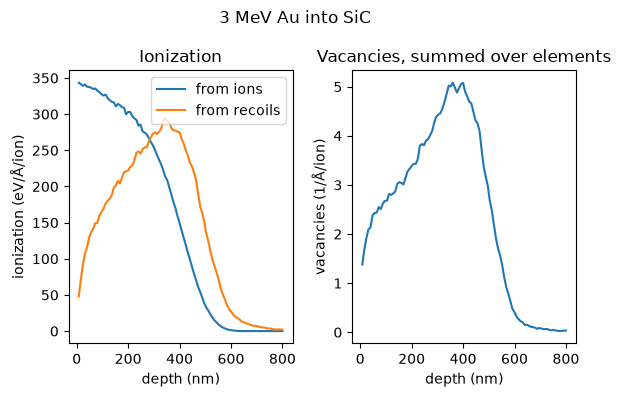
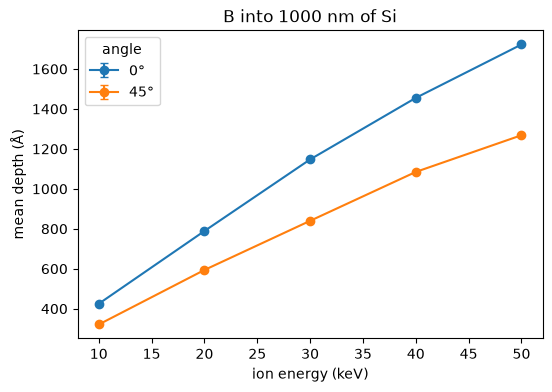
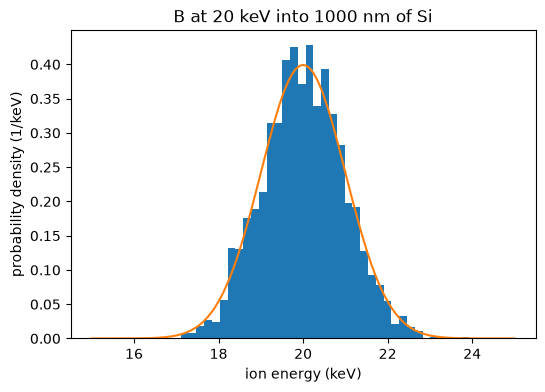
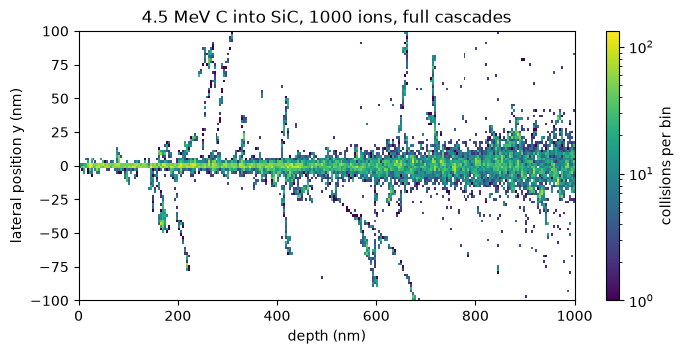
Every picture in the gallery is made by a script in the repository.
Features
- Output as DataFrames: every SRIM output file is parsed into a pandas DataFrame with SRIM's units in the column names. See DataFrames.
- Run specs: describe a calculation in a
run.yamland start it withpysrim2 run. See the run spec. - Parameter scans: run a grid or a list of points in worker processes, with a cache, so a rerun computes nothing new. See scans.
- Beam distributions: ions with energy and position spreads, run as exact ion lists or in bins. See beams.
- Export: Parquet, HDF5 and CSV, with the run's metadata. See export.
- Container: SRIM runs in a linux/amd64 container (Podman or Docker), which is how it runs on macOS. See the container page.
SRIM is not part of this package. SRIM © SRIM.com (James F. Ziegler) — free for non-commercial
use only; see LEGAL.rtf, which the installer keeps next to every copy. You do not need SRIM if
you only analyse existing output files.
Citing
If you use pysrim2 in published work, please cite the paper about the original pysrim, on which pysrim2 is based:
Ostrouchov, C., Zhang, Y., Weber, W. J. (2018). pysrim: Automation, Analysis, and Plotting of SRIM Calculations. Journal of Open Source Software, 3(28), 829. https://doi.org/10.21105/joss.00829
This paper describes the original pysrim, not pysrim2. The software citation metadata is in
CITATION.cff, and the
citing page has the BibTeX entry and the
SRIM citation.
Development
uv sync                          # set up the environment
uv run pytest                    # run the tests (from the repository root)
uv run pre-commit run --all-files   # lint and format
git config blame.ignoreRevsFile .git-blame-ignore-revs
The last command makes git blame skip the one-off formatting commit.
See AGENTS.md for commit conventions. Bug reports and pull
requests are welcome at https://github.com/FSIBT/pysrim2.
Credits
pysrim was written by Chris Ostrouchov
with contributions from Alex Hanson and
dschwen. pysrim2 includes fixes from many
fork authors, listed in
changes from pysrim.
Everyone with commits is listed in CITATION.cff.
License
MIT. See LICENSE. SRIM is licensed separately by its author.
2 maintainers


Metadata
2 maintainers
Release files for pysrim2 0.12.1
For a detailed explanation of source distributions (sdists) and built distributions (wheels), please see the package formats documentation.
Source distribution (sdist)
| File | Size | Uploaded | Provenance | Actions |
|---|---|---|---|---|
| pysrim2-0.12.1.tar.gz | 1.1 MB | With provenance | Details for pysrim2-0.12.1.tar.gz |
Built distribution (wheel)
| File | Interpreter | ABI | Platform | Actions Reset |
|---|---|---|---|---|
| pysrim2-0.12.1-py3-none-any.whl | Python 3 | none | any | Details for pysrim2-0.12.1-py3-none-any.whl |
Total release size: 1.5 MB
Release files / pysrim2-0.12.1.tar.gz
| Download URL | pysrim2-0.12.1.tar.gz |
|---|---|
| Size | 1.1 MB |
| Tags | Source |
|
SHA-256 checksum How to use checksums |
43a0540762ed35d03a63ec1e0b3959069de22def903db3e2d3ef522d9e899e00
|
|
BLAKE2b-256 checksum How to use checksums |
57149fc27914a0d23a3100293b2b01d6ac804f3c521039df095503ac1301b16b
|
| Upload date | |
|
Uploaded using Trusted Publishing? What is trusted publishing? |
Yes |
| Uploaded via |
twine/7.0.0 CPython/3.13.14
|
Provenance
Provenance describes where a file came from. On PyPI, provenance is shared via attestations, which provide a verifiable record of the build or publishing details. View details, limitations and caveats.


PyPI Publish Attestation
PyPI verified that this artifact, at this checksum, originated from the publisher listed below.
Signed by GitHub Actions, verified by PyPI on Nov 15, 2026.
Transparency logRelease files / pysrim2-0.12.1-py3-none-any.whl
| Download URL | pysrim2-0.12.1-py3-none-any.whl |
|---|---|
| Size | 412.0 kB |
| Tags | Python 3 |
|
SHA-256 checksum How to use checksums |
47c3da2a09d62a5c0eb40eaa03c4a41b5460af2379527e32a2afeec47833e221
|
|
BLAKE2b-256 checksum How to use checksums |
b87bdc0a1ea527ff301fffca2b8582a02379f23ce7099465683d12acd8b57e05
|
| Upload date | |
|
Uploaded using Trusted Publishing? What is trusted publishing? |
Yes |
| Uploaded via |
twine/7.0.0 CPython/3.13.14
|
Provenance
Provenance describes where a file came from. On PyPI, provenance is shared via attestations, which provide a verifiable record of the build or publishing details. View details, limitations and caveats.
PyPI Publish Attestation
PyPI verified that this artifact, at this checksum, originated from the publisher listed below.
Signed by GitHub Actions, verified by PyPI on Nov 15, 2026.
Transparency logSecurity for pysrim2 0.12.1
Provenance
Provenance describes where a file came from. On PyPI, provenance is shared via attestations, which provide a verifiable record of the build or publishing details. View details, limitations and caveats.
Full provenance
Both files in this release have been uploaded with provenance metadata.
Attestation for pysrim2-0.12.1.tar.gz
PyPI Publish Attestation
PyPI verified that this artifact, at this checksum, originated from the publisher listed below.
Signed by GitHub Actions, verified by PyPI on Nov 15, 2026.
Transparency logA note on package security
PyPI is a repository for distributing packages, not a service for auditing them. While third-party security researchers and our staff do their best to detect and remove malicious packages, PyPI cannot guarantee the quality, security or suitability of any given package.
To learn more about protecting yourself from malicious actors, visit our package security documentation.














