
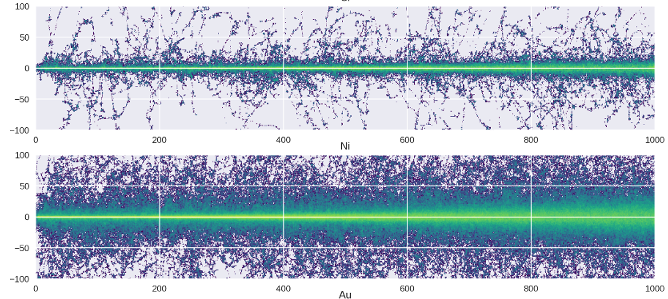
pysrim2: Automation, Analysis, and Plotting of SRIM Calculations
pysrim2 is a maintained continuation of pysrim by Chris Ostrouchov. See what changed.







pysrim2 is a Python package that wraps and extends SRIM, a popular
tool for simulating ions traveling through a material. It addresses
several pain points of SRIM: automation and crash recovery of SRIM
calculations, parsing of all output files, publication quality plots,
and running on Linux and macOS.
The import name is unchanged: import srim. Because both packages
provide the srim module, pysrim2 cannot be installed alongside the
original pysrim.
Documentation: https://pysrim2.readthedocs.io/en/latest/
Installation
pysrim2 has two parts that are installed separately, and most users want
both: the library (import srim, used in your own Python code) and the
command line (pysrim2 install, which sets up SRIM itself).
# 1. The library, pick the way you work:
uv add pysrim2                                  # in a uv project
uv venv && source .venv/bin/activate && uv pip install pysrim2   # uv venv
python -m venv .venv && source .venv/bin/activate && pip install pysrim2  # pip venv
uv run --with pysrim2 my_simulation.py          # one-off script, nothing installed

# 2. The command line, which installs SRIM (it does not make `import srim`
#    available to your own Python):
uv tool install pysrim2 && pysrim2 install
pysrim2 install --dry-run     # show every step, change nothing
pysrim2 doctor                # check the result
If you have pysrim installed, remove it first: in a uv project
uv remove pysrim && uv add pysrim2; in a uv venv
uv pip uninstall pysrim && uv pip install pysrim2; with pip
pip uninstall pysrim && pip install pysrim2. Python 3.11 or newer is
required. SRIM runs natively on Windows and (through wine, in a private prefix
that never touches ~/.wine) on Linux; on macOS it runs in the container
ghcr.io/fsibt/pysrim2 (linux/amd64, Podman or Docker). See the
installation guide,
the container page
(Docker 29 needs a seccomp profile there) and the
command line reference.
pysrim2 install skill installs an
agent skill so coding
agents can run SRIM for you.
SRIM is not part of this package. SRIM © SRIM.com (James F. Ziegler) — free
for non-commercial use only; see LEGAL.rtf, which the installer keeps next
to every copy. You do not need SRIM if you only analyse existing output files.
Features
Automate running SRIM and TRIM on all operating systems
While TRIM is a great code it has many downsides regarding
automation. The TRIM.IN input file is tedious to write yourself and
the gui that constructs the TRIM.IN will crash at unexpeced moments.
One of these crashes everyone has encountered is the fact that a float
text field can never be empty. TRIM also has a tendancy to crash
becuase it stores all cascades in memory. Meaning that for large runs
with full cascades greater than 1,000 ions it will run out of
memory. pysrim2 addresses all of these issues by providing a simple
API wrapper for the input file (supporting all of the features),
ability to run on all operating systems (using
wine
for linux and OSX), and allowing batch runs of calculations see this
notebook
example.
Below is a hello world example of using pysrim2 for running a TRIM
calcualtion. trim.run() uses the SRIM directory that pysrim2 install
set up (see srim.paths.srim_dir()); pysrim2 adds all the necessary
input files. With wine and xvfb-run installed it runs headless;
otherwise a TRIM window may appear.
from srim import Ion, Layer, Target, TRIM

# Construct a 3MeV Nickel ion
ion = Ion("Ni", energy=3.0e6)

# Construct a layer of nick 20um thick with a displacement energy of 30 eV
layer = Layer(
    {"Ni": {"stoich": 1.0, "E_d": 30.0, "lattice": 0.0, "surface": 3.0}}, density=8.9, width=20000.0
)

# Construct a target of a single layer of Nickel
target = Target([layer])

# Initialize a TRIM calculation with given target and ion for 25 ions, quick calculation
trim = TRIM(target, ion, number_ions=25, calculation=1)

# takes about 10 seconds on my laptop; uses the default SRIM directory
# (pass a path to run() to use a SRIM installation somewhere else)
results = trim.run()
# If all went successfully, 25 ions were run (a TRIM window may have appeared
# if wine or xvfb-run is not available)!
# results is `srim.output.Results` and contains all output files parsed
See documentation for all available options.
Copy SRIM output files to directory
After a SRIM calculation has completed run copy_output_files to take
all of the output files and move them to a directory of your liking.
from srim import TRIM
from srim.paths import srim_dir

TRIM.copy_output_files(srim_dir(), "/home/user/scratch/srim")
Post processes SRIM output as numpy arrays
By far the hardest part about running TRIM calculations is analyzing
the output files. pysrim2 comes with parsers for
IONIZ.txt,
VACANCY.txt,
NOVAC.txt,
E2RECOIL.txt,
PHONON.txt,
RANGE.txt,
and
COLLISON.txt. The
COLLISON.txt file can get quite large so the Collision parser uses a
buffered reader that can handle any file size. Additinally a class
srim.output.Results
will processes all output files in a directory and provide an
object whose attributes are the parsed output files (for example
results.phonons). pysrim2 comes with some
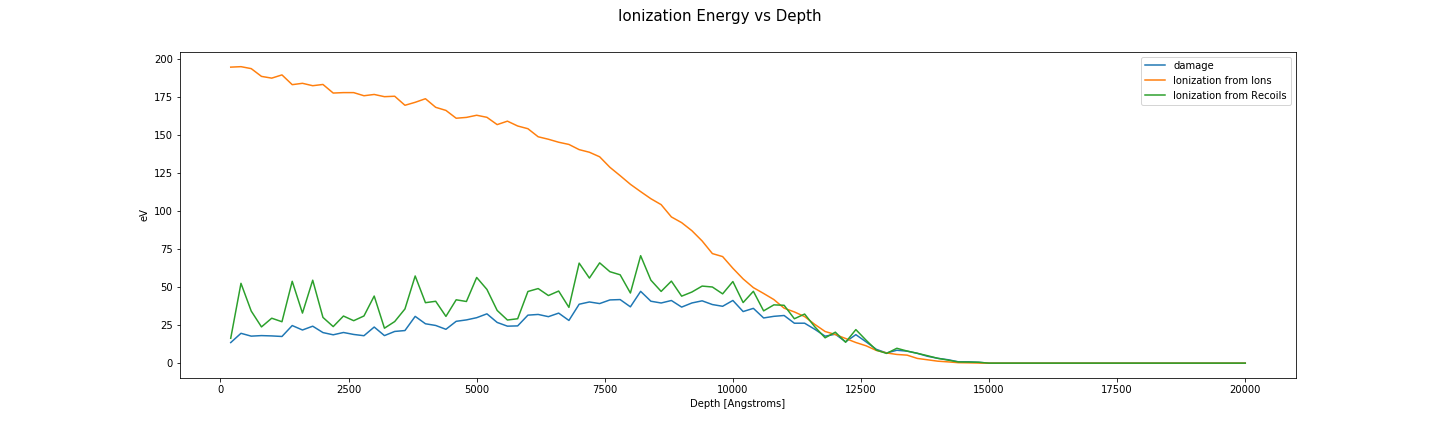
helpful plotting utilities such a plotting the DPA vs depth. However,
pysrim2's most powerful feature is that all of the text files are
exposed as numpy arrays. The example below shows how to plot DPA using
a simple math and numpy. This enables the user to seamlessly use TRIM
and do analysis.
from srim.output import Phonons, Ioniz


def plot_damage_energy(folder, ax):
    phon = Phonons(folder)
    dx = max(phon.depth) / 100.0
    energy_damage = (phon.ions + phon.recoils) * dx
    ax.plot(phon.depth, energy_damage / phon.num_ions, label="{}".format(folder))
    return sum(energy_damage)


def plot_ionization(folder, ax):
    ioniz = Ioniz(folder)
    dx = max(ioniz.depth) / 100.0
    ax.plot(ioniz.depth, ioniz.ions, label="Ionization from Ions")
    ax.plot(ioniz.depth, ioniz.recoils, label="Ionization from Recoils")
Set folders to list of directories to SRIM outputs. See
Analysis
for detailed example. Notice how there is a python class for each SRIM
output file and gives simple access to each column. This did require
some complex regex to get working just right.
folders = ["test_files/2", "test_files/4"]
image_directory = "examples/images"

fig, axes = plt.subplots(1, len(folders), sharey=True, sharex=True)

for ax, folder in zip(np.ravel(axes), folders):
    plot_damage_energy(folder, ax)
    plot_ionization(folder, ax)
    ax.legend()
    ax.set_ylabel("eV")
    ax.set_xlabel("Depth [Angstroms]")
fig.suptitle("Ionization Energy vs Depth", fontsize=15)
fig.set_size_inches((20, 6))
fig.savefig(os.path.join(image_directory, "ionizationvsdepth.png"), transparent=True)
See jupyter notebook for full demonstration of features.
An example of creating some publication graphics with pysrim2 can also be found in the SiC notebook. Chris Ostrouchov used it in a publication.
Development
uv sync                          # set up the environment
uv run pytest                    # run the tests (from the repository root)
uv run pre-commit run --all-files   # lint and format
git config blame.ignoreRevsFile .git-blame-ignore-revs
The last command makes git blame skip the one-off formatting commit.
See AGENTS.md for commit conventions. Bug reports and pull
requests are welcome at https://github.com/FSIBT/pysrim2.
Credits
pysrim was written by Chris Ostrouchov with contributions from Alex Hanson and dschwen. pysrim2 includes fixes from many fork authors, listed in changes from pysrim.
License
MIT. See LICENSE. SRIM is licensed separately by its author.
2 maintainers


Metadata
2 maintainers
Release files for pysrim2 0.7.0
For a detailed explanation of source distributions (sdists) and built distributions (wheels), please see the package formats documentation.
Source distribution (sdist)
| File | Size | Uploaded | Provenance | Actions |
|---|---|---|---|---|
| pysrim2-0.7.0.tar.gz | 5.7 MB | With provenance | Details for pysrim2-0.7.0.tar.gz |
Built distribution (wheel)
| File | Interpreter | ABI | Platform | Actions Reset |
|---|---|---|---|---|
| pysrim2-0.7.0-py3-none-any.whl | Python 3 | none | any | Details for pysrim2-0.7.0-py3-none-any.whl |
Total release size: 5.8 MB
Release files / pysrim2-0.7.0.tar.gz
| Download URL | pysrim2-0.7.0.tar.gz |
|---|---|
| Size | 5.7 MB |
| Tags | Source |
|
SHA-256 checksum How to use checksums |
be97a3d8f86d0ed4572f4202dfef283ba04e2291f2ff71030c2c38b627464c22
|
|
BLAKE2b-256 checksum How to use checksums |
724039c6a6db8ab094928a7787465c3fd92c8f759738fd61fe4793ce87a5b75a
|
| Upload date | |
|
Uploaded using Trusted Publishing? What is trusted publishing? |
Yes |
| Uploaded via |
twine/7.0.0 CPython/3.13.14
|
Provenance
Provenance describes where a file came from. On PyPI, provenance is shared via attestations, which provide a verifiable record of the build or publishing details. View details, limitations and caveats.


PyPI Publish Attestation
PyPI verified that this artifact, at this checksum, originated from the publisher listed below.
Signed by GitHub Actions, verified by PyPI on Nov 4, 2026.
Transparency logRelease files / pysrim2-0.7.0-py3-none-any.whl
| Download URL | pysrim2-0.7.0-py3-none-any.whl |
|---|---|
| Size | 77.2 kB |
| Tags | Python 3 |
|
SHA-256 checksum How to use checksums |
0ddb7c8d935c40c9c138a1cbc79fe80135c1623efc77e49a7fabb9b54e2aa3dd
|
|
BLAKE2b-256 checksum How to use checksums |
7202a6c603854eefbd26838c029cdf91601c98ee968e8ded3760707dfa8dac2a
|
| Upload date | |
|
Uploaded using Trusted Publishing? What is trusted publishing? |
Yes |
| Uploaded via |
twine/7.0.0 CPython/3.13.14
|
Provenance
Provenance describes where a file came from. On PyPI, provenance is shared via attestations, which provide a verifiable record of the build or publishing details. View details, limitations and caveats.
PyPI Publish Attestation
PyPI verified that this artifact, at this checksum, originated from the publisher listed below.
Signed by GitHub Actions, verified by PyPI on Nov 4, 2026.
Transparency logSecurity for pysrim2 0.7.0
Provenance
Provenance describes where a file came from. On PyPI, provenance is shared via attestations, which provide a verifiable record of the build or publishing details. View details, limitations and caveats.
Full provenance
Both files in this release have been uploaded with provenance metadata.
Attestation for pysrim2-0.7.0.tar.gz
PyPI Publish Attestation
PyPI verified that this artifact, at this checksum, originated from the publisher listed below.
Signed by GitHub Actions, verified by PyPI on Nov 4, 2026.
Transparency logA note on package security
PyPI is a repository for distributing packages, not a service for auditing them. While third-party security researchers and our staff do their best to detect and remove malicious packages, PyPI cannot guarantee the quality, security or suitability of any given package.
To learn more about protecting yourself from malicious actors, visit our package security documentation.














