
Well Integrity Log analysis and Visualization tool [This is a Test Release]

Project description
Well Integrity Visualization Tool
pytegrity
pytegrity
This application allows users to upload LAS files, visualize well integrity, and extract finger logs to analyze data related to Well integrity issues (Corrosion, Deposition, etc).
Requirements
Before running the app, make sure to install the following libraries:
pip install streamlit lasio pandas plotly pytegrity
Features
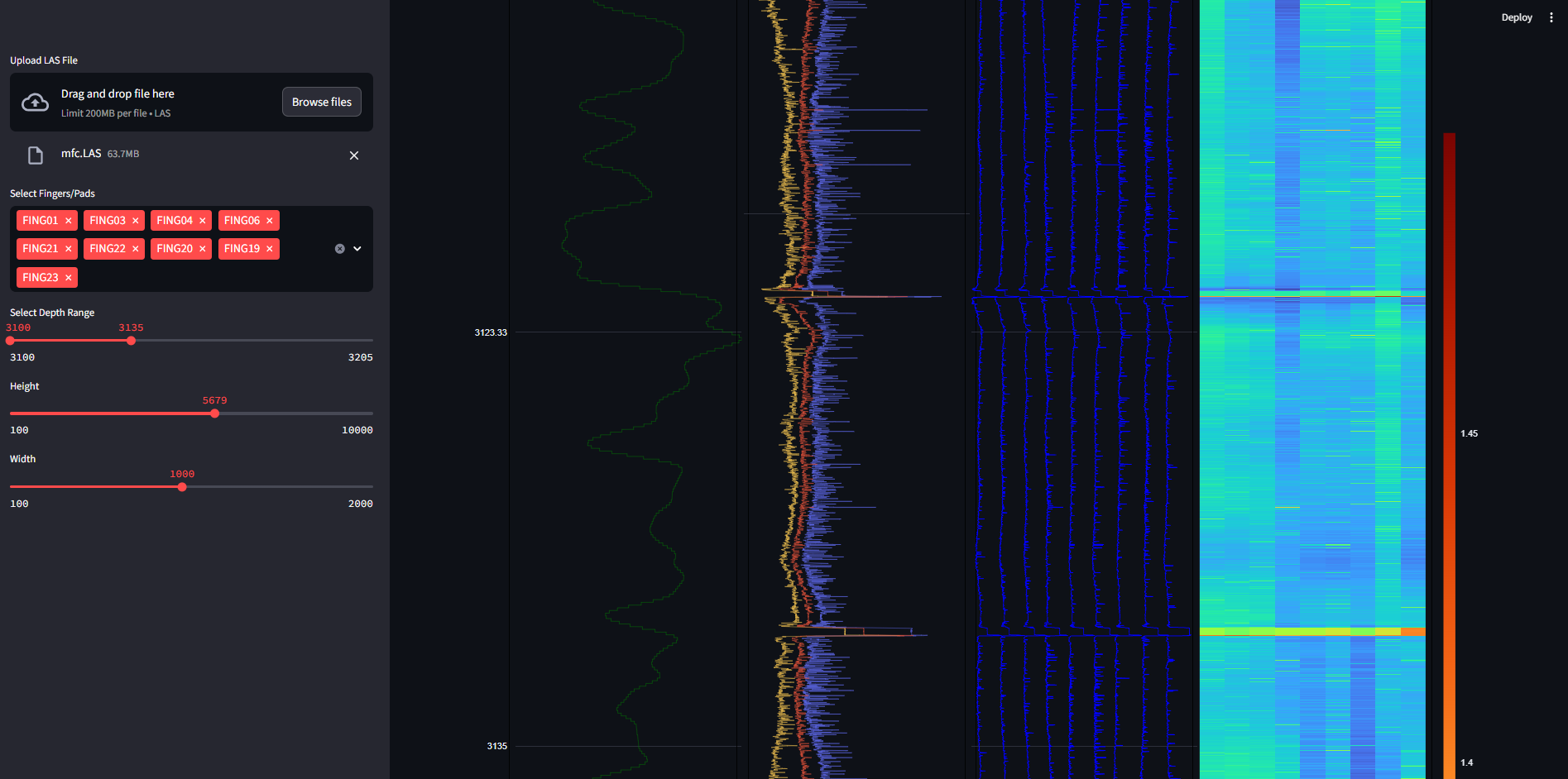
File Upload: Upload LAS files for analysis.
Finger Log Selection: Choose which finger/pad logs to visualize.
Depth Range Control: Adjust the depth range for the plot using a slider.
Plot Customization: Customize the plot's height and width.
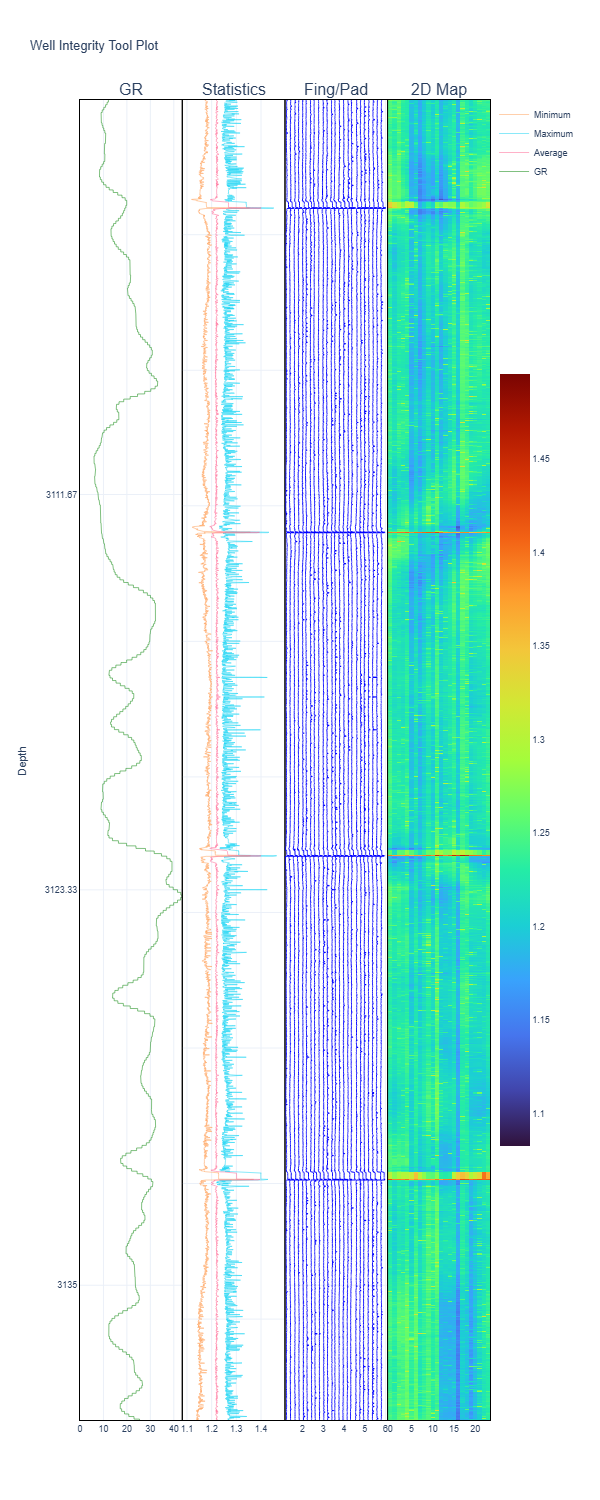
Well Integrity Visualization: View a detailed plot representing the well integrity with selected logs and depth ranges.
Usage
Upload LAS File:
On the sidebar, click the "Upload LAS File" button to upload your LAS file.
The file is temporarily stored for processing.
Select Finger Logs:
Choose the desired finger logs to include in the visualization.
Adjust Depth Range:
Use the depth range slider to select the depth interval to visualize.
Plot Customization:
Set the height and width of the plot for better visualization.
Visualization:
After selecting your preferences, the app will generate the well integrity plot based on the LAS file data.
Code Breakdown File Upload: The file_uploader method is used to upload LAS files, and the uploaded file is saved temporarily for further processing.
Data Loading: The LAS file is read using the lasio library and converted to a pandas DataFrame.
Finger Log Selection: Users can select columns that contain "FING" to display the desired finger logs.
Depth Range Selection: The depth range for visualization is controlled through the sidebar slider, adjusting the Y-axis range on the plot.
Visualization: The plot_well_integrity method from the pytegrity module is used to plot well integrity data. The plot is generated dynamically with customizable height and width.
Release history Release notifications | RSS feed


Download files
Download the file for your platform. If you're not sure which to choose, learn more about installing packages.
Source Distribution
Built Distribution
Filter files by name, interpreter, ABI, and platform.
If you're not sure about the file name format, learn more about wheel file names.
Copy a direct link to the current filters
File details
Details for the file pytegrity-0.1.5.tar.gz.
File metadata
- Download URL: pytegrity-0.1.5.tar.gz
- Upload date:
- Size: 2.3 kB
- Tags: Source
- Uploaded using Trusted Publishing? No
- Uploaded via: twine/6.1.0 CPython/3.12.7
File hashes
| Algorithm | Hash digest | |
|---|---|---|
| SHA256 |
8754c623e706b8922ed2a9a0e02ec70ef538999d3db90448241902a584d4bcf0
|
|
| MD5 |
260709cb89603ce5ea03221e2cfc1e79
|
|
| BLAKE2b-256 |
0ed7ef82c84a49d8c01554137e299edf1a8d3a373a4c3f9c11ec924190c87e6e
|
File details
Details for the file pytegrity-0.1.5-py3-none-any.whl.
File metadata
- Download URL: pytegrity-0.1.5-py3-none-any.whl
- Upload date:
- Size: 2.1 kB
- Tags: Python 3
- Uploaded using Trusted Publishing? No
- Uploaded via: twine/6.1.0 CPython/3.12.7
File hashes
| Algorithm | Hash digest | |
|---|---|---|
| SHA256 |
4ed95a1a266dedaa3f5a550a193417463e649be8916ec049e6d266f770f42796
|
|
| MD5 |
a81676b4a419dbf07e350fe6bee888c0
|
|
| BLAKE2b-256 |
8c05dc6d8749369c8ea9400db15bca0f34fd04f959eab9ab7f425f93bf626b9f
|






