
PyTessera
A modular library for turning whole-slide images into training-ready tile datasets for multi-scale models.
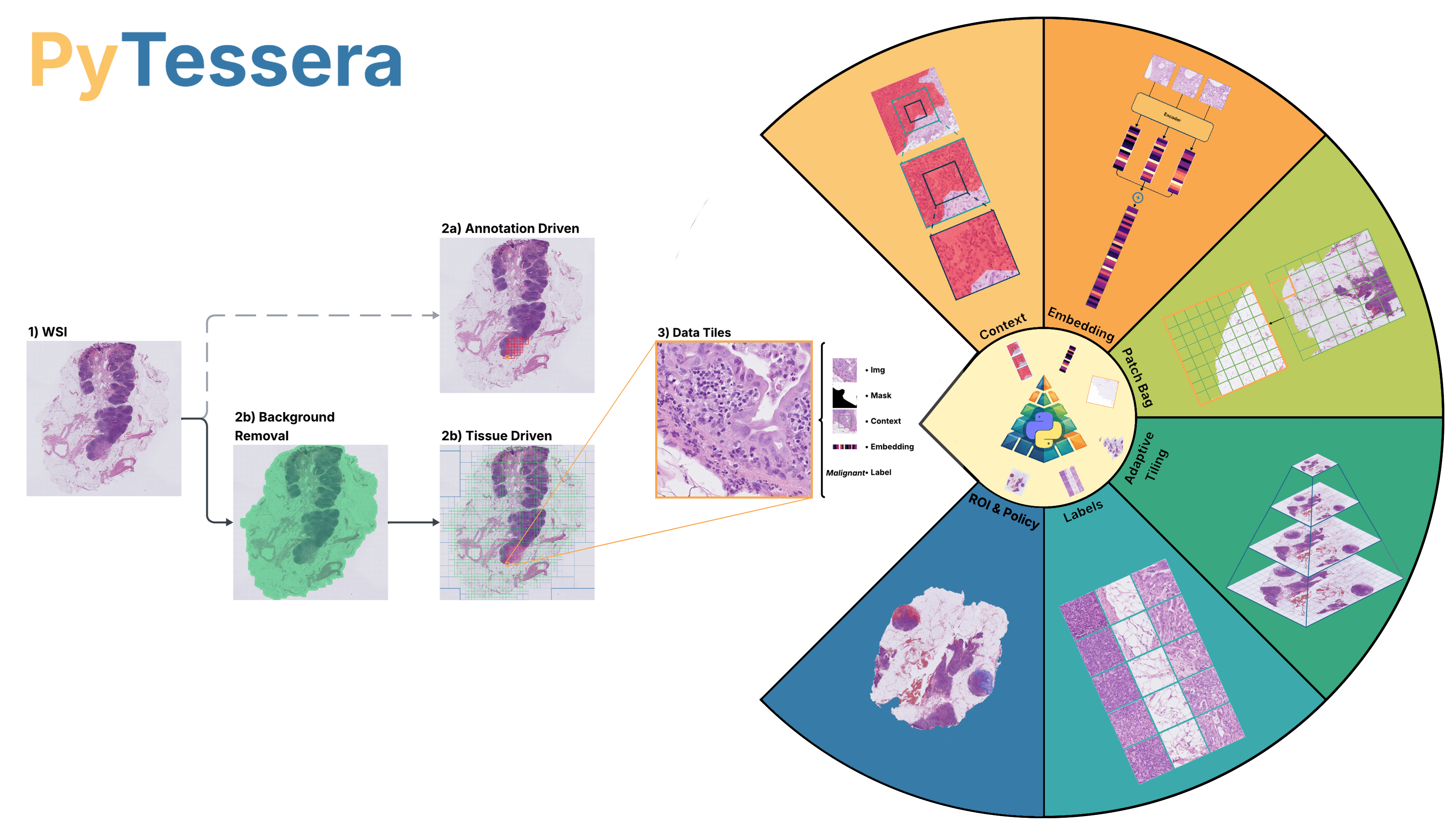
Diagnostic interpretation of whole-slide images (WSIs) relies on integrating cellular
morphology and tissue architecture across multiple magnifications, so AI training datasets
must preserve those spatial relationships. PyTessera builds training-ready tile datasets
from WSIs through modular functions rather than one fixed pipeline. A quadtree tiles only
tissue, or only annotated regions of interest, into DataTiles, the shared unit that each
later stage enriches: a tile can carry a multi-resolution context chain for multi-scale
models, or join its neighbours in a patch bag for hierarchical patch-then-region models.
Encoders and classifiers attach feature embeddings and tissue-type labels through simple
hooks, so users bring their own models, while a class-balanced sampler draws a balanced
subset from the same catalog for a standardized data representation.
Features
- Adaptive quadtree tiling: background is pruned as the tree descends, so tiles follow the tissue, and the whole layout is built as a pixel-free skeleton before anything is read.
- Aligned multi-zoom context: every tile can carry a multi-resolution context chain, and neighbouring tiles regroup into patch bags, both off the same tiling.
- Bring your own models: encoders and classifiers attach through hooks; PyTessera bundles and validates none of them.
- Class-balanced datasets: draw a materialised balanced subset or an exact per-class epoch, over either the annotation-derived category or a hooked tissue-type label.
- Pure Python (≥3.11), with a native DICOM reader in the core. PyTorch (
pytessera[ml]) and the SVS/NDPI/OME-TIFF readers (pytessera[tiff]) are optional extras, soimport pytesseranever pulls PyTorch. - Format-agnostic: a native Sectra DICOM backend, plus Aperio SVS, Hamamatsu
NDPI and OME-TIFF through
tifffile+zarr. Annotations are read from DICOM graphic annotations, ASAP XML, NDPA and pixel-space GeoJSON (as QuPath exports it), and annotations, mask outlines and tile grids write out as GeoJSON for QuPath or the Digital Slide Archive. - Back to the viewer: a predicted mask is written as a Sectra annotation file
(
export_mask_to_graphics), so a pathologist can review the outlines on the slide. - Outputs other tools read (
pytessera.export):stitch_predictionsmerges a model's per-tile output into one map per slide;export_slide_mapwrites it as a pyramidal TIFF (the values, a coloured heatmap, or the heatmap over the slide) with GeoJSON outlines,export_slidewrites any slide as a pyramidal TIFF with its annotations as GeoJSON, andexport_tileswrites tile images, masks and a CSV of labels.
Install
The core is a light, pure-Python install; the slide readers and the PyTorch loading stack are optional extras you add only when your workflow needs them.
pip install pytessera                 # core: tissue segmentation, quadtree tiling, DICOM
pip install "pytessera[tiff]"         # + Aperio SVS / Hamamatsu NDPI / OME-TIFF readers
pip install "pytessera[ml]"           # + PyTorch loading stack (TileDataset, samplers)
pip install "pytessera[tiff,ml]"      # both extras at once (what the tutorials use)
pip install "pytessera[tiff,fm]"      # + timm / transformers, for foundation-model encoders
From the command line
The same builders run as a pytessera command, so a cohort can be tiled from a shell script
or a cluster job and the catalog handed to Python later with load_datatile_dict:
pytessera build --slides cohort/*.svs --magnification 20 --save cohort.npz   # tissue-driven
pytessera build --slides cohort/*.svs --mpp 0.5 --save cohort.npz            # same pixel size on every slide
pytessera build-annotations --slides cohort/*.tif --labels Tumor --save tumour.npz
pytessera build -h                                                           # every flag
Slides can be files of any supported format, or DICOM case folders (--data-root DIR --cases ID...).
The command stops at the catalog; embeddings, labels and balancing are Python calls.
Tutorials
Start here: Train a tumour segmentation model on a cohort takes ten annotated CAMELYON16 slides to a trained model, scores it on held-out slides, and stitches a prediction map over an unseen CAMELYON17 slide, and exports the map, tiles and slide as files other tools open. PyTessera calls do the data side, the scoring and the map; only the model and the training loop are plain PyTorch.
The other notebooks in docs/tutorials/ take one idea each:
- Slide-level MIL on patch bags — group tiles into patch bags, encode them with a foundation model, and feed the bags to an attention-MIL model.
- Tissue mask hook — swap in your own tissue segmentation via the
mask_fnhook. - Embeddings — leaf, chain, and merged tile embeddings, plus a classifier hook.
- Patch bags — group tiles into HIPT-style region grids and encode each into a vector.
- ROI-balanced tiling — label tiles from real ASAP annotations and balance classes before materialising pixels.
- Label-balanced skeleton — enrich with pixels, then drop them and keep only the labelled, embedded skeleton.
- End-to-end training — the cohort training tutorial above.
- Stain normalisation — fit each slide's stains once, serve Macenko-normalised tiles from the loader, and add stain augmentation for training.
Acknowledgements
We thank all paper authors for their contributions: Tomás Bordoy García-Carpintero, Lucas A. D. T. Dyssel, Isabell Seyfried, Sönke Detlefsen and Richard Richard Röttger.
If PyTessera is useful in your work, please cite it; see CITATION.cff.
Contact
Tomás Bordoy García-Carpintero and Lucas A. D. T. Dyssel (equal contribution), University of Southern Denmark & Odense University Hospital. Corresponding author: tobor@imada.sdu.dk. Issues and questions are welcome on the GitLab repository.
1 maintainer

Metadata
1 maintainer
Release files for pytessera 0.1.2
For a detailed explanation of source distributions (sdists) and built distributions (wheels), please see the package formats documentation.
Source distribution (sdist)
| File | Size | Uploaded | Provenance | Actions |
|---|---|---|---|---|
| pytessera-0.1.2.tar.gz | 187.7 kB | Without provenance | Details for pytessera-0.1.2.tar.gz |
Built distribution (wheel)
| File | Interpreter | ABI | Platform | Actions Reset |
|---|---|---|---|---|
| pytessera-0.1.2-py3-none-any.whl | Python 3 | none | any | Details for pytessera-0.1.2-py3-none-any.whl |
Total release size: 408.8 kB
Release files / pytessera-0.1.2.tar.gz
| Download URL | pytessera-0.1.2.tar.gz |
|---|---|
| Size | 187.7 kB |
| Tags | Source |
|
SHA-256 checksum How to use checksums |
f7365ab2a52c22c27e1616ad84cd63c62800ce60d44c96b3d688ff974c664d42
|
|
BLAKE2b-256 checksum How to use checksums |
551d70c6f25b1023dfbce40e27be3bc9c477fa55e471909b67bf71b978d69bff
|
| Upload date | |
|
Uploaded using Trusted Publishing? What is trusted publishing? |
No |
| Uploaded via |
twine/7.0.0 CPython/3.12.10
|
Release files / pytessera-0.1.2-py3-none-any.whl
| Download URL | pytessera-0.1.2-py3-none-any.whl |
|---|---|
| Size | 221.0 kB |
| Tags | Python 3 |
|
SHA-256 checksum How to use checksums |
9e7ede024772134b49b8c8082d42319fcc51690393d335fa914abe745b80da7b
|
|
BLAKE2b-256 checksum How to use checksums |
b0a0184acad1b451bf0e8d6d8b276d8ee796ec913a5ec294aed11974dfb7a790
|
| Upload date | |
|
Uploaded using Trusted Publishing? What is trusted publishing? |
No |
| Uploaded via |
twine/7.0.0 CPython/3.12.10
|
Security for pytessera 0.1.2
Provenance
Provenance describes where a file came from. On PyPI, provenance is shared via attestations, which provide a verifiable record of the build or publishing details. View details, limitations and caveats.
No provenance found
None of the files in this release were uploaded with provenance metadata.
A note on package security
PyPI is a repository for distributing packages, not a service for auditing them. While third-party security researchers and our staff do their best to detect and remove malicious packages, PyPI cannot guarantee the quality, security or suitability of any given package.
To learn more about protecting yourself from malicious actors, visit our package security documentation.














