
Elasticsearch fixtures and fixture factories for Pytest.

Project description

pytest-elasticsearch




What is this?
This is a pytest plugin that enables you to test your code that relies on a running Elasticsearch search engine. It allows you to specify fixtures for Elasticsearch process and client fixtures.
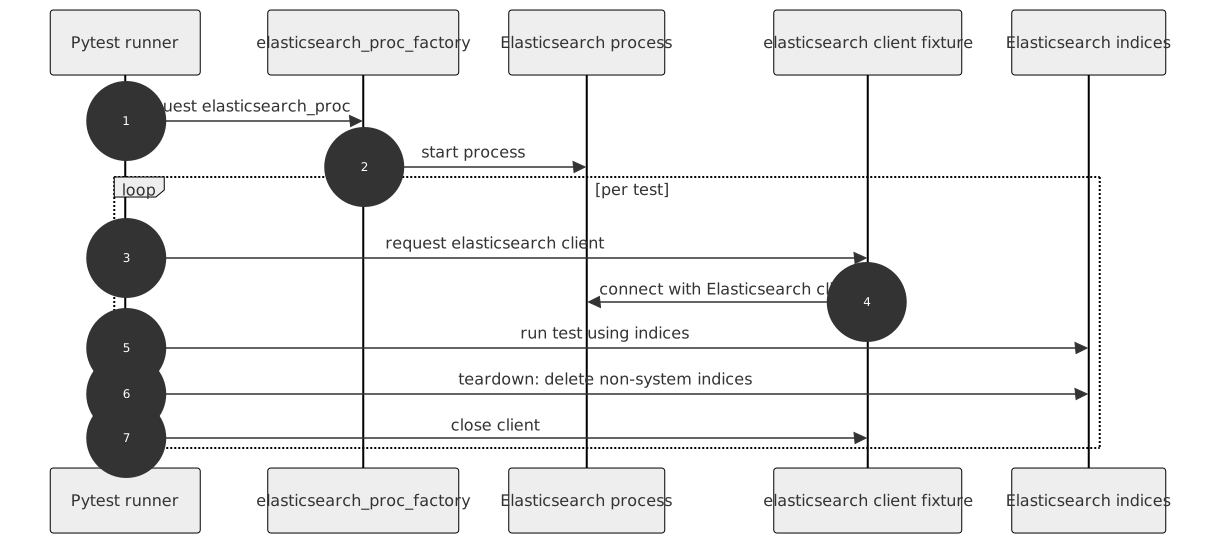
How to use
Prerequisites
Install Elasticsearch 8.x or newer following the official documentation: https://www.elastic.co/guide/en/elasticsearch/reference/current/install-elasticsearch.html
Quickstart: first test
Install the plugin and your test dependencies (as you normally do for your project).
Ensure Elasticsearch is available (local install or container).
Create a test that uses the built-in fixture:
def test_can_connect(elasticsearch):
    assert elasticsearch.info()
Run your tests:
pytestThe plugin contains three fixtures:
elasticsearch - a client fixture that has function-scope, and which cleans Elasticsearch at the end of each test.
elasticsearch_proc - a session-scoped fixture that starts an Elasticsearch instance at its first use and stops at the end of the tests.
elasticsearch_nooproc - a no-process fixture that holds connection data to an already running Elasticsearch instance
Simply include one of these fixtures in your test fixture list.
You can also create additional Elasticsearch client and process fixtures if you need to:
from pytest_elasticsearch import factories

elasticsearch_my_proc = factories.elasticsearch_proc(port=None)
elasticsearch_my = factories.elasticsearch('elasticsearch_my_proc')Connecting to already existing Elasticsearch service
Some projects use already running Elasticsearch servers (e.g., in Docker). To connect to them, use the elasticsearch_nooproc fixture.
es_external = factories.elasticsearch('elasticsearch_nooproc')Configure the host/port to match your running Elasticsearch instance using the options below. If not provided, the noprocess fixture defaults to port 9200.
Configuration
You can define your settings in three ways: fixture factory arguments, command line options, and pytest.ini configuration options. You can pick which you prefer, but remember that these settings are handled in the following order:
Fixture factory argument
Command line option
Configuration option in your pytest.ini file
Elasticsearch option |
Fixture factory argument |
Command line option |
pytest.ini option |
Noop process fixture |
Default |
|---|---|---|---|---|---|
Elasticsearch executable |
executable |
–elasticsearch-executable |
elasticsearch_executable |
/usr/share/elasticsearch/bin/elasticsearch |
|
host |
host |
–elasticsearch-host |
elasticsearch_host |
host |
127.0.0.1 |
port |
port |
–elasticsearch-port |
elasticsearch_port |
port (default 9200) |
random (free port) |
Free port search count |
port_search_count |
–elasticsearch-port-search-count |
elasticsearch_port_search_count |
5 |
|
Elasticsearch cluster name |
cluster_name |
–elasticsearch-cluster-name |
elasticsearch_cluster_name |
elasticsearch_cluster_<port> |
|
index storage type |
index_store_type |
–elasticsearch-index-store-type |
elasticsearch_index_store_type |
mmapfs |
|
network publish host |
network_publish_host |
–elasticsearch-network-publish-host |
elasticsearch_network_publish_host |
127.0.0.1 |
|
Transport TCP port |
transport_tcp_port |
–elasticsearch-transport-tcp-port |
elasticsearch_transport_tcp_port |
random |
Example usage:
pass it as an argument to your own fixture
elasticsearch_proc = factories.elasticsearch_proc(
    cluster_name='awsome_cluster')
specify your cluster name as elasticsearch_cluster_name in your pytest.ini file.
To do so, put a line like the following under the [pytest] section of your pytest.ini:
[pytest]
elasticsearch_cluster_name = awsome_cluster
Known issues
It might happen that the process can’t be started due to lack of permissions. The files that the user running tests must have access to are:
/etc/default/elasticsearch
Make sure you either run tests as a user who has access to these files, or grant the user proper permissions or add them to the proper groups.
In CI, we install Elasticsearch from tar/zip archives, which do not set up additional permission restrictions, so it’s not a problem on the CI/CD.
Package resources
Release history Release notifications | RSS feed


Download files
Download the file for your platform. If you're not sure which to choose, learn more about installing packages.
Source Distribution
Built Distribution
Filter files by name, interpreter, ABI, and platform.
If you're not sure about the file name format, learn more about wheel file names.
Copy a direct link to the current filters
File details
Details for the file pytest_elasticsearch-5.0.0.tar.gz.
File metadata
- Download URL: pytest_elasticsearch-5.0.0.tar.gz
- Upload date:
- Size: 30.2 kB
- Tags: Source
- Uploaded using Trusted Publishing? No
- Uploaded via: twine/6.1.0 CPython/3.13.7
File hashes
| Algorithm | Hash digest | |
|---|---|---|
| SHA256 |
9026c06924860edb9eb4be57b1063b157ea6a4845e5802e4fb26ad984a2b2084
|
|
| MD5 |
7353de9c584a4abc07be69e64d10d79d
|
|
| BLAKE2b-256 |
e1110cc04f28bfc5496f1283793cb889151b26197dc1a6d85cdc667813872949
|
File details
Details for the file pytest_elasticsearch-5.0.0-py3-none-any.whl.
File metadata
- Download URL: pytest_elasticsearch-5.0.0-py3-none-any.whl
- Upload date:
- Size: 28.0 kB
- Tags: Python 3
- Uploaded using Trusted Publishing? No
- Uploaded via: twine/6.1.0 CPython/3.13.7
File hashes
| Algorithm | Hash digest | |
|---|---|---|
| SHA256 |
3895794ee1e269b63531996dfeb2601c26dfabbe2d4c579a17ae99e1a4f72433
|
|
| MD5 |
fcb0e84bc6b8fa8b481e33b238965054
|
|
| BLAKE2b-256 |
e52a19ca0760c340d904c1569d611ecf6d137232d74a9a4a676823e209f74cdd
|






