

pytest-redis




What is this?
This is a pytest plugin that enables you to test your code that relies on a running Redis database. It allows you to specify additional fixtures for Redis process and client.
Quickstart: first test
Install the plugin and your test dependencies (as you normally do for your project).
Ensure Redis is available (local install or container). The redis-server executable must be on PATH, or pass it explicitly with --redis-exec. If Redis can’t be found or started, pytest-redis raises RedisMisconfigured.
Create a test that uses the built-in fixture:
def test_can_connect(redisdb):
    redisdb.set("ping", "pong")
    assert redisdb.get("ping") == b"pong"
Run your tests:
pytestThe plugin contains four fixtures:
redisdb - function-scoped client fixture that cleans all databases after each test.
redisdb_async - function-scoped redis.asyncio client fixture, the asynchronous counterpart of redisdb. Requires the async extra, see Asynchronous Redis client.
redis_proc - session-scoped fixture that starts Redis at first use and stops at the end of the tests.
redis_noproc - no-process fixture that connects to an already running Redis instance.
Simply include one of these fixtures in your test fixture list.
How to use
#
def test_redis(redisdb):
    """Check that it's actually working on redis database."""
    redisdb.set('test1', 'test')
    redisdb.set('test2', 'test')

    my_functionality = MyRedisBasedComponent()
    my_functionality.do_something()
    assert my_functionality.did_something

    assert redisdb.get("did_it") == 1
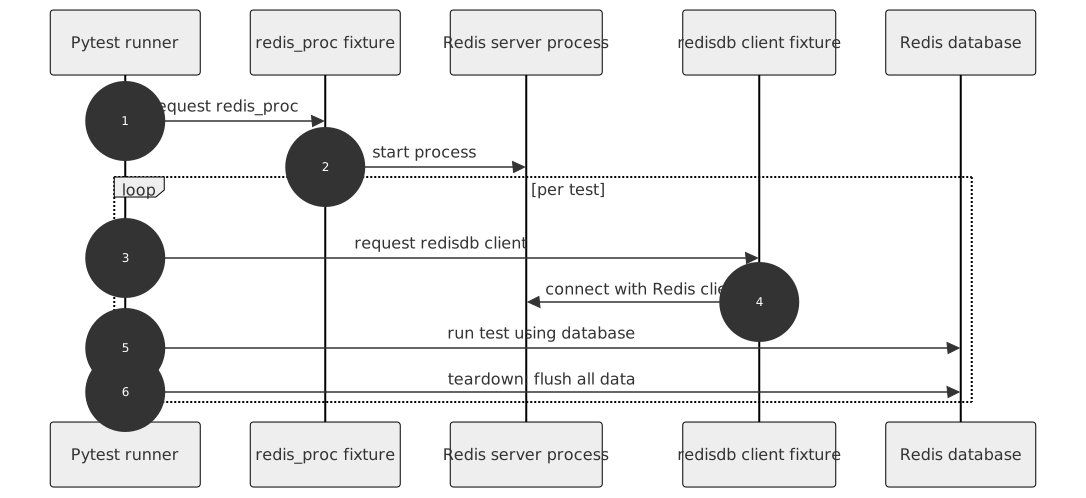
The example above works as follows:
pytest runs tests
redis_proc starts redis database server
redisdb creates client connection to the server
test itself runs and finishes
redisdb cleans up the redis
redis_proc stops server (if that was the last test using it)
pytest ends running tests
You can also create additional redis client and process fixtures if you need to:
from pytest_redis import factories

redis_my_proc = factories.redis_proc(port=None)
redis_my = factories.redisdb('redis_my_proc')

def test_my_redis(redis_my):
    """Check that it's actually working on redis database."""
    redis_my.set('test1', 'test')
    redis_my.set('test2', 'test')

    my_functionality = MyRedisBasedComponent()
    my_functionality.do_something()
    assert my_functionality.did_something

assert redis_my.get("did_it") == 1Asynchronous Redis client
redisdb_async is the asynchronous counterpart of redisdb. It yields a redis.asyncio.Redis client connected to the very same Redis instance the process fixtures manage, flushes all databases after each test and closes the client’s connection pool on teardown.
It builds on pytest-asyncio, which is an optional dependency. Install it along with pytest-redis:
pip install 'pytest-redis[async]'Then use the fixture from an async test:
import pytest

@pytest.mark.asyncio
async def test_redis_async(redisdb_async):
    """Check that it's actually working on redis database."""
    await redisdb_async.set('test1', 'test')

    assert await redisdb_async.get('test1') == b'test'
The redisdb_async factory takes the same arguments as redisdb, so additional async client fixtures are created the same way - including ones connecting to an already running server through redis_noproc:
from pytest_redis import factories

redis_my_proc = factories.redis_proc(port=None)
redis_my_async = factories.redisdb_async('redis_my_proc')
redis_external_async = factories.redisdb_async('redis_noproc')Connecting to already existing redis database
Some projects use already running Redis servers (i.e. on Docker instances). In order to connect to them, one would be using the redis_noproc fixture.
redis_external = factories.redisdb('redis_noproc')

def test_redis(redis_external):
    """Check that it's actually working on redis database."""
    redis_external.set('test1', 'test')
    redis_external.set('test2', 'test')

    my_functionality = MyRedisBasedComponent()
    my_functionality.do_something()
    assert my_functionality.did_something

    assert redis_external.get("did_it") == 1
Standard configuration options apply to it. Note that the modules configuration option has no effect with the redis_noproc fixture, it is the responsibility of the already running redis server to be properly started with extension modules, if needed.
By default the redis_noproc fixture would connect to Redis instance using 6379 port attempting to make a successful socket connection within 15 seconds. The fixture will block your test run within this timeout window. You can overwrite the timeout like so:
# set the blocking wait to 5 seconds
redis_noproc = factories.redis_noproc(startup_timeout=5)
redis_external = factories.redisdb('redis_noproc')

def test_redis(redis_external):
    """Check that it's actually working on redis database."""
    redis_external.set('test1', 'test')
    # etc etc
These are the configuration options that are working on all levels with the redis_noproc fixture:
Configuration
You can define your settings in three ways, it’s fixture factory argument, command line option and pytest.ini configuration option. You can pick which you prefer, but remember that these settings are handled in the following order:
Fixture factory argument
Command line option
Configuration option in your pytest.ini file
Redis server option |
Fixture factory argument |
Command line option |
pytest.ini option |
Noop process fixture |
Default |
|---|---|---|---|---|---|
executable |
executable |
–redis-exec |
redis_exec |
Look in PATH for redis-server via shutil.which |
|
host |
host |
–redis-host |
redis_host |
host |
127.0.0.1 |
port |
port |
–redis-port |
redis_port |
port |
random |
Free port search count |
port_search_count |
–redis-port-search-count |
redis_port_search_count |
5 |
|
username |
username |
–redis-username |
redis_username |
username |
None |
password |
password |
–redis-password |
redis_password |
password |
None |
connection timeout |
timeout |
–redis-timeout |
redis_timeout |
15 |
|
number of databases |
db_count |
–redis-db-count |
redis_db_count |
8 |
|
Whether to enable logging to the system logger |
syslog |
–redis-syslog |
redis_syslog |
False |
|
Redis log verbosity level |
loglevel |
–redis-loglevel |
redis_loglevel |
notice |
|
Compress dump files |
compress |
–redis-compress |
redis_compress |
True |
|
Add checksum to RDB files |
checksum |
–redis-rdbcompress |
redis_rdbchecksum |
False |
|
Save configuration |
save |
–redis-save |
redis_save |
“” |
|
Redis test instance data directory path |
datadir |
–redis-datadir |
redis_datadir |
“” |
|
Redis test instance extension module(s) path |
modules (list of paths) |
–redis-modules (comma-separated string) |
redis_modules (comma-separated string) |
“” |
Example usage:
pass it as an argument in your own fixture
redis_proc = factories.redis_proc(port=8888)use --redis-port command line option when you run your tests
py.test tests --redis-port=8888specify your port as redis_port in your pytest.ini file.
To do so, put a line like the following under the [pytest] section of your pytest.ini:
[pytest]
redis_port = 8888
Options below are for configuring redis client fixture.
Redis client option |
Fixture factory argument |
Command line option |
pytest.ini option |
Default |
|---|---|---|---|---|
decode_response |
decode |
–redis-decode |
redis_decode |
False |
1 maintainer

Download files
Download the file for your platform. If you're not sure which to choose, learn more about installing packages.
Source Distribution
Built Distribution
Filter files by name, interpreter, ABI, and platform.
If you're not sure about the file name format, learn more about wheel file names.
Copy a direct link to the current filters
File details
Details for the file pytest_redis-5.0.0.tar.gz.
File metadata
- Download URL: pytest_redis-5.0.0.tar.gz
- Upload date:
- Size: 22.5 kB
- Tags: Source
- Uploaded using Trusted Publishing? Yes
- Uploaded via:
twine/7.0.0 CPython/3.13.14
File hashes
| Algorithm | Hash digest | |
|---|---|---|
| SHA256 |
2eb0a1e5b63b34c9afcd117b3b728205fbe8d793706b2e9cb2152e81959da21f
|
|
| MD5 |
9699b3ba312e36d533e6c65ebe3f1685
|
|
| BLAKE2b-256 |
b64917cf5226befbd1a7aef771dd530dd7994ed742309676c6cae7055849767f
|
Provenance
The following attestation bundles were made for pytest_redis-5.0.0.tar.gz:
Publisher:
pypi.yml on dbfixtures/pytest-redis
-
Statement:
-
Statement type:
https://in-toto.io/Statement/v1 -
Predicate type:
https://docs.pypi.org/attestations/publish/v1 -
Subject name:
pytest_redis-5.0.0.tar.gz -
Subject digest:
2eb0a1e5b63b34c9afcd117b3b728205fbe8d793706b2e9cb2152e81959da21f - Sigstore transparency entry: 2751267819
- Sigstore integration time:
-
Permalink:
dbfixtures/pytest-redis@234a5a90986e511ffcf84c69013bd243635d61a9 -
Branch / Tag:
refs/tags/v5.0.0 - Owner: https://github.com/dbfixtures
-
Access:
public
-
Token Issuer:
https://token.actions.githubusercontent.com -
Runner Environment:
github-hosted -
Publication workflow:
pypi.yml@234a5a90986e511ffcf84c69013bd243635d61a9 -
Trigger Event:
push
-
Statement type:
File details
Details for the file pytest_redis-5.0.0-py3-none-any.whl.
File metadata
- Download URL: pytest_redis-5.0.0-py3-none-any.whl
- Upload date:
- Size: 20.7 kB
- Tags: Python 3
- Uploaded using Trusted Publishing? Yes
- Uploaded via:
twine/7.0.0 CPython/3.13.14
File hashes
| Algorithm | Hash digest | |
|---|---|---|
| SHA256 |
2618fb7bb8edfa08b4765de8e4a7b43fb128a9154bbf9b5b3b1094198d679599
|
|
| MD5 |
647523ae8cca64b4470dfaf7bca92132
|
|
| BLAKE2b-256 |
70be534850cf113b7b7466e23119842ddfcd0827827fc1c04da3b0cfeaf98228
|
Provenance
The following attestation bundles were made for pytest_redis-5.0.0-py3-none-any.whl:
Publisher:
pypi.yml on dbfixtures/pytest-redis
-
Statement:
-
Statement type:
https://in-toto.io/Statement/v1 -
Predicate type:
https://docs.pypi.org/attestations/publish/v1 -
Subject name:
pytest_redis-5.0.0-py3-none-any.whl -
Subject digest:
2618fb7bb8edfa08b4765de8e4a7b43fb128a9154bbf9b5b3b1094198d679599 - Sigstore transparency entry: 2751268269
- Sigstore integration time:
-
Permalink:
dbfixtures/pytest-redis@234a5a90986e511ffcf84c69013bd243635d61a9 -
Branch / Tag:
refs/tags/v5.0.0 - Owner: https://github.com/dbfixtures
-
Access:
public
-
Token Issuer:
https://token.actions.githubusercontent.com -
Runner Environment:
github-hosted -
Publication workflow:
pypi.yml@234a5a90986e511ffcf84c69013bd243635d61a9 -
Trigger Event:
push
-
Statement type:














