
python-can-usbtingo
This module is a plugin for python-can. It adds support for the USBtingo USB to CAN-FD interface.
Installation
Install using pip:
$ pip install python-can-usbtingo
Usage
After installation, the usbtingo interface can be used like any other in python-can.
Example: Viewer
Python-can provides a tool for monitoring received frames on the console. Connects to a 125kBaud classic CAN bus:
python -m can.viewer -i usbtingo --bitrate 125000
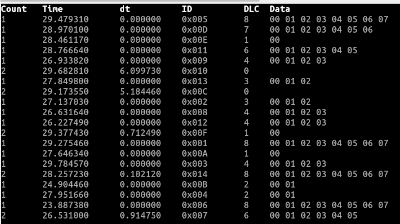
Connects to a 1M/2M CAN-FD bus. If several USBtingos are connected, -c with the unique USB serial number (here: ABCD1234) selects a specific device:
python -m can.viewer -i usbtingo --fd --bitrate 1000000 --data_bitrate 2000000 -c ABCD1234
Example: Send classic CAN message, blocking
import can

with can.Bus(interface="usbtingo", bitrate=125000) as bus:

    message = can.Message(arbitration_id=0x123, is_extended_id=False, data=[0x11, 0x22, 0x33, 0x44])
    bus.send(message)               # blocking: wait until message sent out
Example: Send CAN-FD message, non-blocking
import can

with can.Bus(interface="usbtingo", fd=True, bitrate=1000000, data_bitrate=2000000) as bus:

    message = can.Message(arbitration_id=0x123, is_fd=True, bitrate_switch=True, data=range(64))
    bus.send(message, timeout=0)    # non-blocking
Example: Receive CAN message blocking, open specific device via serial number (channel)
import can

with can.Bus(interface="usbtingo", bitrate=125000, channel="ABCD1234") as bus:

    message = bus.recv()
    print(message)
Example: Receive CAN messages non-blocking with Notifier, receive own (TX) messages
import can

def parse_data(msg):
    print(msg)

with can.Bus(interface="usbtingo", is_fd=True, bitrate=1000000, data_bitrate=2000000, receive_own_messages=True) as bus:

    can.Notifier(bus, [parse_data])

    bus.send(can.Message(arbitration_id=0x123, is_fd=True, bitrate_switch=True, data=range(12)), timeout=0)

    while True:
        time.sleep(1)
Example: Receive CAN messages with iterator, open listen-only (passive)
import can

with can.Bus(interface="usbtingo", bitrate=125000, state=can.BusState.PASSIVE) as bus:

    for msg in bus:
        print(f"{msg.arbitration_id:X}: {msg.data}")
[!NOTE] In listen-only (passive) mode, no ACKs are generated on the CAN bus. With only one active bus device, this causes multiple transmission attempts or errors.
Example: Filter CAN messages (up to 32 hardware filters)
import can

with can.Bus(interface="usbtingo", is_fd=True, bitrate=1000000, data_bitrate=2000000, receive_own_messages=True) as bus:

    bus.set_filters([
        {"can_id": 0x321, "can_mask": 0x7fe, "extended": False},            # accept standard frame with id 0x321
        {"can_id": 0x001, "can_mask": 0x001, "extended": False},            # accept all odd ids of standard frames
        {"can_id": 0x1234567, "can_mask": 0x1fffffff, "extended": True},    # accept extended frame with id 0x1234567
        {"can_id": 0x0000000, "can_mask": 0x00000001, "extended": True}     # accept all even ids of extended frames
    ])
Example: Echo with hardware timestamping and CAN-RX logic analyzing
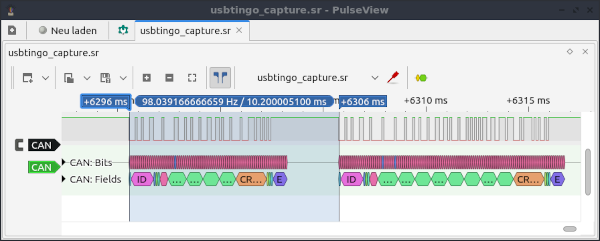
USBtingo generates hardware timestamps by default - both RX and TX. This allows the response time to be measured in an echo test:
import can
import time

with can.Bus(interface="usbtingo", bitrate=10000) as bus:

    bus.recording_start()

    print("wait for message...")

    msgrx = bus.recv()
    print(msgrx)

    print("received. now send a messaage")

    msgtx = can.Message(arbitration_id=0x123, is_extended_id=False,
                        data=[0x00, 0x11, 0x22, 0x33, 0x44, 0x55, 0x66, 0x77])
    bus.send(msgtx)
    print(msgtx)

    diff = msgtx.timestamp - msgrx.timestamp

    print("time diff in milliseconds: ", diff * 1000)

    bus.recording_stop()
Output:
$ python echotest.py
wait for message...
Timestamp: 1701853126.749139        ID: 0123    S Rx                DL:  4    11 22 33 44
received. now send a messaage
Timestamp: 1701853126.759339        ID: 0123    S Tx                DL:  8    00 11 22 33 44 55 66 77
time diff in milliseconds:  10.200023651123047
Additionally the recording function for the CAN-RX line was used. The recorded signal (stored to file usbtingo_capture.sr by default) can be be analyzed with Pulseview:
Example: Detect connected USBtingo devices
import can

devicelist = can.detect_available_configs(interfaces=["usbtingo"])
print(devicelist)
1 maintainer

Metadata
1 maintainer
Release files for python-can-usbtingo 1.0.2
For a detailed explanation of source distributions (sdists) and built distributions (wheels), please see the package formats documentation.
Source distribution (sdist)
| File | Size | Uploaded | |
|---|---|---|---|
| python-can-usbtingo-1.0.2.tar.gz | 12.7 kB | Details |
Built distribution (wheel)
| File | Interpreter | ABI | Platform | Reset |
|---|---|---|---|---|
| python_can_usbtingo-1.0.2-py3-none-any.whl | Python 3 | none | any | Details |
Total release size: 26.1 kB
Release files / python-can-usbtingo-1.0.2.tar.gz
| Download URL | python-can-usbtingo-1.0.2.tar.gz |
|---|---|
| Size | 12.7 kB |
| Tags | Source |
|
SHA-256 checksum How to use checksums |
932cc75e715d9e2268b10c0e516fa156679fa7cebb3ceeab942e0ff1459ca0bf
|
|
BLAKE2b-256 checksum How to use checksums |
d8fd6bf96c96656264502a5b13dc887d7b3293d95cca006b18dc3f0e508ffe11
|
| Upload date | |
|
Uploaded using Trusted Publishing? What is trusted publishing? |
No |
| Uploaded via |
twine/4.0.2 CPython/3.10.12
|
Release files / python_can_usbtingo-1.0.2-py3-none-any.whl
| Download URL | python_can_usbtingo-1.0.2-py3-none-any.whl |
|---|---|
| Size | 13.4 kB |
| Tags | Python 3 |
|
SHA-256 checksum How to use checksums |
1760468fe4e0f920e30c2b7293263749aa031bf7555604dbb4f3a6cfc89009f0
|
|
BLAKE2b-256 checksum How to use checksums |
9f5aa181fbfdaf76b78dd08f546ad030db8b75165607f0318980b2b413f05e56
|
| Upload date | |
|
Uploaded using Trusted Publishing? What is trusted publishing? |
No |
| Uploaded via |
twine/4.0.2 CPython/3.10.12
|













