
Python-can USBtingo

Project description
python-can-usbtingo
This module is a plugin for python-can. It adds support for the USBtingo USB to CAN-FD interface.
Installation
Install using pip:
$ pip install python-can-usbtingo
Usage
After installation, the usbtingo interface can be used like any other in python-can.
Example: Viewer
Python-can provides a tool for monitoring received frames on the console. Connects to a 125kBaud classic CAN bus:
python -m can.viewer -i usbtingo --bitrate 125000
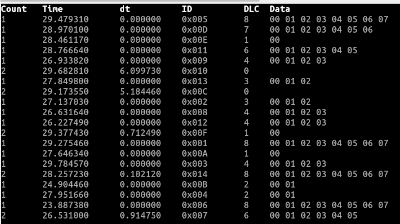
Connects to a 1M/2M CAN-FD bus. If several USBtingos are connected, -c with the unique USB serial number (here: ABCD1234) selects a specific device:
python -m can.viewer -i usbtingo --fd --bitrate 1000000 --data_bitrate 2000000 -c ABCD1234
Example: Send classic CAN message, blocking
import can

with can.Bus(interface="usbtingo", bitrate=125000) as bus:

    message = can.Message(arbitration_id=0x123, is_extended_id=False, data=[0x11, 0x22, 0x33, 0x44])
    bus.send(message)               # blocking: wait until message sent out
Example: Send CAN-FD message, non-blocking
import can

with can.Bus(interface="usbtingo", fd=True, bitrate=1000000, data_bitrate=2000000) as bus:

    message = can.Message(arbitration_id=0x123, is_fd=True, bitrate_switch=True, data=range(64))
    bus.send(message, timeout=0)    # non-blocking
Example: Receive CAN message blocking, open specific device via serial number (channel)
import can

with can.Bus(interface="usbtingo", bitrate=125000, channel="ABCD1234") as bus:

    message = bus.recv()
    print(message)
Example: Receive CAN messages non-blocking with Notifier, receive own (TX) messages
import can

def parse_data(msg):
    print(msg)

with can.Bus(interface="usbtingo", is_fd=True, bitrate=1000000, data_bitrate=2000000, receive_own_messages=True) as bus:

    can.Notifier(bus, [parse_data])

    bus.send(can.Message(arbitration_id=0x123, is_fd=True, bitrate_switch=True, data=range(12)), timeout=0)

    while True:
        time.sleep(1)
Example: Receive CAN messages with iterator, open listen-only (passive)
import can

with can.Bus(interface="usbtingo", bitrate=125000, state=can.BusState.PASSIVE) as bus:

    for msg in bus:
        print(f"{msg.arbitration_id:X}: {msg.data}")
[!NOTE] In listen-only (passive) mode, no ACKs are generated on the CAN bus. With only one active bus device, this causes multiple transmission attempts or errors.
Example: Filter CAN messages (up to 32 hardware filters)
import can

with can.Bus(interface="usbtingo", is_fd=True, bitrate=1000000, data_bitrate=2000000, receive_own_messages=True) as bus:

    bus.set_filters([
        {"can_id": 0x321, "can_mask": 0x7fe, "extended": False},            # accept standard frame with id 0x321
        {"can_id": 0x001, "can_mask": 0x001, "extended": False},            # accept all odd ids of standard frames
        {"can_id": 0x1234567, "can_mask": 0x1fffffff, "extended": True},    # accept extended frame with id 0x1234567
        {"can_id": 0x0000000, "can_mask": 0x00000001, "extended": True}     # accept all even ids of extended frames
    ])
Example: Echo with hardware timestamping and CAN-RX logic analyzing
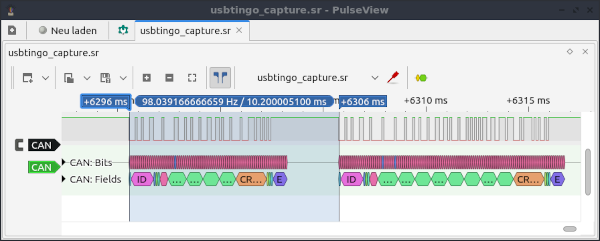
USBtingo generates hardware timestamps by default - both RX and TX. This allows the response time to be measured in an echo test:
import can
import time

with can.Bus(interface="usbtingo", bitrate=10000) as bus:

    bus.recording_start()

    print("wait for message...")

    msgrx = bus.recv()
    print(msgrx)

    print("received. now send a messaage")

    msgtx = can.Message(arbitration_id=0x123, is_extended_id=False,
                        data=[0x00, 0x11, 0x22, 0x33, 0x44, 0x55, 0x66, 0x77])
    bus.send(msgtx)
    print(msgtx)

    diff = msgtx.timestamp - msgrx.timestamp

    print("time diff in milliseconds: ", diff * 1000)

    bus.recording_stop()
Output:
$ python echotest.py
wait for message...
Timestamp: 1701853126.749139        ID: 0123    S Rx                DL:  4    11 22 33 44
received. now send a messaage
Timestamp: 1701853126.759339        ID: 0123    S Tx                DL:  8    00 11 22 33 44 55 66 77
time diff in milliseconds:  10.200023651123047
Additionally the recording function for the CAN-RX line was used. The recorded signal (stored to file usbtingo_capture.sr by default) can be be analyzed with Pulseview:
Example: Detect connected USBtingo devices
import can

devicelist = can.detect_available_configs(interfaces=["usbtingo"])
print(devicelist)
Release history Release notifications | RSS feed

Download files
Download the file for your platform. If you're not sure which to choose, learn more about installing packages.
Source Distribution
Built Distribution
Filter files by name, interpreter, ABI, and platform.
If you're not sure about the file name format, learn more about wheel file names.
Copy a direct link to the current filters
File details
Details for the file python-can-usbtingo-1.0.2.tar.gz.
File metadata
- Download URL: python-can-usbtingo-1.0.2.tar.gz
- Upload date:
- Size: 12.7 kB
- Tags: Source
- Uploaded using Trusted Publishing? No
- Uploaded via: twine/4.0.2 CPython/3.10.12
File hashes
| Algorithm | Hash digest | |
|---|---|---|
| SHA256 |
932cc75e715d9e2268b10c0e516fa156679fa7cebb3ceeab942e0ff1459ca0bf
|
|
| MD5 |
611fa0d178b1aca354948b00f6fae947
|
|
| BLAKE2b-256 |
d8fd6bf96c96656264502a5b13dc887d7b3293d95cca006b18dc3f0e508ffe11
|
File details
Details for the file python_can_usbtingo-1.0.2-py3-none-any.whl.
File metadata
- Download URL: python_can_usbtingo-1.0.2-py3-none-any.whl
- Upload date:
- Size: 13.4 kB
- Tags: Python 3
- Uploaded using Trusted Publishing? No
- Uploaded via: twine/4.0.2 CPython/3.10.12
File hashes
| Algorithm | Hash digest | |
|---|---|---|
| SHA256 |
1760468fe4e0f920e30c2b7293263749aa031bf7555604dbb4f3a6cfc89009f0
|
|
| MD5 |
966289920dbf8944190c8a962908fbef
|
|
| BLAKE2b-256 |
9f5aa181fbfdaf76b78dd08f546ad030db8b75165607f0318980b2b413f05e56
|






