
  ██████╗ ███████╗  ██████╗  ███╗   ██╗ ████████╗ ███████╗
 ██╔════╝ ██╔════╝ ██╔═══██╗ ████╗  ██║ ╚══██╔══╝ ██╔════╝
 ██║      █████╗   ██║   ██║ ██╔██╗ ██║    ██║    ███████╗
 ██║      ██╔══╝   ██║   ██║ ██║╚██╗██║    ██║    ╚════██║
 ╚██████╗ ██║      ╚██████╔╝ ██║ ╚████║    ██║    ███████║
  ╚═════╝ ╚═╝       ╚═════╝  ╚═╝  ╚═══╝    ╚═╝    ╚══════╝

This is a Python port of cfonts. Thanks for the original code and beautiful console fonts!
NOTE: This project supports Python 2.7+ and 3.5+
Installation
$ pip install python-cfonts
Usage
Command line interface:
$ cfonts --help
Usage: cfonts [OPTIONS] TEXT

  This is a tool for sexy fonts in the console. Give your cli some love.

Options:
  --version                       Show the version and exit.
  -m, --max-length INTEGER        Use to define the amount of maximum
                                  characters per line
  -s, --spaceless                 Use to disable the padding around your
                                  output
  -z, --line-height INTEGER       Use to define your line height
  -l, --letter-spacing INTEGER    Use to define your letter spacing
  -a, --align [left|center|right]
                                  Use to align your text output
  -b, --background [transparent|black|red|green|yellow|blue|magenta|cyan|white|bright_black|bright_red|bright_green|bright_yellow|bright_blue|bright_magenta|bright_cyan|bright_white]
                                  Use to define the background color
  -c, --colors TEXT               Use to define the font color
  -f, --font [console|block|simpleBlock|simple|3d|simple3d|chrome|huge]
                                  Use to define the font face
  --help                          Show this message and exit.
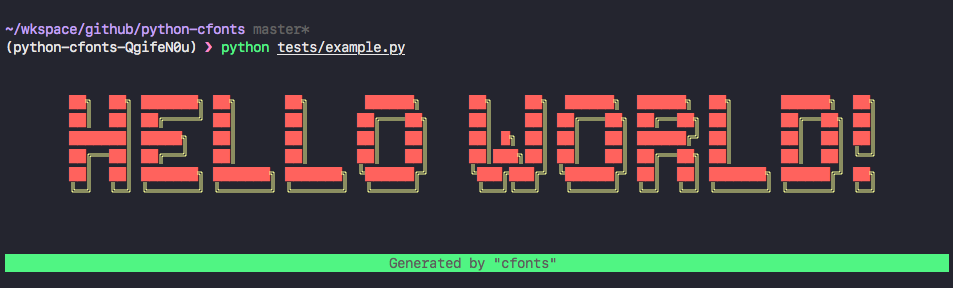
Or generate the fonts pragramatically:
from cfonts import render, say

output = render('Hello world', colors=['red', 'yellow'], align='center')
print(output)
Supported Characters
A |
O |
2 |
2 |
= |
B |
P |
3 |
3 |
@ |
C |
Q |
4 |
4 |
# |
D |
R |
5 |
5 |
$ |
E |
S |
6 |
6 |
% |
F |
T |
7 |
7 |
& |
G |
U |
8 |
8 |
( |
H |
V |
9 |
9 |
) |
I |
W |
! |
! |
/ |
J |
X |
? |
? |
: |
K |
Y |
. |
. |
; |
L |
Z |
+ |
+ |
, |
M |
0 |
- |
- |
' |
N |
1 |
_ |
_ |
(space) |
" |
Contributing
python-cfonts is managed by pdm, first install it:
pipx install pdm
Then, install a dependencies:
pdm install -d
Run tests:
$ pdm run pytest tests
License
The project is originated by @dominikwilkowski, under GPLv2 license. Ported by @frostming, under GPLv2 license. See LICENSE for details
Changelog
- v1.0.0 Support gradient colors and transition gradient.
- v0.5.0 Add four new fonts and double quote as supported charater.
- v0.3.1 Fix a bug that the background doesn't span the full width.
- v0.3.0 Supports Python 2.7.
- v0.2.0 Initial commit and testing.
1 maintainer

Metadata
1 maintainer
Release files for python-cfonts 1.0.0post1
For a detailed explanation of source distributions (sdists) and built distributions (wheels), please see the package formats documentation.
Source distribution (sdist)
| File | Size | Uploaded | Provenance | Actions |
|---|---|---|---|---|
| python-cfonts-1.0.0.post1.tar.gz | 30.2 kB | Without provenance | Details for python-cfonts-1.0.0.post1.tar.gz |
Built distribution (wheel)
| File | Interpreter | ABI | Platform | Actions Reset |
|---|---|---|---|---|
| python_cfonts-1.0.0.post1-py2.py3-none-any.whl | Python 3, Python 2 | none | any | Details for python_cfonts-1.0.0.post1-py2.py3-none-any.whl |
Total release size: 64.6 kB
Release files / python-cfonts-1.0.0.post1.tar.gz
| Download URL | python-cfonts-1.0.0.post1.tar.gz |
|---|---|
| Size | 30.2 kB |
| Tags | Source |
|
SHA-256 checksum How to use checksums |
9718b002991e8d67df333605d866114cc3d296f79c38895509da3c4540130323
|
|
BLAKE2b-256 checksum How to use checksums |
819ffa156ea84d9d0be5be010c48f77e0854a0122a2136b7ec986cd4eaee1e78
|
| Upload date | |
|
Uploaded using Trusted Publishing? What is trusted publishing? |
No |
| Uploaded via |
twine/3.1.1 pkginfo/1.5.0.1 requests/2.22.0 setuptools/45.1.0 requests-toolbelt/0.9.1 tqdm/4.41.1 CPython/3.7.4
|
Release files / python_cfonts-1.0.0.post1-py2.py3-none-any.whl
| Download URL | python_cfonts-1.0.0.post1-py2.py3-none-any.whl |
|---|---|
| Size | 34.4 kB |
| Tags | Python 2 Python 3 |
|
SHA-256 checksum How to use checksums |
39af129635987a3bd508793b793a596590261abfabad3b7f14307018cea60706
|
|
BLAKE2b-256 checksum How to use checksums |
018ce3772fd40cb3e08631a84baa954b49a448bcc2ac7f54a7549e886dd6b99b
|
| Upload date | |
|
Uploaded using Trusted Publishing? What is trusted publishing? |
No |
| Uploaded via |
twine/3.1.1 pkginfo/1.5.0.1 requests/2.22.0 setuptools/45.1.0 requests-toolbelt/0.9.1 tqdm/4.41.1 CPython/3.7.4
|
Security for python-cfonts 1.0.0post1
Provenance
Provenance describes where a file came from. On PyPI, provenance is shared via attestations, which provide a verifiable record of the build or publishing details. View details, limitations and caveats.
No provenance found
None of the files in this release were uploaded with provenance metadata.
A note on package security
PyPI is a repository for distributing packages, not a service for auditing them. While third-party security researchers and our staff do their best to detect and remove malicious packages, PyPI cannot guarantee the quality, security or suitability of any given package.
To learn more about protecting yourself from malicious actors, visit our package security documentation.














