




pygfm is a unified Python toolkit for Graph Foundation Model (GFM) research. It integrates 11 state-of-the-art baseline methods under a single, pip-installable package with shared utilities, standardized interfaces, and fully reproducible experiment pipelines.
Developed by Beihang University · School of Computer Science and Engineering · ACT Lab · MAGIC GROUP.
Framework Overview
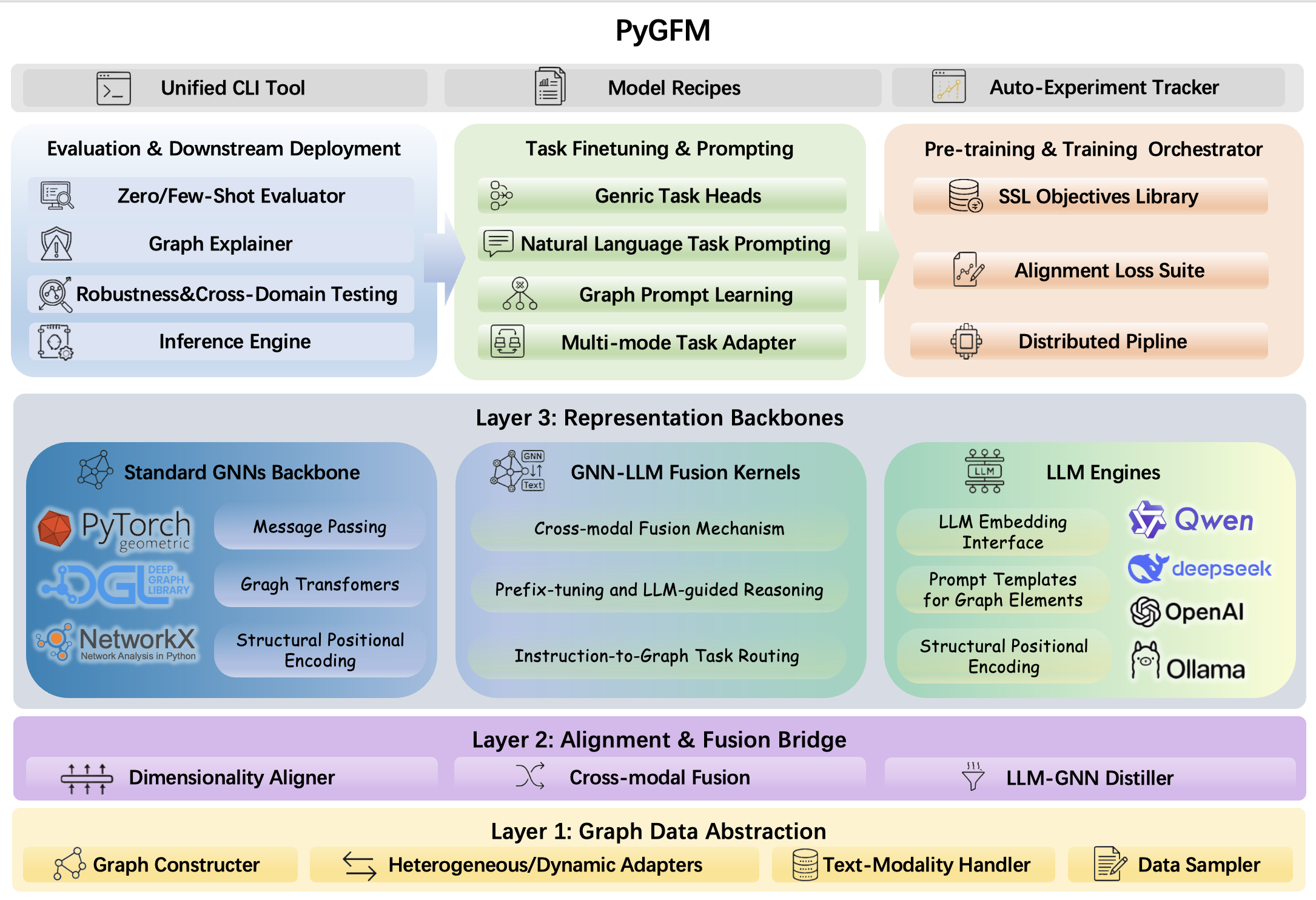
PyGFM is organized into four stacked layers — Graph Data Abstraction → Alignment & Fusion Bridge → Representation Backbones → Task Heads & Orchestration — with a unified CLI, model recipes, and an auto-experiment tracker sitting on top.
Highlights
- One package, 11 baselines — prompt-based GFMs, structure-aware models, LLM-integrated approaches, and retrieval-augmented methods all available via a single
pip install. - Reproducible pipelines — every baseline ships with YAML-driven experiment configs, training scripts, and evaluation helpers.
- Shared backbone library — common GNN encoders, loss functions, and data utilities are factored out and reused across all baselines, reducing code duplication.
- CLI-first design — launch pre-training, fine-tuning, and evaluation jobs directly from the command line without writing any boilerplate.
- LLM-ready — first-class support for LLM-integrated GFMs (GraphText) with HuggingFace-compatible YAML configs.
Installation
CUDA (recommended)
Default (fresh env): torch + light together — PyTorch wheel index + PyPI + PyG find-links:
pip install "python-gfm[torch,light]" --index-url https://download.pytorch.org/whl/cu128 --extra-index-url https://pypi.org/simple -f https://data.pyg.org/whl/torch-2.8.0+cu128.html
If CUDA PyTorch / PyG is already in the env — install [light] from PyPI only:
pip install "python-gfm[light]"
LLM-integrated GFMs — after [torch] and [light] are in place:
pip install "python-gfm[llm]"
CPU:
--index-url https://download.pytorch.org/whl/cpuand-f https://data.pyg.org/whl/torch-2.8.0+cpu.html.
Extras overview
| Extra | Contents (short) |
|---|---|
torch |
PyTorch Geometric stack, graph libs, sklearn helpers |
light |
NumPy/Pandas stack, Transformers (≥4.36), Hydra, APIs, Gradio, W&B, SwanLab, OpenCV (cv2) |
llm |
Transformers 5.x, tokenizers, safetensors, PEFT, bitsandbytes, datasets, accelerate, fschat, Ray, Vertex AI, DeepSpeed, sentence-transformers, OpenAI SDK |
Optional dev extra
pip install "python-gfm[dev]" adds pytest and ruff for testing and linting.
Package layout (installed wheel)
pygfm/
├── baseline_models/   # GFM baseline implementations
├── public/            # Shared utilities, losses, backbone encoders
├── private/           # Core encoders and internal helpers
└── cli/               # Console entry points
Supported Baselines
| Category | Methods |
|---|---|
| Prompt-based GFM | MDGPT, SAMGPT, GraphPrompt, MultiGPrompt |
| Structure-aware GFM | SA2GFM, Bridge, GraphKeeper, GraphMore, Graver |
| LLM-integrated GFM | GraphText |
| Retrieval-augmented GFM | RAG-GFM |
Reproducing baselines (config download)
Published YAML configs and toolbox assets live in a Hugging Face dataset. With python-gfm installed (stdlib only; no extra deps for this step), run:
python -m pygfm.cli.download --repo aboutime233/gtb --path gfmtoolbox_docs
Outputs go under --outdir (default: downloads/). Command-line options for the downloader (repo, revision, path, output directory, etc.) are described in the official documentation on the project homepage.
Experiment workflow
Typical end-to-end flow (YAML names and paths are examples — point -c at the configs you downloaded or arranged for your baseline):
# Download config files, or manually fetch them from the Hugging Face dataset:
# https://huggingface.co/datasets/aboutime233/gtb
python -m pygfm.cli.download

# Configure datasets and other settings following each baseline’s official documentation on the project site.

# Step 1: Generate few-shot downstream splits
python -m pygfm.cli.run_yaml -c configs/mdgpt/01_split_cora_1shot.yaml
# -> downstream_data/mdgpt/splits.pt

# Step 2: Leave-one-domain pre-training
python -m pygfm.cli.run_yaml -c configs/mdgpt/02_pretrain_cora.yaml
# -> ckpts/mdgpt/preprompt.pth

# Step 3: Downstream fine-tuning & evaluation
python -m pygfm.cli.run_yaml -c configs/mdgpt/03_finetune_cora_1shot.yaml
# -> Cora 1-shot node classification accuracy (and other logged outputs)
The same YAML driver is available as pygfm / gfm (see Console Commands): pygfm -c configs/mdgpt/02_pretrain_cora.yaml.
Console Commands
| Command | Description |
|---|---|
python -m pygfm.cli.download |
Fetch baseline / toolbox YAML and assets from Hugging Face (above) |
python -m pygfm.cli.run_yaml |
Same as pygfm / gfm: run a stage from YAML (-c /path/to/config.yaml) — see Experiment workflow |
Configuration
After downloading configs, drive stages with pygfm / gfm or python -m pygfm.cli.run_yaml and -c (see Experiment workflow). For each baseline, read the official documentation on the project homepage (hyperparameters, data roots, optional API keys, etc.); do not commit secrets.
Baseline Documentation
Each baseline’s setup, data layout, and evaluation notes are published in the official documentation on the project homepage. Index of per-method guides:
| Baseline | Docs |
|---|---|
| MDGPT | MDGPT README |
| SAMGPT | SAMGPT README |
| GraphPrompt | GraphPrompt README |
| MultiGPrompt | MultiGPrompt README |
| SA2GFM | SA2GFM README |
| Bridge | Bridge README |
| GraphKeeper | GraphKeeper README |
| GraphMore | GraphMore README |
| Graver | Graver README |
| GraphText | GraphText README |
| RAG-GFM | RAG-GFM README |
Requirements
| Dependency | Version | Extra |
|---|---|---|
| Python | ≥ 3.12 | (base) |
| PyTorch | 2.8.0 (CUDA 12.8 recommended) | torch |
| PyTorch Geometric | 2.7.0 (pinned) | torch, light |
| Transformers | ≥ 4.36.0 | light |
| Transformers | 5.5.4 (pinned) | llm |
| Accelerate | ≥ 0.26.0 | torch |
| Accelerate | 1.13.0 (pinned) | llm |
Install [torch,light] for GNN baselines; add [llm] on top for LLM-integrated methods. Pinned versions above come from pyproject.toml; see that file for the full dependency specification.
License
This project is licensed under the Apache License 2.0.
Team
MAGIC GROUP — Beihang University, School of Computer Science and Engineering, ACT Lab.
2 maintainers


Metadata
2 maintainers
Release files for python-gfm 0.1.19
For a detailed explanation of source distributions (sdists) and built distributions (wheels), please see the package formats documentation.
Source distribution (sdist)
| File | Size | Uploaded | Provenance | |
|---|---|---|---|---|
| python_gfm-0.1.19.tar.gz | 18.9 MB | Without provenance | Details |
Built distribution (wheel)
| File | Interpreter | ABI | Platform | Reset |
|---|---|---|---|---|
| python_gfm-0.1.19-py3-none-any.whl | Python 3 | none | any | Details |
Total release size: 38.1 MB
Release files / python_gfm-0.1.19.tar.gz
| Download URL | python_gfm-0.1.19.tar.gz |
|---|---|
| Size | 18.9 MB |
| Tags | Source |
|
SHA-256 checksum How to use checksums |
787b594af8c3e265b6ae07c1b02019464750b64f1492d1f2f5e7604bbb491ca5
|
|
BLAKE2b-256 checksum How to use checksums |
09719249cb20012c13dbfac421937435b4afdc996322d78f2416fdf125cc14eb
|
| Upload date | |
|
Uploaded using Trusted Publishing? What is trusted publishing? |
No |
| Uploaded via |
twine/6.2.0 CPython/3.12.13
|
Release files / python_gfm-0.1.19-py3-none-any.whl
| Download URL | python_gfm-0.1.19-py3-none-any.whl |
|---|---|
| Size | 19.2 MB |
| Tags | Python 3 |
|
SHA-256 checksum How to use checksums |
ce14b61394318e6e247f911157a9a3c33ec39508ae5cd7aead90f016ee9ebc25
|
|
BLAKE2b-256 checksum How to use checksums |
323f510008321f3cfb1fee942d420b77d0d46de910ae98597f23e8ad948fff9f
|
| Upload date | |
|
Uploaded using Trusted Publishing? What is trusted publishing? |
No |
| Uploaded via |
twine/6.2.0 CPython/3.12.13
|
Security for python-gfm 0.1.19
Provenance
Provenance describes where a file came from. On PyPI, provenance is shared via attestations, which provide a verifiable record of the build or publishing details. View details, limitations and caveats.
No provenance found
None of the files in this release were uploaded with provenance metadata.
A note on package security
PyPI is a repository for distributing packages, not a service for auditing them. While third-party security researchers and our staff do their best to detect and remove malicious packages, PyPI cannot guarantee the quality, security or suitability of any given package.














