
An AI copilot for graph data and models (Under active development).


Project description




pygfm is a unified Python toolkit for Graph Foundation Model (GFM) research. It integrates 17 state-of-the-art baseline methods under a single, pip-installable package with shared utilities, standardized interfaces, and fully reproducible experiment pipelines.
Developed by Beihang University · School of Computer Science and Engineering · ACT Lab · MAGIC GROUP.
Framework Overview
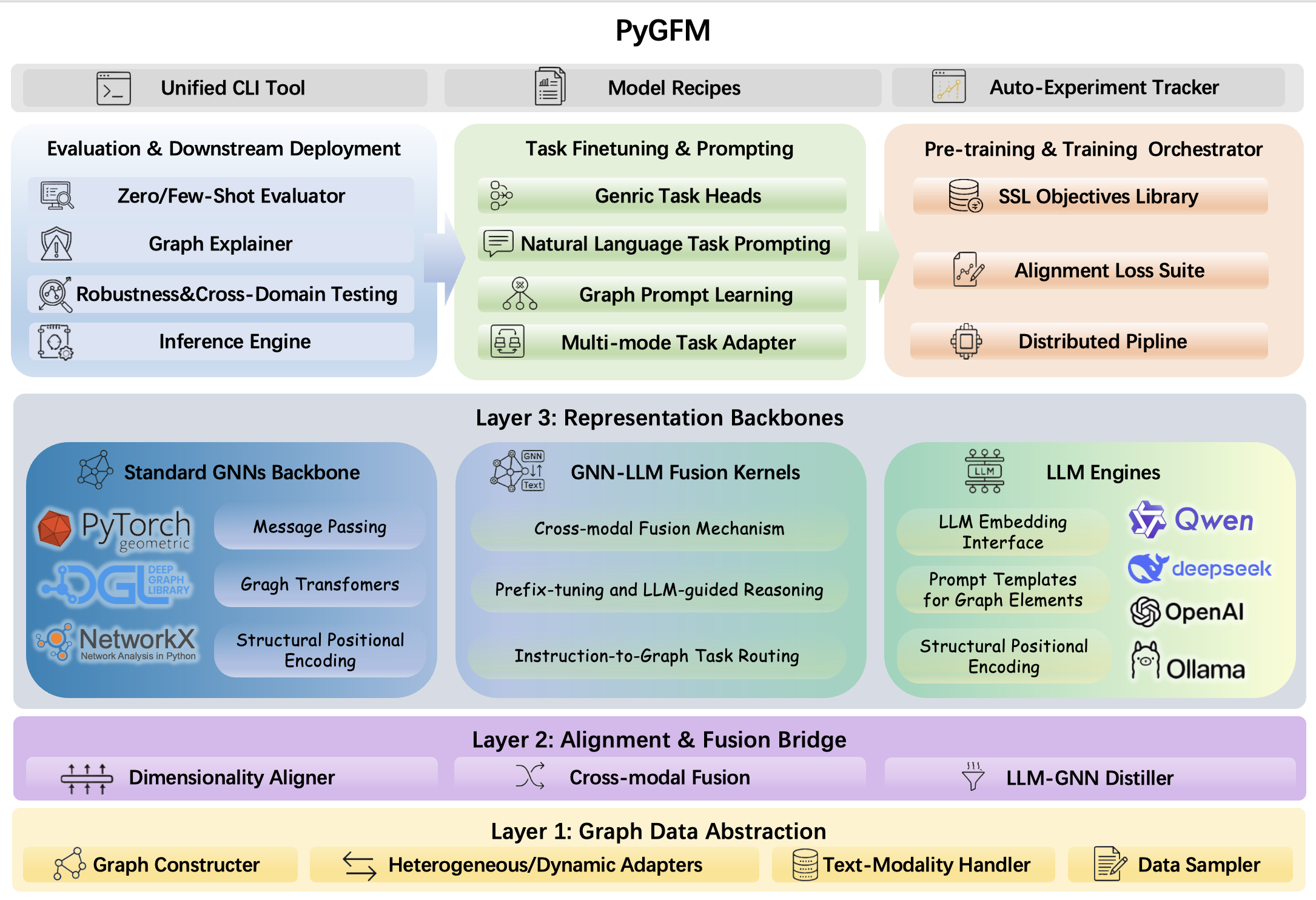
PyGFM is organized into four stacked layers — Graph Data Abstraction → Alignment & Fusion Bridge → Representation Backbones → Task Heads & Orchestration — with a unified CLI, model recipes, and an auto-experiment tracker sitting on top.
Highlights
- One package, 17 baselines — prompt-based GFMs, structure-aware models, LLM-integrated approaches, and retrieval-augmented methods all available via a single
pip install. - Reproducible pipelines — every baseline ships with YAML-driven experiment configs, training scripts, and evaluation helpers.
- Shared backbone library — common GNN encoders, loss functions, and data utilities are factored out and reused across all baselines, reducing code duplication.
- CLI-first design — launch pre-training, fine-tuning, and evaluation jobs directly from the command line without writing any boilerplate.
- LLM-ready — first-class support for LLM-integrated GFMs (GraphGPT, GraphText, LLaGA, OneForAll) with HuggingFace-compatible YAML configs.
Installation
CUDA (recommended)
Default (fresh env): torch + light together — PyTorch wheel index + PyPI + PyG find-links:
pip install "python-gfm[torch,light]" --index-url https://download.pytorch.org/whl/cu128 --extra-index-url https://pypi.org/simple -f https://data.pyg.org/whl/torch-2.8.0+cu128.html
If CUDA PyTorch / PyG is already in the env — install [light] from PyPI only:
pip install "python-gfm[light]"
LLM-integrated GFMs — after [torch] and [light] are in place:
pip install "python-gfm[llm]"
CPU:
--index-url https://download.pytorch.org/whl/cpuand-f https://data.pyg.org/whl/torch-2.8.0+cpu.html.
Extras overview
| Extra | Contents (short) |
|---|---|
torch |
PyTorch Geometric stack, graph libs, sklearn helpers |
light |
NumPy/Pandas stack, Transformers, Hydra, APIs, Gradio, W&B, SwanLab |
llm |
PEFT, bitsandbytes, datasets, fschat, Ray, Vertex, DeepSpeed |
Optional dev extra
pip install "python-gfm[dev]" adds pytest and ruff for testing and linting.
Package layout (installed wheel)
pygfm/
├── baseline_models/   # GFM baseline implementations
├── public/            # Shared utilities, losses, backbone encoders
├── private/           # Core encoders and internal helpers
└── cli/               # Console entry points
Supported Baselines
| Category | Methods |
|---|---|
| Prompt-based GFM | MDGPT, SAMGPT, MDGFM, GraphPrompt, HGPrompt, MultiGPrompt, GCoT |
| Structure-aware GFM | SA2GFM, Bridge, GraphKeeper, GraphMore, Graver |
| LLM-integrated GFM | GraphGPT, GraphText, LLaGA, OneForAll |
| Retrieval-augmented GFM | RAG-GFM |
Reproducing baselines (config download)
Published YAML configs and toolbox assets live in a Hugging Face dataset. With python-gfm installed (stdlib only; no extra deps for this step), run:
python -m pygfm.cli.download --repo aboutime233/gtb --path gfmtoolbox_docs
Outputs go under --outdir (default: downloads/). Command-line options for the downloader (repo, revision, path, output directory, etc.) are described in the official documentation on the project homepage.
Experiment workflow
Typical end-to-end flow (YAML names and paths are examples — point -c at the configs you downloaded or arranged for your baseline):
# Download config files, or manually fetch them from the Hugging Face dataset:
# https://huggingface.co/datasets/aboutime233/gtb
python -m pygfm.cli.download

# Configure datasets and other settings following each baseline’s official documentation on the project site.

# Step 1: Generate few-shot downstream splits
python -m pygfm.cli.run_yaml -c configs/mdgpt/01_split_cora_1shot.yaml
# -> downstream_data/mdgpt/splits.pt

# Step 2: Leave-one-domain pre-training
python -m pygfm.cli.run_yaml -c configs/mdgpt/02_pretrain_cora.yaml
# -> ckpts/mdgpt/preprompt.pth

# Step 3: Downstream fine-tuning & evaluation
python -m pygfm.cli.run_yaml -c configs/mdgpt/03_finetune_cora_1shot.yaml
# -> Cora 1-shot node classification accuracy (and other logged outputs)
The same YAML driver is available as pygfm / gfm (see Console Commands): pygfm -c configs/mdgpt/02_pretrain_cora.yaml.
Console Commands
| Command | Description |
|---|---|
python -m pygfm.cli.download |
Fetch baseline / toolbox YAML and assets from Hugging Face (above) |
python -m pygfm.cli.run_yaml |
Same as pygfm / gfm: run a stage from YAML (-c /path/to/config.yaml) — see Experiment workflow |
Configuration
After downloading configs, drive stages with pygfm / gfm or python -m pygfm.cli.run_yaml and -c (see Experiment workflow). For each baseline, read the official documentation on the project homepage (hyperparameters, data roots, optional API keys, etc.); do not commit secrets.
Baseline Documentation
Each baseline’s setup, data layout, and evaluation notes are published in the official documentation on the project homepage. Index of per-method guides:
| Baseline | Docs |
|---|---|
| MDGPT | MDGPT README |
| SA2GFM | SA2GFM README |
| SAMGPT | SAMGPT README |
| MDGFM | MDGFM README |
| GraphPrompt | GraphPrompt README |
| HGPrompt | HGPrompt README |
| MultiGPrompt | MultiGPrompt README |
| GCoT | GCoT README |
| Graver | Graver README |
| GraphMore | GraphMore README |
| Bridge | Bridge README |
| GraphKeeper | GraphKeeper README |
| GraphGPT | GraphGPT README |
| GraphText | GraphText README |
| LLaGA | LLaGA README |
| OneForAll | OneForAll README |
| RAG-GFM | RAG-GFM README |
Requirements
| Dependency | Version |
|---|---|
| Python | ≥ 3.12 |
| PyTorch | 2.8.0 (CUDA 12.8 recommended) |
| PyTorch Geometric | ≥ 2.3.0 |
| Transformers | ≥ 4.36.0 |
| Accelerate | ≥ 0.26.0 |
See pyproject.toml on GitHub for the full dependency specification.
License
This project is licensed under the Apache License 2.0.
Team
MAGIC GROUP — Beihang University, School of Computer Science and Engineering, ACT Lab.
Release history Release notifications | RSS feed


Download files
Download the file for your platform. If you're not sure which to choose, learn more about installing packages.
Source Distribution
Built Distribution
Filter files by name, interpreter, ABI, and platform.
If you're not sure about the file name format, learn more about wheel file names.
Copy a direct link to the current filters
File details
Details for the file python_gfm-0.1.16.tar.gz.
File metadata
- Download URL: python_gfm-0.1.16.tar.gz
- Upload date:
- Size: 18.9 MB
- Tags: Source
- Uploaded using Trusted Publishing? No
- Uploaded via: twine/6.2.0 CPython/3.11.5
File hashes
| Algorithm | Hash digest | |
|---|---|---|
| SHA256 |
afdf2ff2f23c4a90fc833c416145051de8c175b7809cffa374cdc2d6f3875fc7
|
|
| MD5 |
83be1830ab4acec10b04ec0a262643e2
|
|
| BLAKE2b-256 |
36d76a069747780ddbe096cd38baef0501d32d3f0eb106c7ed21f7bd4dfadc93
|
File details
Details for the file python_gfm-0.1.16-py3-none-any.whl.
File metadata
- Download URL: python_gfm-0.1.16-py3-none-any.whl
- Upload date:
- Size: 19.1 MB
- Tags: Python 3
- Uploaded using Trusted Publishing? No
- Uploaded via: twine/6.2.0 CPython/3.11.5
File hashes
| Algorithm | Hash digest | |
|---|---|---|
| SHA256 |
e93f60ace8b12ba409f03793efb42ec174249d1711d202f5657bc8a30fb9ed61
|
|
| MD5 |
617cc5959765ef9cdb76ba9ed17eb26a
|
|
| BLAKE2b-256 |
a039a6458caa6e375052607d902c847176de1db39dab73f30186bd19861e8da2
|






